


מילעניום MPS-450 E-דראַם מאָדול
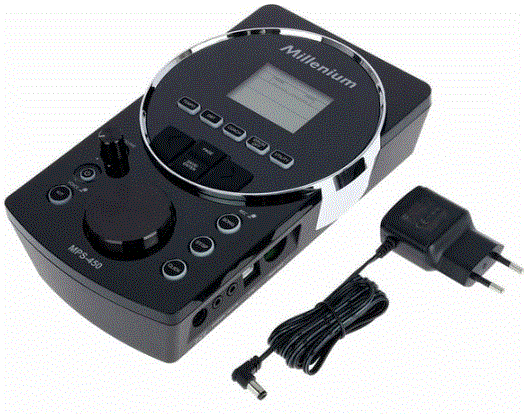
פּראָדוקט אינפֿאָרמאַציע
ספּעסאַפאַקיישאַנז
- מאָדעל: MPS-450
- Product Type: E-Drum Module
- מעלדונג טאָג: 23.04.2025/XNUMX
- פּראָדוקט שייַן: 461045 (V4)
- ווייכווארג ווערסיע: V1.2
אַלגעמיינע אינפֿאָרמאַציע
- דער דאָקומענט כּולל וויכטיק אינסטרוקציעס פֿאַר די זיכער אָפּעראַציע פון די פּראָדוקט. לייענען און נאָכגיין די זיכערקייַט אינסטרוקציעס און אַלע אנדערע אינסטרוקציעס. האַלטן דעם דאָקומענט פֿאַר צוקונפֿט רעפֿערענץ. מאַכן זיכער אַז עס איז בארעכטיגט פֿאַר אַלע יענע וואָס נוצן דעם פּראָדוקט. אויב איר פאַרקויפן דעם פּראָדוקט צו אן אנדער באַניצער, זיין זיכער אַז זיי אויך באַקומען דעם דאָקומענט.
- אונדזער פּראָדוקטן און דאַקיומענטיישאַן זענען אונטערטעניק צו אַ פּראָצעס פון קעסיידערדיק אַנטוויקלונג. זיי זענען דעריבער אונטערטעניק צו טוישן. ביטע אָפּשיקן צו די לעצטע ווערסיע פון די דאַקיומענטיישאַן, וואָס איז גרייט פֿאַר אראפקאפיע אונטער www.thomann.de.
סימבאָלס און סיגנאַל ווערטער
אין דעם אָפּטיילונג איר וועט געפֿינען אַן איבערבליקview פון די טייַטש פון סימבאָלס און סיגנאַל ווערטער וואָס זענען געניצט אין דעם דאָקומענט.
| סיגנאַל וואָרט | טייַטש |
| געפאַר! | די קאָמבינאַציע פון סימבאָל און סיגנאַל וואָרט ינדיקייץ אַ באַלדיק געפערלעך סיטואַציע וואָס וועט פירן צו טויט אָדער ערנסט שאָדן אויב עס איז נישט אַוווידאַד. |
| ווארענונג! | די קאָמבינאַציע פון סימבאָל און סיגנאַל וואָרט ינדיקייץ אַ מעגלעך געפערלעך סיטואַציע וואָס קען פירן צו טויט אָדער ערנסט שאָדן אויב עס איז נישט אַוווידאַד. |
| נאָטיץ! | די קאָמבינאַציע פון סימבאָל און סיגנאַל וואָרט ינדיקייץ אַ מעגלעך געפערלעך סיטואַציע וואָס קען פירן צו מאַטעריאַל און ינווייראַנמענאַל שעדיקן אויב עס איז נישט אַוווידאַד. |
| ווארענונג וואונדער | טיפּ פון געפאַר |
 |
ווארענונג - הויך-וואָלtage. |
 |
ווארענונג - געפאַר זאָנע. |
זיכערקייַט ינסטראַקשאַנז
בדעה נוצן
- פּויק מאַדזשולז זענען בדעה צו זיין געוויינט פֿאַר קאַנווערטינג דיגיטאַל צינגל סיגנאַלז פון פּויק פּאַדס צו פאַרשידן פּערקוססיאָן סאָונדס. ניצן די אַפּאַראַט בלויז ווי דיסקרייבד אין דעם מאַנואַל. קיין אנדערע נוצן אָדער נוצן אונטער אנדערע אַפּערייטינג באדינגונגען איז באטראכט צו זיין ימפּראַפּער און קען פירן צו פערזענלעכע שאָדן אָדער פאַרמאָג שעדיקן. קיין אַכרייַעס וועט זיין אנגענומען פֿאַר דאַמידזשיז ריזאַלטינג פון ימפּראַפּער נוצן.
- דער מיטל קען זיין געוויינט בלויז דורך מענטשן מיט גענוג פיזיש, סענסעריאַל און אינטעלעקטואַל אַבילאַטיז און מיט קאָראַספּאַנדינג וויסן און דערפאַרונג. אנדערע מענטשן קענען נוצן דעם מיטל בלויז אויב זיי זענען סופּערווייזד אָדער געלערנט דורך אַ מענטש וואָס איז פאַראַנטוואָרטלעך פֿאַר זייער זיכערקייַט.
זיכערקייַט
- געפאַר!
ריזיקירן פון שאָדן און טשאָוקינג ריזיקירן פֿאַר קינדער!
קינדער קענען דערשטיקן פּאַקקאַגינג מאַטעריאַל און קליין טיילן. קינדער קענען שאַטן זיך ווען האַנדלינג די מיטל. קיינמאָל לאָזן קינדער צו שפּילן מיט די פּאַקקאַגינג מאַטעריאַל און די מיטל. שטענדיק קראָם פּאַקקאַגינג מאַטעריאַל אויס פון די דערגרייכן פון בייביז און קליין קינדער. שטענדיק אַוועקוואַרפן פּאַקקאַגינג מאַטעריאַל רעכט ווען עס איז נישט אין נוצן. קיינמאָל לאָזן קינדער צו נוצן די מיטל אָן השגחה. האַלטן קליין טיילן אַוועק פון קינדער און מאַכן זיכער אַז די מיטל טוט נישט אָפּדאַך קיין קליין טיילן (אַזאַ קנאָבז) וואָס קינדער קענען שפּילן מיט. - געפאַר!
געפאַר צו לעבן רעכט צו עלעקטריש קראַנט!
ין די מיטל עס זענען געביטן ווו הויך וואָלtagעס קען זיין פאָרשטעלן. קיינמאָל אַראָפּנעמען קיין קאָווערס. עס זענען קיין באַניצער-סערוויסאַבלע פּאַרץ ין. דו זאלסט נישט נוצן די מיטל ווען קאָווערס, זיכערקייַט ויסריכט אָדער אָפּטיש קאַמפּאָונאַנץ זענען פעלנדיק אָדער דאַמידזשד. - ווארענונג!
מעגלעך געהער שעדיקן רעכט צו הויך וואַליומז אויף כעדפאָונז!
די נוצן פון כעדפאָונז אין הויך וואַליומז קען פירן צו שטענדיק געהער ימפּערמאַנט. איבער אַן עקסטענדעד צייט, אפילו לעוועלס וואָס ויסקומען צו זיין אַנקריטיש קענען פאַרשאַפן געהער שעדיקן. ויסמיידן אַפּערייטינג כעדפאָונז אין הויך וואַליומז, ספּעציעל פֿאַר אַ לאַנג צייט. - נאָטיץ!
שעדיקן צו די פונדרויסנדיק מאַכט צושטעלן רעכט צו הויך וואָלtages!
דער מיטל איז Powered דורך אַ פונדרויסנדיק מאַכט צושטעלן. די פונדרויסנדיק מאַכט צושטעלן קענען זיין דאַמידזשד אויב עס איז אַפּערייטאַד מיט די פאַלש וואַלtagE אָדער אויב הויך וואָלtagע פּיקס פאַלן. אין די ערגסט פאַל, וידעפדיק וואָלtagעס קען אויך פאַרשאַפן אַ ריזיקירן פון שאָדן און פירעס. מאַכן זיכער אַז די וואָלtagדי ספּעסאַפאַקיישאַנז אויף די פונדרויסנדיק מאַכט צושטעלן שטימען מיט די היגע מאַכט גריד איידער פּלאַגינג די מאַכט צושטעלן. נאָר אַרבעטן די פונדרויסנדיק מאַכט צושטעלן פון פּראַפעשאַנאַלי אינסטאַלירן מיינז סאַקאַץ וואָס זענען פּראָטעקטעד דורך אַ ריזידזשואַל קראַנט קרייַז צוימען (פי). פאַרזיכערן אַז די מאַכט שנור צאַפּן איז לייכט צוטריטלעך אין אַלע צייט אויב עס איז דער בלויז מיטל צו בעשאָלעם דיסקאַנעקט די מיטל פון די מעינס צושטעלן. ווי אַ פּריקאָשאַן, דיסקאַנעקט די מאַכט צושטעלן פון די מאַכט גריד ווען סטאָרמז זענען אַפּראָוטשינג אָדער די מיטל וועט נישט זיין געוויינט פֿאַר אַ מער צייט. - נאָטיץ!
שעדיקן צו די מיטל רעכט צו נוצן פון ומפּאַסיק פונדרויסנדיק מאַכט סופּפּליעס!
אויב די מיטל איז אַפּערייטאַד מיט אַ ומפּאַסיק פונדרויסנדיק מאַכט צושטעלן, די מיטל קענען זיין דאַמידזשד דורך אָוווערוואָלtagע אָדער פאַלש פּאָולעראַטי. אויב די טינגז גיין שלעכט, ניצן אַ ומפּאַסיק מאַכט צושטעלן קענען אויך פאַרשאַפן אַ ריזיקירן פון שאָדן און פייַער. נאָר נוצן די פונדרויסנדיק מאַכט צושטעלן דעזיגנייטיד פֿאַר די מיטל אָדער אַן עקוויוואַלענט פונדרויסנדיק מאַכט צושטעלן מיט יידעניקאַל פּאַראַמעטערס. אויב אין צווייפל, פאַרגלייַכן די וואָלtagדי ספּעסאַפאַקיישאַנז אויף די פונדרויסנדיק מאַכט צושטעלן און די פּאָולעראַטי (+/-) מיט די ספּעסאַפאַקיישאַנז אין דעם מאַנואַל און געדרוקט אויף די מיטל. VoltagE און פּאָולעראַטי מוזן שטענדיק גלייַכן. - נאָטיץ!
שעדיקן צו די מיטל אויב אַפּערייטאַד אין ומפּאַסיק אַמביאַנט טנאָים!
דער מיטל קענען זיין דאַמידזשד אויב עס איז אַפּערייטאַד אין ומפּאַסיק אַמביאַנט טנאָים. נאָר אַרבעטן די מיטל ינעווייניק אין די אַמביאַנט טנאָים ספּעסיפיעד אין די "טעכניש ספּעסאַפאַקיישאַנז" קאַפּיטל פון דעם באַניצער מאַנואַל. ויסמיידן אַפּערייטינג עס אין ינווייראַנמאַנץ מיט דירעקט זונשייַן, שווער שמוץ און שטאַרק ווייבריישאַנז. ויסמיידן אַפּערייטינג עס אין ינווייראַנמאַנץ מיט שטאַרק טעמפּעראַטור פלאַקטשויישאַנז. אויב טעמפּעראַטור פלאַקטשויישאַנז קענען ניט זיין אַוווידאַד (למשלampנאָך אַריבערפירן אין נידעריק אַרויס טעמפּעראַטורעס), טאָן ניט באַשטימען אויף די מיטל מיד. קיינמאָל אונטערטעניק די מיטל צו ליקווידס אָדער נעץ. קיינמאָל מאַך די מיטל צו אן אנדער אָרט בשעת עס איז אין אָפּעראַציע. אין ינווייראַנמאַנץ מיט געוואקסן שמוץ לעוועלס (למשלampרעכט צו שטויב, רויך, ניקאָטין אָדער נעפּל): האָבן די מיטל קלינד דורך קוואַלאַפייד ספּעשאַלאַסץ מיט רעגולער ינטערוואַלז צו פאַרמייַדן שעדיקן רעכט צו אָוווערכיטינג און אנדערע מאַלפאַנגקשאַנז.
פֿעיִקייטן
- 418 קולות
- 30 pre-programmed drum kits
- 10 באַניצער קיץ
- 80 pre-programmed songs
- 5 באַניצער לידער
- 128 MIDI סאָונדס
- מעטראָנאָם
- Coach mode with various exercise types
- Connections for headphones, AUX, USB and MIDI
- Power adapter and retaining plate (included)
- אַפּערייטינג סיסטעם: Windows® 8 און שפּעטער, Mac OS X® 10.8 און שפּעטער
ייַנמאָנטירונג
- אַנפּאַק און קאָנטראָלירן קערפאַלי אַז עס איז קיין טראַנספּערטיישאַן שעדיקן איידער איר נוצן די אַפּאַראַט. האַלטן די עקוויפּמענט פּאַקקאַגינג. צו גאָר באַשיצן די פּראָדוקט קעגן ווייבריישאַן, שטויב און נעץ בעשאַס טראַנספּערטיישאַן אָדער סטאָרידזש, נוצן די אָריגינעל פּאַקקאַגינג אָדער דיין אייגענע פּאַקקאַגינג מאַטעריאַל ריספּעקטיוולי פּאַסיק פֿאַר אַריבערפירן אָדער סטאָרידזש.
- שאַפֿן אַלע קאַנעקשאַנז בשעת די מיטל איז אַוועק. ניצן די שאָרטיסט מעגלעך הויך-קוואַליטעט קייבאַלז פֿאַר אַלע קאַנעקשאַנז. נעמען זאָרג ווען פליסנדיק די קייבאַלז צו פאַרמייַדן טריפּינג כאַזערדז.
סעטאַפּ, קאַנעקטינג פּאַדס און פּעדאַלז
- די אויפשטעלונג און צוזאַמענשטעלונג פון די פּאַדס און פּעדאַלן ווערט דעטאַלירט באַשריבן אין די אַרייַנגעשלאָסענע פֿאַרזאַמלונג אינסטרוקציעס.
- קאָנטראָלירט אַז אַלע פֿאַרבינדונג קייבלס צווישן די פּאַדס און די טרומל מאָדול זענען ריכטיק פֿאַרבונדן.
קאַנעקטינג די מאַכט צושטעלן
- Connect the included power adapter to the power supply socket on the device.
- צאַפּן די מעינס צאַפּן אין די כאָלעל.
קאַנעקטינג כעדפאָונז
פֿאַרבינדט אייערע סטערעאָ כעדפאָונז צו די [PHONES] אַרויסגאַנג פֿון די דראַם מאָדול.
קאַנעקטינג אַודיאָ דעוויסעס
- פאַרבינדן די ינפּוץ פון דיין ampליפיער אדער אקטיווער מאָניטאָר צו די [OUTPUT] סאָקעץ פון די טרומל מאָדול.
- If you are using a mono ampלייפיער, פארבינדט זיין אריינגאנג צום [L/MONO] ארויסגאנג סאקעט פונעם טרומל מאדול.
קאַנעקטינג אַ קאָמפּאַקטדיסק אָדער mp3 שפּילער
פֿאַרבינדט אַ סי-די אָדער MP3 שפּילער צום [AUX IN] אַרײַנגאַנג סאָקעט פֿון דעם דראַם מאָדול.
קאַנעקטינג MIDI דעוויסעס
- פֿאַרבינדט עקסטערנע MIDI דעווייסעס אָדער אייער קאָמפּיוטער צום [USB] פּאָרט פֿון דעם דראַם מאָדול.
- Use a current operating system still supported by the provider to avoid tech‐nical difficulties.
קאַנעקשאַנז און קאָנטראָלס
פראָנט טאַפליע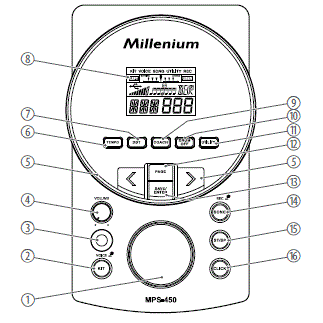
| 1 | Jog wheel for selecting a drum kit and setting values quickly |
| 2 | [Kit/VOICE] | Button for opening the ‘KIT’ און ‘VOICE’ מעניוז
Short press: opens the ‘KIT’ menu. Press and hold: opens the menu. ‘VOICE’ . |
| 3 | [קראַפט] | הויפּט באַשטימען. טורנס די מיטל אויף און אַוועק. |
| 4 | [VOLUME] | VOLUME control for the headphone output of the device |
| 5 | [<] / [>] | Selects an option or sets a value |
| 6 | [טעמפּאָ] | Adjusts the metronome and playback speed |
| 7 | [DBT] | Enables the double bass trigger |
| 8 | ווייַז |
| 9 | [קאָאַטש] | Opens coach mode with practice sets. |
| 10 | [DRUM OFF] | Mutes the drum track of a piece of music |
| 11 | [יוטיליטי] | Opens the ‘UTILITY’ menu for changing device settings |
| 12 | [זייַט] | Toggles between the settings of different functions |
| 13 | [SAVE/ENTER] | Confirms or saves drum kit settings |
| 14 | [SONG/REC] | Button for opening the ‘SONG’ menu and recording mode
Short press: opens the ‘SONG’ menu. Press and hold: starts the recording mode. |
| 15 | [ST/SP] | Starts or stops the playback of songs |
| 16 | [קליקט] | Switches the metronome on and off |
דערציען טאַפליע
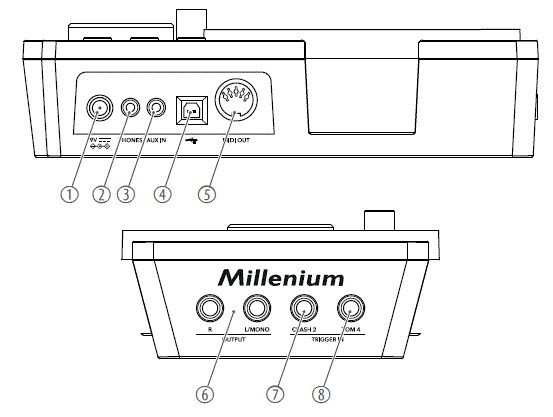
| 1 | [9V] | Connection socket for the plug-in power supply for power supply |
| 2 | [פאָנעס] | Connection socket for headphones |
| 3 | [AUX IN] | Input for external audio devices such as MP3 or CD players |
| 4 | [USB MIDI] | Connection socket for an external MIDI device with a USB interface |
| 5 | [MIDI OUT] | Connecting socket for an external MIDI device |
| 6 | [OUTPUT R | L / MONO] | Output for external audio devices |
| 7 | [TRIGGER IN – CRASH2] | Connection socket for crash 2 |
| 8 | [TRIGGER IN – TOM 4] | Connection socket for tom 4 |
ווייַז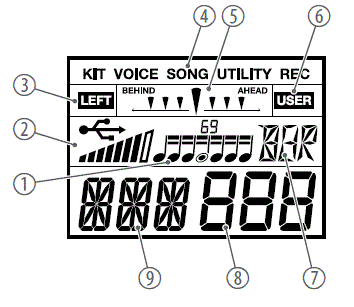
| 1 | Coach mode: Displays the rhythm type |
| 2 | Displays the connected external device and the current touch velocity |
| 3 | Displays the current mode of a sublevel |
| 4 | Displays the current mode, e.g. ‘KIT’ , ‘VOICE’ , ‘SONG’ , ‘UTILITY’ אאז"ו ו |
| 5 | Coach mode: Displays the deviation from the beat |
| 6 | Displays the current mode of a sublevel |
| 8 | Displays the value associated with the selected parameter, or the number of the song, voice, or drum kit |
| 7 | Displays the name of the selected pad |
| 9 | Displays the currently selected parameter, e.g. volume, trigger curve, etc. |
אַפּערייטינג
פאַנגקשאַנז
אויסגעדרייט אויף און אַוועק
- Check all cable connections for correct seat before turning on.
- Before switching the device on, turn the [VOLUME] control to minimum.
- Use the [POWER] main switch to turn the drum module on or off. The current device settings are retained when switching off.
אָטאַמאַטיק פאַרמאַכן
- When the device is not used it automatically shuts off after 30 minutes.
- Use the Utility menu ( Ä Chapter 6.12 ‘Utility menu’ on page 22) to disable automatic shutoff.
אַדזשאַסטינג די באַנד
To adjust the volume, hit a pad while slowly turning the [VOLUME] control clockwise.
באַשטעטיק צו פאַבריק דיפאָלץ
- To reset the entire drum module to factory settings, turn it off first.
- Hold down [<] and [>] simultaneously and additionally press [POWER] until the display shows ‘FAC SET…’ .
Selecting and adjusting drum kits
- A drum kit is a compilation in which a certain sound (voice) and several sound parameters are assigned to each pad. Selecting different drum kits lets you customise the sound of your drum kit in seconds to the desired music genre. Besides the 30 pre-programmed drum kits you can also create, customise and save 10 user drum kits.
- די פּויק קיט רשימה איז בנימצא פֿאַר אראפקאפיע אויף די פּראָדוקט בלאַט אין www.thomann.de.
אויסקלייַבן אַ פּויק קיט
To select a specific drum kit, proceed as follows:
- Press [KIT/VOICE].
- The current kit name and kit number are displayed.
- Use the arrow buttons ([<] / [>]) or the jog wheel to select the desired kit. The setting is automatically stored.
צוטיילן א שטימע
די קול רשימה איז בנימצא פֿאַר אראפקאפיע אויף די פּראָדוקט בלאַט בייַ www.thomann.de.
To programme a specific voice for a pad, proceed as follows:
- Hold down [KIT/VOICE] for about 2 seconds.
- The current Voice name and Voice number are displayed.
- Strike the pad whose voice you want to change.
- The name of the current pad is displayed.
- Use the arrow buttons ([<] / [>]) or the jog wheel to select the desired voice. The setting is automatically stored.
פּלייַינג די פּויק קיט
- די לעבנס-צייט פון די באַס טראָמל פּעד'ס מעש קאָפּ הויט ווערט באַדייטנד פֿאַרלענגערט דורך ניצן די שוואַרצע פּלאַסטיק זייט פון די באַס טראָמל קלאַפּער. ווען מען ניצט אָבער די פֿילץ זייט, ווערט די אָפּשײַבונג און אַ מעגלעכער צוריס פֿון דער מעש קאָפּ הויט באַדייטנד פֿאַרשנעלערט.
- דער באַס טרומל קלאָפּער קען ווערן געדרײט 180 גראַד דורך לאָזן לויצן די שלאָס שרויף.
ווי אויף אַן אַקוסטישן טראָמל קיט, רעאַגירן די פּעדס צו פֿאַרשידענע שפּיל טעכניקן און דינאַמיק. אַלע פּעדס זענען גיכקייט סענסיטיוו. עטלעכע קולות טוישן זייער טימברע דיפּענדינג אויף די פּאַנטש געניצט.
- דראַמז
With the snare drum we distinguish between head and rimshot.- קאָפּ
Strike the head only. - רימשאָט
Simultaneously strike the head and the rim or only the rim of the pad.
- קאָפּ
- סימבאַלס
We distinguish the following cymbal zones:- בויגן
Play in the area between the edge and the bell of the cymbal. - דערשטיקן
Choke play is possible with crash and ride cymbals but not with the hi-hat. To do so, stop the sound of the crash and ride cymbals with the hand at the edge of the cymbal immediately after hitting it.
- בויגן
- Hi–הוט
With the hi-hat we distinguish between hi-hat pedal change, open hi-hat, closed hi-hat, hi-hat pedal and splash.- Hi-hat pedal change
When the pedal is pressed in different positions, the voice changes when the hi-hat pad is hit (similar to an acoustic drum kit). - עפֿענען היי-העט
Strike the hi-hat pad without pressing the pedal. - פארמאכטע היי-העט
Strike the hi-hat pad with fully pressed pedal. - הי-הוט טרעטלען
Press the hi-hat controller pedal to generate a closed sound without striking the hi-hat pad. - שפּריצן
Play the hi-hat with fully pressed pedal and then open it suddenly.
- Hi-hat pedal change
Modifying drum kits
קאַסטאַמייז אַ פּויק קיט
Drum kits 1 … 30 are preset. You can change the preset kits and save them as user kits 31 … 40.
- Press [KIT/VOICE].
- The Kit menu is displayed.
- Press [PAGE] repeatedly until the required ‘KIT NAME’ or ‘VOLUME’ submenu is displayed.
- Use the arrow buttons ([<] / [>]) or the jog wheel to change the parameter value.
| Paramעטער | ווייַז | טייַטש | ווערט קייט |
| קיט נאָמען | NUM XXX | פּויק קיט סעלעקציע |
|
| באַנד | VOL XXX | Volume of the pads of the drum kit | 0 … 127 |
באַנד
Changing the volume of a particular drum kit affects all pads.
קאַסטאַמייזירן שטימע פּאַראַמעטערס
שטימע פאראמעטערס זענען שטענדיק פארבונדן נאר מיט איין פעדל. למשלampלע, אויב איר ענדערט דעם באַנד פון די סנער דראַם, ווערן די אנדערע פּאַדס נישט אַפעקטירט.
- Hold down [KIT/VOICE] for about 2 seconds.
- The current Voice name and Voice number are displayed.
- Strike the pad whose voice you want to change.
- The name of the current pad is displayed.
- Press [PAGE] repeatedly until the required ‘VOICE NAME’ or ‘VOLUME’ sub‐menu is displayed.
- Use the arrow buttons ([<] / [>]) or the jog wheel to change the parameter value.
| Paramעטער | ווייַז | טייַטש | ווערט קייט |
| צינגל | KIK, Sn, SnR, T1, T2, T3, T4, HH, C1, C2, Rd, Pd, PS | צינגל |
|
| VOICE NAME | NUM XXX | Voice assigned to the trigger | 1 … 408 |
| באַנד | VOL XXX | באַנד | 0…127 |
Saving user kits
די עקזיסטירנדיקע פאָרגעשטעלטע קיטס קענען גענוצט ווערן ווי אַ באַזע פֿאַר באַניצער קיטס. די באַניצער קיטס קענען דערנאָך געשפּאָרן ווערן אין די דעווייס זכּרון.
- To save changes in the drum kit or voice menu, press [SAVE/ENTER].
- Use the arrow buttons ([<] / [>]) or the jog wheel to select a user kit in which you want to save the changed settings (display shows 31 … 40).
- The user kit number flashes.
- Press [SAVE/ENTER].
- The display shows ‘OK’ . The changes are saved.
Playing, customising and accompanying songs
סעלעקטינג אַ ליד
- Your digital drum module provides 80 pre-programmed songs. You can play the songs and accompany them on the drum module. A song contains a drum part (con‐taining the rhythm in which you play the pads) and an accompaniment part (percus‐sion and melody). The volume of both parts can be adjusted separately.
- די ליד רשימה איז בארעכטיגט פֿאַר אראפקאפיע אויף די פּראָדוקט בלאַט אין www.thomann.de.
- Press [SONG].
- The name and number of the current song appear in the display.
- Press [PAGE] repeatedly until the required ‘SONG SELECT’ , ‘ACC VOLUME’ or ‘ DRUM VOLUME’ submenu is displayed.
- Use the arrow buttons ([<] / [>]) or the jog wheel to change the parameter value.
- Press [START/STOP] to play and stop the songs.
| Paramעטער | ווייַז | טייַטש | ווערט קייט |
| SONG SELECT | NUM XXX | Number of the song. | 1 … 85 |
| ACC VOLUME | ACC XXX | אַקאַמפּנימאַנט באַנד | 0 … 8 |
| טראָמל וואָלומען | DRM XXX | Drum kit volume | 0 … 8 |
מיוטינג די פּויק שפּור
You can mute the drum track of the pre-programmed songs.
- Press [DRUM OFF] to mute the drum track.
- The indicator LED of the button lights.
- Press [DRUM OFF] again to unmute the drum track.
מעטראָנאָם פֿונקציע
Press [CLICK] to turn the Metronome on and off again. While the metronome is on, the indicator LED of the button is flashing.
סעטטינגס
- Press [PAGE] repeatedly until the required ‘TIME SIGNATURE’ , ‘INTERVAL’ , ‘VOLUME’ or ‘NAME’ submenu is displayed.
- Use the arrow buttons ([<] / [>]) or the jog wheel to change the parameter value.
| Paramעטער | ווייַז | טייַטש | ווערט קייט |
| TIME SIG‐ NATURE | SIG XXX | אַקצענט אויף ביטן |
|
| ינטערוואַל | INT XXX | ביטן פּער מאָס |
|
| באַנד | VOL XXX | גיט באַנד | 0 … 5 |
| נאָמען | NUM XXX | Name and number of the cor‐ responding click voice | 1 … 6 |
רעקאָרדינג פאַנגקשאַנז
This feature allows you to use the drum module for recording. You can record your own drum track with or without an accompanying song. The recording can be stored as a MIDI file in 5 user songs directly in the drum module.
אויפֿנאַמע צוגרייטונג
- Hold down [SONG/REC] for 2 seconds.
- The indicator LED of the button flashes.
- Use the arrow buttons ([<] / [>]) or the jog wheel to select the user song (dis‐play shows ‘81’ … ‘85’ ) in which the recording is to be stored.
- Press [ST/SP].
- The display shows ‘RDY’ . The device is now record-enabled.
אָנהייב און סטאָפּפּינג רעקאָרדינג
- When the device is ready to record (the display shows ‘RDY’ ), press [ST/SP] or hit a pad.
- The recording starts after 4 beats. The display shows ‘ING’ .
- To stop recording, press [ST/SP].
- The indicator LED of the button goes out.
- Press [ST/SP] to play the recorded song.
- When the recording capacity is exhausted, the display shows ‘REC FUL’ . The recording then stops automatically.
- The metronome is switched off by default during recording. Press [CLICK] to turn the metronome on or off.
קאָוטש מאָדע
Starting coach mode
Coach mode is a practice set. It consists of three different exercise types and a switch‐able display that monitors whether you keep the beat.
- Press [COACH] to start coach mode.
- Press [PAGE] repeatedly until the required ‘Quiet Count’ , ‘Change Up’ , ‘Beat Check’ or ‘Measure Hint’ submenu is displayed.
- Press [SAVE/ENTER] to start the exercise type.
- Press [PAGE] to set additional parameters in the submenus.
- Press [TEMPO] to change the pace of the exercise at any time.
- Press [COACH] to exit coach mode.
| געניטונג טיפּ | ווייַז | באַשרייַבונג |
| שטילער גראף | QUT CNt | This exercise develops the sense for pace. There are 3 different silent modes and 5 selectable rhythm modes. |
| טוישן אַרויף | טוישן זיך | This exercise trains the timing accuracy. There are 3 different types of rhythm, the change occurs every two bars. |
| קלאַפּן טשעק | BEA CHE | This exercise trains the precision. There are 13 selectable rhythm types. |
| Measure Hint | MEA | Displays the deviation from the beat. |
QUIET COUNT coach mode
The ‘Quiet Count’ exercise type develops the sense of pace.
- Press [COACH] to start coach mode.
- Press [PAGE] repeatedly until the required ‘Quiet Count’ submenu is displayed.
- Press [SAVE/ENTER] to start the exercise type.
- Press [PAGE] to toggle between the parameters [QUT] and [CNT].
- Use the arrow buttons ([<] / [>]) or the jog wheel to change the parameter value.
- Press [ST/SP] to start the exercise. The exercise start after one bar.
- Press [ST/SP] again to stop the exercise.
| Paramעטער | ווייַז | באַשרייַבונג | ווערט קייט |
| QUT | QUT XXX | ניצן די פייַל קנעפּלעך ([<] / [>]) or the jog wheel to select a suitable silent mode. | 1 … 5 |
| CNT | CNT XXX | ניצן די פייַל קנעפּלעך ([<] / [>]) or the jog wheel to select a suit‐ able counting mode.
|
1-1, 2-2, 1-3 |
CHANGE UP coach mode
The ‘Change Up’ exercise type trains the timing accuracy. A rhythm change will occurs every two bars. Starting from semitones, the note values gradually become shorter and then return to semitones. A flashing note symbol on the display indicates the upcoming rhythm change.
- Press [COACH] to start coach mode.
- Press [PAGE] repeatedly until the required ‘Change Up’ submenu is displayed.
- Press [SAVE/ENTER] to start the exercise type.
- Use the arrow buttons ([<] / [>]) or the jog wheel to select the desired rhythm type.
- Press [PAGE] and use the arrow buttons ([<] / [>]) or the jog wheel to toggle the display of the practice success ( ‘ON’ ) or ( ‘OFF’ ). The default setting for showing the practice success is ‘OFF’ .
- Press [ST/SP] to start the exercise. The exercise start after one bar. An automatic rhythm change will occurs every two bars.
- If the practice success display is on, the exercise stops automatically after a few passes and your score is displayed.
- Press [ST/SP] to stop the exercise.
| Paramעטער | ווייַז | באַשרייַבונג | ווערט קייט |
| CHG | CHG XXX | ניצן די פייַל קנעפּלעך ([<] / [>]) or the jog wheel to select an appropriate rhythm type. | 1 … 3 |
| SCO | SCO XXX |
|
אנצינדן אויסלעשן |
BEAT CHECK coach mode
The ‘Beat Check’ exercise type trains precision with metronome assistance. If the dis‐play of the practice success is activated, the score will be displayed at the end of the exercise.
- Press [COACH] to start coach mode.
- Press [PAGE] repeatedly until the required ‘Beat Check’ submenu is displayed.
- Press [SAVE/ENTER] to start the exercise type.
- Use the arrow buttons ([<] / [>]) or the jog wheel to select one of 13 rhythm types.
- Press [PAGE] and use the arrow buttons ([<] / [>]) or the jog wheel to toggle the display of the practice success ( ‘ON’ ) or ( ‘OFF’ ). The default setting for showing the practice success is ‘OFF’ .
- Press [ST/SP] to start the exercise. The exercise start after one bar.
- If the practice success display is on, the exercise stops automatically after a few passes and your score is displayed.
- Press [ST/SP] to stop the exercise.
| Paramעטער | ווייַז | באַשרייַבונג | ווערט קייט |
| BEA | BEA XXX | ניצן די פייַל קנעפּלעך ([<] / [>]) or the jog wheel to select an appropriate rhythm type. | 1 … 13 |
| SCO | SCO XXX |
|
אנצינדן אויסלעשן |
Double bass trigger
With the Double Bass Trigger (DBT) even beginners can master the double bass tech‐nique. With DBT assistance, one pedal stroke of the bass drum produces two or three continuous kick sounds.
סעטטינגס
- Press [DBT] to activate the double bass trigger.
- The indicator LED of the button lights. The display shows ‘DBT 1-x’ .
- Use the arrow buttons ([<] / [>]) or the jog wheel to change the trigger time for the second trigger. The selected setting is retained after switching off.
- Press [DBT] again to deactivate the double bass trigger.
| Param‐ עטער | ווייַז | באַשרייַבונג | ווערט קייט |
| דבט | DBT XXX | ניצן די פייַל קנעפּלעך ([<] / [>]) or the jog wheel to select a suitable trigger type.
|
1-1, 1-2, 1-3, 1-4 |
Tempo
You can use [TEMPO] to adjust the speed of the metronome or the accompanying music.
- Press [TEMPO].
- Use the arrow buttons ([<] / [>]) or the jog wheel to set the desired pace.
טריגער סעטטינגס
אַדזשאַסטינג טריגער סעטטינגס
The touch responsiveness can be adjusted to your needs and preferences by the set‐tings of this menu.
- Press [UTILITY].
- The display shows the Utility menu.
- Press [PAGE] repeatedly until the required submenu appears.
- Strike the pad whose parameter you want to modify.
- ניצט די פײַל קנעפּלעך ([<] / [>]) אדער די דזשאָג ראָד צו ענדערן דעם פּאַראַמעטער ווערט. ביטע באַמערקט די אינפֿאָרמאַציע אין דער טאַבעלע אונטן.
| Paramעטער | ווייַז | טייַטש | ווערט קייט |
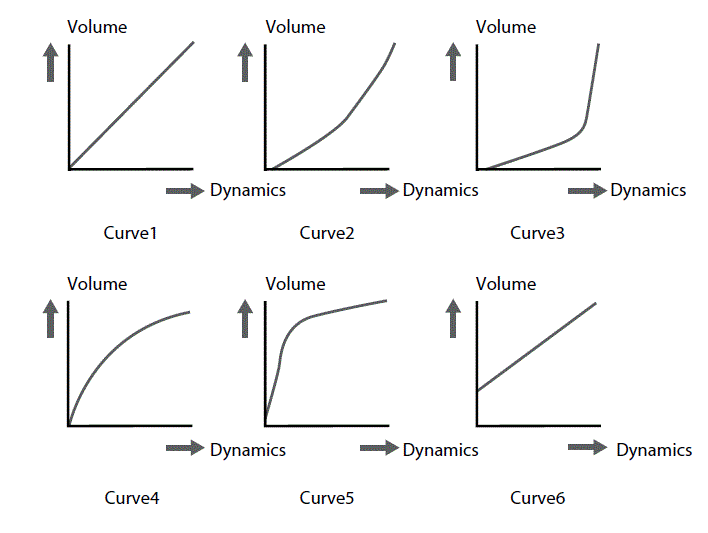
| SENSI‐ TIVITY | SEN XXX | די וואליום אויפפירונג פון א פעדל, נישט קוקנדיק אויף די אקטועלע קלאג אינטענסיטעט. ווי העכער דער ווערט, אלץ העכער דער וואליום ביים שפילן, און פארקערט. | 1…16 |
| XTALK | XTK XXX | If several pads are mounted on a rack vibrations can be transmitted to other pads when you hit a trigger and unintentionally trigger sounds. This crosstalk can be avoided by the appropriate setting. The value should be set as low as possible. | 1…8 |
| CURVE | CUR XXX |
|
1…6 |
| Paramעטער | ווייַז | טייַטש | ווערט קייט |
| ריטריג באָטל מאַכן | RTG XXX | We call it ‘double trigger’ when multiple sounds are successively produced when playing a pad. This effect can be caused, among other things, by irregular waveforms, specifically in the decaying of the trigger. With this parameter, these distortions can be suppressed. The higher the value is, the higher the likelihood that rapidly successive strikes – such as in a drum roll – are no longer detected. So the value should be set as low as possible. | 1…16 |
| MIDI NOTE | מיטן XXX | צוגעטיילטע MIDI נאָט | 0…127 |
נוצן מעניו
אַדזשאַסטינג דיווייס סעטטינגס
In this menu, you can change various settings of the device.
- Press [UTILITY].
- The display shows the Utility menu.
- Press [PAGE] repeatedly until the required submenu appears.
- Use the arrow buttons ([<] / [>]) or the jog wheel to change the parameter value.
| Param‐ עטער | ווייַז | טייַטש | ווערט קייט |
| GM MODE | GM XXX | Defines the processing of programme change commands: ON: Programme change commands for MIDI channel 10 are processed as selection (GM kit). OFF: Programme change commands for MIDI channel 10 are processed as selection (local kit). |
אנצינדן אויסלעשן |
| AUTO POWER | POW XXX | דעפינירט די אויפפירונג פון די אויטאמאטישע אויסשליסונג:
|
30, 60, OFF |
סטאַטוס אַרטיקלען
| סטאַטוס אָנזאָג | טייַטש |
| REC FUL | The storage capacity for the recording is exhausted. |
| FAC SEt | The factory reset is complete. |
| עמפּ | The user song list is empty. |
| OK | The device settings and drum kit settings have been saved. |
| WAT | Data is loaded from the flash ROM, please wait. |
MIDI ימפּלאַמענטיישאַן
| פֿונקציע | טראַנסמיטטעד | דערקענט | באמערקונגען | |
| באַסיק קאַנאַל | פעליקייַט | טש 10 | 1-16 | |
| געביטן | ניין | ניין | ||
| מאָדע | פעליקייַט | ניין | ניין | |
| אַרטיקלען | ניין | ניין | ||
| פארענדערט | ******** | ******** | ||
| באַמערקונג נומער | 0…127 | 0…127 | ||
| אמת קול | ******** | 0…127 | ||
| גיכקייַט | באַמערקונג אויף | Yes (99H, V=1…127) | 0…127 | |
| באַמערקונג אַוועק | Yes (99H, V=0) | 0…127 | ||
| Aftertouch | שליסלען | ניין | ניין | |
| טשאַנאַלז | ניין | ניין | ||
| פּעך בענדער | ניין | יא | ||
| קאָנטראָל ענדערונג | 0 | ניין | יא | באַנק סעלעקטירן |
| 1 | ניין | יא | מאָדולאַטיאָן | |
| 5 | ניין | יא | פּאָרטאַמענטאָ צייט | |
| 6 | ניין | יא | דאַטע פּאָזיציע | |
| 7 | ניין | יא | באַנד | |
| 10 | ניין | יא | פּאַן | |
| 11 | ניין | יא | אויסדרוק | |
| 64 | ניין | יא | ונטערהאַלטן טרעטלען | |
| 65 | ניין | יא | Portamento ON / OFF | |
| 66 | ניין | יא | Sostenuto טרעטלען | |
| 67 | ניין | יא | ווייך טרעטלען | |
| 80 | ניין | יא | רעווערב פּראָגראַם | |
| 81 | ניין | יא | כאָר פּראָגראַם | |
| 91 | ניין | יא | ריווערב מדרגה | |
| 93 | ניין | יא | די מדרגה פון די קאָראַס | |
| 120 | ניין | יא | כל סאָונד אויסגעלאשן | |
| 121 | ניין | יא | באַשטעטיק אַלע קאָנטראָללער | |
| 123 | ניין | יא | כל נאָטעס אויסגעלאשן | |
| פּראָגראַם ענדערונג | יא | יא | ||
| ויסשליסיק סיסטעם | ניין | יא | ||
| סיסטעם פּראָסט | ליד פּאָזיציע | ניין | ניין | |
| סאָנג אויסקלייַבן | ניין | ניין | ||
| ניגן | ניין | ניין | ||
| פֿונקציע | טראַנסמיטטעד | דערקענט | באמערקונגען | |
| סיסטעם פאַקטיש צייט | זייגער | יא | ניין | נאָר אָנהייב און האַלטן |
| באַפֿעל | יא | ניין | ||
| אַוקס אַרטיקלען | לאקאלע אויף/אַוועק | ניין | ניין | |
| כל נאָטעס אַוועק | ניין | ניין | ||
| אַקטיוו סענס | יא | ניין | ||
| סיסטעם באַשטעטיק | ניין | ניין | ||
טעכניש ספּעסאַפאַקיישאַנז
| אַרייַנשרייַב קאַנעקשאַנז | מאַכט צושטעלן | פּוסט צאַפּן כאָלעל פֿאַר די מאַכט אַדאַפּטער |
| וסב פּאָרט | יו-עס-בי טיפ ב (מידי) | |
| צינגל | 2 × 6.35 mm mono jack socket | |
| AUX אין | 1 × 3.5 mm stereo jack socket | |
| רעזולטאַט קאַנעקשאַנז | שורה אויס (ר / ל מאָנאָ) | 2 × 6.35 מם דזשאַק כאָלעל |
| כעדפאָונז | 1 × 3.5 mm stereo jack socket | |
| MIDI | DIN טאַפליע כאָלעל, 5-שפּילקע | |
| טימבערס | 418 | |
| פּויק קיץ | 30 פּריסעט קיץ, 10 באַניצער קיץ | |
| Demo and practise songs | 80 פאַר-פּראָגראַמירטע לידער, 5 באַניצער לידער | |
| MIDI סאָונדס | 128 (די MIDI רשימות זענען בארעכטיגט פֿאַר אראפקאפיע אויף די פּראָדוקט בלאַט ביי www.thomann.de.) | |
| מאַכט צושטעלן | פונדרויסנדיק מאַכט אַדאַפּטער, 100 – 240 וו 50/60 הז | |
| אַפּערייטינג וואָלtagE / קראַנט | 9 V / min. 500 mA, polarity: Centre positive | |
| אַפּערייטינג סיסטעם | Windows® 8 און שפּעטער, Mac OS X® 10.8 און שפּעטער | |
| דימענשאַנז (W × H × D) | 125 מם × 95 מם × 187.5 מם | |
| וואָג | 0.5 קג | |
| אַמביאַנט טנאָים | טעמפּעראַטור קייט | 0 °C…40 °C |
| קאָרעוו הומידיטי | 20%…80% (ניט-קאַנדענסינג) | |
מער אינפֿאָרמאַציע
| געשטעל אַרייַנגערעכנט | יא |
| אַוועקזעצן אַרייַנגערעכנט | ניין |
| באַס פּויק טרעטלען אַרייַנגערעכנט | יא |
| כעדפאָונז אַרייַנגערעכנט | ניין |
| מעש קאָפּ פּאַדס | יא |
| פּאַדס אין סטערעאָ | יא |
| נומער פון דירעקט אַוטפּוץ | 0 |
צאַפּן און קשר אַסיינמאַנט
הקדמה
דער קאַפּיטל וועט העלפֿן איר אויסקלייַבן די רעכט קייבאַלז און פּלאַגז צו פאַרבינדן דיין ווערטפול ויסריכט אין אַזאַ אַ וועג אַז אַ גאנץ געזונט דערפאַרונג איז ינשורד. ביטע טאָן די עצות, ווייַל ספּעציעל אין 'סאָונד & ליכט' וואָרענען איז אנגעוויזן: אפילו אויב אַ צאַפּן פיץ אין די כאָלעל, אַ פאַלש קשר קען פירן צו אַ חרובֿ מאַכט. amp, אַ קורץ קרייַז אָדער 'נאָר' אין נעבעך טראַנסמיסיע קוואַליטעט!
באַלאַנסט און אַנבאַלאַנסט טראַנסמיסיע
Unbalanced transmission is mainly used in semi-professional environment and in hifi use. Instrument cables with two conductors (one core plus shielding) are typical representatives of the unbalanced transmission. One conductor is ground and shielding while the signal is transmitted through the core. Unbalanced transmission is susceptible to electromagnetic interference, especially at low levels, such as microphone signals and when using long cables. In a professional environment, therefore, the balanced transmission is preferred, because this enables an undisturbed transmission of signals over long distances. In addition to the conductors ‘Ground’ and ‘Signal’, in a balanced transmission a second core is added. This also transfers the signal, but phase-shifted by 180°.
זינט די ינטערפיראַנס אַפעקץ ביידע קאָרעס גלייַך, דורך סאַבטראַקטינג די פאַסע-שיפטיד סיגנאַלז, די ינטערפירינג סיגנאַל איז גאָר נוטראַלייזד. דער רעזולטאַט איז אַ ריין סיגנאַל אָן קיין ראַש ינטערפיראַנס.
TS טעלעפאָן צאַפּן (מאָנאָ, אַנבאַלאַנסט)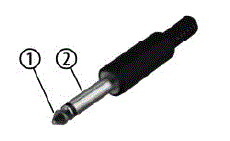
- סיגנאַל
- ערד, שילדינג
דריי-פלאָקן 1/8 ″ מיני טעלעפאָן דזשאַק (סטערעאָ, אַנבאַלאַנסט)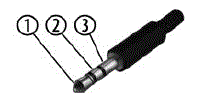
- סיגנאַל (לינקס)
- סיגנאַל (רעכט)
- ערד, שילדינג
רייניקונג
מיטל טיילן
ריין די צוטריטלעך טיילן פון די מיטל קעסיידער. די אָפטקייַט פון רייניקונג דעפּענדס אויף די אָפּערייטינג סוויווע: פייַכט, רויך אָדער דער הויפּט גראָב ינווייראַנמאַנץ קען פאַרשאַפן אַ העכער אַקיומיאַליישאַן פון שמוץ אויף די קאַמפּאָונאַנץ פון די מיטל.
- ניצן אַ טרוקן ווייך שטאָף פֿאַר רייניקונג.
- אַראָפּנעמען פאַרביסן סטאַינס מיט אַ ביסל דamp שטאָף.
- קיינמאָל נוצן קלינערז מיט אַלקאָהאָל אָדער טינער.
- Never put any vinyl items on the device, as vinyl can stick to the surface or lead to its discolouration.
פּראַטעקטינג די סוויווע
באַזייַטיקונג פון די פּאַקינג מאַטעריאַל
- ינווייראַנמענאַלי פרייַנדלעך מאַטעריאַלס זענען אויסדערוויילט פֿאַר די פּאַקקאַגינג. די מאַטעריאַלס קענען זיין געשיקט פֿאַר נאָרמאַל ריסייקלינג. פאַרזיכערן אַז פּלאַסטיק באַגס, פּאַקקאַגינג אאז"ו ו זענען דיספּאָוזד פון די געהעריק שטייגער.
- דו זאלסט נישט אַוועקוואַרפן די מאַטעריאַלס מיט דיין נאָרמאַל הויזגעזינד וויסט, אָבער מאַכן זיכער אַז זיי זענען געזאמלט פֿאַר ריסייקלינג. ביטע נאָכגיין די ינסטראַקשאַנז און מאַרקינגז אויף די פּאַקקאַגינג.
- אָבסערווירן די באַזייַטיקונג טאָן וועגן דאַקיומענטיישאַן אין פֿראַנקרייַך.
 באַזייַטיקונג פון דיין אַלט מיטל
- דער פּראָדוקט איז אונטערטעניק צו דער אייראפעישער וויסט עלעקטריקאַל און עלעקטראָניש ויסריכט דירעקטיוו (WEEE) ווי אַמענדיד.
- צי ניט אַוועקוואַרפן דיין אַלט מיטל מיט דיין נאָרמאַל הויזגעזינד וויסט; אַנשטאָט, צושטעלן עס פֿאַר קאַנטראָולד באַזייַטיקונג דורך אַ באוויליקט אָפּפאַל באַזייַטיקונג פירמע אָדער דורך דיין היגע וויסט מעכירעס. אויב אין צווייפל, באַראַטנ זיך דיין היגע וויסט פאַרוואַלטונג מעכירעס. איר קענט אויך צוריקקומען די מיטל צו אַ זיצער אויב זיי פאָרשלאָגן צו נעמען די מיטל צוריק פֿאַר פריי אָדער אויב זיי זענען ליגאַלי אַבליידזשד צו טאָן דאָס. ווען דיספּאָוזינג די מיטל, נאָכקומען מיט די כּללים און רעגיאַליישאַנז וואָס אַפּלייז אין דיין לאַנד. איר קענט אויך צוריקקומען דיין אַלט מיטל צו Thomann GmbH אָן אָפּצאָל. קוק די קראַנט טנאָים אויף www.thomann.de.
- געהעריק באַזייַטיקונג פּראַטעקץ די סוויווע ווי געזונט ווי די געזונט פון דיין יונגערמאַן מענטשן. דאָס איז ווייַל די געהעריק האַנדלינג פון אַלט דעוויסעס ניגט די פּאָטענציעל נעגאַטיוו יפעקץ פון כאַזערדאַס סאַבסטאַנסיז, און ווייַל עס קאַנסערנז רעסורסן דורך ריסייקלינג זיי.
- אויך טאָן אַז וויסט ויסמיידן איז אַ ווערטפול צושטייַער צו ינווייראַנמענאַל שוץ. ריפּערינג אַ מיטל אָדער פאָרן עס צו אן אנדער באַניצער איז אַן יקאַלאַדזשיקלי ווערטפול אָלטערנאַטיוו צו באַזייַטיקונג. פֿאַר עקסampאיר, נוצן די קלאַסאַפייד אַדס פון Thomann GmbH.
- אויב דיין אַלט מיטל כּולל פערזענלעכע דאַטן, ויסמעקן די דאַטן איידער דיספּאָוזינג עס.
דייטשלאנד · www.thomann.de
FAQ
Q: Can the MPS-450 E-Drum Module be connected to other electronic drum pads?
A: Yes, the MPS-450 E-Drum Module can be connected to various electronic drum pads using digital trigger signals for enhanced percussion sound generation.
דאָקומענטן / רעסאָורסעס
 | מפּס -450 E- פּויק שטעלן |