1. הקדמה
Thank you for choosing the TOZO NC9 Hybrid Active Noise Cancelling Wireless Earbuds. These earbuds are designed to provide an immersive audio experience with advanced noise cancellation, clear call quality, and comfortable all-day wear. This manual will guide you through the setup, operation, and maintenance of your new earbuds.
2. וואָס איז אין דער קעסטל
- TOZO Hybrid Active Noise Cancelling Wireless Earbuds
- טשאַרדזשינג קאַסע
- יו-עס-בי-סי (א צו סי) קאבל (20 ס״מ)
- אויער-טיפּס (פאַרשידענע גרייסן)
- באַניצער מאַנואַל

Figure 2.1: Contents of the TOZO NC9 package.
3. פּראָדוקט איבערview
The TOZO NC9 earbuds feature a compact design with advanced audio technology. Key components include:
- היבריד אַקטיוו ראַש קאַנסאַלינג: Up to 45dB noise reduction for an immersive listening experience.
- 6-Microphone ENC Clear Call: Enhanced environmental noise cancellation for clear voice transmission during calls.
- דורכזעיקייַט מאָדע: Allows you to hear your surroundings without removing the earbuds.
- Stereo Bass Sound: Built-in 10mm drivers with OrigX Acoustic 2.0 technology for rich bass and clear audio.
- ערגאָנאָמיק פּלאַן: Comfortable fit with six replaceable ear tip sizes.
- TOZO App Integration: Customize sound with 32 EQ options and noise cancellation modes.
- עקסטענדעד שפּיל צייט: Up to 59 hours total playtime with the charging case (ANC off).
- IPX8 וואַסער קעגנשטעל: Protection against sweat, rain, and splashes.
- בלועטאָאָטה 5.3 טעכנאָלאָגיע: Stable connection and low latency.
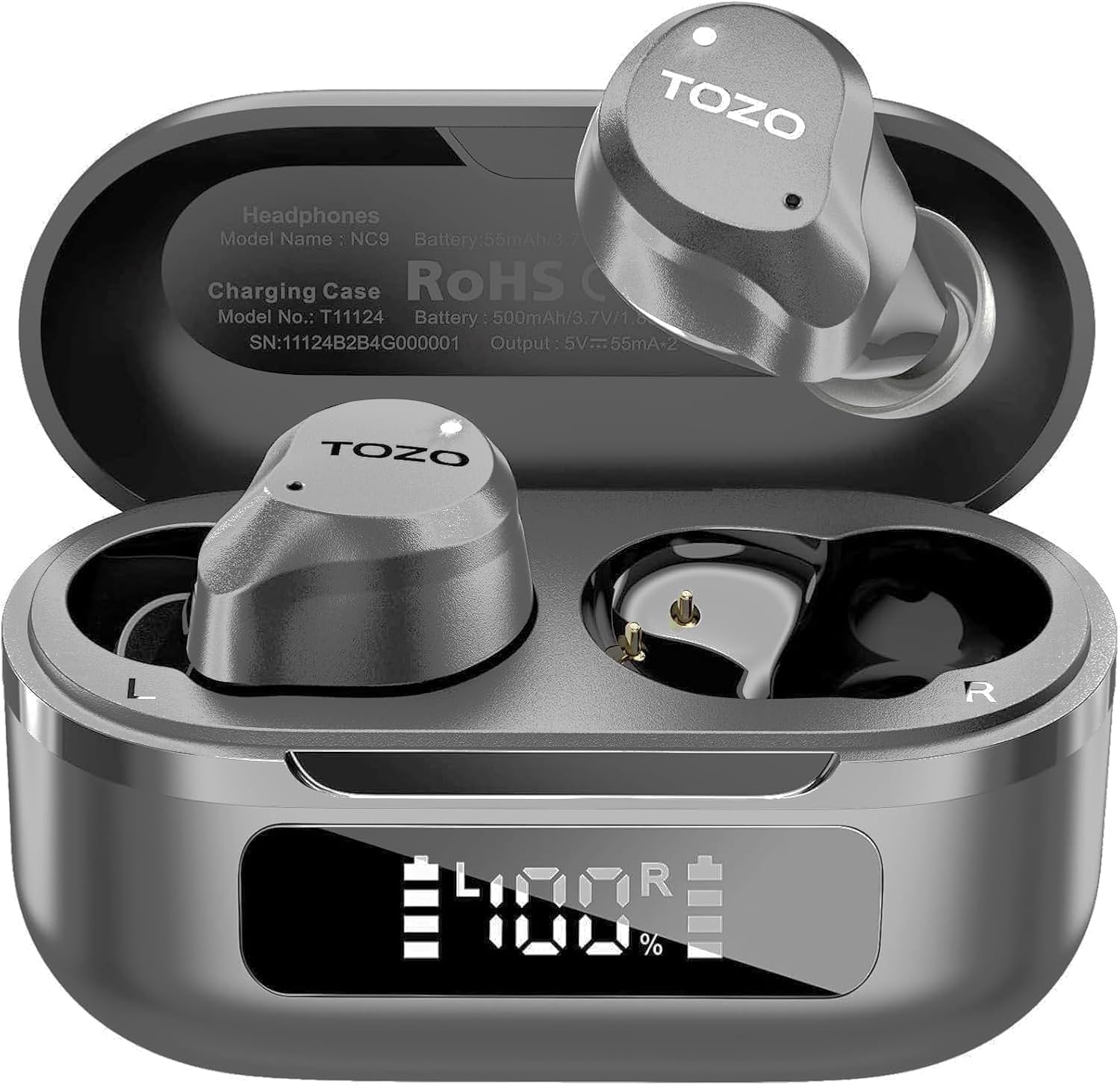
Figure 3.1: TOZO NC9 Earbuds and Charging Case.

Figure 3.2: TOZO OrigX Acoustics Technology for enhanced sound.
4. סעטאַפּ
4.1. ערשט פּערינג
- עפֿנט דעם טשאַרדזשינג קעסטל. די אויערקנעפּלעך וועלן אויטאָמאַטיש אַרײַן אין פּערינג מאָדע.
- אויף אייער דעווייס (סמאַרטפאָן, טאַבלעט, אאז"וו), אַקטיווירט בלועטוט.
- זוכן פֿאַר "TOZO NC9" in the list of available Bluetooth devices and select it to connect.
- אַמאָל פארבונדן, וועט איר הערן אַן אַודיאָ פּראָמפּט וואָס באַשטעטיקט די געראָטענע פּאָרינג.
4.2. טראָגן די אויערקנעפּלעך
For optimal sound quality and comfort, ensure a proper fit:
- Choose the ear tips that best fit your ear canal from the provided sizes.
- Insert the earbuds into your ears with the sound hole pointing downwards.
- Gently rotate the earbuds backward to secure them snugly in your ear.

Figure 4.1: Proper wearing of the TOZO NC9 Earbuds.
5. אַפּערייטינג ינסטרוקטיאָנס
5.1. ריר קאָנטראָלס
The TOZO NC9 earbuds feature intuitive touch controls on each earbud:
- Single Tap (Left/Right): שפּילן/פּויזע מוזיק, ענטפֿערן/ענדיגן רוף.
- טאָפּלט קלאַפּ (לינקס): פֿריִערדיקע שפּור.
- טאָפּלט קלאַפּ (רעכטס): ווייַטער שפּור.
- טריפל טאַפּ (לינקס): Activate/Deactivate Noise Cancellation or Transparency Mode.
- טריפל טאַפּ (רעכטס): Activate Voice Assistant (Siri, Google Assistant).
- Long Press (Left/Right): אָפּוואַרפן רופן.
5.2. אַקטיווע ראַש קאַנסאַליישאַן (ANC) און טראַנספּעראַנסי מאָדע
The earbuds offer three sound modes:
- אַקטיוו ראַש קאַנסאַליישאַן (ANC): Reduces external noise for an immersive audio experience.
- דורכזעיקייַט מאָדע: לאָזט אַמביאַנט סאָונדס דורכגיין, האַלטנדיק אײַך באַוואוסטזיניק וועגן אײַער סביבה.
- נאָרמאַל מאָדע: Standard audio with no active noise processing.
Switch between modes by triple-tapping the left earbud.
Figure 5.1: Active Noise Cancellation in action.
5.3. TOZO App Features
Download the TOZO App to unlock advanced customization options:
- 32 EQ Options: Tailor your audio experience with various preset equalizers or create custom sound profiles.
- ראַש קאַנסאַליישאַן מאָדעס: Fine-tune ANC and Transparency settings.
- EQ Zone: Share and discover custom EQ settings from other users.

Figure 5.2: TOZO App for sound customization.
6. טשאַרדזשינג און באַטאַרייע לעבן
6.1. אויפלאָדן דעם קעסטל און די אויערקנעפּלעך
The charging case can be charged via the included USB-C cable. The earbuds charge automatically when placed inside the case.
- טשאַרדזשינג צייט: בעערעך 1.5 שעה פֿאַר אַ פול אָפּצאָל.
- באַטערי ינדיקאַטאָר: די טשאַרדזשינג קעסטל האט אַן LED דיספּלעי צו ווייַזן די פארבליבענע באַטאַרייע פּראָצענט.tage.

Figure 6.1: Charging case with LED display.
6.2. באַטערי פאָרשטעלונג
- Total Playtime (with charging case): Up to 59 hours (ANC off), 42 hours (ANC on).
- Single Use Playback: Up to 14 hours (ANC off), 10 hours (ANC on).

Figure 6.2: Extended playtime capabilities.
7. וישאַלט & קער
7.1. וואַסער קעגנשטעל
The TOZO NC9 earbuds are IPX8 water-resistant, meaning they can withstand sweat, rain, and accidental splashes. However, they are not designed for swimming or prolonged submersion. Ensure earbuds are dry before placing them back in the charging case.
7.2. רייניקונג
Regularly clean your earbuds and charging case to maintain optimal performance:
- ניצט אַ ווייכן, טרוקענעם, לינט-פֿרייעם שטאָף צו ווישן די אויערקנעפּלעך און די טשאַרדזשינג קעסטל.
- אַראָפּנעמען די אויער־שפּיצן און רייניקן זיי מיט מילד זייף און וואַסער, און דערנאָך טרוקן גוט אויס איידער איר זיי צוריקבאַפעסטיקט.
- ויסמיידן ניצן אַברייסיוו מאַטעריאַלס אָדער האַרב קעמיקאַלז.
8. טראָובלעשאָאָטינג
- אויערקנעפּלעך נישט פּערינג: Ensure both earbuds are in the charging case, then open the lid to initiate pairing mode. Check your device's Bluetooth settings.
- נאָר איין אויערקנעפּל אַרבעט: Place both earbuds back in the charging case, close the lid, then open it again. Re-pair if necessary.
- נעבעך געזונט קוואַליטעט: Ensure ear tips provide a secure seal. Clean earbuds to remove any debris. Check audio source quality.
- טשאַרדזשינג ישוז: Ensure the charging cable is securely connected and the charging case is clean. Check the LED display for battery status.
- באַשטעטיק עאַרבודז: Refer to the full user manual for specific reset instructions if persistent issues occur.
9. ספּעסאַפאַקיישאַנז
| שטריך | באַשרייַבונג |
|---|---|
| מאָדעל נאָמען | TOZO NC9 |
| ראַש קאָנטראָל | היבריד אַקטיוו ראַש קאַנסאַליישאַן |
| בלועטאָאָטה ווערסיע | 5.3 |
| בלועטאָאָטה קייט | 10 מעטער |
| באַטעריע לעבן (אויערקנעפּלעך) | 14 שעה (ANC אויסגעלאשן), 10 שעה (ANC אן) |
| גאַנץ שפּילצייט (מיט קעסטל) | 59 שעה (ANC אויסגעלאשן), 42 שעה (ANC אן) |
| טשאַרדזשינג צייט | 1.5 שעה |
| וואַסער קעגנשטעל מדרגה | IPX8 |
| אַודיאָ דרייווער גרייס | 10 מילאַמיטערז |
| קאָנטראָל טיפּ | Touch Control / APP |
| אַרייַנגערעכנט קאַמפּאָונאַנץ | אויערקנעפּלעך, טשאַרדזשינג קעסטל, USB-C קאַבל, אויערטיפּס, באַניצער מאַנואַל |
10. וואָראַנטי & שטיצן
Your TOZO NC9 earbuds come with an 18-Month Extended Warranty. For warranty activation and support, please visit the official TOZO webפּלאַץ אָדער קאָנטאַקט קונה דינסט.
פֿאַר ווייטערדיקע הילף, ביטע באַזוכט די TOZO Store on Amazon.
ווידעא 10.1: אן איבערview of the TOZO NC9 earbuds, including unboxing and features.
ווידעא 10.2: א רעview highlighting the sound quality, fit, and value of the TOZO NC9 earbuds.
Video 10.3: A demonstration of the noise cancelling capabilities of the TOZO NC9 earbuds.


