1. הקדמה
א דאנק פארן קויפןasing the Marathon CL030050P Digital Desk Clock. This compact and versatile clock is designed for convenience, offering a clear digital display with a soft blue backlight, an alarm with snooze function, temperature display, and multi-language day of the week display. This manual provides detailed instructions for setup, operation, and maintenance to ensure optimal performance.
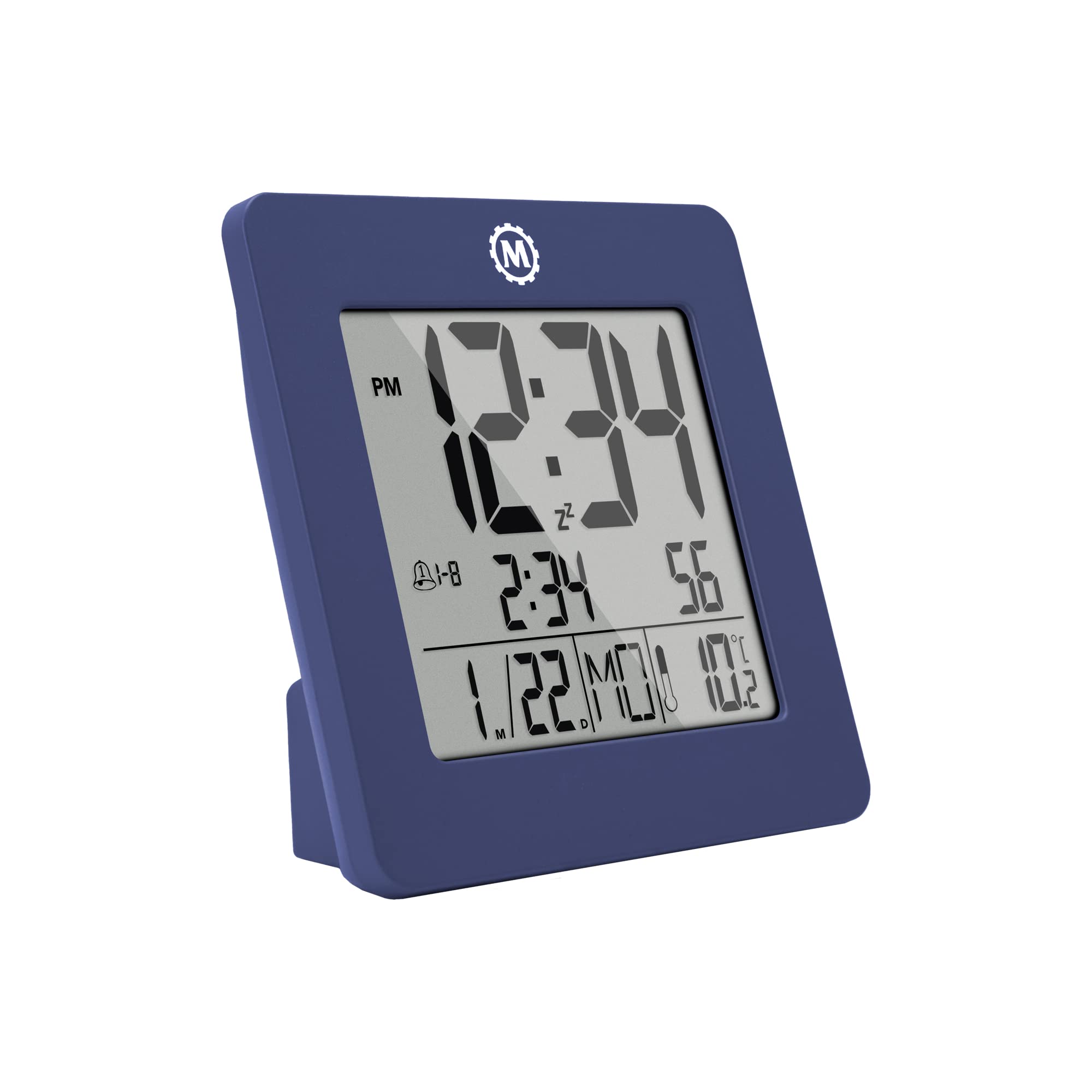
פיגורע 1: פראָנט view of the Marathon CL030050P Digital Desk Clock.
2. פּעקל אינהאַלט
- Marathon CL030050P Digital Desk Clock
- באַניצער מאַנואַל (דעם דאָקומענט)
- באַטעריעס (פאַר-אינסטאַלירט אָדער אַרייַנגערעכנט באַזונדער)
3. סעטאַפּ
3.1 באַטאַרייע ייַנמאָנטירונג
The clock operates on batteries. If batteries are not pre-installed, open the battery compartment cover on the back of the clock and insert the required batteries, ensuring correct polarity (+/-). Close the cover securely.
3.2 Initial Settings (Time, Date, Language, Temperature Unit)
The back of the clock features several buttons for configuration:
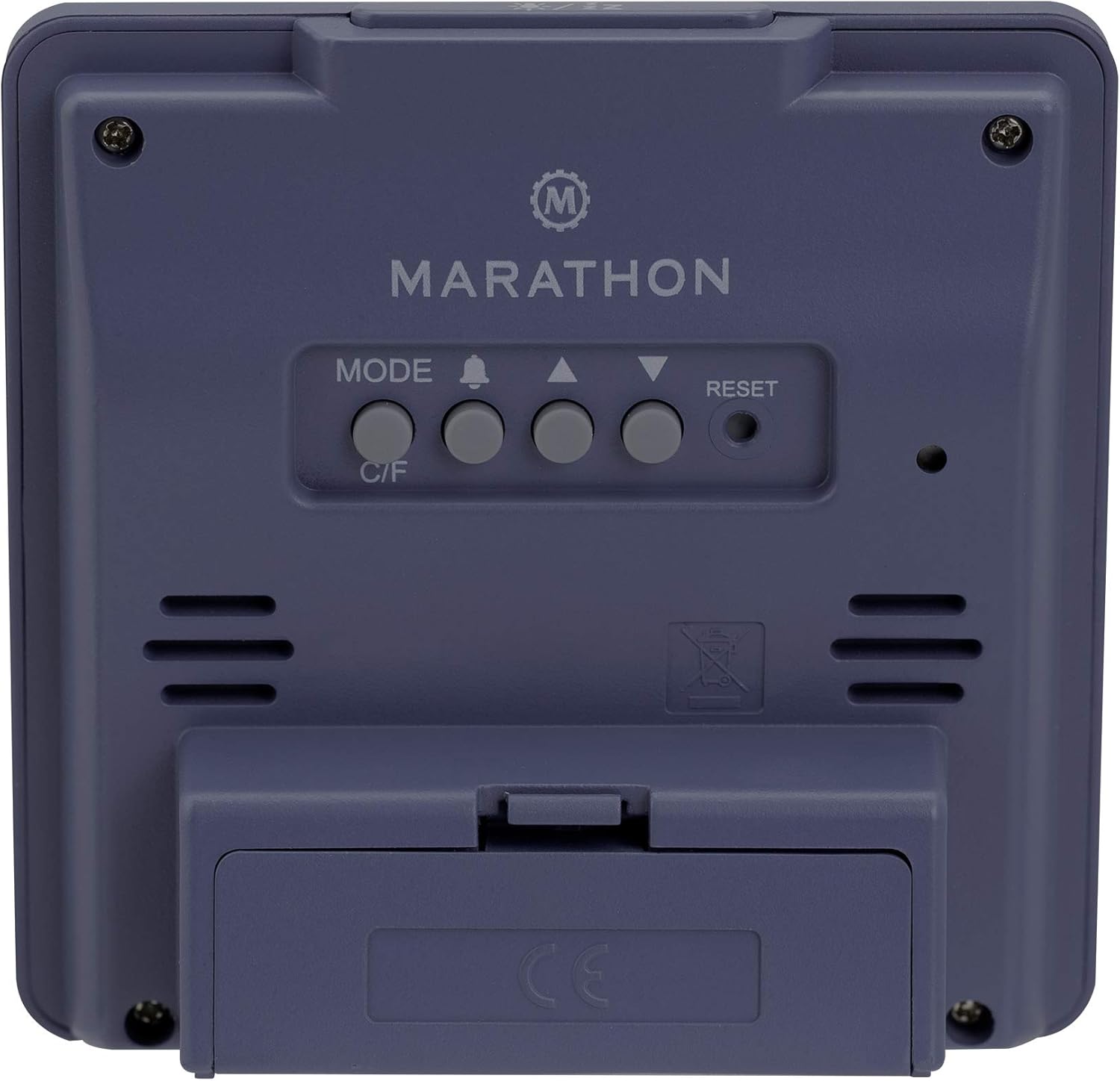
פיגורע 2: דערציען view of the clock with control buttons.
- שטעלן צייט און דאַטע: דריקן און האַלטן די מאָדע קנעפּל צו אַרייַן צייט שטעלן מאָדע. ניצט דעם אַרויף (▲) און אַראָפּ (▼) buttons to adjust the flashing value (e.g., hour, minute, year, month, day). Press מאָדע נאכאמאל צו באשטעטיגן און אריבערגיין צו דער נעקסטער סעטינג.
- 12/24 שעה פֿאָרמאַט: While in time setting mode, press the אַרויף (▲) קנעפּל צו טוישן צווישן 12-שעה (מיט AM/PM אינדיקאַטאָר) און 24-שעה פֿאָרמאַטן.
- Day of Week Language: The day of the week can be displayed in 7 languages (English, Dutch, French, Spanish, Italian, Danish, German). This setting is typically adjusted within the date setting sequence. Use אַרויף (▲) or אַראָפּ (▼) to select your preferred language when the day of the week is flashing.
- Temperature Unit (C/F): דרוק די C / F button on the back of the clock to switch between Celsius (℃) and Fahrenheit (℉) temperature display.
4. אַפּערייטינג ינסטרוקטיאָנס
4.1 אַרויסווייַזן מאָדעס
The clock continuously displays time, date, and temperature. The large, high-contrast display ensures readability.
4.2 באַקלייט אַקטיוואַציע
The clock features a soft blue Nightglow Super Glow backlight. To activate the backlight, press any button on the clock. The backlight will illuminate for a few seconds, providing temporary visibility in low-light conditions.
4.3 שרעק באַשטעטיקן
- דרוק די ALARM (🔔) קנעפּל אַמאָל צו view די קראַנט שרעק צייַט.
- דריקן און האַלטן די ALARM (🔔) button to enter alarm setting mode. The hour digit will flash.
- ניצן די אַרויף (▲) און אַראָפּ (▼) קנעפּלעך צו סטרויערן די שעה. דריק ALARM (🔔) צו באַשטעטיקן און גיין צו די מינוט איינשטעלונג.
- שטעל די מינוט דורך ניצן די אַרויף (▲) און אַראָפּ (▼) קנעפּלעך. דרוק ALARM (🔔) צו באַשטעטיקן און אַרויסגיין פון אַלאַרם סעטטינג מאָדע.
- צו אַקטיווירן/דעאַקטיווירן דעם אַלאַרם, דריק די ALARM (🔔) button briefly outside of setting mode. An alarm icon will appear/disappear on the display.
4.4 סנוז פונקציע
ווען דער אַלאַרם קלינגט, דריק אויף יעדן קנעפּל (אחוץ באַשטעטיק) to activate the snooze function. The alarm will temporarily stop and sound again after a few minutes (snooze duration is typically fixed and cannot be adjusted). To turn off the alarm completely, press the באַשטעטיק button or let it ring for its full duration.

Figure 3: The clock is compact and fits comfortably in hand.
5. וישאַלט
5.1 רייניקונג
ווישט אָפּ דעם זייגער מיט אַ ווייכן, טרוקענעם שטאָף. ניצט נישט קיין שאַרפע רייניקונגס־מיטלען אָדער סאָלווענטן, ווייל זיי קענען שאַטן דעם עקראַן אָדער...asing.
5.2 באַטערי פאַרבייַט
When the display becomes dim or the clock functions erratically, it is time to replace the batteries. Open the battery compartment on the back, remove the old batteries, and insert new ones, observing correct polarity. Dispose of old batteries responsibly.
6. טראָובלעשאָאָטינג
- דיספּליי איז ליידיק אָדער טונקל: קאָנטראָלירט די באַטעריע אינסטאַלאַציע. טוישט די באַטעריעס אויב נייטיק.
- אומרעכטע צייט/דאטום: Re-enter time and date settings as described in Section 3.2.
- דער שרעק קלינגט נישט: Ensure the alarm is activated (alarm icon visible on display). Check alarm volume if adjustable (this model may not have adjustable volume).
- Clock unresponsive: דרוק די באַשטעטיק button on the back of the clock using a pointed object (e.g., a paperclip). This will reset the clock to factory defaults, and you will need to set the time and date again.
7. ספּעסאַפאַקיישאַנז
| מאָדעל | CL030050P |
| סאָרט | מעראַטאַן |
| קאָליר | French Blue |
| גרייס | קליין |
| מאַטעריאַל | פּלאַסטיק |
| ווייַז טיפּ | דיגיטאַל |
| פֿעיִקייטן | Alarm, Temperature Display |
| מאַכט מקור | באַטאַרייע פּאַוערד |
| פּראָדוקט דימענשאַנז | 9.4 X 3.81 X 9.4 סענטימעטער (3.7 X 1.5 X 3.7 אינטשעס) |
| פּונקט וואָג | 0.1 קילאָגראַם (100 ג) |
| דרינענדיק / דרויסנדיק נוצן | דרינענדיק |

Figure 4: Product dimensions for the Marathon CL030050P Digital Desk Clock.
8. וואָראַנטי און שטיצן
For warranty information or technical support, please refer to the warranty card included with your product or visit the official Marathon webזייטל. אויב איר טרעפט אויף פראבלעמען וואָס זענען נישט באדעקט אין דעם מאַנואַל, ביטע קאָנטאַקטירט קונה סערוויס פֿאַר הילף.


