PDP מאַנואַלן און באַניצער גיידס
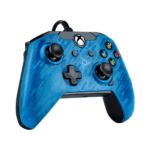
פּי-די-פּי (פּערפאָרמאַנס דיזיינט פּראָדוקטן) איז אַ פירנדיקער פאַבריקאַנט פון ווידעא שפּיל אַקסעסאָריעס, אַרייַנגערעכנט קאָנטראָולערס, כעדסעטס און טשאַרדזשינג סיסטעמען פֿאַר קסבאָקס, פּלייסטיישאַן און נינטענדאָ סוויטש.
About PDP manuals on Manuals.plus
Performance Designed Products (PDP) is a prominent gaming accessory manufacturer known for designing stylish and functional peripherals for major gaming consoles and PC. Now part of the Turtle Beach family, PDP produces a wide range of officially licensed products including wired and wireless controllers, gaming headsets, and charging solutions.
Key product lines include the vibrant אַפטערגלאָוו סעריע, רעמאַטש controllers, and various specialized gaming gear. PDP focuses on delivering high-performance accessories that enhance the gaming experience through ergonomic designs, programmable features, and durable build quality.
פּי-די-פּי מאַנואַלן
לעצטע מאַנואַלן פֿון manuals+ אויסגעקליבן פֿאַר דעם בראַנד.
פּדפּ גיימינג 500-180 קאָנטראָללער בארג נינטענדאָו סוויטש גריי באַניצער גייד
פּדפּ גיימינג NS 500-188 Joy-Con טשאַרדזשינג וועבשיפל פֿאַר נינטענדאָו סוויטש באַניצער גייד
פּדפּ גיימינג LVL50 ווירעלעסס כעדסעט באַניצער מאַנואַל
פּדפּ גיימינג LVL40 ווייערד סטערעאָ גיימינג כעדסעט באַניצער גייד
pdp gaming 049-012 גיימינג קאָנטראָללער באַניצער גייד
פּדפּ גיימינג 500-181 ראַק זיסוואַרג ווייערד קאָנטראָללער פֿאַר נינטענדאָו סוויטש באַניצער גייד
pdp gaming 049-012 Xbox Gaming Controller User Guide
פּדפּ גיימינג 049-012 ווייערד קסבאָקס קאָנטראָללער באַניצער גייד
פּדפּ גיימינג 049-012 ווייערד קאָנטראָללער פֿאַר XBOX באַניצער גייד
PDP Concept Maple Suspension Tom Mount Installation Guide
PDP Afterglow Wired Xbox 360 Controller Vibration Motors Replacement Guide
REMATCH Wired Controller for Nintendo Switch - Quick Start Guide
PDP Afterglow Wave Wired Controller Quick Start Guide
עפטערגלאָו ווירעלעס דעלוקס קאָנטראָללער שנעל אָנהייב גייד - פּי-די-פּי
PDP REALMz™ וויירלעס קאָנטראָללער שנעל אָנהייב גייד פֿאַר נינטענדאָ סוויטש
PDP REALMz וויירלעס קאָנטראָללער פֿאַר Xbox שנעל אָנהייב גייד
PDP Afterglow Wave Dual Charger שנעל אָנהייב גייד פֿאַר PlayStation 5 און 4
PDP Airlite Pro Wireless Dongle פֿאַר PlayStation: שנעל אָנהייב גייד און זיכערהייט אינפֿאָרמאַציע
REMATCH ווייערד קאָנטראָללער פֿאַר נינטענדאָ סוויטש: שנעל אָנהייב גייד
REALMz™ דראָט קאָנטראָללער שנעל אָנהייב גייד פֿאַר נינטענדאָ סוויטש
PDP מאַנואַלן פון אָנליין ריטיילערז
PDP Gaming REMATCH GLOW Enhanced Wired Controller - Titan Steel User Manual
PDP Kinect Sensor TV Mounting Clip for Xbox 360 User Manual
PDP Afterglow LVL 3 Stereo Gaming Headset (Model 048-041) Instruction Manual
PDP LVL30 Wired Chat Headset User Manual
PDP Rock Candy Wired Controller for Xbox 360, Blueberry Boom Instruction Manual
PDP AIRLITE GLOW Wired Headset User Manual: Jolt Green (Model 049-015-JGR)
PDP Gaming Energizer Dual Controller Charging System for Xbox One - Instruction Manual
PDP Wired Controller for Xbox One & PC (Model 048-065-NA) Instruction Manual
PDP REMATCH Enhanced Wired Nintendo Switch Pro Controller User Manual
PDP Gaming Faceoff Deluxe+ Audio Wired Controller for Nintendo Switch - Instruction Manual
PDP Afterglow Wave Wireless Headset User Manual for Xbox, PlayStation, and PC
PDP REALMz Wireless Nintendo Switch Pro Controller - Sonic Superstars Edition User Manual
PDP support FAQ
געוויינטלעכע פראגעס וועגן מאַנואַלן, רעגיסטראַציע און שטיצע פֿאַר דעם בראַנד.
-
How do I pair my PDP wireless controller?
For most wireless PDP controllers, press and hold the sync button (usually located on the top or back) for 3-5 seconds until the LED blinks rapidly. Then, activate the pairing mode on your console or PC adapter.
-
Why is my PDP controller not charging?
Ensure you are using the provided USB cable and that it is connected directly to the console. If using a charging dock, verify the controller is seated correctly on the pins. Blinking orange LEDs typically indicate charging is in progress.
-
Where can I download the PDP Control Hub app?
The PDP Control Hub app, used for customizing button mapping and lighting, is available on the Microsoft Store for Xbox and Windows PC.
-
Does my PDP product have a warranty?
Yes, PDP typically offers a manufacturer's warranty for their products. You can verify coverage and initiate claims through the PDP support webפּלאַץ.