📘 קערלינק מאַנואַלן • פריי אָנליין פּדף'ס
Kerlink לאָגאָ

קערלינק מאַנואַלן און באַניצער גיידס

Kerlink is a premier global provider of IoT connectivity solutions, specializing in carrier-grade LoRaWAN gateways, network management software, and smart city infrastructure.

עצה: לייגט אריין דעם פולן מאָדעל נומער געדרוקט אויף אייער קערלינק עטיקעט כדי עס זאל זיין די בעסטע פּאַסיק.

וועגן קערלינק מאַנואַלן אויף Manuals.plus

קערלינק is a leading global provider of Internet of Things (IoT) connectivity solutions, established in 2004. Headquartered in France, the company specializes in network infrastructure for the LoRaWAN standard, serving telecom operators, smart cities, and private industries worldwide.

The company offers a robust lineup of hardware, including the Wirnet iStation און Wirnet iFemtoCell gateways, designed for reliable outdoor and indoor connectivity. Beyond hardware, Kerlink provides network management software and value-added services to streamline IoT deployments for efficient asset tracking, metering, and environmental monitoring.

קערלינק מאַנואַלן

לעצטע מאַנואַלן פֿון manuals+ אויסגעקליבן פֿאַר דעם בראַנד.

Kerlink Wirnet iStation 915 MHz LoRaWAN דרויסנדיק גאַטעווייַ באַזיצער מאַנואַל

אקטאבער 23, 2024
קערלינק ווירנעט iStation 915 MHz LoRaWAN דרויסנדיק גייטוויי ספּעציפֿיקאַציעס דימענסיעס: 265 מם x 165 מם x 100 מם סערטיפֿיקאַציעס: 915, 923 (צוגעלייגטע אינפֿאָרמאַציע בנימצא אויף פאָדערונג) פּראָדוקט אינפֿאָרמאַציע די ווירנעטTM iStation איז אַ…

Kerlink Wirnet iZepto Cell Cellular User Guide

אקטאבער 22, 2024
קערלינק ווירנעט iZepto סעלולאַר פּראָדוקט אינפֿאָרמאַציע ספּעציפֿיקאַציעס: פּראָדוקט נאָמען: גייטוויי אידענטיפֿיקאַציע קאַרטל מאָדעל: ווירנעט iZeptoCell מאַכט צושטעלן: מולטי-בליידס מאַכט צושטעלן (צפון אַמעריקע, אייראָפּע, פֿאַראייניקטע קעניגרייך) אַקסעסאָריעס: USB-A קאַבל עקסטענדער,…

kerlink Wirnet iZeptoCell LoRaWAN Gateway User Guide

2 סעפטעמבער 2024
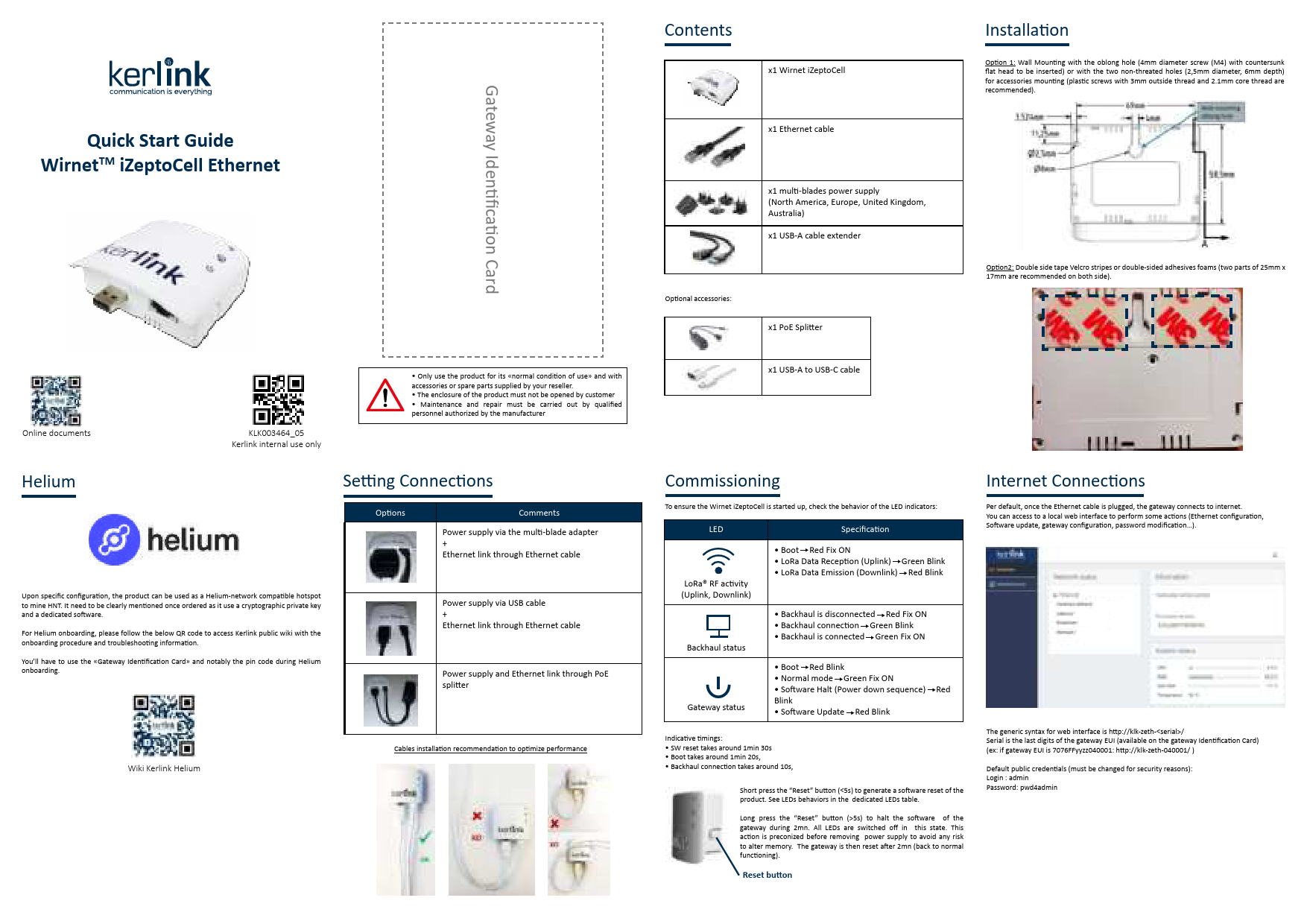
שנעלע אָנהייב גייד Wirnet TM iZeptoCell Ethernet Wirnet iZeptoCell LoRaWAN Gateway https://qrco.de/bcyF7AKLK003464_05 Kerlink אינערלעכע נוצן בלויז Gateway אידענטיפיקאציע קאַרטל ניצן בלויז דעם פּראָדוקט פֿאַר זיין «נאָרמאַל צושטאַנד פון נוצן» און…

kerlink ACCIOT-POW01 Wirnet iStation אַן ינסטרוקטיאָן מאַנואַל פֿאַר זונ פּאַנאַלז

27טן דעצעמבער 2023
קערלינק ACCIOT-POW01 ווירנעט iStation AN זונ פּאַנעלן אינסטרוקציע מאַנואַל הקדמה ווירנעט™ iStation אינסטאַלאַציע מיט זונ פּאַנעלן דאַרף גאָר קאָנטראָלירן די מאַכט עפעקטיווקייט פון יעדן טייל פון דער קייט. טאַקע, ווען…

Kerlink 923 ווירעלעסס דרויסנדיק אַפּ ינסטאַללאַטיאָן גייד

24 פעברואר 2023
קערלינק 923 ווירעלעס דרויסנדיק AP אינסטאַלירונג גייד פּאַקעט אינהאַלט צובינד און אינדיקאַטאָרן LED אינדיקאַטאָר אינסטרוקציעס פּאָרץ אינסטרוקציעס מיטל אינסטאַלירונג מעטאָד 1. פאַרבינדן קאָמפּיוטער צו די ווירעלעס סיגנאַל פון AP, די…

Kerlink Sub-LoRa-Gateway Helium Network Compatible Wirnet iFemtoCell Evolution Miner User Guide

6 יאנואר 2023
קערלינק סוב-לאָראַ-גייטוויי העליום נעטוואָרק קאָמפּאַטיבל ווירנעט iFemtoCell עוואָלוציע מיינער וואָס איז אין דער קעסטל ווירנעט™ iFemtoCell/ iFemtoCell-עוואָלוציע אַרייַננעמען די פאלגענדע: גייטוויי לאָראַ אַנטענע 110V/220V מאַכט צושטעלן ווירנעט™ iStation אַרייַננעמען די פאלגענדע:…

kerlink GWKLK1700 Wirnet iStation לאָראַוואַן באַניצער גייד

4 אפריל 2022
קערלינק GWKLK1700 ווירנעט iStation LoRaWAN באַניצער גייד 1. דאַרפֿט איר הילף? כּדי צו צושטעלן די מערסט אַפּדייטיד טעכנישע דאָקומענטאַציע, ווי אויך באַטראַכטן און שפּאָרן די ענווייראָנמענטאַלע רעסורסן, איז קערלינק...

Kerlink 473-2846 LoRaWAN Wirnet iFemtoCell Gateway User Manual

24 יאנואר 2022
באַניצער מאַנואַל WIRNET™ IFEMTOCELL נאָמען געשריבן דורך באַשטעטיקט דורך וואַלידירט דורך Benoit LE TEXIER מאַרטין CHAPLET Pierre TALVAZ ענטיטי KLK/KIS/DRD/BS KLK/KIS/DRD/BS KLK/KIS/DRD/SPT דאַטע 26/02/2019 26/02/2019 14/03/2019 געשיכטע דאַטע מאָדיפיקאַציע מחבר…

Kerlink LoRa IoT Station (Wirnet Station) Installation and Maintenance Manual

מאַנואַל פֿאַר ינסטאַלירונג און וישאַלט
This document provides detailed installation and maintenance instructions for the Kerlink LoRa IoT Station (Wirnet Station). It covers technical specifications, regulatory compliance, setup procedures, and troubleshooting for reliable IoT connectivity.

Kerlink Wanesy™ Wave Schnellstartanleitung

שנעל אָנהייב גייד
Schnellstartanleitung für das Kerlink Wanesy™ Wave IoT-Gerät. Enthält Anleitungen zur Einrichtung, Konfiguration, Sicherheitshinweise und Support-Informationen.

Wirnet™ iStation: זונ פּאַנעל ינסטאַלירונג דורך USB-C אַרייַנגאַנג - Kerlink אַפּלאַקיישאַן נאָטיץ

אַפּפּליקאַטיאָן באַמערקונג
אַפּליקאַציע נאָטיץ דעטאַלירט ווי צו ינסטאַלירן זונ פּאַנאַלז מיט די Kerlink Wirnet™ iStation ניצן אַ USB-C אַרייַנגאַנג און אַ DC/DC קאָנווערטער פֿאַר פֿאַרבעסערטע מאַכט עפעקטיווקייַט. כולל ספּעסאַפאַקיישאַנז, מאַכט קאַנסאַמשאַן דאַטן,...

שנעל אָנהייב גייד פון Kerlink Wirnet iStation: LoRaWAN IoT Gateway

שנעל אָנהייב גייד
הייבט אן מיטן Kerlink Wirnet™ iStation, א פילזייטיגן LoRaWAN® גייטוויי פאר IoT אפליקאציעס. די אנווייזונג באהאנדלט אויפשטעל, קאנעקשאנס, זיכערהייט, און רעסורסן פארן אויפשטעלן אייער גייטוויי.

רעקאָמענדאַציעס פֿאַר אינסטאַלאַציע פֿון קערלינק LoRaWAN גייטווייז: AN-KLK03357

אַפּליקאַציע נאָטיץ / ינסטאַלירונג גייד
א פולשטענדיגע אינסטאַלאַציע גייד פֿאַר קערלינק'ס LoRaWAN גייטווייז, אַרייַנגערעכנט Wirnet iBTS, iStation, iFemtoCell, און iZeptoCell סעריע. דעקט אָרט אויסוואַל, מאָנטירונג, קאַנעקשאַנז, מאַכט צושטעל, און זיכערהייט.

Kerlink support FAQ

געוויינטלעכע פראגעס וועגן מאַנואַלן, רעגיסטראַציע און שטיצע פֿאַר דעם בראַנד.

  • How do I access the Kerlink gateway web צובינד?

    Connect your computer to the gateway via Ethernet or Wi-Fi (if supported). Use the generic URL format http://klk-zeth-/ or the device IP. The default credentials are typically 'admin' with the password 'pwd4admin'.

  • What do the LED indicators on the Wirnet iStation mean?

    Generally, a solid green LED indicates power, while the red LED indicates system status. A blinking red LED typically indicates boot sequences, LoRa status, or software updates. Refer to your specific model's manual for exact patterns.

  • How do I perform a reset on my Kerlink gateway?

    A short press (less than 5 seconds) of the Reset button triggers a software reset. A long press (more than 5 seconds) halts the software. If utilizing the device for Helium mining, avoid resetting via the web interface to prevent disabling mining capabilities.

  • Is my Kerlink gateway compatible with the Helium Network?

    Only Kerlink gateways explicitly sold as 'Helium Network Compatible' support mining. Standard gateways cannot simply be updated via software to become Helium miners.