הקדמה
The Havit H2015PRO is a versatile gaming headset designed for multi-platform compatibility and immersive audio experiences. Featuring five distinct connection modes, this headset offers flexibility for various gaming setups and entertainment needs. It delivers high-fidelity sound with 360° spatial audio and low latency, ensuring a competitive edge in gaming. This manual provides essential information for setting up, operating, maintaining, and troubleshooting your Havit H2015PRO headset.
פּראָדוקט איבערview
The Havit H2015PRO headset includes the following components:
- Havit H2015PRO Gaming Headset
- דעטאַטשאַבלע מיקראָפאָן
- 2.4 GHz USB Wireless Dongle
- וסב-C טשאַרדזשינג קאַבלע
- 3.5 מם אַודיאָ קאַבלע
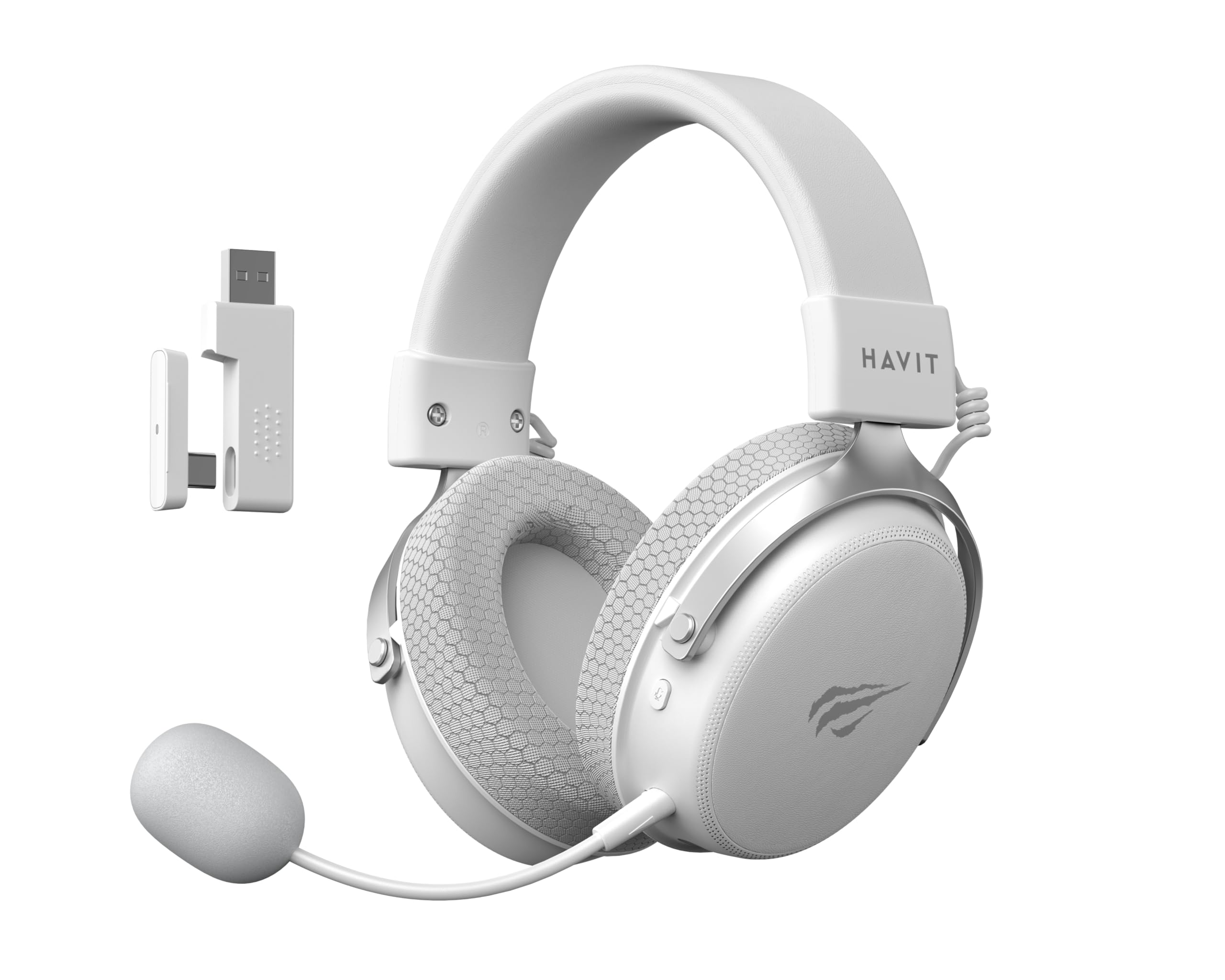
Image: The Havit H2015PRO headset in white, showcasing the main unit, detachable microphone, and the 2.4 GHz USB wireless dongle. This image provides a clear view of the primary components included with the product.
סעטאַפּ
The Havit H2015PRO offers five connectivity options to suit various devices and preferences.
1. 2.4 GHz Wireless Connection (USB Dongle)
- Insert the 2.4 GHz USB wireless dongle into an available USB port on your PC, PlayStation, or Nintendo Switch (in docked mode).
- Power on the headset. The headset should automatically connect to the dongle.
- זיכער מאַכן אַז די כעדסעט איז אויסגעקליבן ווי די אַודיאָ אַרויסגאַנג און אַרייַנגאַנג מיטל אין דיין סיסטעם סעטטינגס.
2. בלועטאָאָטה קאַנעקשאַן
- Power on the headset and switch it to Bluetooth mode (refer to the headset controls for mode selection).
- On your device (smartphone, tablet, PC with Bluetooth), go to Bluetooth settings and enable Bluetooth.
- Select "Havit H2015PRO" from the list of available devices to pair.
3. דראָטיקע פֿאַרבינדונג (3.5 מ״מ אַודיאָ קאַבל)
- פֿאַרבינדט איין עק פֿון דעם 3.5 מ״מ אַודיאָ קאַבל צום כעדסעט'ס 3.5 מ״מ פּאָרט.
- Connect the other end to the 3.5mm audio jack on your PC, console controller, or mobile device.
- This mode does not require the headset to be powered on.
4. Wired Connection (USB-C Cable)
- Connect the USB-C cable to the headset's USB-C port.
- Connect the other end to a compatible USB-C port on your PC or device.
- This connection can be used for both audio and charging.

בילד: א ווינקלדיקע view of the Havit H2015PRO headset, highlighting the earcups, headband, and visible controls on the side. This perspective helps in identifying connection ports and buttons.
אַפּערייטינג ינסטראַקשאַנז
מאַכט אויף / אַוועק
- צו אנצינדן, דריק און האלט דעם פּאַוער קנעפּל ביז די אינדיקאַטאָר ליכט צינדט זיך אָן.
- צו אויסלאָשן, דריק און האַלט די פּאַוער קנעפּל ביז די אינדיקאַטאָר ליכט גייט אויס.
באַנד קאָנטראָל
- Use the volume roller or buttons located on the earcup to adjust the audio level.
מיקראָפאָן באַניץ
- באַפעסטיקט דעם אָפּנעמבאַרן מיקראָפאָן צום באַשטימטן פּאָרט אויף דעם כעדסעט.
- Adjust the microphone's flexible arm for optimal voice pickup.
- Use the microphone mute button (if available) on the headset to toggle mute on/off.
טשאַרדזשינג די העאַדסעט
- Connect the USB-C charging cable to the headset's USB-C port and the other end to a USB power source.
- The indicator light will show charging status (e.g., red for charging, off or green for fully charged).
- א פולע אויפלאדונג נעמט געווענליך בערך 2-3 שעה.
וישאַלט
Proper care ensures the longevity and performance of your Havit H2015PRO headset.
- רייניקונג: Use a soft, dry cloth to wipe the headset. For earcups, a slightly damp cloth with mild soap can be used, but ensure no moisture enters the speaker grilles.
- סטאָרידזש: האַלט די כעדסעט אין אַ קיל, טרוקן אָרט אַוועק פון דירעקט זונשייַן און עקסטרעמע טעמפּעראַטורן.
- באַטערי זאָרגן: כדי צו שפּאָרן דעם באַטאַרייע לעבן, זאָלט איר נישט אָפט גאָר אויסלאָדן דעם כעדסעט. לאָדט עס רעגולער אויף, אפילו אויב עס ווערט נישט גענוצט פֿאַר לענגערע צייטן.
- ויסמיידן ליקווידס: Do not expose the headset to water or other liquids, as it is not water-resistant.
טראָובלעשאָאָטינג
If you encounter issues with your Havit H2015PRO headset, refer to the following common solutions:
| פּראָבלעם | לייזונג |
|---|---|
| קיין קלאַנג פֿון כעדסעט |
|
| מיקראָפאָן טוט נישט אַרבעטן |
|
| כעדסעט פֿאַרבינדט זיך נישט וויירלעס |
|
| טשאַרדזשינג ישוז |
|
ספּעסאַפאַקיישאַנז
Detailed technical specifications for the Havit H2015PRO headset:
- מאָדעל נאָמען: HAVIT H2015PRO
- קאַנעקטיוויטי טעכנאָלאָגיע: Hybrid (2.4 GHz Wireless, Bluetooth, 3.5mm Jack, USB-C)
- דרייווער גרייס: 53 מם
- ימפּעדאַנסע: 64 אָהמס
- אָפטקייַט ענטפער: 20.2 Hz (Specific value provided, typical range is 20Hz-20kHz)
- באַטאַרייע קאַפּאַציטעט: 1500 מאַה
- נידעריק לייטאַנס: 24 מיז
- אַודיאָ פֿעיִקייטן: 360° Spatial Audio, Virtual 7.1 Surround Sound
- מיקראָפאָן: רימווואַבאַל און אַדדזשוסטאַבלע
- קאָנטראָל טיפּ: Integrated (Touch controls)
- מאַטעריאַל: פּלאַסטיק
- פּראָדוקט וואָג: 500 גראַמז
- קאַמפּאַטאַבילאַטי: Desktops, PC, PlayStation, Xbox, Nintendo Switch, Mobile Devices
- וואַסער קעגנשטעל מדרגה: ניט וואַסער-קעגנשטעליק

בילד: א פראָנט-פייסינג view of the Havit H2015PRO headset, clearly showing the earcups, headband, and the attached microphone. This view emphasizes the ergonomic design and microphone placement.
וואָראַנטי און שטיצן
וואָראַנטי אינפֿאָרמאַציע
The Havit H2015PRO headset comes with a 1-יאָר פאַבריקאַנט וואָראַנטידי וואָראַנטי דעקט חסרונות אין מאַטעריאַלן און אַרבעט אונטער נאָרמאַל נוצן. ביטע האַלטן דיין קויפן באַווייַז פֿאַר וואָראַנטי קליימז.
קונה שטיצן
פֿאַר טעכנישע הילף, וואָראַנטי קליימז, אָדער ווייטערדיקע פֿראַגעס, ביטע קאָנטאַקטירן Havit קונה שטיצע דורך זייער באַאַמטער website or the retailer where the product was purchased. Provide your product model number (H2015PRO) and proof of purchase when seeking support.