הקדמה
Thank you for choosing the FiiO EH11 Retro On-Ear Bluetooth Headphones. These headphones combine classic design with modern wireless technology, offering high-resolution audio and versatile connectivity. This manual provides essential information for the proper use, setup, and maintenance of your EH11 headphones.
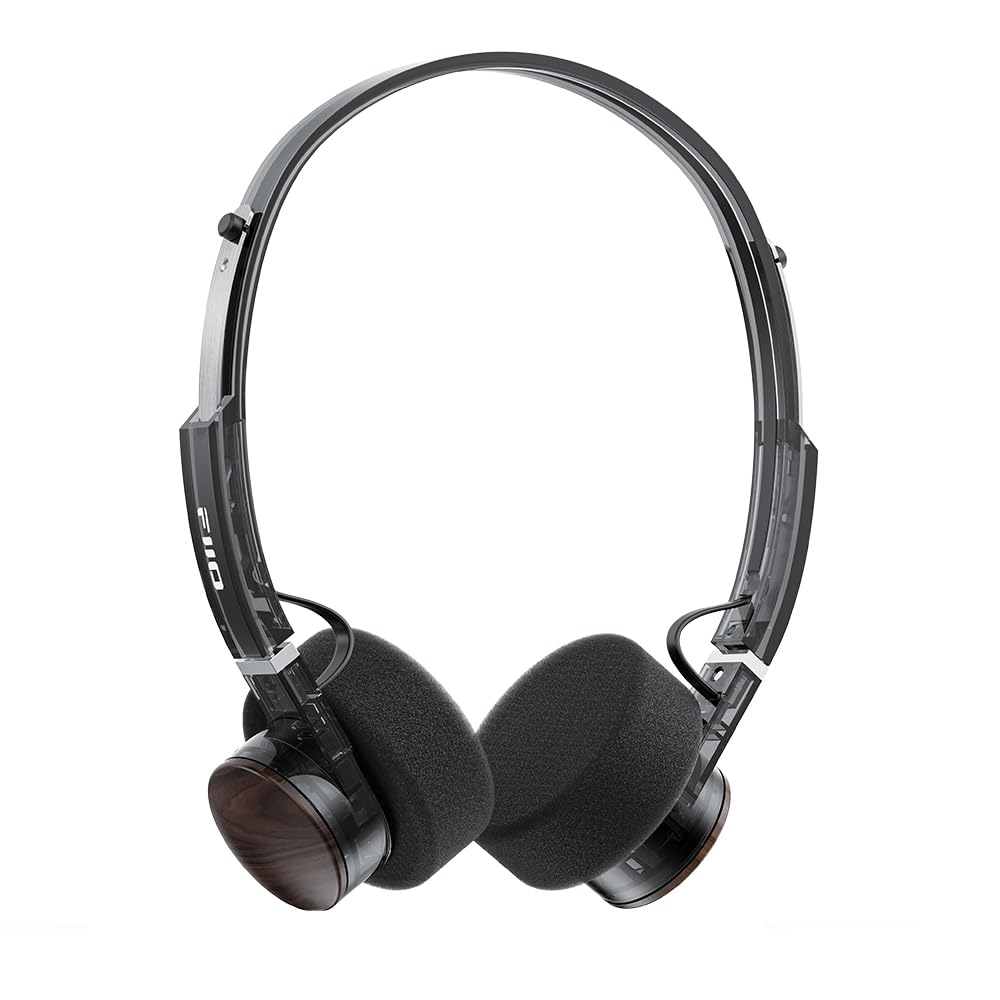
Image: FiiO EH11 Retro On-Ear Bluetooth Headphones, Transparent Black variant. This image displays the overall design of the headphones, highlighting the on-ear form factor and retro aesthetic.
זיכערקייַט אינפֿאָרמאַציע
- שטעלט נישט אויס די כעדפאָונז צו עקסטרעמע טעמפּעראַטורן, הומידיטי, אדער קעראָזיווע סביבות.
- ויסמיידן צוגעהערט אין הויך באַנד לעוועלס פֿאַר עקסטענדעד פּיריאַדז צו פאַרמייַדן געהער שעדיקן.
- Do not disassemble, repair, or modify the device yourself. Contact authorized service personnel for assistance.
- האַלטן די מיטל אַוועק פון קינדער און פּעץ.
- אַוועקוואַרפן דעם פּראָדוקט און זײַן באַטאַרייע פאַראַנטוואָרטלעך לויט די לאָקאַלע רעגולאַציעס.
פּעקל אינהאַלט
ביטע קאָנטראָלירט אַז אַלע זאכן זענען פאַראַן אין אייער פּעקל:
- FiiO EH11 Retro On-Ear Bluetooth Headphones
- Foam earpads (2 pairs)
- USB A to Type-C charging cable (1)
- Quick guide (1)
פּראָדוקט איבערview
Familiarize yourself with the main components and controls of your FiiO EH11 headphones.
קאָנטראָלס און פּאָרץ
- מאַכט/מולטי-פונקציע קנעפּל: Used for power on/off, play/pause, answering/ending calls.
- באַנד קנעפּל: Rotatable knob for volume adjustment and track control.
- וסב טיפּ-C פּאָרט: פֿאַר טשאַרדזשינג די כעדפאָונז.
- מיקראָפאָן: איינגעבויט פֿאַר רופן און שטימע קאָמאַנדעס.
- LED ינדיקאַטאָר: ווײַזט מאַכט, טשאַרדזשינג, און בלועטוט סטאַטוס.
Note: Specific button functions and LED indicator behaviors are detailed in the 'Operating' section.
סעטאַפּ
1. טשאַרדזשינג די כעדפאָונז
- פֿאַרבינדט דעם USB טיפּ-C טשאַרדזשינג קאַבל צום טשאַרדזשינג פּאָרט אויף די כעדפאָונז.
- פֿאַרבינדט דעם אַנדערן עק פֿונעם קאַבל צו אַ USB מאַכט אַדאַפּטער (נישט אַרייַנגערעכנט) אָדער אַ קאָמפּיוטער'ס USB פּאָרט.
- די LED אינדיקאַטאָר וועט ווייַזן די טשאַרדזשינג סטאַטוס (למשל, רויט בשעת טשאַרדזשינג, אויס ווען גאָר טשאַרדזשד).
- A full charge takes approximately 1.5 hours and provides up to 30 hours of playback.
Description: Connect the provided USB-C cable to the headphone's charging port and a power source to charge the internal battery.
2. פּאָווערינג אויף / אויסגעלאשן
- מאַכט אויף: Press and hold the Power/Multi-function button for approximately 3 seconds until the LED indicator lights up and you hear a power-on prompt.
- מאַכט אַוועק: Press and hold the Power/Multi-function button for approximately 5 seconds until the LED indicator turns off and you hear a power-off prompt.
3. בלועטאָאָטה פּערינג
- מאַכן זיכער אַז די כעדפאָונז זענען פּאַוערד אַוועק.
- Press and hold the Power/Multi-function button for approximately 5-7 seconds until the LED indicator flashes red and blue alternately, indicating pairing mode.
- אויף אייער דעווייס (סמאַרטפאָן, טאַבלעט, קאָמפּיוטער), אַקטיווירט בלועטוט און זוכט פֿאַר פֿאַראַן דעווייסעס.
- Select "FiiO EH11" from the list of found devices.
- Once connected, the LED indicator will flash blue periodically, and you will hear a connection prompt.
4. צווייפאַכיקע מיטל פֿאַרבינדונג
The EH11 supports simultaneous connection to two Bluetooth devices.
- פֿאַרבינדט די כעדפאָונז מיטן ערשטן מיטל ווי אויבן באַשריבן.
- דיאַקטיווירן בלוטוט אויף דער ערשטער דעווייס. די כעדפאָונז וועלן ווידער אַרייַן אין פּערינג מאָדע.
- פּאָר די כעדפאָונז מיט די רגע מיטל.
- ווידער אַקטיווירן בלוטוט אויף דער ערשטער דעווייס. די כעדפאָונז זאָלן זיך אויטאָמאַטיש פֿאַרבינדן צו ביידע דעווייסעס.
- איר קענט איצט אָן פּראָבלעמען באַשטימען צווישן אַודיאָ קוועלער פֿון די צוויי פֿאַרבונדענע דעווייסעס.
5. FiiO Control App
Download the FiiO Control App from your device's app store to unlock additional features and customization options, including EQ presets and gaming mode settings.
- זוכן פֿאַר "FiiO Control" in the App Store (iOS) or Google Play Store (Android).
- Install the app and ensure your EH11 headphones are connected via Bluetooth.
- Open the app to access settings such as EQ, gaming mode, and firmware updates.
אַפּערייטינג ינסטראַקשאַנז
מוזיק פּלייַבאַקק
- שפּיל / פּויזע: דריק קורץ דעם מאַכט/מולטי-פונקציע קנעפּל.
- באַנד אַרויף: Rotate the Volume knob clockwise.
- באַנד אַראָפּ: Rotate the Volume knob counter-clockwise.
- ווייַטער שפּור: Double-click the Volume knob.
- פֿריִערדיקע שפּור: Triple-click the Volume knob.
רופן פאַרוואַלטונג
- ענטפֿערן / סוף רופן: דריק קורץ דעם מאַכט/מולטי-פונקציע קנעפּל.
- אָפּוואַרפן רופן: דריק און האלט דעם מאַכט/מולטי-פונקציע קנעפּל פֿאַר 2 סעקונדעס.
גיימינג מאָדע
Activate Gaming Mode via the FiiO Control App to enhance in-game audio cues like footsteps and gunshots for a more immersive experience. This mode also optimizes latency.
LDAC High-Resolution Audio
The FiiO EH11 supports LDAC codec for high-resolution wireless audio. Ensure your source device also supports LDAC and that it is enabled in your device's Bluetooth settings for the best audio quality.
וישאַלט
רייניקונג
- ווישט די כעדפאָונז מיט אַ ווייכן, טרוקענעם, לינט-פֿרייע שטאָף.
- דו זאלסט נישט נוצן האַרב קעמיקאַלז, רייניקונג סאָלוואַנץ אָדער שטאַרק דיטערדזשאַנץ.
- פֿאַרמײַדט אַרײַנצוקומען פֿײַכטקײַט אין קיין עפענונגען.
אויער פּאַד פאַרבייַט
The foam ear pads are detachable for easy cleaning and replacement. Gently pull the ear pads off the earcups to remove them. Align the new ear pads with the earcups and press them firmly into place until they are securely attached.
Two pairs of different-colored official ear pads are included in the package for customization.
סטאָרידזש
When not in use, store the headphones in a cool, dry place, away from direct sunlight and extreme temperatures. Avoid placing heavy objects on the headphones.
טראָובלעשאָאָטינג
- קיין מאַכט:
- זיכער מאַכן אַז די כעדפאָונז זענען גאָר אויפגעלאָדן.
- Try connecting to a different charging cable or power source.
- קען נישט צוזאמענשטעלן מיטן דעווייס:
- Ensure the headphones are in pairing mode (LED flashing red and blue).
- מאַכן זיכער אַז בלועטאָאָטה איז ענייבאַלד אויף דיין מיטל.
- ריקט די כעדפאָונז נענטער צו אייער דעווייס.
- פּרוּווט ריסטאַרטן ביידע די כעדפאָונז און דיין דעווייס.
- ויסמעקן פריערדיקע בלועטוט קאַנעקשאַנז אויף דיין מיטל.
- קיין געזונט אָדער נידעריק באַנד:
- קאָנטראָלירט דעם באַנד לעוועל אויף ביידע די כעדפאָונז און אייער פֿאַרבונדענע מיטל.
- זיכער מאַכן אַז די כעדפאָונז זענען ריכטיק פארבונדן צו דיין מיטל.
- פרובירט צו שפּילן אַודיאָ פֿון אַן אַנדער אַפּליקאַציע אָדער מקור.
- נעבעך אַודיאָ קוואַליטעט:
- זיכער מאַכן אַז עס זענען נישטאָ קיין שטערונגען צווישן די כעדפאָונז און דיין מיטל.
- גייט אַוועק פון קוועלער פון שטערונג (למשל, Wi-Fi ראָוטערס, אַנדערע בלועטוט דעוויסעס).
- If using LDAC, ensure your source device supports it and it is enabled.
ספּעסאַפאַקיישאַנז
| שטריך | באַשרייַבונג |
|---|---|
| מאָדעל נאָמען | EH11 |
| קאַנעקטיוויטי טעכנאָלאָגיע | בלועטאָאָטה |
| ווירעלעסס קאָמוניקאַציע טעכנאָלאָגיע | בלועטאָאָטה |
| אַודיאָ דרייווער טיפּ | דינאַמישער דרייווער (40 מ״מ) |
| עאַרפּיעסע פאָרעם | אויף-אויער |
| באַטערי לעבן | אַרויף צו 30 שעה |
| טשאַרדזשינג צייט | בעערעך. 1.5 שעה |
| וואָג | בעערעך. 92 ג (3.25 אַז) |
| ספּעציעלע שטריך | LDAC High-Resolution Bluetooth Audio, Dual Device Connection, FiiO Control App Support, Gaming Mode |
| אַרייַנגערעכנט קאַמפּאָונאַנץ | Foam earpads*2, Quick guide*1, USB A to Type-C charging cable*1 |
וואָראַנטי און שטיצן
FiiO products come with a limited warranty. For detailed warranty information, technical support, or service inquiries, please refer to the official FiiO webזייטל אדער קאָנטאַקט אייער לאקאלן דיסטריביאַטאָר.
איר קענט געפֿינען מער אינפֿאָרמאַציע און קאָנטאַקט דעטאַלן אויף FiiO Official Store.


