1. הקדמה
This manual provides detailed instructions for the LAUNCH Creader Elite V3.0 OBD2 Scanner, a professional diagnostic tool designed specifically for Land Rover and Jaguar vehicles. It covers device setup, operational procedures for various diagnostic and service functions, software updates, and troubleshooting tips. Please read this manual thoroughly before operating the device to ensure correct usage and optimal performance.
2. פּראָדוקט איבערview
2.1. וואָס איז אין דער קעסטל
- 1 * LAUNCH Creader Elite V3.0 OBD2 Scanner for JLR
- 1 * OBD2 Diagnostic Cable
- 1 * שנעל אָנהייב גייד
- 1 * באַניצער מאַנואַל
2.2. שליסל פֿעיִקייטן
The LAUNCH Creader Elite V3.0 offers a comprehensive suite of features for vehicle diagnostics and maintenance:
- פֿאַרבעסערטע האַרדווער: Features Android 8.1 operating system, 32GB ROM, 3000mAh battery, and 2.4&5GHz dual-band Wi-Fi for improved performance.
- DoIP Protocol Support: Supports the new DoIP protocol for Land Rover & Jaguar models manufactured after 2017 (requires an adapter).
- Full Systems Diagnostics: Provides in-depth scanning for all available vehicle modules, including engine, transmission, ABS, SRS, and more.
- צוויי-דירעקציאָנעלע קאָנטראָל (אַקטיווער טעסט): Allows control of vehicle components and systems for active testing, such as windows, mirrors, wipers, and horn.
- Comprehensive Service Functions: Includes Oil Reset, Electronic Parking Brake (EPB) Reset, Battery Management System (BMS) Reset, Steering Angle Sensor (SAS) Calibration, Injector Coding, Throttle Relearn, Height Calibration, Transmission Adaptation, Crankshaft/Camshaft Relearn, Sunroof Calibration, and more.
- 4-אין-1 לייוו דאַטן סטרים: Displays real-time data from multiple sensors simultaneously in a graphical format, with recording and playback capabilities.
- Smart Diagnostic Functions: Features Auto VIN for automatic vehicle identification, DTC Lookup for code explanations, and the ability to generate and share diagnostic reports.
- פולע OBD2 פונקציעס: Supports all 10 OBD2 test modes for universal vehicle compatibility (post-1996 models).
- לעבנס-לאנגע פרייע דערהייַנטיקונגען: Provides lifetime free software updates specifically for Land Rover and Jaguar vehicle brands.
2.3. מיטל פאַרגלייַך
The Creader Elite V3.0 offers significant upgrades over previous versions:

Image: Comparison of Creader Elite V3.0, V2.0, and V1.0, highlighting V3.0's superior features like DoIP, Android 8.1, 32GB memory, and 2.4&5GHz WiFi.
2.4. גשמיות באַשרייַבונג
The device features a durable orange casing with a 4-inch touchscreen display. The back of the device includes product identification details such as the model number, FCC ID, and serial number.
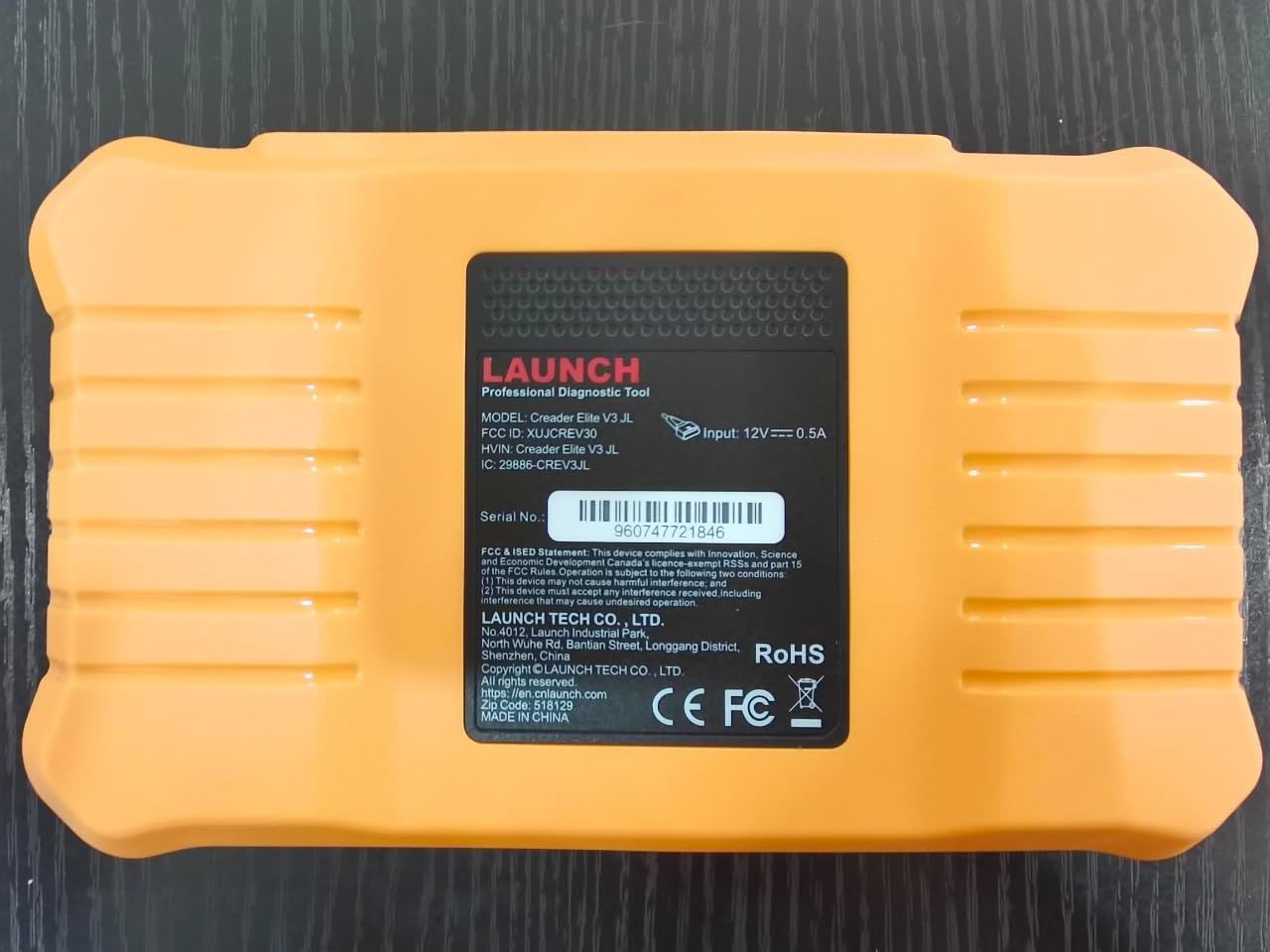
בילד: הינטערשטע view of the LAUNCH Creader Elite V3.0, displaying the model number, FCC ID, and serial number (e.g., 960747721846).
3. סעטאַפּ
3.1. ערשטע איינשאַלטונג
- פאַרזיכערן אַז די מיטל איז גאָר באפוילן אָדער קאָננעקטעד צו אַ מאַכט מקור.
- דריק און האלט דעם מאַכט קנעפּל ביז דער עקראַן באַלויכטנט זיך.
- פֿאָלגט די אינסטרוקציעס אויף דעם עקראַן צו אויסקלײַבן אײַער בילכער שפּראַך און ראַיאָן.
3.2. ווי-פי קאַנעקשאַן
- פֿון דעם הויפּט מעניו, נאַוויגירט צו סעטטינגס.
- אויסקלייַבן ווי-פי און קער עס אויף.
- קלייַבט אייער געוואונטשענע Wi-Fi נעץ פֿון דער רשימה און גיט אריין דעם פּאַראָל אויב געבעטן.
- Confirm the connection. A stable internet connection is required for software updates and online resources.
3.3. רעגיסטראַציע און אַקטיוואַטיאָן
Upon first use or after a factory reset, you may be prompted to register your device. Follow the on-screen instructions to create an account or log in. This step is crucial for accessing software updates and technical support.
4. אַפּערייטינג ינסטרוקטיאָנס
4.1. זיך פֿאַרבינדן צום פֿאָרמיטל
- Locate the vehicle's OBD2 diagnostic port, typically under the dashboard on the driver's side.
- Ensure the vehicle's ignition is in the ON position (engine off or running, depending on the test).
- Connect the OBD2 diagnostic cable to the vehicle's OBD2 port and to the LAUNCH Creader Elite V3.0 device.
- The device will automatically power on or prompt you to do so.
4.2. Full Systems Diagnostics
This function allows you to scan all available electronic control units (ECUs) in the vehicle.

Image: Display showing OE-level all system diagnostics, including Auto VIN, fault codes, 4-in-1 live data, and MIL reset.
- פון די הויפּט מעניו, אויסקלייַבן לאקאלע דיאַגנאָסיס.
- Choose the vehicle brand (Land Rover or Jaguar).
- אויסקלייַבן אַוטאָ זוך or מאַנואַל סעלעקציע. Auto Search (Auto VIN) will attempt to automatically identify the vehicle.
- Once the vehicle is identified, select געזונט באריכט or סיסטעם סקאַן to perform a comprehensive scan of all modules.
- Review the diagnostic trouble codes (DTCs) and ECU information. You can then choose to clear codes if necessary.
4.3. סערוויס פונקציעס
The Creader Elite V3.0 provides numerous maintenance and reset services. Access these functions via Diagnose > Brand > System Selection > Special Function.

בילד: איבערview of various service functions including Oil Reset, Brake Reset, SAS Calibration, Start-Stop Reset, TPMS Reset, Injector Coding, Battery Reset, ABS Bleeding, Seat Calibration, and Height Calibration.
Common services include:
- אָיל באַשטעטיק: Resets the engine oil life system.
- EPB צוריקשטעלן: Resets the electronic parking brake after replacement.
- SAS קאַלאַבריישאַן: קאליברירט דעם סטירינג ווינקל סענסאָר.
- אינדזשעקטאָר קאָדירונג: Codes new injector numbers into the ECU.
- גאז איבערלערנען: לערנט זיך ווידער די פּאָזיציע פֿון דעם גאַז־ראַטעלער.
- הייך קאַלאַבריישאַן: Calibrates the vehicle's suspension height.
- באַטערי באַשטעטיק: Registers a new battery replacement.
- ABS בלוטונג: פירט אויס ABS ברעיק בלידינג פּראָצעדורן.
Note: The availability of specific service functions may vary depending on the vehicle model and year. Always check compatibility before performing a service.
4.4. Bi-Directional Control (Active Tests)
Active tests allow you to send commands to vehicle systems and components to verify their functionality.

Image: Depicts bi-directional active tests, showing the device sending commands to vehicle actuators like wipers, windows, clutch, and injectors to check their status.
- Navigate to the desired vehicle system within the diagnostic menu.
- אויסקלייַבן אַקטיוו טעסט or Bi-Directional Control.
- Choose the specific component or system you wish to test (e.g., 'Wiper Test', 'Window Test', 'Horn Test').
- Follow the on-screen instructions to activate and observe the component's response.
4.5. פולע OBD2 פונקציעס
For universal vehicle diagnostics (all OBD2 compliant vehicles after 1996), use the אָבד וו מעניו אָפּציע.
- לייענען קאָודז: Retrieves generic (P0, P2, P3, U0) and manufacturer specific (P1, P3, U1) codes.
- קלאָרע קאָדן: Clears diagnostic trouble codes and turns off the Malfunction Indicator Light (MIL).
- לעבן דאַטן: ווײַזט רעאַל-צייט דאַטן שטראָם פֿון די פֿאָרמיטל'ס סענסאָרן.
- I/M גרייטקייט: קאָנטראָלירט די גרייטקייט פון עמיסיע-פֿאַרבונדענע מאָניטאָרן.
- פרירן פריים: Displays a snapshot of operating conditions at the time of an emission-related fault.
- O2 סענסאָר טעסט: באַקומט די רעזולטאַטן פון די O2 סענסאָר מאָניטאָר.
- אויף-באָרד מאָניטאָר טעסט (מאָדע 6): באַקומט רעזולטאַטן פֿאַר עמיסיע-פֿאַרבונדענע מאָטאָר-קאָמפּאָנענטן און סיסטעמען.
- עוואַפּ סיסטעם טעסט (מאָדע 8): הייבט אן א טעסט פון די עוואפאראטיווע עמיסיע קאנטראל סיסטעם.
- פאָרמיטל אינפֿאָרמאַציע: באַקומט צוריק פאָרמיטל אידענטיפיקאַציע נומער (VIN), קאַליבראַציע ID (CALID), און קאַליבראַציע וועריפיקאַציע נומער (CVN).
4.6. Real-Time Monitoring and Data Stream
Monitor various vehicle parameters in real-time to diagnose intermittent issues or verify repairs.

Image: Real-time monitoring screen showing battery voltage, transmission oil temperature, coolant temperature, and vehicle speed, with a detailed 4-in-1 data stream graph below.
- פֿון דעם דיאַגנאָסטישן מעניו, אויסקלײַבן לעבן דאַטאַ.
- קלייַבט די פּאַראַמעטערס וואָס איר ווילט מאָניטאָרירן.
- The device can display up to four data streams simultaneously in a graphical format.
- ניצן די רעקאָרד און פּלייַבאַקק functions to capture and review data for later analysis.
4.7. Smart Diagnostic Features
The device includes features to streamline the diagnostic process:
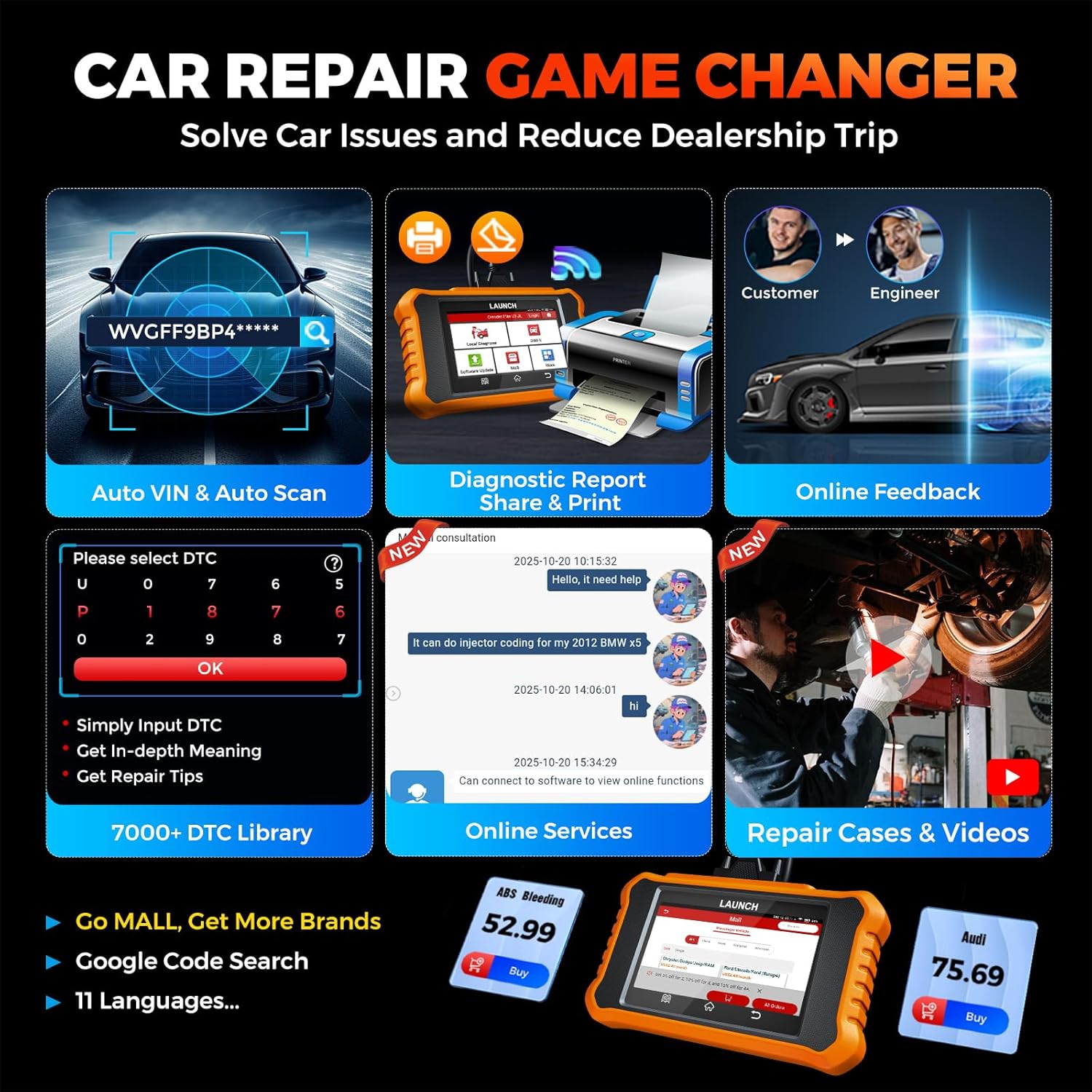
Image: Smart diagnostic features such as Auto VIN, diagnostic report generation and printing, online feedback, 7000+ DTC library, and access to online services.
- Auto VIN: Automatically identifies vehicle information (year, make, model) for quicker diagnostics.
- DTC זוכן: Provides detailed explanations for diagnostic trouble codes.
- דיאַגנאָסטיש באַריכט: Generates a professional diagnostic report that can be shared or printed.
- אָנליין באַמערקונגען: Allows users to submit feedback or issues directly to technical support.
5. אויפהאלטונג און דערהייַנטיקונגען
5.1. ווייכווארג דערהייַנטיקונגען
The LAUNCH Creader Elite V3.0 offers lifetime free software updates for Land Rover and Jaguar brands.
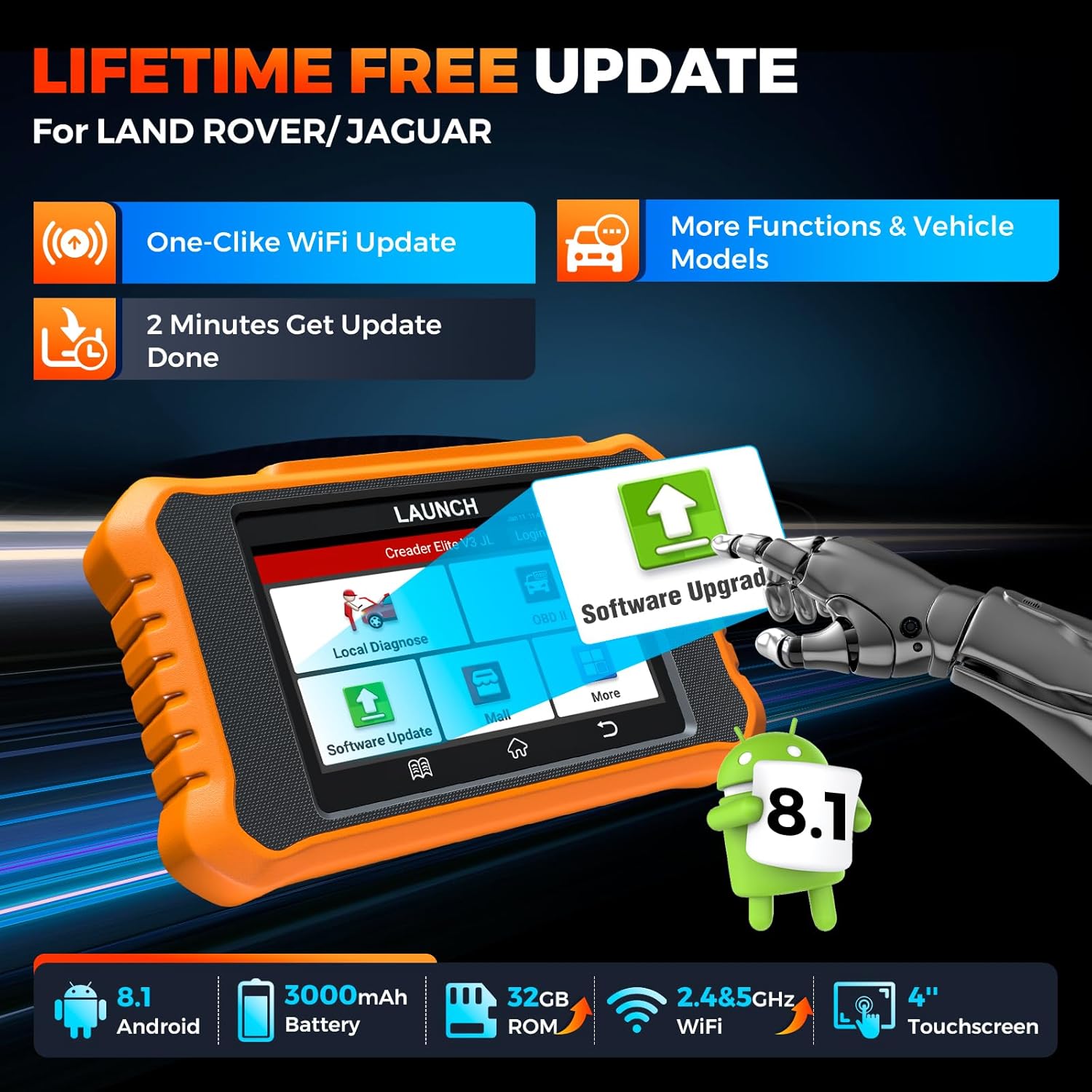
Image: Device screen illustrating the one-click Wi-Fi update process, emphasizing lifetime free updates for Land Rover/Jaguar and the ability to get more functions and vehicle models.
- זיכער מאַכן אַז די מיטל איז פארבונדן צו אַ סטאַביל Wi-Fi נעץ.
- פון די הויפּט מעניו, אויסקלייַבן ווייכווארג דערהייַנטיקן.
- די דעווייס וועט קאָנטראָלירן פֿאַר פֿאַראַן דערהייַנטיקונגען.
- Select the updates you wish to install and follow the on-screen prompts. Updates typically take a few minutes.
5.2. Expanding Vehicle Coverage (Mall)
If you require diagnostic capabilities for other vehicle brands beyond Land Rover and Jaguar, you can purchase additional software packages from the מאָל application on the device. Please note that software purchased from the Mall is typically valid for one year and may require re-purchase after expiry.
5.3. מיטל קער
- האַלט דעם אַפּאַראַט ריין און פריי פון שטויב און נעץ.
- ויסמיידן דראַפּינג די מיטל אָדער אונטערטעניק צו שטאַרק ימפּאַקץ.
- סטאָר די מיטל אין אַ קיל, טרוקן אָרט ווען ניט אין נוצן.
- ניצט נאָר דעם צוגעשטעלטן טשאַרדזשינג קאַבל און אַקסעסאָריעס.
6. קאַמפּאַטאַבילאַטי
The LAUNCH Creader Elite V3.0 is primarily designed for:

Image: Device interface showing diagnostic options for Land Rover (Defender, Discovery, Range Rover, Evoque) and Jaguar (E-Pace, F-Pace, F-Type, S-Type, X-Type, XE, XF, XJ, XK) models, with a note on DoIP protocol for models after 2017.
- לענד ראָווער: Compatible with models such as Defender, Discovery, Discovery Sport, Range Rover, Range Rover Evoque, etc.
- דזשאַגואַר: Compatible with models such as E-Pace, F-Pace, F-Type, S-Type, X-Type, XE, XF, XJ, XK, etc.
- DoIP Protocol: Supports Land Rover & Jaguar models after 2017, requiring a separate DoIP adapter.
- Universal OBD2: Fully compatible with all OBD2 compliant vehicles manufactured after 1996 for basic OBD2 functions.
For specific vehicle compatibility, it is recommended to contact technical support via obdbox21@163.com.
7. ספּעסאַפאַקיישאַנז
| מאָדעל | LAUNCH Creader Elite 3.0-JL |
| אָפּערייטינג סיסטעם | אַנדרויד 8.1 |
| פאַרשטעלן גרייס | 4 אינטשעס |
| אינערלעכער סטאָרידזש (ראַם) | 32 גיגאבייט |
| באַטאַרייע קאַפּאַציטעט | 3000 מאַה |
| ווי-פי | 2.4 און 5GHz דואַל-באַנד |
| מאַכט מקור | באַטאַרייע פּאַוערד |
| פּונקט וואָג | 1.49 פונט |
| פּעקל דימענשאַנז | 8 X 7.5 X 1.5 אינטשעס |
| אַוטאָמאָטיווע פּאַסיק טיפּ | Universal Fit (for OBD2 functions) |
8. טראָובלעשאָאָטינג
8.1. דיווייס גייט נישט אן
- Check battery level. Connect the device to a charger and allow it to charge for at least 30 minutes.
- זיכער מאַכן אַז דער מאַכט קנעפּל איז ריכטיק געדריקט און געהאַלטן.
- If connected to the vehicle, ensure the vehicle's ignition is on and the OBD2 cable is securely connected.
8.2. Communication Error with Vehicle
- Verify the OBD2 cable is securely connected to both the device and the vehicle's port.
- Ensure the vehicle's ignition is in the ON שטעלע.
- Confirm that the vehicle is OBD2 compliant (generally 1996 and newer for US vehicles).
- Try a different OBD2 compliant vehicle to rule out a vehicle-specific issue.
- Ensure the correct vehicle brand software is installed and up to date.
8.3. Software Update Failure
- Check your Wi-Fi connection for stability and signal strength.
- Ensure the device has sufficient battery charge or is connected to power during the update process.
- Verify that there is enough free storage space on the device.
- Restart the device and attempt the update again.
8.4. Inaccurate Readings or Functions Not Working
- Ensure the vehicle's make, model, and year are correctly identified by the device.
- Verify that the specific function is supported for your vehicle model and year. Refer to the compatibility section or contact support.
- Ensure the device software is fully updated.
9. וואָראַנטי און שטיצן
9.1. וואָראַנטי אינפֿאָרמאַציע
The LAUNCH Creader Elite V3.0 comes with an Extended 60-Day Return & Replacement policy and a 5-Year Quality Backup. Please retain your proof of purchase for warranty claims.
9.2. טעכניש שטיצן
For any technical assistance, questions, or compatibility inquiries, please contact our support team:
- בליצפּאָסט: obdbox21@163.com
- Our support team is available 24/7/365.
Note: Please direct all support inquiries to the provided email address. Do not contact LAUNCH Tech USA for support related to this specific product.


