הקדמה
א דאנק פארן קויפןasing the HOMCOM Industrial Style TV Stand. This manual provides important information regarding the assembly, operation, maintenance, and safety of your new TV stand. Please read these instructions carefully before assembly and retain them for future reference.
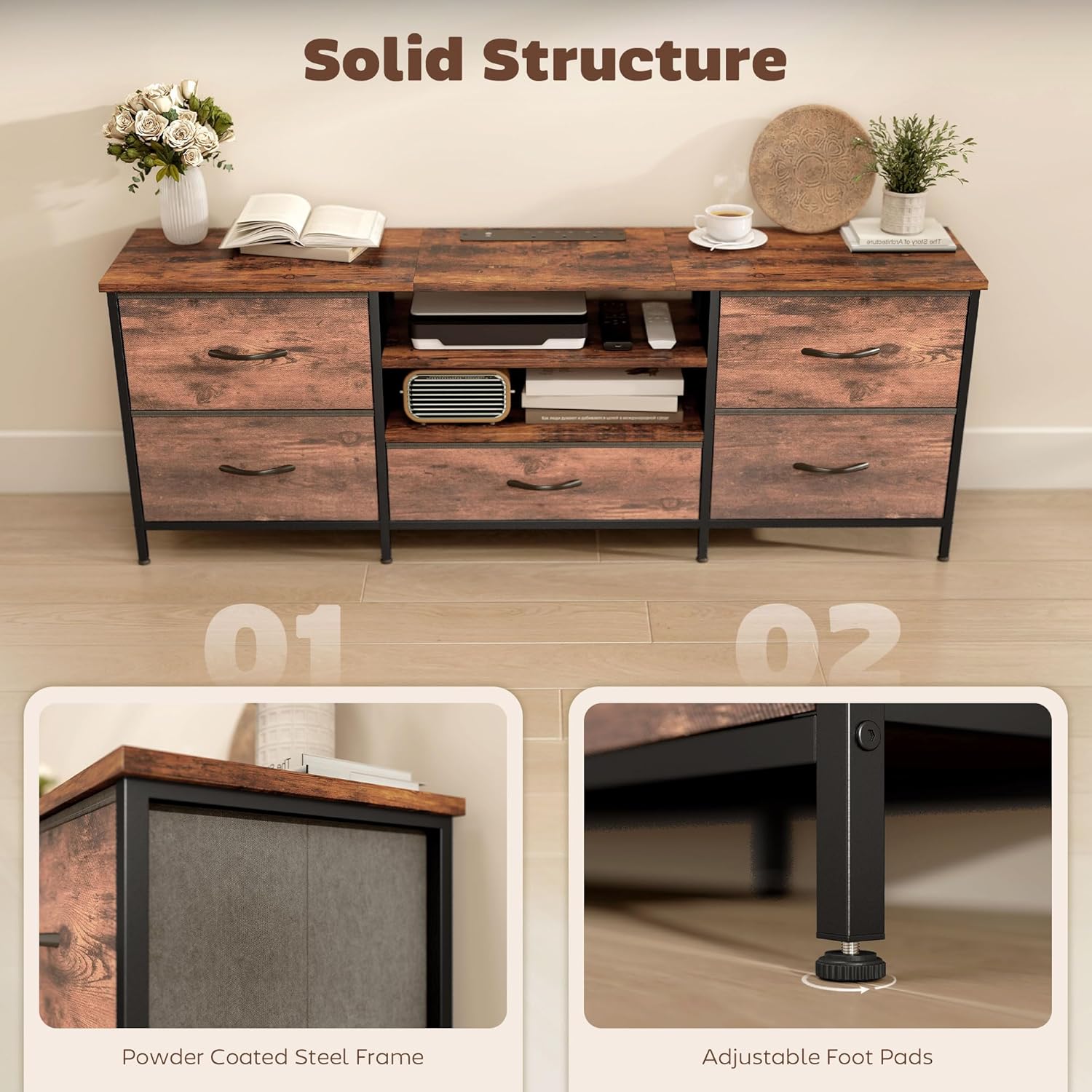
This TV stand is designed to accommodate televisions up to 65 inches and features a built-in charging station, five fabric drawers, and two open shelves for organized storage.

זיכערקייַט אינפֿאָרמאַציע
- שטענדיק נאָכגיין די פֿאַרזאַמלונג ינסטראַקשאַנז.
- פאַרזיכערן אַז אַלע טיילן זענען סיקיורלי פאַסאַנד איידער נוצן.
- Do not overload the TV stand. The maximum load capacity is 50 kg (110 lbs).
- שטעלט דעם טעלעוויזיע שטאנד אויף א פלאכער, סטאַבילער ייבערפלאַך כדי צו פאַרמייַדן עס צו איבערקערן.
- האַלט קליינע טיילן און פּאַקאַדזשינג מאַטעריאַלן אַוועק פון קינדער.
- לאָזט נישט קינדער קריכן אויף דעם טעלעוויזיע שטאַנד.
- When using the charging hub, ensure devices are compatible with the specified voltage and current. Do not exceed the maximum power rating of the charging hub.
- Unplug the charging hub from the wall outlet when not in use or during electrical storms.
פּעקל אינהאַלט
Before beginning assembly, please check that all components listed below are present and undamaged. If any parts are missing or damaged, please contact customer support.
- TV Stand Panels (engineered wood)
- שטאָל ראַם קאָמפּאָנענטן
- 5 שטאָף שופלאָדן
- Built-in Charging Hub (pre-installed or separate unit)
- Assembly Hardware (screws, bolts, cam locks, etc.)
- אַדזשאַסטאַבאַל פֿיס פּאַדס
- פֿאַרזאַמלונג מכשירים (למשל, אַלען שליסל, שרויפנציהער - קען זיין אַרייַנגערעכנט אָדער פארלאנגט)
אינסטרוקציעס פֿאַר אויפֿשטעלן און פֿאַרזאַמלען
Assembly is required for this TV stand. It is recommended to have two people for assembly. Please follow the step-by-step instructions provided in the included assembly guide (not part of this digital manual). Ensure you have a clear, spacious area for assembly.
- אויספּאַקן אַלע קאָמפּאָנענטן: פֿאָרזיכטיק אַרויסנעמען אַלע טיילן פֿון דער פֿאַרפּאַקונג און לייגן זיי אויס אויף אַ ווייכער, ריינער ייבערפֿלאַך כּדי צו פֿאַרמייַדן קראַצן.
- Assemble the steel frame: Connect the steel frame components using the provided hardware. Ensure all connections are tight and secure.
- Attach panels: Secure the engineered wood panels to the steel frame according to the assembly guide.
- Install shelves: Place the two open shelves into their designated slots.
- Insert fabric drawers: Fold and insert the five fabric drawers into their respective compartments.
- Adjust foot pads: Once assembled, place the TV stand in its desired location. Adjust the foot pads at the bottom of the steel frame to ensure the stand is level and stable on uneven floors.
- Connect charging hub: If the charging hub is not pre-installed, follow the instructions to secure it and plug its power cord into a wall outlet.
אַפּערייטינג ינסטראַקשאַנז
Placing Your Television
This TV stand is designed to hold televisions up to 65 inches in size and a maximum weight of 50 kg (110 lbs). Carefully place your television on the top surface of the stand, ensuring it is centered and stable.

Using the Built-in Charging Hub
The TV stand features a convenient built-in charging hub with three AC sockets and two USB ports (5V, 2.1A). This allows you to power and charge various media devices directly from the stand.
- Plug the charging hub's power cord (1.5m length) into a standard wall outlet (220-250V, 50Hz).
- Connect your media devices (e.g., DVD players, gaming consoles, soundbars) to the AC sockets.
- Connect your mobile devices (e.g., smartphones, tablets) to the USB ports for charging.
- Ensure that the total power consumption of connected devices does not exceed the hub's maximum rating.

ניצן סטאָרידזש פּלאַץ
The TV stand offers versatile storage options:
- עפענען שעלוועס: Use the two open shelves for media players, game consoles, or decorative items that require easy access or ventilation.
- שטאָף גאַטקעס: The five fabric drawers provide concealed storage for cables, remotes, games, DVDs, or other accessories, helping to keep your living space tidy.

וישאַלט
To ensure the longevity and appearance of your HOMCOM TV stand, follow these simple maintenance guidelines:
- רייניקונג: Wipe the surfaces with a soft, dry cloth. Avoid using harsh chemicals, abrasive cleaners, or excessive moisture, as these can damage the finish.
- ספּילז: Immediately wipe up any spills with a dry cloth to prevent staining or damage to the engineered wood.
- ייַזנוואַרג: קאָנטראָלירט פּעריִאָדיש אַלע שרויפן און פֿאַרשטאַרקער צו זיכער מאַכן אַז זיי בלייבן פֿעסט. פֿעסטציִען אויב נייטיק צו האַלטן די סטאַביליטעט.
- זונשייַן: Avoid prolonged exposure to direct sunlight, which can cause fading or discoloration of the wood-effect finish.
- היץ: לייגט נישט קיין הייסע זאכן גלייך אויף דער ייבערפלאַך. ניצט קאָוסטערס אדער שוץ פּאַדס.
טראָובלעשאָאָטינג
| פּראָבלעם | מעגלעך סיבה | לייזונג |
|---|---|---|
| דער טעלעוויזיע שטאַנד איז וואָקלדיק אָדער נישט סטאַביל. | נישט גלייכע שטאָק; פרייַ פאַסטערז. | Adjust the foot pads at the bottom of the stand. Check and tighten all assembly screws and bolts. |
| Charging hub is not working. | Not plugged into wall outlet; wall outlet not active; device not properly connected; device incompatible; hub overloaded. | Ensure the hub's power cord is securely plugged into a live wall outlet. Test the outlet with another device. Check device connections. Verify device compatibility and ensure total load does not exceed hub capacity. |
| שופלאדן גליטשן נישט גלאט. | Drawer not assembled correctly; obstruction. | Ensure fabric drawers are fully expanded and correctly inserted. Check for any items obstructing the drawer's movement. |
ספּעסאַפאַקיישאַנז
| מאָדעל נומער | UK83B-662V70RB0331 |
| קוילעלדיק דימענשאַנז (L X W X H) | 140 X 30 X 50 סענטימעטער (55.1 X 11.8 X 19.7 אינטשעס) |
| וואָג | 14 קג (30.8 לבס) |
| מאַטעריאַל | אינזשענירטע האָלץ, צומיש שטאָל |
| קאָליר | פּויעריש ברוין |
| מאַקסימום טעלעוויזיע גרייס | 65 אינטשעס |
| מאַקסימום מאַסע קאַפּאַציטעט | 50 קג (110 לבס) |
| נומער פון גאַטקעס | 5 (שטאָף) |
| נומער פון שעלוועס | 2 (Open) |
| טשאַרדזשינג הוב | 3 AC Sockets, 2 USB Ports (5V, 2.1A) |
| מאַכט אַרייַנשרייַב | 220-250 וו, 50 הז |
| מאַכט שנור לענג | 1.5 עם |
| ספּעציעלע פֿעיִקייטן | Fabric Drawers, Integrated Charging Hub, Adjustable Feet |

וואָראַנטי און שטיצן
פֿאַר וואָראַנטי אינפֿאָרמאַציע אָדער קונה שטיצע, ביטע זען די דאָקומענטאַציע וואָס איז אַרייַנגערעכנט מיט דיין קויפן אָדער באַזוכן די באַאַמטער HOMCOM וועבזייטל. website. If you encounter any issues not covered in this manual, please contact HOMCOM customer service for assistance.
פאַבריקאַנט: Sold by MHSTAR


