1. הקדמה
The KONNWEI MAXOBD OBD2 Scanner is a professional diagnostic tool designed to read and clear diagnostic trouble codes (DTCs) from your vehicle's engine control unit (ECU). It provides access to various vehicle systems, allowing users to monitor live data, perform I/M readiness tests, and retrieve vehicle information. This manual provides detailed instructions for the proper use and maintenance of your MAXOBD scanner.
2. זיכערקייַט אינפֿאָרמאַציע
Before operating the MAXOBD OBD2 Scanner, please read and understand all safety messages and instructions in this manual. Failure to do so may result in personal injury or damage to the vehicle or the scanner.
- שטענדיק דורכפירן אָטאַמאָוטיוו טעסטינג אין אַ זיכער סוויווע.
- טראָגן אויג שוץ וואָס טרעפן ANSI סטאַנדאַרדס.
- האַלטן קליידער, האָר, הענט, מכשירים, פּרובירן ויסריכט, אאז"ו ו, אַוועק פון אַלע מאָווינג אָדער הייס מאָטאָר פּאַרץ.
- אַרבעטן די פאָרמיטל אין אַ געזונט-ווענאַלייטיד אַרבעט געגנט; ויסמאַטערן גאַסאַז זענען סאַמיק.
- שטעלן די טראַנסמיסיע אין PARK (פֿאַר אָטאַמאַטיק טראַנסמיסיע) אָדער נייטראַל (פֿאַר מאַנואַל טראַנסמיסיע) און מאַכן זיכער אַז די פּאַרקינג טאָרמאָז איז פאַרקנאַסט.
- Keep a fire extinguisher suitable for gasoline/electrical fires nearby.
- דו זאלסט נישט פאַרבינדן אָדער דיסקאַנעקט קיין פּראָבע ויסריכט בשעת די יגנישאַן איז אויף אָדער די מאָטאָר איז פליסנדיק.
3. פּראָדוקט איבערview
The MAXOBD scanner features a clear display and intuitive button layout for easy navigation and operation. It connects directly to your vehicle's OBD-II port to retrieve diagnostic information.
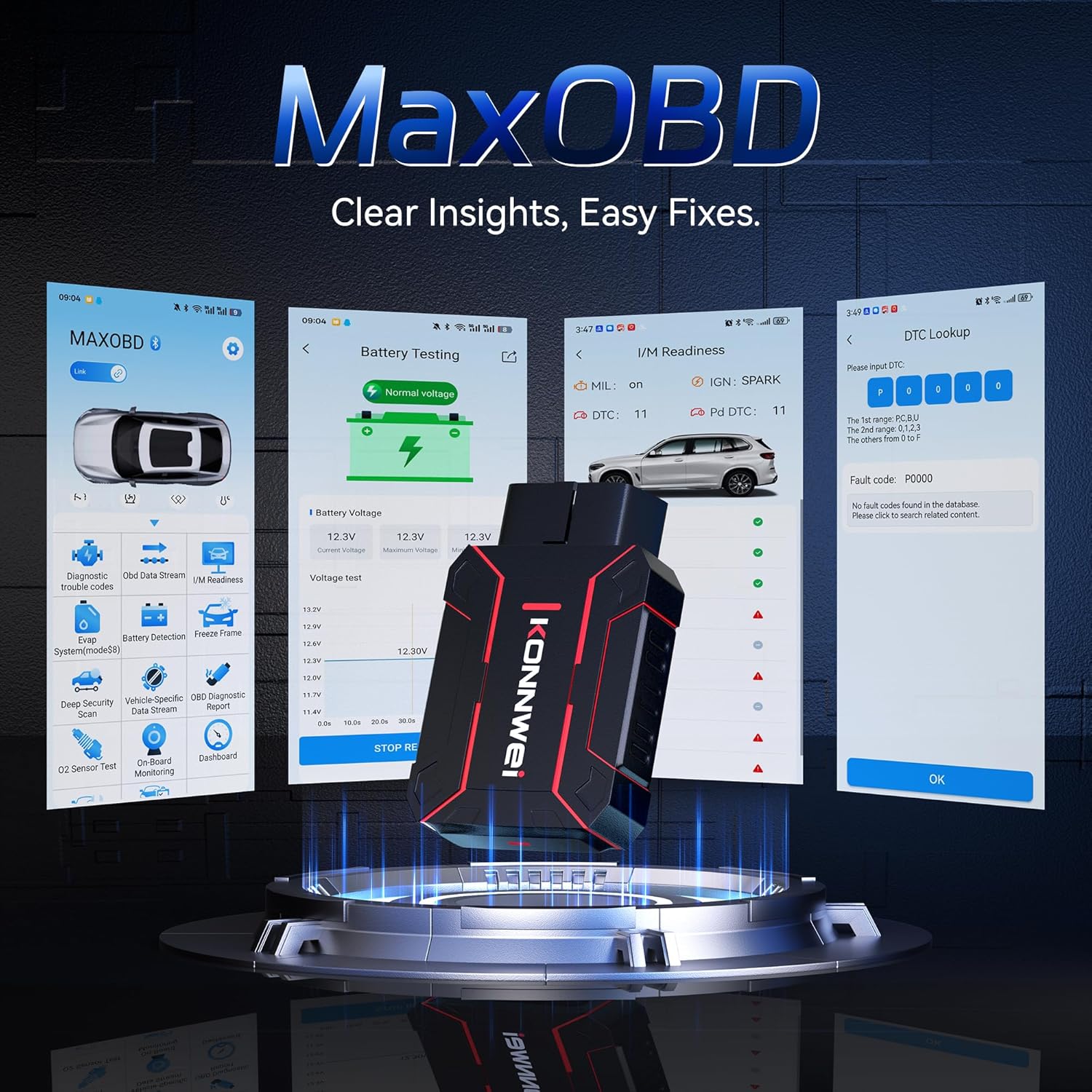
Image: The KONNWEI MAXOBD OBD2 Scanner device, illustrating its physical form and various diagnostic screen interfaces such as battery testing, I/M readiness, and DTC lookup.
שליסל קאַמפּאָונאַנץ:
- OBD-II Connector: פֿאַרבינדט זיך צום פֿאָרמיטל'ס דאַטן לינק קאַנעקטאָר (DLC).
- LCD ווייַז: ווײַזט טעסט רעזולטאַטן און מעניו אָפּציעס.
- נאַוויגאַציע קנעפּלעך: Used to scroll through menus and select options.
- Enter/Exit Buttons: Confirm selections or return to previous screens.
4. סעטאַפּ
Follow these steps to set up your MAXOBD OBD2 Scanner:
- Locate the Vehicle's OBD-II Port: דער 16-פּין דאַטן לינק קאַנעקטאָר (DLC) געפינט זיך געוויינטלעך אונטערן דאַשבאָרד אויף דער דרייווער'ס זייט פונעם אויטאָ. זעט אין אייער אויטאָ'ס סערוויס מאַנואַל פֿאַר דער גענויער אָרט אויב איר קענט עס נישט געפֿינען.
- פֿאַרבינדן דעם סקאַנער: Plug the MAXOBD scanner's OBD-II connector firmly into the vehicle's DLC. Ensure a secure connection.
- מאַכט אויף: Once connected, the scanner will automatically power on. If it does not, turn the vehicle's ignition to the 'ON' position (engine off).
5. אַפּערייטינג ינסטרוקטיאָנס
The MAXOBD scanner offers various diagnostic functions. Use the navigation buttons to move through menus and the Enter button to select options.

Image: A visual representation of a vehicle highlighting various systems (Engine, ABS, SAS, SRS, DPF, TPMS) that the MAXOBD scanner can perform a full system scan on.
הויפּט מעניו פאַנגקשאַנז:
- לייענען קאָודז: Retrieves Diagnostic Trouble Codes (DTCs) from the vehicle's ECU. These codes indicate specific issues detected by the vehicle's onboard diagnostic system.
- מעקן קאָדעס: Clears all DTCs from the vehicle's ECU and turns off the Malfunction Indicator Lamp (MIL). זיכער מאַכן אַז די אונטערלייגנדיקע פּראָבלעם איז געלעזט איידער איר ויסמעקן קאָודז.
- I/M גרייטקייט: Checks the status of emission-related monitoring systems to determine if they are ready for an emissions test.
- דאַטאַ סטרים: Displays real-time operational parameters from the vehicle's sensors and components. This can include engine RPM, vehicle speed, oxygen sensor readings, and more.
- פרירן פריים: Captures a snapshot of sensor data at the moment a DTC was set. This data can help identify the conditions under which a fault occurred.
- O2 סענסאָר טעסט: Retrieves O2 sensor monitoring test results for the most recently completed tests from the vehicle's onboard computer.
- אויף-באָרד מאָניטאָר טעסט: Retrieves results for emission-related powertrain components and systems that are not continuously monitored.
- EVAP סיסטעם טעסט: הייבט אן א ליק טעסט פארן אויטא'ס פארדאַמפּונגס-אויסשטויסונג קאנטראל סיסטעם.
- פאָרמיטל אינפֿאָרמאַציע: ווײַזט די פאָרמיטל אידענטיפיקאַציע נומער (VIN), קאַליבראַציע ID (CALID), און קאַליבראַציע וועריפיקאַציע נומער (CVN).
Performing a Diagnostic Scan:
- Connect the scanner to the vehicle's DLC and turn the ignition to 'ON'.
- From the main menu, select 'Read Codes' and press Enter.
- The scanner will communicate with the vehicle and display any detected DTCs.
- Use the navigation buttons to scroll through the codes and their descriptions.
- To clear codes, return to the main menu, select 'Erase Codes', and confirm.
6. וישאַלט
Proper maintenance ensures the longevity and reliable operation of your MAXOBD scanner.
- רייניקונג: ניצן אַ ווייך, דamp א שטאָף צו רייניקן די אויסערלעכע זייט פון דעם סקאַנער. ניצט נישט קיין שרײַבנדיקע רייניגערס אדער סאָלווענטן.
- סטאָרידזש: Store the scanner in a dry, clean environment away from extreme temperatures and direct sunlight. Keep it in its original packaging or a protective case when not in use.
- ווייכווארג דערהייַנטיקונגען: קאָנטראָלירט פּעריִאָדיש דעם KONNWEI באַאַמטער website for available software updates to ensure your scanner has the latest vehicle compatibility and features. Follow the instructions provided on the website for updating the device.
7. טראָובלעשאָאָטינג
If you encounter issues with your MAXOBD scanner, refer to the following common problems and solutions:
| פּראָבלעם | מעגלעך סיבה | לייזונג |
|---|---|---|
| דער סקאַנער גייט נישט אָן. | Loose connection; vehicle ignition off; faulty OBD-II port. | Ensure the scanner is securely plugged into the DLC. Turn vehicle ignition to 'ON'. Test on another vehicle if possible. |
| מעסעדזש "לינק טעות" אדער "קאמוניקאציע טעות". | Loose connection; vehicle not OBD-II compliant; ignition off; communication protocol issue. | Verify connection. Ensure vehicle is OBD-II compliant (most vehicles 1996 and newer). Turn ignition to 'ON'. Try a different vehicle if available. |
| דער עקראַן איז ליידיק אָדער פֿאַרפֿרוירן. | ווייכווארג פראבלעם; עלעקטרישע אונטערברעכונג. | Disconnect and reconnect the scanner. If the issue persists, contact customer support. |
If the problem persists after attempting these solutions, please contact KONNWEI customer support for further assistance.
8. ספּעסאַפאַקיישאַנז
- סאָרט: KONNWEI
- מאָדעל: maxobdTM
- מאַכט מקור: Battery Powered (via OBD-II port)
- אַפּערייטינג סיסטעם: לינוקס
- פאַרשטעלן גרייס: 2.8 אינטשעס
- אויטאמאטיוו פּאַסיק טיפּ: Universal Fit (for OBD-II compliant vehicles)
- פּעקל דימענשאַנז: 10.04 X 7.28 X 2.76 אינטשעס
9. וואָראַנטי און שטיצן
KONNWEI products are designed for reliability and performance. For warranty information, please refer to the documentation included with your purchase or visit the official KONNWEI website. For technical support, troubleshooting assistance, or any other inquiries, please contact KONNWEI customer service through their official channels.
KONNWEI Official Webפּלאַץ: Visit the KONNWEI Store on Amazon


