1. הקדמה
This manual provides essential information for the safe and efficient use of your DOOGEE Note56 Android 16 smartphone. Please read it thoroughly before using your device.

בילד: פאָרנט און הינטן view of the DOOGEE Note56 smartphone, showcasing its design and key specifications like 6150mAh battery, Android 16, 6.56-inch display, and 90Hz refresh rate.
2. סעטאַפּ
2.1. פּעקל אינהאַלט
באַשטעטיקן אַז דיין פּעקל כּולל די פאלגענדע זאכן:
- DOOGEE Note56 Smartphone
- מאַכט אַדאַפּטער
- וסב קאַבלע
- סים עדזשעקטאָר טול
- פּראַטעקטיוו קאַסע
- שנעל אָנהייב גייד (דעם מאַנואַל)
2.2. סים קאַרטל און TF קאַרטל אינסטאַלאַציע
The DOOGEE Note56 supports dual SIM cards and a TF (microSD) card for expandable storage.
- געפינט די סים קארטל טאַץ אויף דער זייט פון דעם מיטל.
- שטעקט אריין דעם סים אויסווארף געצייג אין דעם קליינעם לאך לעבן דעם טרעי און דריקט לײַכט ביז דער טרעי קומט ארויס.
- Place your Nano-SIM cards and/or TF card into the designated slots on the tray. Ensure the gold contacts face downwards.
- פֿאָרזיכטיק צוריקשטעלט דעם טאַץ אין דעם טעלעפֿאָן ביז עס קליקט אַרײַן אין פּלאַץ.
2.3. ערשטע איינשטראָם און גרונטלעכע קאָנפיגוראַציע
- דריק און האלט דעם פּאַוער קנעפּל ביז דער DOOGEE לאָגאָ דערשיינט.
- פֿאָלגט די אינסטרוקציעס אויף דעם עקראַן צו אויסקלײַבן אײַער שפּראַך, פֿאַרבינדן זיך צו אַ Wi-Fi נעץ, און אויפֿשטעלן אײַער Google חשבון.
- Configure security settings such as screen lock (PIN, pattern, password) and face recognition.
2.4. טשאַרדזשינג די מיטל
Connect the USB cable to the power adapter and then to the phone's charging port. Plug the adapter into a power outlet. The battery indicator will show charging status. For optimal battery life, use the provided charger.
3. אַפּערייטינג ינסטרוקטיאָנס
3.1. אַנדרויד 16 אָפּערייטינג סיסטעם
The DOOGEE Note56 runs on the latest Android 16 system, offering an optimized and intuitive user experience. It features improved application launch speeds, enhanced responsiveness, and a refined user interface. A new Privacy Space function allows for hiding sensitive data and applications, ensuring secure usage.

בילד: איבערview of the Android 16 operating system interface, displaying various applications, settings menus, and system information.
3.2. ווייַז פֿעיִקייטן
The device is equipped with a 6.56-inch IPS waterdrop display, providing a smooth visual experience with a 90Hz high refresh rate. The 720x1612 HD+ resolution and 90% screen-to-body ratio enhance viewing of movies and videos. Two eye-friendly modes are included to reduce eye strain during prolonged use.

בילד: א נאָענטע בילד view of the DOOGEE Note56's 6.56-inch IPS display, illustrating its vibrant colors and the smooth 90Hz refresh rate.
3.3. קאַמעראַ פונקציעס
Capture vivid and beautiful photos with the 8MP main camera and take clear selfies with the 5MP front camera. The device utilizes AI functions for enhanced photography, including:
- AI Scene Recognition: Automatically detects and optimizes settings for 12 different scenes.
- נאַכט מאָדע: פֿאַרבעסערט פאָטאָ קוואַליטעט אין נידעריק-ליכט באדינגונגען.
- פּאָרטרעט מאָדע: שאַפט פּראָפעסיאָנעל-אויסזעענדיקע פאָטאָס מיט פֿאַרשוואָמענע הינטערגרונטן.
- HDR: Enhances dynamic range for balanced exposure.
- פּראָ מאָדע: Offers manual control over camera settings.
- שמייכל כאַפּן: נעמט אויטאָמאַטיש אַ פאָטאָ ווען אַ שמייכל ווערט דעטעקטירט.
- פּאַנאָראַמאַ: Captures wide-angle scenic shots.
- קעסיידערדיק שאָס: נעמט קייפל פאָטאָס אין שנעלער סוקסעסיע.
- Fun Filters: Apply various creative effects to your photos.

Image: Diagram illustrating the 8MP rear camera and 5MP front camera specifications, along with icons representing various AI scene recognition modes.

Image: The camera interface of the DOOGEE Note56, highlighting features like HDR, Pro Mode, Smile Capture, Panorama, Continuous Shooting, Night Mode, and Fun Filters, with a sampדי פאָטאָ.

Image: The 5MP front camera's capabilities for selfies, demonstrating Beauty Mode and Portrait Effect for bright, natural, and shareable self-portraits.
3.4. זכּרון און סטאָרידזש
The DOOGEE Note56 is equipped with 24GB RAM (3GB physical RAM + 21GB extended RAM) and 64GB of internal storage (ROM). It supports TF card expansion up to 2TB, providing ample space for photos, videos, and applications. This powerful memory configuration ensures smooth multitasking and minimizes lag during gaming or heavy app usage.

בילד: אן אינערליכע view diagram highlighting the 64GB ROM and 24GB RAM (composed of 3GB physical and 21GB extended RAM) for seamless performance.
3.5. קאָנעקטיוויטי און נאַוויגאַציע
The device supports Bluetooth 4.2 for stable wireless connections and 4G Dual SIM for broad network compatibility both domestically and internationally. For navigation, it integrates three major positioning systems: GPS, GLONASS, and Galileo, ensuring accurate location services from urban areas to remote locations.
3.6. Other Smart Features
- Instant Face Recognition: Unlock your device quickly and securely using your face.
- עפעם ראַדיאָ: Enjoy local radio stations without an internet connection.
- 3.5 מם כעדפאָון דזשאַק: Connect your wired headphones for audio playback and calls.
- Smart Body Sensor: (Specific functionality not detailed, refers to general smart sensor capabilities).
- Dual System Mode: Allows for separate user environments.
- סופּער קליפּבאָרד: פֿאַרבעסערטע קליפּבאָרד פֿונקציאָנאַליטעט.
- Screen Optimization & Color Customization: Adjust display settings for personal preference.

Image: Visual representation of instant face recognition, accurate GPS navigation, and the FM radio interface on the DOOGEE Note56.

בילד: א קאלאזש אויסשטעלונגasing various smart OS features of the DOOGEE Note56, including smart body sensor, dual system mode, super clipboard, RAM expansion, screen optimization, and screen color customization.
4. וישאַלט
4.1. באַטערי מאַנאַגעמענט
The DOOGEE Note56 features a 6150mAh large capacity battery, designed for extended use. It supports approximately 1000 charge/discharge cycles and offers up to 4 years of durable battery life. The device also supports 5W reverse charging, allowing it to act as a power bank for other devices.
- כּדי צו מאַקסאַמיזירן די באַטאַרייע לעבן, זאָל מען אויסמייַדן עקסטרעמע טעמפּעראַטורן.
- לאָדן נישט אָפּ די באַטאַרייע פֿולשטענדיק רעגולער.
- ניצט דעם אריגינעלן טשאַרדזשער פֿאַר אָפּטימאַלער טשאַרדזשינג פאָרשטעלונג.
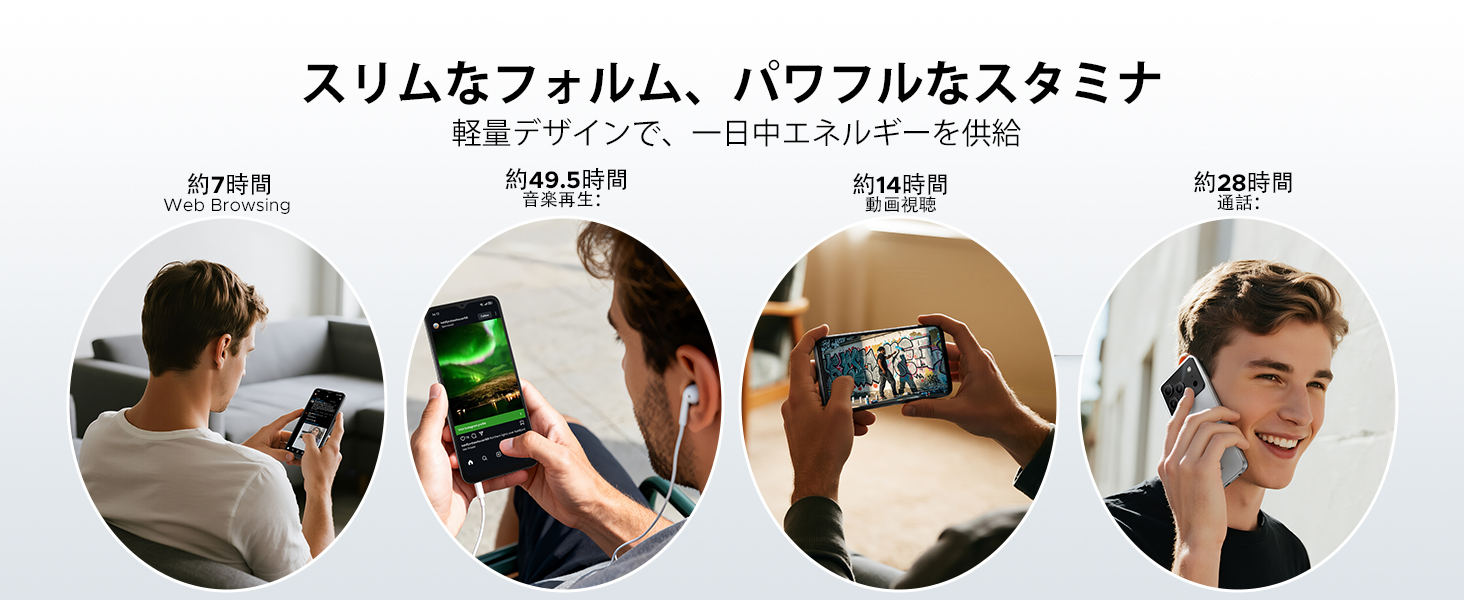
Image: Diagram illustrating the 6150mAh silicon-carbon battery, highlighting its features such as 1000 charge cycles, 4 years of durability, 20% smaller size, and 5W reverse charging capability.

Image: Infographic showing estimated battery life for different activities on the DOOGEE Note56: approximately 7 hours for web browsing, 49.5 hours for music playback, 14 hours for video watching, and 28 hours for calls.
4.2. רייניקונג און קער
- ניצן אַ ווייך, לינט-פריי שטאָף צו ריין די פאַרשטעלן און גוף פון די מיטל.
- ויסמיידן ניצן האַרב קעמיקאַלז אָדער אַברייסיוו מאַטעריאַלס.
- Keep the device away from excessive dust and moisture.
4.3. ווייכווארג דערהייַנטיקונגען
Regularly check for and install software updates to ensure your device has the latest features, security patches, and performance improvements. You can usually find this option in the device's settings under 'System' or 'About phone'.
5. טראָובלעשאָאָטינג
If you encounter issues with your DOOGEE Note56, refer to the following common troubleshooting steps:
- מיטל נישט קער אויף: זיכער מאַכן אַז די באַטאַרייע איז אָנגעלאָדן. דריק און האַלט די פּאַוער קנעפּל פֿאַר לפּחות 10-15 סעקונדעס צו צווינגען אַ ריסטאַרט.
- אַפּפּס קראַשן אָדער פרירן: Close and reopen the app. Clear the app's cache and data in Settings > Apps. If the issue persists, uninstall and reinstall the app.
- נעטוואָרק קאַנעקטיוויטי ישוז: Check if Airplane Mode is off. Restart the device. Verify your SIM card is correctly inserted and your mobile data plan is active. For Wi-Fi, try forgetting the network and reconnecting.
- טשאַרדזשינג פּראָבלעמס: Ensure the charging cable and adapter are securely connected and undamaged. Try a different outlet or charger. Clean the charging port gently.
- לאַנגזאַמע פאָרשטעלונג: שליסט אומנייטיקע הינטערגרונט אַפּפּס. רייניקט קאַש רעגולער. באַטראַכט צו באַפרייען סטאָרידזש פּלאַץ.
פֿאַר מער קאָמפּליצירטע פּראָבלעמען, ביטע זעט די שטיצע אָפּטייל.
6. ספּעסאַפאַקיישאַנז
| שטריך | באַשרייַבונג |
|---|---|
| פאַרשטעלן גרייס | 6.56 אינטשעס |
| באַטאַרייע קאַפּאַציטעט | 6150 מאַה |
| קאָליר | Black (other variants available) |
| סאָרט נאָמען | DOOGEE |
| פאַבריקאַנט | DOOGEE |
| מעלדונג יאָר | 2025 |
| אַרייַנגערעכנט קאַמפּאָונאַנץ | מאַכט אַדאַפּטער |
| קאַמפּאַטאַבאַל אַס | אַנדרויד 16 |
| אנדערע פֿעיִקייטן | SIM-free |
| מאָדעל נאָמען | נאָטיץ 56 |
| ווייַז טיפּ | IPS |
| פּעקל דימענשאַנז | 19.3 רענטגענ 10.5 רענטגענ 5.1 סענטימעטער; 410 ג |
| Manufacturer Reference | נאָטיץ 56 |
| אינסטאַלירטע ראַם גרייס | 24 גיגאבייט |
| זכּרון סטאָרידזש קאַפּאַסיטי | 64 גיגאבייט |
7. וואָראַנטי און שטיצן
7.1. וואָראַנטי אינפֿאָרמאַציע
The DOOGEE Note56 comes with a 1 יאָר וואָראַנטי from the date of purchase, ensuring peace of mind for your usage. This warranty covers manufacturing defects under normal use conditions.
7.2. How to Contact Support
In the unlikely event of a product defect or if you require technical assistance, please contact our support team through the following methods:
- Via Amazon Purchase History: Navigate to your Amazon purchase history and contact our store directly regarding your order.
- Via Product Page: On the product page, click on the store name located below the 'Add to Cart' button. Then, click the 'Ask a Question' button displayed in the upper right corner to send us an inquiry.


