1. הקדמה
The Zebra ZQ220 Plus is a versatile mobile thermal printer designed for on-the-go professionals. This portable device offers reliable, high-quality receipt and label printing capabilities, making it suitable for various applications including retail, hospitality, and field services. Featuring Bluetooth 5.0 connectivity and a durable design, the ZQ220 Plus ensures efficient operation in diverse working environments. Its thermal printing technology eliminates the need for ink or toner, simplifying maintenance.
2. זיכערקייַט אינפֿאָרמאַציע
- Read all instructions before operating the printer.
- Do not expose the printer to extreme temperatures, direct sunlight, or high humidity.
- Use only Zebra-approved accessories and power sources.
- Avoid dropping the printer or subjecting it to severe impacts.
- האַלטן די דרוקער אַוועק פון וואַסער און אנדערע ליקווידס.
- פּרוּווט נישט צו צענעמען אָדער פאַרריכטן דעם דרוקער אַליין. ווענדט זיך צו קוואַליפֿיצירטע סערוויס פּערסאָנעל.
3. פּעקל אינהאַלט
באַשטעטיקן אַז אַלע זאכן זענען פאַראַן אין פּעקל:
- Zebra ZQ220 Plus Mobile Thermal Printer
- קריקאָנלאָדלעך באַטערי
- וסב טשאַרדזשינג קאַבלע
- שנעל אָנהייב גייד
- Sample Thermal Paper Roll
4. פּראָדוקט איבערview
Familiarize yourself with the components of your ZQ220 Plus printer.

פיגורע 4.1: פראָנט View of the ZQ220 Plus Printer
This image displays the front of the ZQ220 Plus printer, highlighting its compact design. The top panel features an LCD display and three control buttons: Power, Settings, and Connectivity. The paper output slot is visible below the control panel.
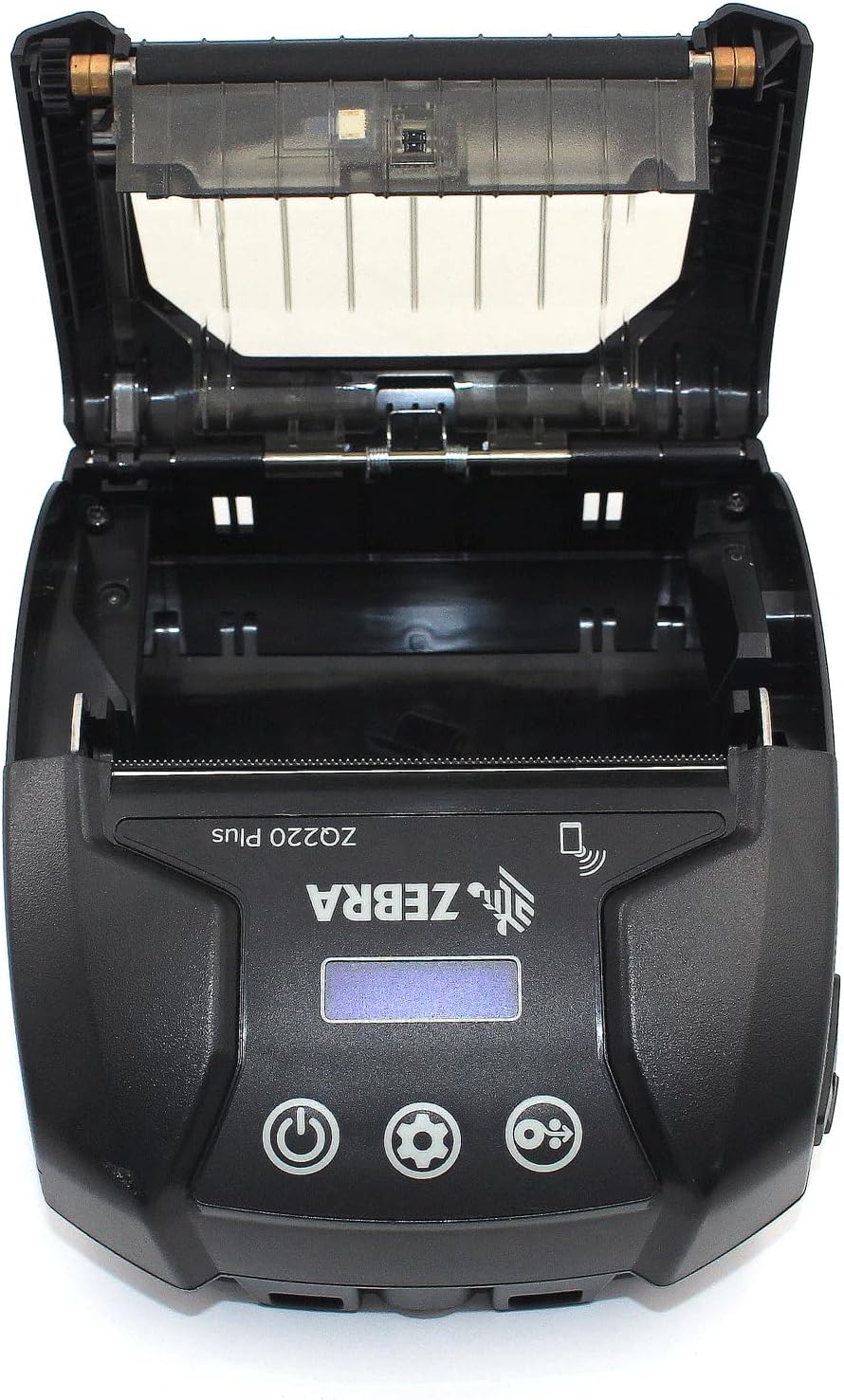
Figure 4.2: Media Compartment Open
This image shows the printer with its top cover open, providing access to the media compartment. The thermal printhead is visible, along with the spindle for loading paper rolls. This view is essential for understanding how to load printing media.

Figure 4.3: Media Roll Insertion
This image demonstrates the media loading process. The side view with the cover open clearly shows how a roll of thermal paper is placed into the printer's media bay, ensuring correct alignment for printing.
5. סעטאַפּ
5.1. באַטאַרייע ייַנמאָנטירונג
- מאַכן זיכער אַז די דרוקער איז פּאַוערד אַוועק.
- Locate the battery compartment cover on the back or bottom of the printer.
- Open the cover and insert the rechargeable battery, ensuring the contacts align correctly.
- פאַרמאַכן די באַטאַרייע אָפּטייל דעקן סיקיורלי.
5.2. Loading Print Media
- Open the media compartment cover (refer to Figure 4.2).
- Place the thermal paper roll into the compartment with the leading edge feeding from the bottom of the roll.
- Pull a small amount of paper past the printhead.
- Close the media compartment cover firmly until it latches.
5.3. ערשטע איינשטראָם און אויפלאָדן
- Connect the USB charging cable to the printer and a power source (e.g., USB wall adapter, vehicle USB port).
- Allow the battery to fully charge before first use. The charging indicator light will show the status.
- Press and hold the Power button until the printer powers on. The LCD display will illuminate.
6. אפערירן דעם דרוקער
6.1. בלועטאָאָטה פּערינג
- Ensure the printer is powered on and within range of your host device (smartphone, tablet, etc.).
- On your host device, navigate to the Bluetooth settings and enable Bluetooth.
- זוכן פֿאַר available devices. The printer will appear as 'ZQ220 Plus' or a similar identifier.
- Select the printer from the list to initiate pairing. If prompted, enter the default PIN (usually '0000' or '1234').
- Once paired, the Bluetooth icon on the printer's display will indicate a successful connection.
6.2. דרוקן
- Ensure the printer is paired with your host device and has sufficient media loaded.
- Open your printing application (e.g., ZLabel Designer Mobile App for Android or iOS, or other compatible software).
- Select the ZQ220 Plus as your target printer within the application.
- Initiate the print command from your application. The printer will begin printing the document or label.
6.3. וסב טשאַרדזשינג
The ZQ220 Plus supports simple USB charging. Connect the printer to any standard USB power source using the provided USB cable. This allows for convenient charging in vehicles or from portable power banks.
7. וישאַלט
7.1. רייניקונג די פּרינטער
- עקסטעריע: ווישט אָפּ די אויסערלעכע זייט פון דעם דרוקער מיט אַ ווייכן, טרוקענעם שטאָף.amp שטאָף. דו זאלסט נישט נוצן האַרב קעמיקאַלז אָדער אַברייסיוו קלינערז.
- פּרינטהעאַד: Periodically clean the thermal printhead using a printhead cleaning pen or a cotton swab lightly dampened with isopropyl alcohol. Ensure the printer is off and cool before cleaning. Allow to dry completely before use.
- פּלאַטען ראָללער: Clean the platen roller with a lint-free cloth dampened with isopropyl alcohol to remove paper dust or adhesive residue.
7.2. סטאָרידזש
When not in use for extended periods, store the printer in a cool, dry place, away from direct sunlight and extreme temperatures. Remove the battery if storing for several months to prevent discharge or damage.
8. טראָובלעשאָאָטינג
| פּראָבלעם | מעגלעך סיבה | לייזונג |
|---|---|---|
| דרוקער גייט נישט אן | נידעריק אָדער דיפּליטיד באַטאַרייע Improperly installed battery | אָפּצאָל די באַטאַרייע ריינסטאַל די באַטאַרייע ריכטיק |
| קיין דרוק ארויסגאַנג | No paper loaded פאפיר איז אומרעכט אנגעלאדן Printhead dirty or damaged | Load thermal paper Reload paper correctly רייניקן דעם דרוקקאפ |
| נעבעך דרוק קוואַליטעט | Dirty printhead נידעריק באַטאַרייע פאַלש מידיאַ טיפּ | רייניקן דעם דרוקקאפ אָפּצאָל די באַטאַרייע Ensure correct thermal media is used |
| קענען ניט פאַרבינדן דורך בלועטאָאָטה | בלועטאָאָטה ניט ענייבאַלד אויף מיטל Printer not in pairing mode אויס פון קייט | Enable Bluetooth on host device Ensure printer is discoverable Move device closer to printer |
| Printer stops during operation | נידעריק באַטאַרייע פּאַפּיר קלעם אָוווערכיטינג | אָפּצאָל די באַטאַרייע Clear any paper jam Allow printer to cool down |
9. ספּעסאַפאַקיישאַנז
| שטריך | באַשרייַבונג |
|---|---|
| מאָדעל נאָמען | ZQ220 PLUS |
| דרוק טעכנאָלאָגיע | דירעקט טערמאַל |
| דרוק האַכלאָטע | 203 דפּי (דאַץ פּער אינטש) |
| מאַקסימום דרוק גיכקייט (מאָנאָכראָם) | 20 פּיפּיעם |
| Supported Media Widths | 80 mm (3.14 in), 76.2 mm (3 in), 58 mm (2.28 in) |
| קאַנעקטיוויטי | בלועטאָאָטה 5.0, וסב |
| באַטאַרייע קאַפּאַציטעט | 2500 מאַה |
| זכּרון | 8 מב |
| האַרטקייט שאַץ | IP54 (resistance to dust and liquids) |
| פּראָדוקט דימענשאַנז (ד רענטגענ וו רענטגענ ה) | 3.15" x 2.25" x 3" |
| פּונקט וואָג | 4 אונס (0.25 לבס) |
| אַרייַנגערעכנט קאַמפּאָונאַנץ | Printer, Battery, USB Cable |
10. וואָראַנטי און שטיצן
10.1. וואָראַנטי אינפֿאָרמאַציע
The Zebra ZQ220 Plus Mobile Thermal Printer comes with a לימיטעד מאַנופאַקטורער וואָראַנטי. Please refer to the warranty card included with your product or visit the official Zebra webזייטל פֿאַר דעטאַלירטע תּנאים און באַדינגונגען וועגן קאַווערידזש, געדויער, און פאָדערונג פּראָצעדורן.
10.2. טעכניש שטיצן
For technical assistance, troubleshooting beyond this manual, or service inquiries, please contact Zebra customer support. Contact information can typically be found on the official Zebra webוועבזייטל אדער אין אייער פּראָדוקט דאָקומענטאַציע.


