1. הקדמה
This manual provides detailed instructions for the ANCEL BT310 12V 24V Car Battery Tester and the ANCEL TD700 Diagnostic Tool. This bundle offers comprehensive solutions for vehicle battery health assessment and advanced automotive diagnostics. The BT310 is designed to accurately test 12V and 24V vehicle batteries, including cranking and charging system analysis. The TD700 is a specialized diagnostic scanner for Toyota vehicles, offering multi-system diagnosis and special functions, alongside standard OBD2 capabilities for all vehicle brands.
2. ANCEL BT310 Battery Tester Overview
The ANCEL BT310 is a professional tool for evaluating the health of 12V and 24V automotive batteries. It performs battery tests, cranking tests, and charging system tests to provide a complete picture of your vehicle's electrical system. It supports a wide range of battery types and CCA values.
2.1 Key Features of BT310
- Supports 12V and 24V batteries.
- Tests batteries with Cold Cranking Amps (CCA) ratings from 100 to 2000.
- Performs Battery Test, Cranking Test, and Charging Test.
- Compatible with various battery types: Flooded, EFB, GEL, AGM Spiral, AGM Flat Plate, and Lithium-Ion.
- Provides detailed results including Voltage, Measured CCA, State of Charge, State of Health, and Internal Resistance.
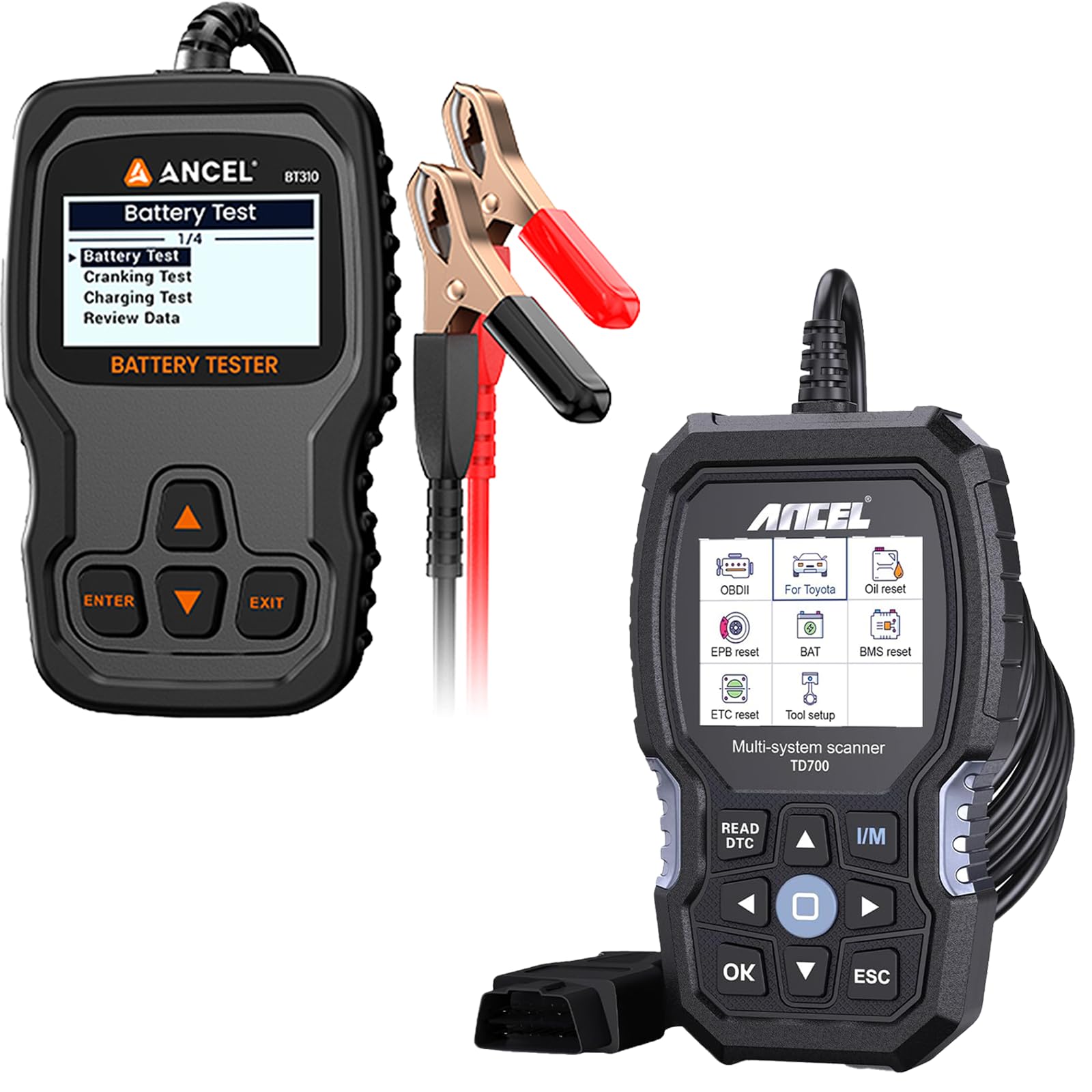
Figure 2.1: ANCEL BT310 Battery Tester connected to a vehicle battery, illustrating its primary function.

Figure 2.2: BT310 compatibility with different battery technologies (Flooded, EFB, GEL, AGM, Lithium-Ion) and vehicle types (ATV, Boat, Car, SUV, Pickup, Motorcycle).
3. ANCEL TD700 Diagnostic Tool Overview
The ANCEL TD700 is a professional-level diagnostic scanner specifically designed for Toyota vehicles, offering in-depth system diagnostics and special service functions. It also provides full OBD2 functionality for all OBD2-compliant vehicles, making it a versatile tool for automotive enthusiasts and professionals.
3.1 Key Features of TD700
- Toyota Multi-System Diagnosis: Accesses Engine, Transmission, Airbag, TPMS, ABS, SAS, BMS, EPB, GPS, ESP, A/C, and more.
- Professional-Level Toyota Functions: Includes Oil Reset, EPB Reset, ETC Reset, TPMS Reset, BMS Reset, ABS Bleeding, SAS Calibration, DPF Regeneration, Throttle Learning, Battery Registration, Injector Coding. באַמערקונג: ספּעציפֿישע פֿונקציעס קענען זיין אַנדערש לויטן מאָדעל און יאָר פֿון פֿאָרמיטל.
- פולע OBD2 פונקציעס: Read Codes, Erase Codes, Live Data Stream, I/M Readiness, Evap System Test, Vehicle Information, DTC Lookup, Turn off Malfunction Indicator Lamp (MIL).
- נאָך פֿעיִקייטן: באַטערי וואָלtage Check, One-click Smog Check, Auto VIN detection.

Figure 3.1: ANCEL TD700 displaying its multi-system diagnostic menu for Toyota vehicles.

Figure 3.2: ANCEL TD700 showing its professional-level special functions menu for Toyota vehicles.

Figure 3.3: ANCEL TD700 displaying its OBD2 diagnostic menu, applicable to all vehicle brands.
4. סעטאַפּ און קאַנעקשאַן
4.1 ANCEL BT310 Battery Tester Setup
- צוגרייטן די באַטאַרייע: Ensure the vehicle's ignition is off and all accessories are turned off. The battery terminals should be clean and free of corrosion.
- פאַרבינדן קלamps: פאַרבינדן די רויט positive (+) קלamp of the BT310 to the positive (+) terminal of the battery. Connect the black negative (-) clamp צו די נעגאַטיוו (-) וואָקזאַל פון די באַטאַרייע.
- מאַכט אויף: The BT310 will power on automatically once correctly connected to the battery.
- ערשט סעטטינגס: Follow the on-screen prompts to select language and other initial settings if required.

Figure 4.1: Proper connection of the BT310 clamps to a vehicle battery.
4.2 ANCEL TD700 Diagnostic Tool Setup
- געפינען די OBD2 פּאָרט: The OBD2 diagnostic port is typically located under the dashboard on the driver's side. Refer to your vehicle's manual if you cannot find it.
- Connect TD700: Plug the TD700's OBD2 connector firmly into the vehicle's OBD2 port.
- מאַכט אויף: The TD700 will power on automatically once connected to the vehicle's OBD2 port.
- פאָרמיטל צינדונג: Turn the vehicle's ignition to the 'ON' position (engine off) for most diagnostic functions. For some tests, the engine may need to be running.
5. Operating the ANCEL BT310 Battery Tester
After connecting the BT310, use the navigation buttons (ENTER, EXIT, Up/Down arrows) to select desired tests from the main menu.
5.1 באַטערי טעסט
- פֿון הויפּט מעניו, אויסקלײַבן "באַטעריע טעסט" און דריקן ENTER.
- Select the battery type (e.g., Flooded, AGM, GEL, Lithium-Ion) and press ENTER.
- Enter the battery's Cold Cranking Amps (CCA) rating as specified on the battery label and press ENTER.
- דער טעסטער וועט דורכפירן די אנאליז און ווייזן די רעזולטאטן.
- ינטערפּריטינג רעזולטאַטן:
- גוט באַטערי: באַטערי איז אין גוט צושטאַנד.
- Good-Recharge: Battery is good but needs recharging.
- Charge & Retest: Battery needs charging, then retest to confirm health.
- פאַרבייַטן באַטערי: Battery is failing and should be replaced.
- Bad Cell-Replace: One or more cells are faulty; replace the battery.
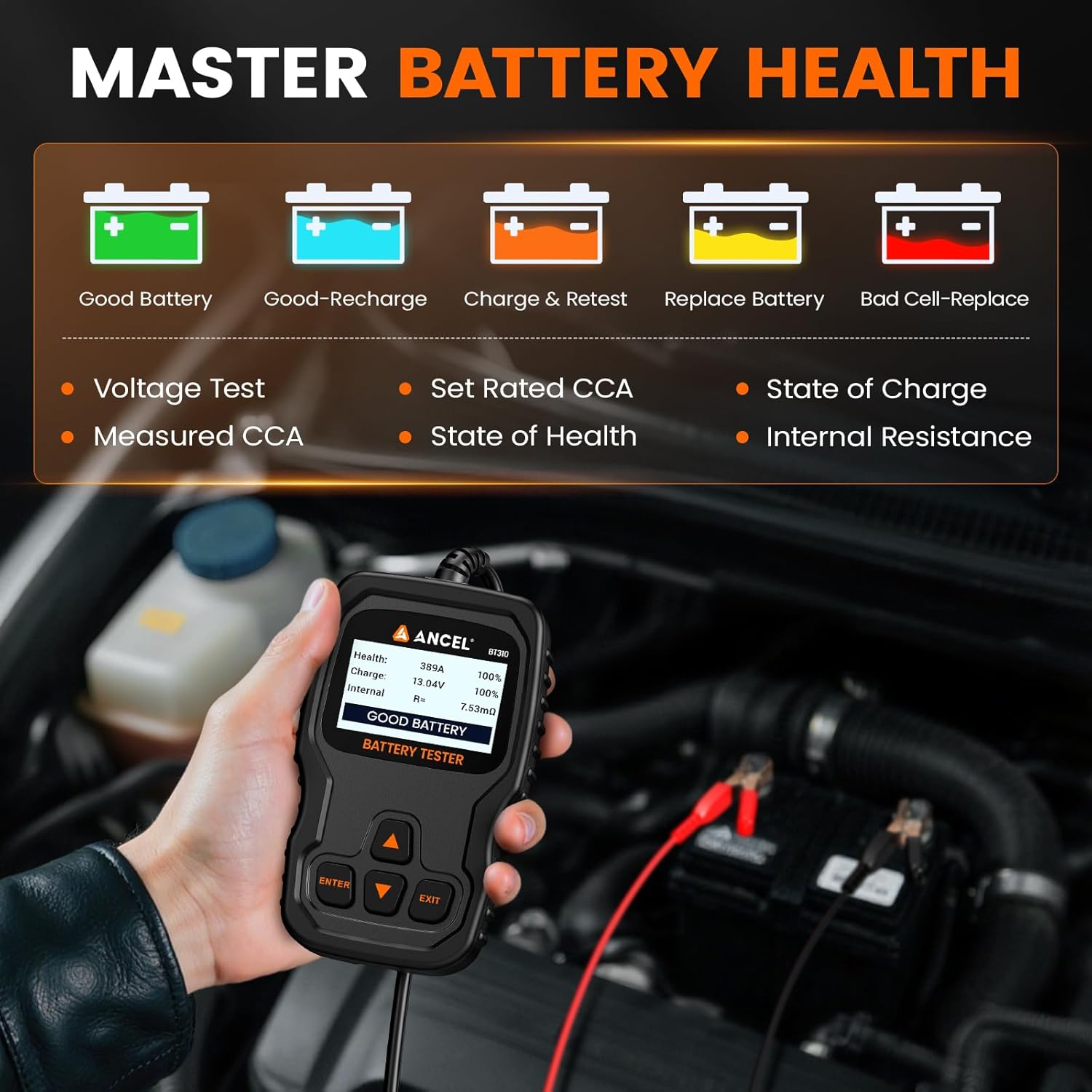
Figure 5.1: BT310 displaying comprehensive battery health results.
5.2 קראַנקינג טעסט
- פֿון הויפּט מעניו, אויסקלײַבן "קראַנקינג טעסט" און דריקן ENTER.
- פֿאָלגט די אינסטרוקציעס אויף דעם עקראַן צו אָנהייבן דעם מאָטאָר פֿונעם פֿאָרמיטל.
- דער טעסטער וועט אנאליזירן די קראַקינג וואָלומעןtage and time, then display the results.
- ינטערפּריטינג רעזולטאַטן: The display will show cranking time and voltage. A 'CRANKING NORMAL' message indicates a healthy starter system. Low voltage or extended cranking time may indicate issues with the battery or starter.
5.3 טשאַרדזשינג טעסט
- פֿון הויפּט מעניו, אויסקלײַבן "טשאַרדזשינג טעסט" און דריקן ENTER.
- Follow the on-screen instructions to start the vehicle's engine and perform any requested actions (e.g., revving the engine).
- The tester will measure the alternator's output under various conditions (unloaded, loaded) and check for excessive ripple voltage.
- ינטערפּריטינג רעזולטאַטן: The display will show unloaded voltage, געלאָדענע באַנדtage, און ריפל וואָלtage. A 'VOLTAGE NORMAL' message indicates a healthy charging system. Readings outside the normal range may indicate issues with the alternator or voltagE רעגולאַטאָר.

Figure 5.2: BT310 displaying Cranking Test and Charging Test results.
5.4 שייַעךview דאַטאַ
אויסקלייבן "רעview Data" from the main menu to view previously saved test results. This allows for comparison and tracking of battery health over time.
6. Operating the ANCEL TD700 Diagnostic Tool
After connecting the TD700 to the vehicle's OBD2 port and turning the ignition on, the device will boot up. Use the navigation buttons (OK, ESC, Up/Down/Left/Right arrows) to navigate the menus.
6.1 Toyota Multi-System Diagnosis
- From the main menu, select the Toyota diagnostic option.
- The tool will automatically identify the vehicle or prompt you to enter vehicle information.
- Select the desired system for diagnosis (e.g., Engine, Transmission, ABS, Airbag).
- Choose to Read Codes, Erase Codes, or view Live Data Stream for the selected system.
- באַמערקונג: Some advanced features and system access may only be supported on specific Toyota models. If a feature is not available, please confirm compatibility with your vehicle.
6.2 Toyota Professional-Level Functions
- From the Toyota diagnostic menu, navigate to "Special Functions" or a similar option.
- Select the desired function (e.g., Oil Reset, EPB Reset, BMS Reset).
- Follow the on-screen instructions carefully to perform the service function. Ensure all prerequisites (e.g., engine off, ignition on) are met.
- וואָרענען: Special functions can alter vehicle settings. Ensure you understand the procedure before proceeding. Compatibility varies by vehicle.
6.3 OBD2 Functions (All Vehicle Brands)
- From the main menu, select "OBDII/EOBD" or a similar option.
- Choose from the available functions:
- לייענען קאָודז: Retrieves Diagnostic Trouble Codes (DTCs) from the Powertrain Control Module (PCM).
- מעקן קאָדעס: רייניקט DTCs און שטעלט אויס דעם Malfunction Indicator Lamp (MIL).
- לעבעדיקע דאַטן סטרים: ווײַזט רעאַל-צייט סענסאָר דאַטן פֿון דעם פֿאָרמיטל.
- I/M גרייטקייט: קאָנטראָלירט דעם סטאַטוס פון עמיסיע-פֿאַרבונדענע מאָניטאָרן.
- פארדאַמפּונג סיסטעם טעסט: הייבט אן א טעסט פון די עוואפאראטיוו עמישאן קאנטראל סיסטעם.
- פאָרמיטל אינפֿאָרמאַציע: באַקומט צוריק פאָרמיטל אידענטיפיקאַציע נומער (VIN), קאַליבראַציע ID, עטק.
- DTC זוכן: Provides definitions for generic DTCs.
6.4 Additional Features of TD700
- באַטערי וואָלtage טשעק: Quickly checks the current voltage פון די פאָרמיטל'ס באַטאַרייע.
- One-click Smog Check: Provides a quick status check for emissions readiness.
- Auto VIN: Automatically retrieves the vehicle's VIN for quick identification.

Figure 6.1: TD700 displaying additional features such as Battery Voltage Check and Auto VIN.
7. וישאַלט
- רייניקונג: Use a soft, dry cloth to clean the device casings. Avoid using abrasive cleaners or solvents.
- סטאָרידזש: Store the devices in a dry, cool environment, away from direct sunlight and extreme temperatures. Keep them in their original packaging or a protective case when not in use.
- קאַבלע זאָרגן: קאָנטראָלירט קאַבלען רעגולער פֿאַר שאָדן. בייגט אָדער קנייטשט נישט קאַבלען צו פיל.
- ווייכווארג דערהייַנטיקונגען: פּעריִאָדיש קאָנטראָלירן דעם ANCEL באַאַמטער website for available software updates for both the BT310 and TD700 to ensure optimal performance and compatibility with newer vehicles.
8. טראָובלעשאָאָטינג
| פּראָבלעם | מעגלעך סיבה | לייזונג |
|---|---|---|
| די מיטל טוט נישט מאַכט אויף. | Incorrect connection; vehicle battery too low (BT310); OBD2 port issue (TD700). | פאַרזיכערן קלamps are correctly connected (BT310). Verify OBD2 connection (TD700). Check vehicle battery voltage. |
| "Connection Error" message. | Loose connection; faulty cable; vehicle communication issue. | Reconnect the device. Inspect the cable for damage. Ensure vehicle ignition is ON. Try on another vehicle if possible. |
| Inaccurate BT310 test results. | Incorrect CCA input; dirty battery terminals; battery not fully charged. | Verify the CCA value entered matches the battery. Clean battery terminals. Fully charge the battery before retesting. |
| TD700 cannot access certain Toyota systems or functions. | Vehicle model/year not supported for that specific function; outdated software. | Confirm compatibility with your specific Toyota model. Update the TD700 software to the latest version. |
9. ספּעסאַפאַקיישאַנז
9.1 ANCEL BT310 Battery Tester
- VoltagE קייט: 9V - 30V גלייכשטראָם
- טעסט קייט: 100 - 2000 קקאַ
- סופּפּאָרטעד באַטערי טייפּס: Flooded, EFB, GEL, AGM Spiral, AGM Flat Plate, Lithium-Ion
- אַפּערייטינג טעמפּעראַטור: 0°C צו 50°C (32°F צו 122°F)
- סטאָרידזש טעמפּעראַטור: -20°C צו 70°C (-4°F צו 158°F)
9.2 ANCEL TD700 Diagnostic Tool
- ווייַז: קאָליר לקד
- קאַנעקטיוויטי: Standard 16-pin OBD2 connector
- שטיצט פּראָטאָקאָלס: OBDII/EOBD קאָמפּאַטיבלע פּראָטאָקאָלן
- פאָרמיטל קאַווערידזש: Toyota (multi-system & special functions), All OBD2 compliant vehicles (engine diagnostics)
- אַפּערייטינג טעמפּעראַטור: 0°C צו 50°C (32°F צו 122°F)
- סטאָרידזש טעמפּעראַטור: -20°C צו 70°C (-4°F צו 158°F)
10. וואָראַנטי און שטיצן
ANCEL products typically come with a standard manufacturer's warranty. For specific warranty details, please refer to the warranty card included with your product or visit the official ANCEL website. If you encounter any issues or have questions regarding the ANCEL BT310 or TD700, please contact ANCEL customer support through the following channels:
- באַזוכט די אָפֿיציעלע ANCEL webזייטל פֿאַר שטיצע רעסורסן און קאָנטאַקט אינפֿאָרמאַציע.
- Contact the seller directly via the Amazon messaging system for assistance.


