הקדמה
Thank you for choosing the OUKITEL Smartwatch. This device is designed to enhance your daily life with smart features, comprehensive health monitoring, and various sports modes. This manual provides detailed instructions to help you set up, operate, and maintain your smartwatch effectively. Please read this manual thoroughly before use to ensure optimal performance and longevity of your device.
וואָס איז אין די קעסטל
- OUKITEL Smartwatch
- טשאַרדזשינג קאַבלע
- באַניצער מאַנואַל
סעטאַפּ גייד
1. אויפלאָדן די סמאַרטוואַטש
Before first use, fully charge your smartwatch. Connect the magnetic charging cable to the charging contacts on the back of the watch and plug the USB end into a power adapter (not included) or a computer's USB port. A full charge typically takes about 2.5 hours.

Image: The OUKITEL Smartwatch connected to its magnetic charging cable, displaying a charging icon on its screen.
A full charge provides approximately 5-10 days of normal usage and up to 30 days in standby mode.
2. אַפּ אינסטאַלאַציע און פּערינג
To unlock all features, download the companion app (e.g., "GloryFit" as mentioned in reviews) on your smartphone. The app is compatible with iOS 9.0+ and Android 6.0+ devices.
- Scan the QR code in the user manual or search for the app name in your phone's app store (Apple App Store for iOS, Google Play Store for Android).
- ינסטאַלירן און עפֿענען די אַפּ.
- Follow the on-screen instructions to create an account and set up your profile.
- געבן בלועטאָאָטה אויף דיין סמאַרטפאָנע.
- In the app, search for your OUKITEL Smartwatch and select it to pair. Confirm the pairing request on both your phone and the smartwatch.
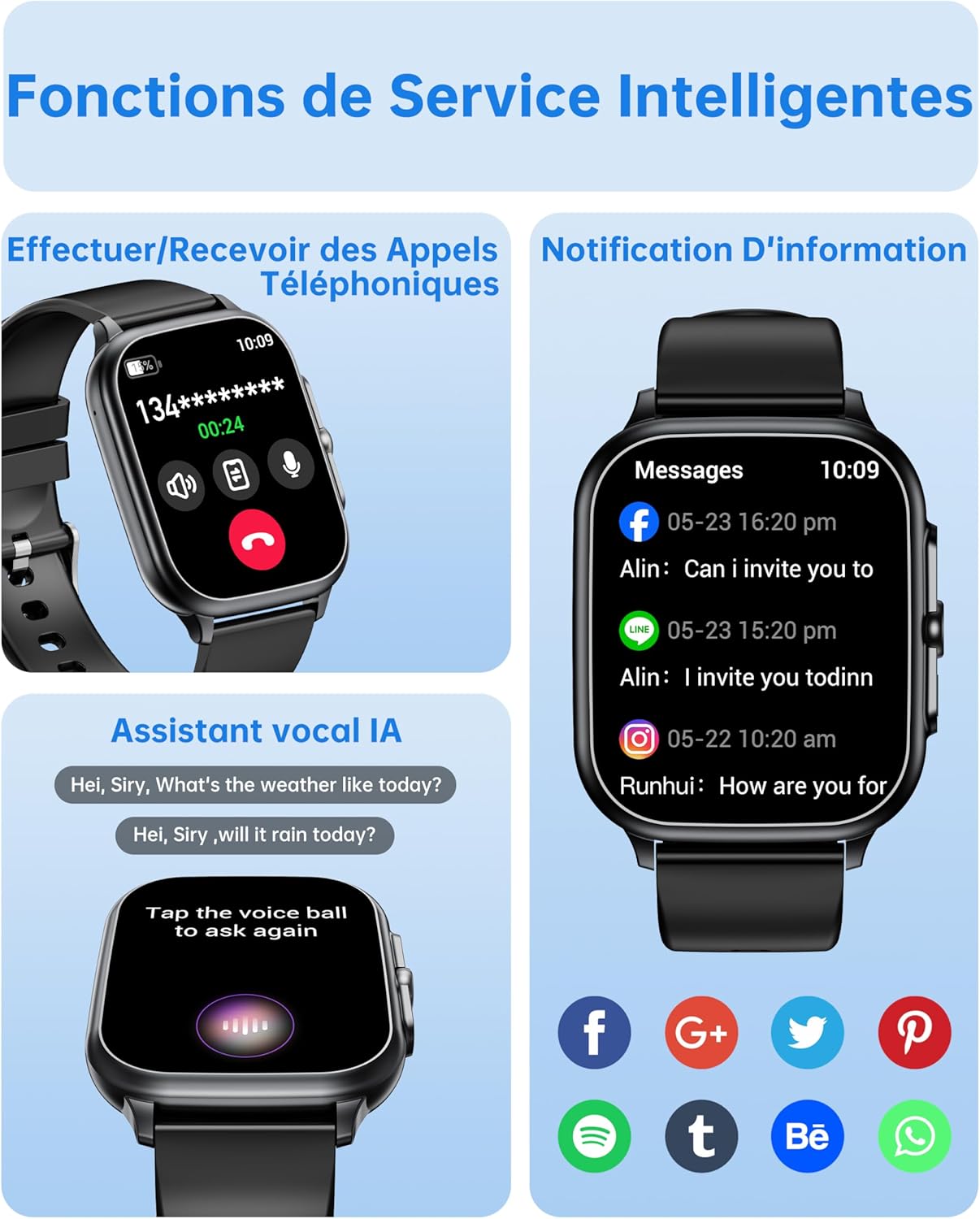
Image: The OUKITEL Smartwatch screen showing an incoming call interface, illustrating its Bluetooth call functionality and readiness for connection.
אַפּערייטינג ינסטראַקשאַנז
יקערדיק נאַוויגאַציע
The OUKITEL Smartwatch features a 1.91-inch HD touchscreen for intuitive control. Swipe left, right, up, or down to navigate through menus and functions. Press the side button to return to the home screen or access the app list.
סמאַרט פאַנגקשאַנז
- בלועטאָאָטה קאַללס: Once paired with your phone, you can make and receive calls directly from your smartwatch. Access the dial pad, call history, or contacts on your watch.
- AI Voice Assistant: Utilize the integrated AI voice assistant (e.g., Alexa) to perform voice commands such as asking questions, checking the weather, or initiating calls.
- נאָטיפיקאַטיאָנס: Receive real-time notifications for calls, SMS, and various social media apps (WhatsApp, Facebook, etc.) directly on your wrist.
- מוזיק קאָנטראָל: Control music playback on your smartphone (play, pause, skip tracks) directly from your smartwatch.
- אנדערע פאַנגקשאַנז: Includes weather forecasts, stopwatch, timer, alarm clock, remote camera control, and a "Find My Phone" feature.

Image: A composite image showing the smartwatch interface for making/receiving calls, displaying app notifications, and interacting with the AI voice assistant.
געזונט מאָניטאָרינג
The smartwatch provides 24/7 health tracking to help you monitor your well-being.
- האַרץ קורס מאָניטאָרינג: כסדר טראַקס דיין האַרץ טעמפּאָ איבערן טאָג. View רעאַל-צייט דאַטן און היסטאָרישע טרענדס אין דער אַפּ.
- מאָניטאָרינג פון בלוט זויערשטאָף (SpO2): מעסט אייערע בלוט זויערשטאָף זעטיקונג לעוועלס.
- שלאָף טראַקינג: Analyzes your sleep patterns, including deep sleep, light sleep, and awake times, to help improve sleep quality.
- דרוק מאָניטאָרינג: מאָניטאָרט אייערע סטרעס לעוועלס.

Image: A composite image showing the smartwatch displaying heart rate, blood oxygen levels, and sleep duration data, alongside a person running outdoors.
ספּאָרט מאָדעס און טעטיקייט טראַקינג
The smartwatch offers over 100 indoor and outdoor sports modes, including walking, running, cycling, hiking, basketball, and football. It records exercise data such as steps, heart rate, and calories burned.

Image: A person on a bicycle, with the smartwatch displaying various sports modes and an activity analysis screen showing duration, heart rate, calories, and steps.
קוסטאָמיזאַטיאָן
Personalize your smartwatch with over 100 built-in watch faces. You can also upload your favorite photos to create unique custom dials through the companion app. The watch supports 6 different menu styles.

Image: The OUKITEL Smartwatch showcasing different menu styles and customizable watch faces, including options to use personal photos.
וישאַלט
וואַסער קעגנשטעל (IP68)
The OUKITEL Smartwatch is IP68 waterproof, meaning it is resistant to splashes, rain, and sweat. It can withstand daily water exposure like hand washing. However, it is ניט פּאַסיק for hot baths, saunas, diving, or exposure to corrosive liquids like seawater.

Image: The OUKITEL Smartwatch highlighting its IP68 water resistance with icons representing protection against rain, hand washing, and perspiration.
רייניקונג און קער
- ווישט די זייגער און רימען רעגולער ווי מיט א ווייכן, טרוקענעם שטאָף.
- ויסמיידן ניצן האַרב קעמיקאַלז אָדער אַברייסיוו מאַטעריאַלס.
- זיכער מאַכן אַז די טשאַרדזשינג קאָנטאַקטן זענען ריין און טרוקן איידער טשאַרדזשינג.
טראָובלעשאָאָטינג
| פּראָבלעם | מעגלעך לייזונג |
|---|---|
| Smartwatch won't turn on. | זיכער מאַכן אַז די זייגער איז גאָר אויפגעלאָדן. פֿאַרבינדט עס צום טשאַרדזשער פֿאַר לפּחות 30 מינוט. |
| קען נישט פאַרבינדן מיטן סמאַרטפאָן. |
|
| Inaccurate health data readings. |
|
| Screen turns on too frequently (as noted in reviewס). | Check the watch settings for "Raise to Wake" or "Wrist Sense" features. You may be able to adjust sensitivity or disable it if it's causing unwanted screen activation. |
| נאָטיפיקאַציעס דערשייַנען נישט. |
|
ספּעסאַפאַקיישאַנז
| סאָרט | OUKITEL |
| מאָדעל נומער | B0FXGFXMT5 |
| אָפּערייטינג סיסטעם | יאָס, אַנדרויד |
| פאַרשטעלן גרייס | 1.91 אינטשעס |
| קאַנעקטיוויטי טעכנאָלאָגיע | בלועטאָאָטה |
| ספּעציעלע פֿעיִקייטן | AI Voice Assistant & Notifications, 100+ Sports Modes, 1.91 Inch HD Screen |
| קאַמפּאַטאַבאַל דעוויסעס | סמאַרטפאָנע |
| וואַסער קעגנשטעל | IP68 |
| גפּס | קיין גפּס |
| פאָרעם | רעקטאַנגגיאַלער |
| ציל וילעם | Women, Men |
וואָראַנטי און שטיצן
The OUKITEL Smartwatch comes with a 1-יאָר פאַבריקאַנט ס וואָראַנטי. די וואָראַנטי קאָווערס חסרונות אין מאַטעריאַלס און ווערקמאַנשיפּ אונטער נאָרמאַל נוצן.
For technical support, troubleshooting assistance, or warranty claims, please contact OUKITEL customer service through their official website or the contact information provided with your purchase. Please have your model number (B0FXGFXMT5) and proof of purchase ready when contacting support.


