הקדמה
This manual provides detailed instructions for the safe and effective use of your NEEWER RGB1 LED Tube Light Stick. Please read this manual thoroughly before operating the device and retain it for future reference.
פּראָדוקט איבערview
פּעקל אינהאַלט
- 1 x RGB1 Light Stick
- 1 x Metal Barndoor
- 1 x Handgrip
- 1 x Honeycomb Grid
- 1 רענטגענ טאַש
- 1 x Waterproof Bag
- 1 x האַנטגעלענק רימען
- 2 x Corner Protector
- 4 x Adhesive Metal Pad
- 1 קס וסב טיפּ C קאַבלע
- 1 x באַניצער מאַנואַל
שליסל פֿעיִקייטן
- Magnetic/Handheld Design with Barndoor: Mountable via 1/4" thread or 5/8" receiver. Features inner magnets for metal surfaces and includes 4 adhesive metal pads for non-metallic surfaces. The metal barndoor helps control light spill and shadow effects. A lanyard is included for portability and security.
- Responsive RGB Touch Bar & 17 Scenes: Offers HSI Mode for blending hue, saturation, and brightness via a touch bar. A lock button prevents accidental changes. Scene Mode provides 17 pre-programmed lighting effects.
- Bi-Color Light with GM Correction: CCT Mode allows for 3200K-5600K variable color temperature and 0-100% flicker-free dimming. The GM (Green/Magenta) function assists with color correction. 150 SMD LEDs ensure soft, stable lighting with a CRI of 98+. A honeycomb grid is included for focused light output.
- Intelligent Wireless App Control: The 'NEEWER' app provides wireless control up to 164ft/50m. Features include RGB color wheel selection, brightness, color temperature, hue, saturation adjustments, scene selection, preset saving, and Source Match.
- 6400 מאַה ריטשאַרדזשאַבאַל באַטאַרייע: Built-in battery offers approximately 90 minutes of runtime at 100% brightness, ideal for outdoor use. Charges via USB Type-C port using wall, portable, or car chargers. Includes a carrying pouch, waterproof bag, and rubber corner protectors.

פיגור 1: פּראָדוקט איבערview and Included Accessories. This image displays the RGB1 light stick along with its various components and accessories, including the barndoors, handgrip, honeycomb grid, pouch, waterproof bag, wrist strap, corner protectors, adhesive metal pads, USB Type C cable, and user manual.
סעטאַפּ
Attaching the Handgrip and Barndoor
- Align the 1/4" screw on the handgrip with the corresponding thread on the RGB1 light stick.
- Rotate the handgrip clockwise until securely fastened.
- Attach the metal barndoor to the light stick by sliding it onto the designated grooves until it clicks into place.
מאַונטינג אָפּציעס
- כאַנדכעלד נוצן: Utilize the attached handgrip for portable operation. Secure the wrist strap for added safety.
- מאַגנעטיק אַטאַטשמאַנט: The light stick features internal magnets. For non-metallic surfaces, apply the adhesive metal pads to the desired location, then attach the light stick.
- Tripod/Light Stand: The handgrip includes a 5/8" receiver for mounting on compatible light stands or tripods (not included).
טשאַרדזשינג די באַטאַרייע
Connect the included USB Type-C cable to the light stick's Type-C port and a compatible USB power source (wall charger, portable charger, or car charger). The battery indicator on the display will show charging status. A full charge provides approximately 90 minutes of runtime at 100% brightness.

Figure 2: RGB1 Light Stick with Barndoor and Handgrip. This image shows the light stick assembled with the metal barndoor and handgrip, demonstrating its versatile mounting options.

Figure 3: Built-in Battery and USB Type-C Port. This image highlights the integrated 6400mAh battery and the USB Type-C charging port for convenient power management.
אַפּערייטינג ינסטראַקשאַנז
מאַכט אויף / אַוועק
Long press the power button (marked with a power symbol) to turn the light stick on or off.
מאָדע סעלעקציע
Short press the 'M-' button to cycle through the main modes: CCT (Correlated Color Temperature), HSI (Hue, Saturation, Intensity), and Scene Mode.
CCT Mode (White Light)
- קאָליר טעמפּעראַטור אַדזשאַסטמאַנט: Use the '+' and '-' buttons to adjust the color temperature between 3200K and 5600K.
- ברייטנאַס אַדזשאַסטמאַנט: Use the '1L' and '1M' buttons to adjust brightness from 0% to 100%.
- GM Correction: The GM (Green/Magenta) function allows for fine-tuning color balance. Use the dedicated GM controls to adjust as needed.
Figure 4: CCT Mode Display and Controls. This image illustrates the display showing color temperature, brightness, and GM settings, along with the corresponding control buttons.
HSI Mode (RGB Colors)
- Hue Selection: Glide your fingertip along the RGB touch bar to select the desired hue (0-360°).
- Saturation Adjustment: Use the '+' and '-' buttons to adjust color saturation (0-100%).
- ברייטנאַס אַדזשאַסטמאַנט: Use the '1L' and '1M' buttons to adjust brightness (0-100%).
- Touch Bar Lock: Press the lock button below the touch bar to prevent accidental changes to the hue.

Figure 5: HSI Mode and Touch Bar. This image demonstrates the use of the touch bar for hue selection and the display showing HSI values.
Scene Mode (Special Effects)
In Scene Mode, you can select from 17 pre-programmed lighting effects. Use the '+' and '-' buttons to cycle through the available scenes. These scenes are designed to add dynamic lighting to your video productions.
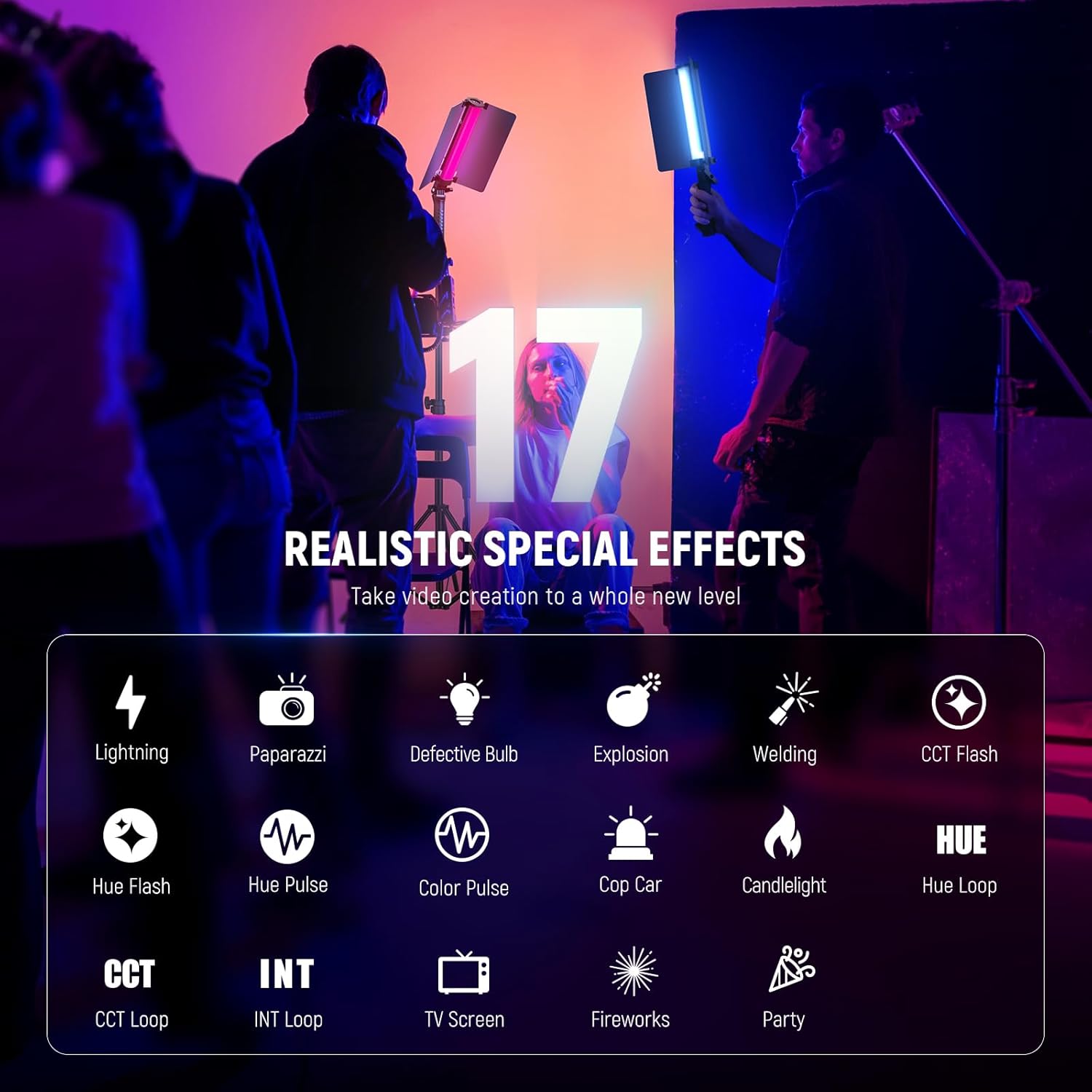
Figure 6: 17 Realistic Special Effects. This image displays the various scene options available, such as Lightning, Paparazzi, Candlelight, and more.
אַפּ קאָנטראָל
The NEEWER RGB1 LED Tube Light Stick can be controlled wirelessly via the 'NEEWER' app, available for iOS and Android devices. This allows for convenient remote adjustments and access to advanced features.
קאַנעקטינג צו די אַפּ
- Download the 'NEEWER' app from your device's app store.
- מאַכן זיכער אַז בלועטאָאָטה איז ענייבאַלד אויף דיין סמאַרטפאָנע.
- Power on the RGB1 light stick.
- Open the NEEWER app and follow the on-screen instructions to connect to your device. For Android users, location/GPS services may need to be enabled, and the Bluetooth icon on the light should be blinking during connection.
אַפּ פֿעיִקייטן
- Pick any color using an RGB color wheel.
- Adjust brightness, color temperature, hue, and saturation.
- Select and customize scenes.
- Save custom presets.
- Utilize the Source Match function.

Figure 7: App Wireless Control Interface. This image shows the NEEWER app interface on a smartphone, demonstrating the various controls for the RGB1 light stick.
Video 1: NEEWER RGB1 LED Tube Light Stick with Metal Barndoor. This video demonstrates the features and functionality of the NEEWER RGB1 LED Tube Light Stick, including its metal barndoor and various lighting modes.
וישאַלט
רייניקונג
To clean the light stick, use a soft, dry cloth. Avoid using abrasive cleaners or solvents, as these can damage the surface or internal components.
באַטערי קער
- באַשולדיקן די באַטאַרייע גאָר איידער ערשטער נוצן.
- פֿאַר אַן אָפּטימאַלן באַטאַרייע לעבן, זאָלט איר נישט אָפט גאָר אויסליידיקן די באַטאַרייע.
- If storing the device for an extended period, charge it to approximately 50% and recharge every 3-6 months to prevent deep discharge.
- Always power off the device completely when not in use to prevent battery drain, especially if Bluetooth is enabled.
סטאָרידזש
Store the light stick in its included pouch or waterproof bag in a cool, dry place away from direct sunlight and extreme temperatures.
טראָובלעשאָאָטינג
ליכט נישט טורנינג אויף
- Ensure the battery is charged. Connect the USB Type-C cable to a power source and check the charging indicator.
- Perform a long press on the power button to ensure it is properly activated.
אַפּ קאַנעקטיוויטי פּראָבלעמען
- Verify Bluetooth is enabled on your smartphone and the light stick.
- For Android devices, ensure location/GPS services are active.
- Try resetting the Bluetooth connection on the light stick by long pressing the '2.4G/Bluetooth Mode' button for 5 seconds.
- Ensure the light stick is within the 164ft/50m wireless control range.
שנעלע באַטעריע אויסלאָשן
- If the light stick is left in Bluetooth standby mode, it may experience significant battery drain. Always power off the device completely when not in use.
- Ensure the light is not operating at 100% brightness for extended periods, as this consumes more power.
ספּעסאַפאַקיישאַנז
| שטריך | באַשרייַבונג |
|---|---|
| מאָדעל נומער | RGB1 |
| פּעקל דימענשאַנז | 12.76 X 6.22 X 2.95 אינטשעס |
| פּונקט וואָג | 2.73 פונט |
| באַטעריז פארלאנגט | אינערלעכע 6400mAh ריטשאַרדזשאַבאַל באַטאַרייע |
| באַטאַרייע קאַפּאַציטעט | 6400 מאַה |
| Battery Life (100% brightness) | קסנומקס מינוט |
| קאַנעקטיוויטי טעכנאָלאָגיע | וסב, בלועטאָאָטה |
| ייַזנוואַרג צובינד | וסב טיפּ-C |
| קאָליר טעמפּעראַטור ראַנגע | 3200K-5600K |
| CRI | 98+ |
| לעדס | 150 SMD לעדס |
וואָראַנטי און שטיצן
For warranty information or technical support, please refer to the official NEEWER webזייטל אדער קאנטאקט זייער קאסטומער סערוויס גלייך. האלט אייער קויף קוויטל אלס באווייז פון קויפן פאר יעדע גאראנטיע טענות.


