1. הקדמה
Welcome to the user manual for your new DOOGEE Blade 10 Ultra Rugged Smartphone. This device is engineered for durability and high performance, featuring an Octa-core processor, a 50MP camera, and robust IP68/IP69K and MIL-STD-810H certifications for water, dust, and shock resistance. This manual provides essential information on setting up, operating, maintaining, and troubleshooting your smartphone to ensure optimal performance and longevity.
2. פּראָדוקט איבערview
The DOOGEE Blade 10 Ultra combines a sleek, ultra-thin design with rugged capabilities. Familiarize yourself with the device's physical features and components.

פיגור 2.1: פאָרנט און הינטן view of the DOOGEE Blade 10 Ultra smartphone.

פיגורע 2.2: דעטאַילעד view of the transparent back cover, showcasing internal components.

פיגור 2.3: זייט פּראָfile highlighting the 10.7mm ultra-thin design.
3. סעטאַפּ
3.1 סים קאַרטל און מיקראָסד קאַרטל ינסטאַלירונג
The DOOGEE Blade 10 Ultra supports Dual SIM 4G and expandable storage up to 2TB via a microSD card. Ensure the phone is powered off before inserting or removing cards.
- געפינט די סים קארטל טאַץ אויף דער זייט פון דעם מיטל.
- ניצט דעם צוגעשטעלטן סים ארויסווארפער געצייג צו עפענען דעם טאץ.
- Carefully place your Nano-SIM cards and/or microSD card into the designated slots. Ensure correct orientation.
- שטופּ אָפּ דעם טאַץ צוריק אין דעם אַפּאַראַט ביז עס איז גלייך.
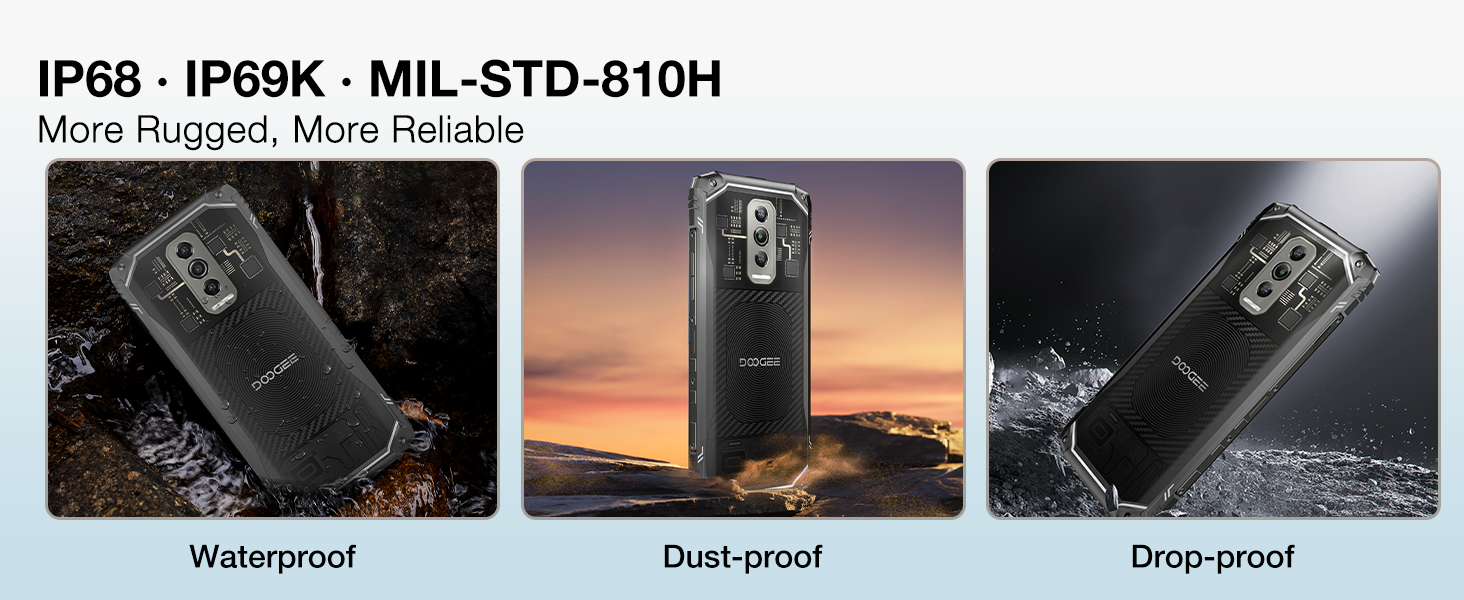
Figure 3.1: Illustration of inserting SIM and microSD cards into the tray.
3.2 ערשטע איינשטראָם און גרונטלעכע סעטטינגס
Press and hold the power button until the DOOGEE logo appears. Follow the on-screen prompts to complete the initial setup, including language selection, Wi-Fi connection, and Google account setup.
4. אַפּערייטינג ינסטרוקטיאָנס
4.1 אַרויסווייַז און באַניצער צובינד
The Blade 10 Ultra features a 6.56-inch 90Hz display, providing a smooth visual experience. Navigate the Android 14 operating system using touch gestures. Swipe down from the top for notifications and quick settings, swipe up for the app drawer, and use the navigation bar or gestures for home, back, and recent apps.

Figure 4.1: The 6.56-inch HD+ 90Hz Waterdrop Display.
4.2 קאַמעראַ פונקציעס
Capture high-quality images with the 50MP AI main camera. The Morpho Imaging Algorithm enhances your photography with features like Super Night Mode for brighter low-light shots, EIS Anti-Shake for stable photos and videos, and EIS UltraZoom for detailed distant objects.
Video 4.1: Demonstrating the Morpho Imaging Algorithm for enhanced photography.

פיגורע 4.2: איבערview of Morpho Imaging Algorithm features for diverse photography.
4.3 פאָרשטעלונג און סטאָרידזש
Powered by a robust Octa-core processor, the Blade 10 Ultra ensures smooth multitasking and efficient performance. It comes with 20GB RAM (8GB physical + 12GB virtual) and 256GB internal storage, expandable up to 2TB with a microSD card.
Video 4.2: Highlighting the powerful Octa-core processor for fast and power-saving performance.

Figure 4.3: Visual representation of the Octa-core processor.

Figure 4.4: Details on RAM, ROM, and expandable storage.
4.4 באַטאַרייע לעבן
The device is equipped with a 5150mAh large battery, providing extended usage times for standby, music playback, calls, video watching, and web בראַוזינג.
ווידעא 4.3: ווייַזןasing the 5150mAh large battery capacity.

פיגור 4.5: באַטעריע קאַפּאַציטעט און געשאצטע באַניץ צייטן.
4.5 זיכערהייט פֿעיִקייטן
Unlock your device securely using Face Recognition or the side-mounted Fingerprint Sensor. The fingerprint sensor offers a 0.19s response speed and 360° identification angle.

Figure 4.6: Dual unlocking modes for enhanced security.
4.6 קאָנעקטיוויטי און נאַוויגאַציע
The Blade 10 Ultra supports NFC for convenient mobile payments and data transfer, GPS for accurate navigation, and OTG for connecting external USB devices. It also features dual-band Wi-Fi for reliable internet access.

Figure 4.7: NFC functionality for seamless transactions.

Figure 4.8: GPS for precise location tracking and navigation.
4.7 אַפּערייטינג סיסטעם
The smartphone runs on the latest Android 14 system, offering advanced privacy and security features, along with a customizable user experience.
5. וישאַלט
5.1 שטאַרקע פֿעיִטשערס
The DOOGEE Blade 10 Ultra is designed to withstand harsh environments, certified with IP68/IP69K for water and dust resistance, and MIL-STD-810H for shock resistance. This means it can endure submersion in water, exposure to dust, and drops from certain heights.
Video 5.1: Demonstrating the ruggedness and reliability of the DOOGEE Blade 10 Ultra.

Figure 5.1: Visual representation of the phone's waterproof, dustproof, and drop-proof capabilities.
5.2 רייניקונג אינסטרוקציעס
To clean your device, power it off and wipe it gently with a soft, damp שטאָף. פֿאַרמײַדט ניצן שאַרפֿע כעמיקאַלן אָדער אַברייסיוו מאַטעריאַלן וואָס קענען שאַטן דעם עקראַן אָדערasing. Ensure all ports are dry before charging or connecting accessories after exposure to water.
6. טראָובלעשאָאָטינג
If you encounter issues with your DOOGEE Blade 10 Ultra, refer to the following common solutions:
- מיטל נישט פּאַוערינג אויף: זיכער מאַכן אַז די באַטאַרייע איז אויפגעלאָדן. פֿאַרבינדט דעם טעלעפאָן צו זײַן טשאַרדזשער און וואַרט אַ פּאָר מינוט איידער איר פּרוּווט עס ווידער אָנצוצינדן.
- נעץ קאָנעקטיוויטי פּראָבלעמען: Check if your SIM card is correctly inserted. Verify that mobile data is enabled in settings. If issues persist, contact your network provider.
- פּאַמעלעך פאָרשטעלונג: Close unnecessary background applications. Clear cache from apps or perform a factory reset (back up data first).
- עקראַן רעאַגירט נישט: Restart the device by holding the power button. If unresponsive, force restart by holding power and volume down buttons simultaneously for about 10 seconds.
- קאַמעראַ אַרבעט נישט: Ensure the camera app has necessary permissions. Restart the device.
For more complex issues, please refer to the support section or contact customer service.
7. ספּעסאַפאַקיישאַנז
| שטריך | באַשרייַבונג |
|---|---|
| סאָרט | DOOGEE |
| מאָדעל | בלייד 10 אולטרא |
| זכּרון סטאָרידזש קאַפּאַסיטי | 256 גיגאבייט (אויסברייטבאר ביז 2 טב מיט מיקראָסד) |
| באַראַן | 20 גיגאבייט (8 גיגאבייט פיזיש + 12 גיגאבייט ווירטועל) |
| פאַרשטעלן גרייס | 6.56 אינטשעס |
| דערפרישן קורס | 90 הז |
| ווירעלעסס קאַריער | Unlocked for All Carriers (Note: Not support T-mobile and AT&T networks) |
| קאָליר | שוואַרץ |
| פּראַסעסער | אָקטאַ-האַרץ |
| הויפּט אַפּאַראַט | 50MP אַי אַפּאַראַט |
| באַטאַרייע קאַפּאַציטעט | 5150 מאַה |
| געווער | IP68/IP69K Waterproof, Dustproof, Shockproof; MIL-STD-810H Certified |
| אָפּערייטינג סיסטעם | אַנדרויד 14 |
| דימענסיעס (L X W X H) | 6.45 X 2.98 X 0.33 אינטשעס (163.8 X 75.7 X 8.4 מם) |
| גרעב | 10.7 מ״מ (דיןסטער טייל) |
8. וואָראַנטי און שטיצן
Your DOOGEE Blade 10 Ultra comes with a two-year warranty service. For any product-related inquiries, technical assistance, or warranty claims, please contact DOOGEE customer support. You can find contact information on the official DOOGEE webזייטל אדער דורך אייער קויפן פּלאַטפאָרמע.
ביטע באַהאַלטן אייער קויפן-באַווייַז פֿאַר וואָראַנטי וואַלידאַציע.