1. וויכטיק סאַפעטי אינסטרוקציעס
Please read this manual carefully before using the LEFANT M330Pro Robot Vacuum and Mop and keep it for future reference. Failure to follow these instructions may result in electric shock, fire, or serious injury.
- דער מיטל קענען ווערן גענוצט דורך קינדער אַלט 8 יאר און העכער און מענטשן מיט רידוסט פיזיש, סענסערי אָדער גייַסטיק קייפּאַבילאַטיז אָדער פעלן פון דערפאַרונג און וויסן אויב זיי האָבן באקומען השגחה אָדער לימעד וועגן נוצן פון די אַפּפּליאַנסע אויף אַ זיכער וועג און פֿאַרשטיין די כאַזערדז ינוואַלווד. .
- קינדער זאָל זיין סופּערווייזד צו ענשור אַז זיי טאָן ניט שפּילן מיט די אַפּפּליאַנסע.
- רייניקונג און באַניצער וישאַלט זאָל ניט זיין געמאכט דורך קינדער אָן השגחה.
- Do not use the robot in wet environments or near water.
- Ensure the charging base is placed on a level surface against a wall, with adequate clear space around it.
- Remove any loose cables, small objects, or fragile items from the floor before operation to prevent entanglement or damage.
- Do not allow the robot to pick up large objects, liquids, or burning/smoking materials.
- Use only the original power adapter and charging base provided with the robot.
- Turn off the robot and unplug the charging base before performing any maintenance or cleaning.
2. פּראָדוקט איבערview
The LEFANT M330Pro is a versatile 3-in-1 robot vacuum and mop designed for efficient cleaning of various floor types, including carpets and hard floors. It features powerful suction, intelligent navigation, and smart control options.
שליסל פֿעיִקייטן:
- 3-אין-1 רייניקונג: Combines vacuuming, sweeping, and mopping functions.
- 5000Pa זויג-מאַכט: Strong suction for dirt, crumbs, and pet hair.
- Brushless Design: Reduces hair tangles, simplifying maintenance.
- dToF Laser Navigation: 360° precise mapping and intelligent path planning.
- PSD Obstacle Avoidance: 190° detection to avoid furniture, cables, and objects.
- Automatic Carpet Recognition: Adjusts cleaning mode and suction power on carpets.
- Multi-level Mapping: Supports mapping for up to 3 floors.
- עקסטענדעד רונטימע: Up to 150 minutes, covering up to 150 square meters.
- אָטאַמאַטיק ריטשאַרדזשינג: Returns to base when battery is low and resumes cleaning.
- 200 מל וואַסער טאַנק: Provides consistent water distribution for mopping.
- 450ml Dustbin: Large capacity reduces frequency of emptying.
- סמאַרט קאָנטראָל: Via Lefant App, compatible with Alexa, Google Assistant, and Apple Watch.
פּראָדוקט קאַמפּאָונאַנץ:
Familiarize yourself with the main parts of your LEFANT M330Pro robot vacuum.

Image: The LEFANT M330Pro robot vacuum demonstrating its 3-in-1 cleaning capabilities (sweeping, vacuuming, mopping) with a 200ml water tank and 99% cleaning efficiency indicated.
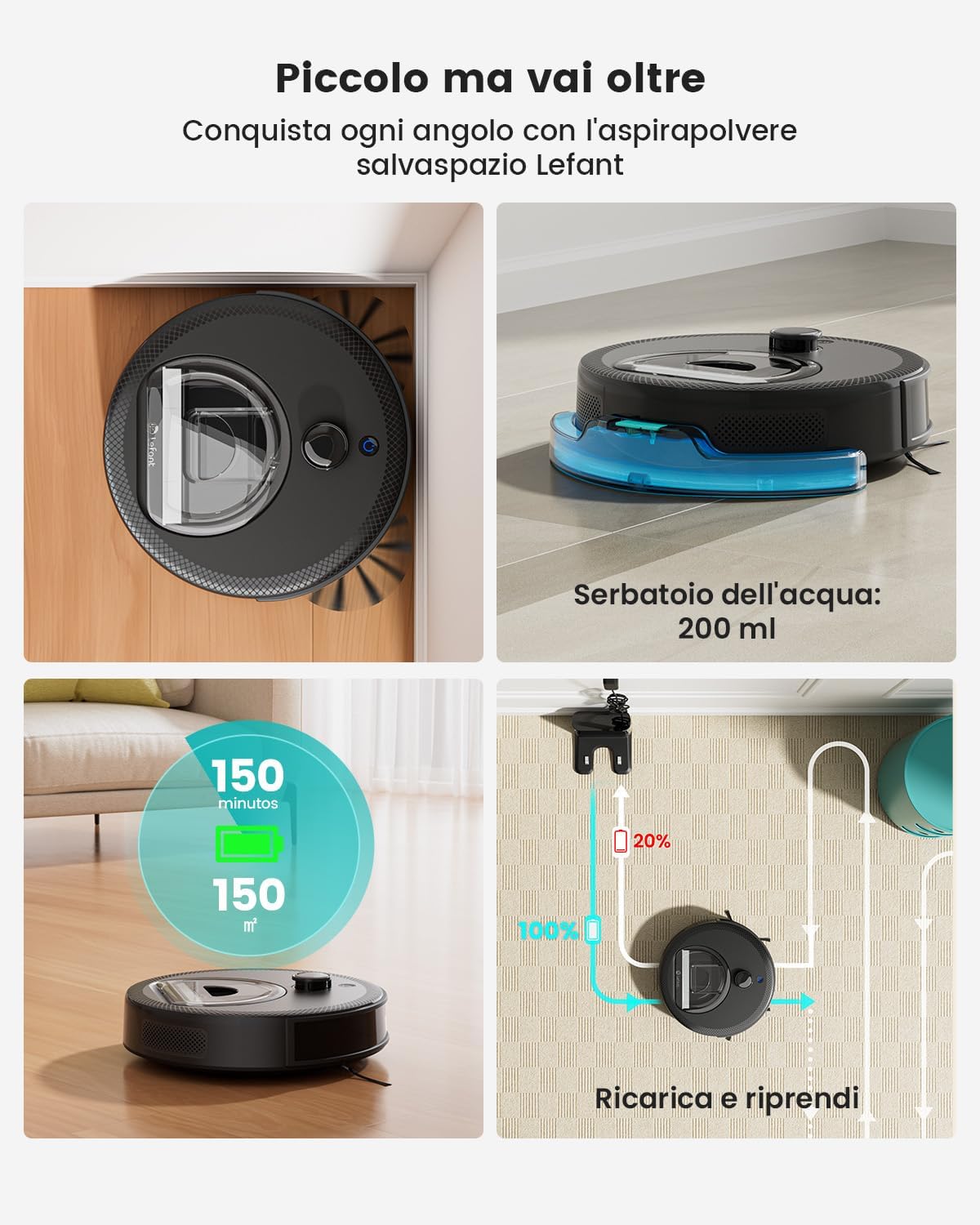
Image: A visual representation of the LEFANT M330Pro's features, including its 200ml water tank, 150 minutes of runtime covering 150 square meters, and automatic recharge and resume function.

Image: The compact design of the LEFANT M330Pro allows it to clean effectively under beds, tables, and sofas, reaching difficult areas.
3. סעטאַפּ
3.1 אַנפּאַקינג
Carefully remove the robot vacuum, charging base, power adapter, and all accessories from the packaging. Remove any protective films or packing materials from the robot and charging base.
3.2 פּלאַצירונג פון די טשאַרדזשינג באַזע
- Place the charging base against a wall on a hard, level surface.
- Ensure there is at least 0.5 meters (1.6 feet) of clear space on both sides of the charging base and 1.5 meters (4.9 feet) in front of it.
- Keep the area clear of obstacles, such as power cords, rugs, or furniture, that could block the robot's path to the charging base.
- שטעקט אריין דעם מאַכט אַדאַפּטער אין דער טשאַרדזשינג באַזע און דערנאָך אין אַ וואַנט ווענטיל.
3.3 ערשט אָפּצאָל
Place the robot onto the charging base, ensuring the charging contacts align. The robot will begin charging automatically. For first-time use, fully charge the robot for at least 6 hours.
3.4 App Connection and Smart Home Integration
To unlock the full potential of your M330Pro, download the Lefant App on your smartphone. The app allows for advanced control, scheduling, and monitoring.
- Download the "Lefant" app from the App Store (iOS) or Google Play Store (Android).
- רעגיסטרירן אַ חשבון און קלאָץ אין.
- Follow the in-app instructions to add your M330Pro robot. Ensure your phone is connected to a 2.4GHz or 5GHz Wi-Fi network during setup.
- Once connected, you can link your robot to voice assistants like Amazon Alexa or Google Assistant through their respective apps for voice control.
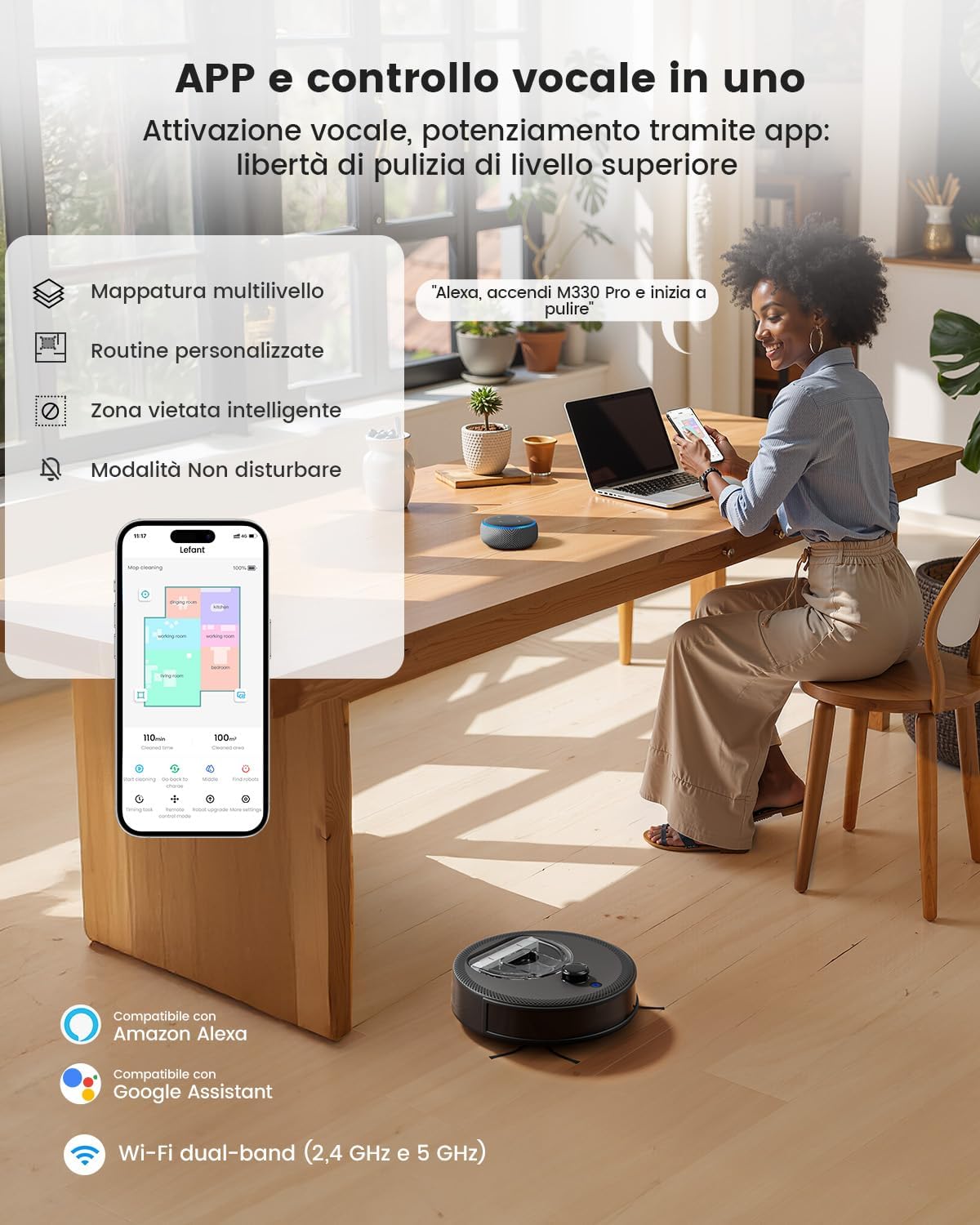
Image: The Lefant App interface showing multi-level mapping, custom routines, intelligent no-go zones, and Do Not Disturb mode. The robot is compatible with Amazon Alexa and Google Assistant, supporting dual-band Wi-Fi (2.4 GHz and 5 GHz).
4. אַפּערייטינג ינסטרוקטיאָנס
4.1 אָנהייבן און אָפּשטעלן רייניקונג
- אָנהייב: Press the power button on the robot or use the "Start Cleaning" option in the Lefant App. The robot will begin cleaning in automatic mode.
- פּויזע: Press the power button again or use the "Pause" option in the app to temporarily stop cleaning.
- Return to Charging Base: Press the home button on the robot or select "Recharge" in the app.
4.2 רייניקונג מאָדעס
Select different cleaning modes via the Lefant App to suit your needs:
- אָטאַמאַטיק רייניקונג: דער ראָבאָט מאַפּט און רייניקט קלוג דיין גאַנץ היים.
- אָרט רייניקונג: רייניקט אַ ספּעציפֿישע געגנט מיט קאָנצענטרירטער זויג.
- Room Cleaning: Select specific rooms to clean from your mapped layout.
- מאַנואַל קאָנטראָל: Use the app's directional controls to guide the robot.
4.3 Carpet Recognition and Surface Adaptation
The M330Pro automatically detects carpets and adjusts its cleaning mode and suction power for optimal performance. It increases suction on carpets for deeper cleaning and maintains balanced operation on hard floors.

Image: The robot intelligently adapts to surfaces, detecting carpets and boosting power for deeper cleaning, while maintaining standard operation on hard floors.
4.4 מאָפּינג פֿונקציע
Attach the mop cloth and fill the 200ml water tank with clean water. The robot will distribute water consistently for effective mopping on hard surfaces. Do not use the mopping function on carpets.
4.5 Advanced Mapping and Navigation
The dToF laser navigation system creates precise maps of your home, allowing for efficient cleaning paths and advanced features.
- קאַסטאַמייזאַבאַל מאַפּס: View and edit your home's map in the Lefant App.
- Multi-level Mapping: The robot can store maps for up to 3 different floors.
- Custom Routines: Set specific cleaning schedules and areas for different times.
- ניט-גיין זאָנעס: Define areas the robot should avoid, such as pet bowls or fragile items.

Image: The dToF navigation system enables precise laser mapping for hands-free cleaning, supporting custom routines and multi-level mapping for up to 3 floors.

Image: The Lefant M330Pro allows users to define custom no-go zones on the map, ensuring the robot cleans exactly where desired and avoids specific areas like pet feeding stations.
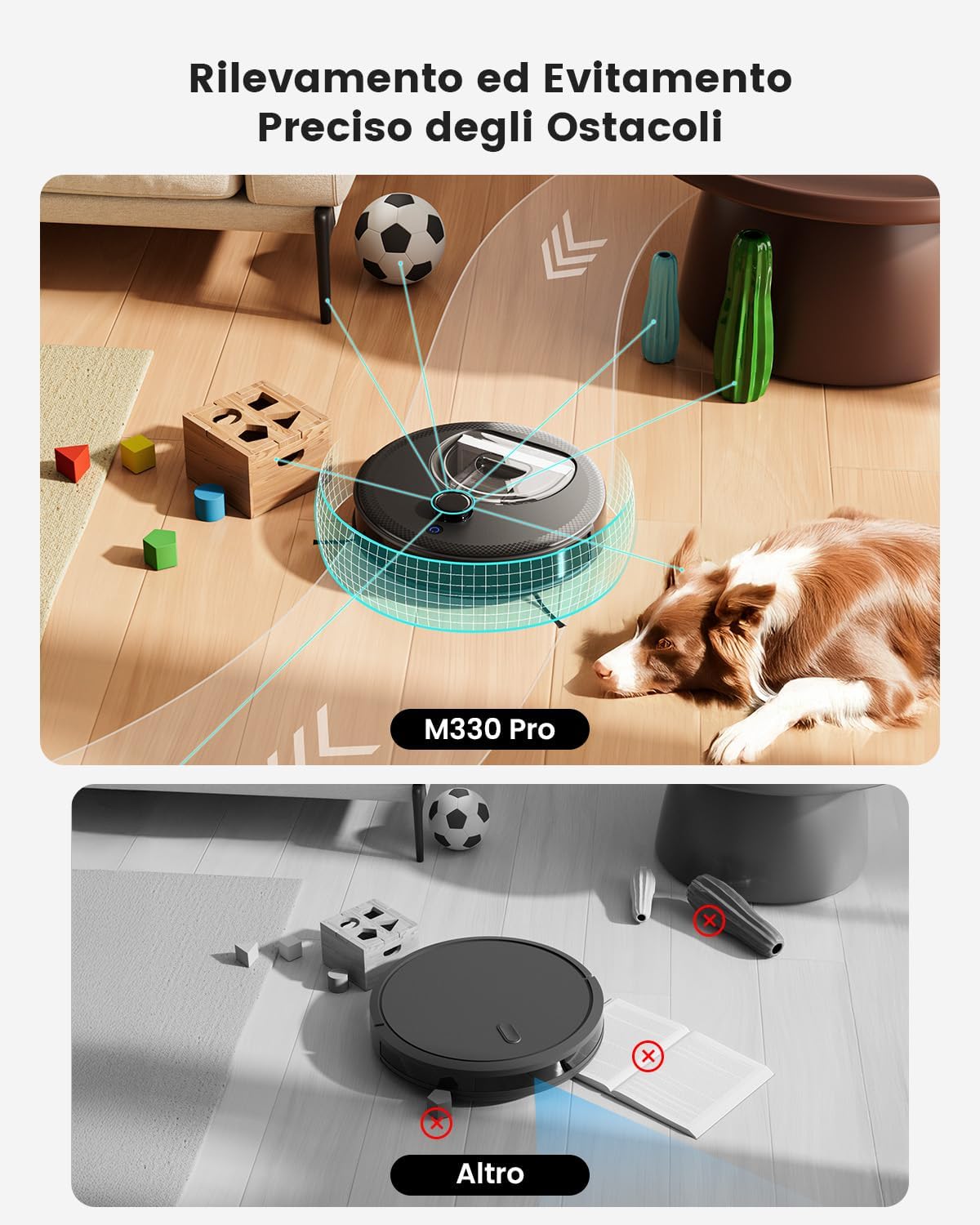
Image: The M330Pro features precise obstacle detection and avoidance, using its PSD system to navigate around objects like toys, cables, and furniture, preventing collisions and ensuring smooth operation.
5. וישאַלט
Regular maintenance ensures optimal performance and extends the lifespan of your LEFANT M330Pro. Always turn off the robot and unplug the charging base before performing maintenance.
5.1 אויסליידיקן דעם מיסטקאסטן
The 450ml dustbin should be emptied after each cleaning cycle or when full.
- Open the top cover of the robot.
- Remove the dustbin by pulling it upwards.
- Open the dustbin lid and empty its contents into a trash can.
- Clean the filter inside the dustbin with the provided cleaning tool or a small brush.
- שווענקט אויס דעם מיסטקאסטן מיט וואסער אויב נויטיג (מאכט זיכער אז עס איז אינגאנצן טרוקן איידער איר לייגט עס צוריק אריין).
- Reinsert the dustbin and close the top cover.

Image: The LEFANT M330Pro features a transparent 450ml dustbin, allowing easy visual inspection of collected debris and less frequent emptying compared to smaller dustbins.
5.2 Cleaning the Mop Cloth and Water Tank
- After each mopping session, remove the mop cloth from the water tank.
- Rinse the mop cloth thoroughly with water and allow it to air dry completely before reuse.
- Empty any remaining water from the water tank and rinse it. Allow it to air dry.
5.3 רייניקונג פון סענסאָרן און טשאַרדזשינג קאָנטאַקטן
Wipe the following components with a clean, dry cloth:
- קליף סענסארן: Located on the bottom of the robot.
- טשאַרדזשינג קאָנטאַקטן: On the bottom of the robot and on the charging base.
- dToF Laser Sensor: On the top of the robot.
- PSD Obstacle Avoidance Sensors: On the front bumper of the robot.
5.4 זייט באַרשט וישאַלט
Inspect the side brushes regularly for tangled hair or debris. Use scissors to cut away any tangled hair and pull out debris. Replace worn-out side brushes as needed.
6. טראָובלעשאָאָטינג
If you encounter issues with your LEFANT M330Pro, refer to the following common problems and solutions:
| פּראָבלעם | מעגלעך סיבה | לייזונג |
|---|---|---|
| ראָבאָט טוט נישט קער אויף. | נידעריגע באַטעריע; מאַכט אויסשאַלטן. | Charge the robot fully; ensure the main power switch is ON. |
| ראָבאָט קען נישט צוריקקומען צו דער טשאַרדזשינג באַזע. | טשאַרדזשינג באַזע פֿאַרשטאָפּט; ראָבאָט צו ווייט פֿון באַזע. | Clear obstacles around the charging base; manually place the robot closer to the base. |
| רייניקונג פאָרשטעלונג איז שלעכט. | Dustbin full; filters clogged; side brushes tangled. | Empty dustbin; clean/replace filters; clean side brushes. |
| ראָבאָט בלייבט אָפט שטעקן. | Loose cables, small objects, or high thresholds. | Clear the cleaning area; use No-Go Zones in the app. |
| אַפּ קאַנעקשאַן פּראָבלעמען. | Incorrect Wi-Fi password; robot not in pairing mode; router issues. | Verify Wi-Fi password; reset robot's Wi-Fi; restart router; ensure 2.4GHz/5GHz network is used. |
If the problem persists, please contact LEFANT customer support for assistance.
7. ספּעסאַפאַקיישאַנז
| שטריך | דעטאַל |
|---|---|
| סאָרט | לעפאַנט |
| מאָדעל נאָמען | M330 Pro |
| סאַקשאַן מאַכט | ביז 5000Pa |
| נאַוויגאַציע טיפּ | dToF Laser Navigation (360°) |
| שטערונג אַוווידאַנס | PSD (190°) |
| באַטערי רונטימע | אַרויף צו 150 מינוט |
| קאַווערידזש שטח | Up to 150 square meters per charge |
| דוסטבין קאַפּאַציטעט | 450 מל |
| וואַסער טאַנק קאַפּאַציטעט | 200 מל |
| קאַנעקטיוויטי | Wi-Fi 2.4G/5G, App Control, Alexa, Google Assistant, Apple Watch |
| רעקאַמענדיד סערפאַסיז | Hard floor, Carpet, Parquet, Tiles |
| קאָליר | שוואַרץ |
8. וואָראַנטי און שטיצן
LEFANT provides a limited warranty for the M330Pro Robot Vacuum and Mop. Please refer to the warranty card included in your product packaging for specific terms and conditions, including warranty duration and coverage.
For technical support, troubleshooting assistance, or warranty claims, please contact LEFANT customer service. You can find contact information on the official LEFANT website or through the Lefant App.
אָנליין רעסורסן: For additional support, FAQs, and video tutorials, visit the official LEFANT webפּלאַץ: www.lefant.com


