
הקדמה
Thank you for choosing the TOZO NC9 Bluetooth 5.3 Hybrid ANC Wireless Earbuds. These earbuds are designed to provide a superior audio experience with advanced features such as Hybrid Active Noise Cancellation, clear call quality, and extended battery life. This manual will guide you through the setup, operation, and maintenance of your new earbuds.
פּעקל אינהאַלט
ביטע זיכער מאַכן אַז אַלע זאכן זענען פאַראַן אין דיין פּעקל:
- TOZO NC9 Wireless Earbuds (Left and Right)
- טשאַרדזשינג קאַסע
- Ear Tips (Multiple Sizes)
- וסב-C טשאַרדזשינג קאַבלע
- באַניצער מאַנואַל (דעם דאָקומענט)
פּראָדוקט איבערview
Familiarize yourself with the components of your TOZO NC9 earbuds and charging case.
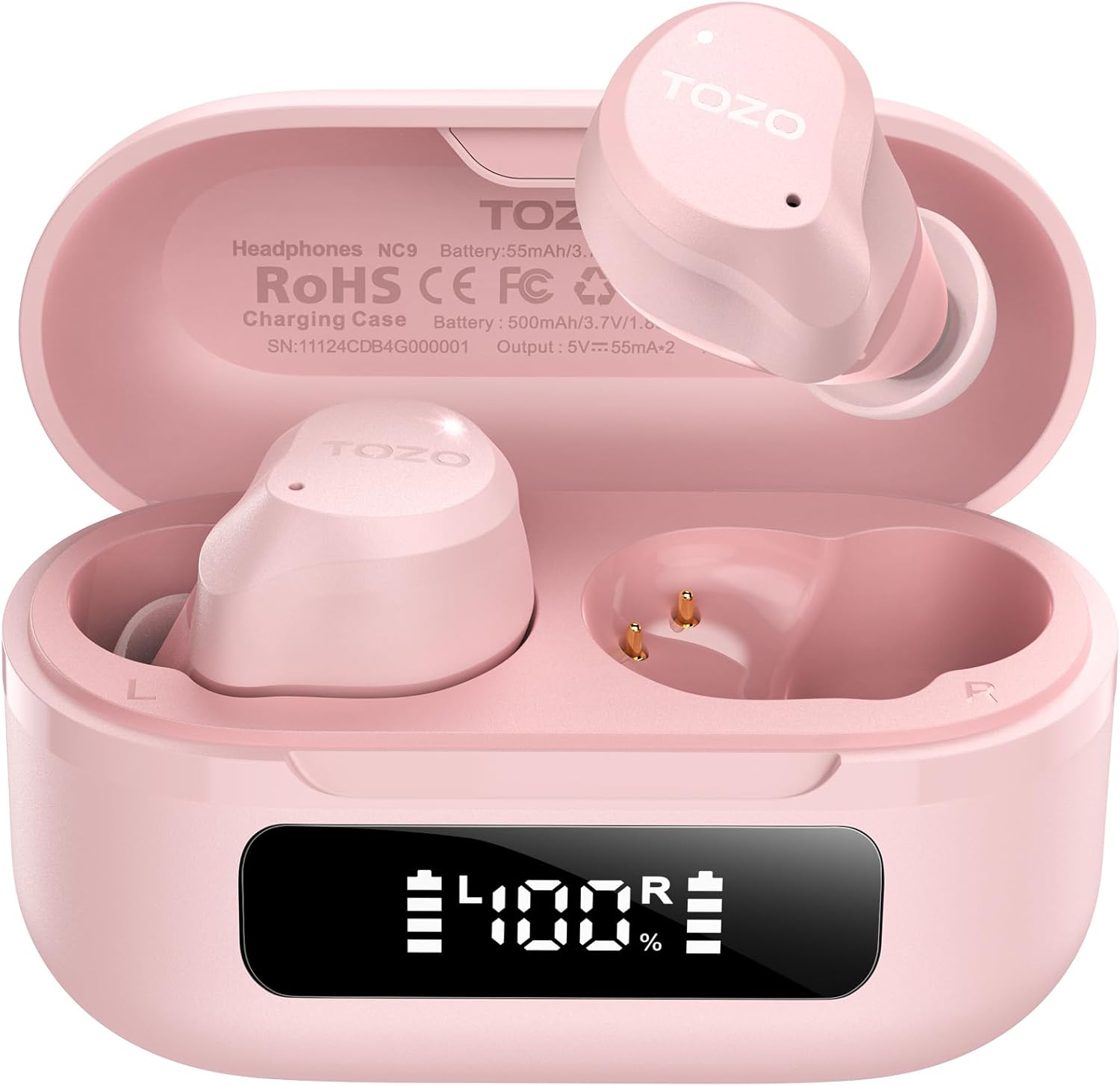
Image: The TOZO NC9 earbuds shown with their charging case. The earbuds are pink and feature an in-ear design. The charging case is also pink with a smooth, compact form factor. This image provides a general view פון די פּראָדוקט קאַמפּאָונאַנץ.

Image: The TOZO NC9 earbuds are placed inside their open charging case, revealing an LED display on the front of the case that shows battery percentage. This illustrates how the earbuds are stored and charged within the case.

Image: A detailed diagram illustrating the internal driver components of the TOZO NC9 earbud, highlighting the OrigX Acoustics Technology. This visual explains the audio engineering behind the sound quality.
סעטאַפּ
1. אויפלאָדן די אויערקנעפּלעך און קעסטל
פארן ערשטן באַנוץ, לאָדן די אויערקנעפּלעך און די טשאַרדזשינג קעסטל גאָר אויף.
- לייגט די אויערן-קנעפּלעך אין דעם טשאַרדזשינג קעסטל. מאַכט זיכער אַז זיי זענען ריכטיק אײַנגעזעצט.
- פֿאַרבינדט דעם USB-C טשאַרדזשינג קאַבל צום טשאַרדזשינג פּאָרט אויף דער קעיס און צו אַ מאַכט מקור.
- The LED display on the charging case will indicate the charging status. A full charge may take approximately 5 hours if completely depleted.

Image: The TOZO NC9 charging case with earbuds, displaying "60 hrs" to indicate the total playtime. This image emphasizes the extended battery life of the product.

Image: A close-up of the TOZO NC9 charging case's LED display showing "100%" battery charge, with the "SmartPow Power Management" logo. This highlights the intelligent battery optimization feature.
2. פּערינג מיט דיין מיטל
The TOZO NC9 earbuds use Bluetooth 5.3 for a stable connection.
- עפֿנט דעם טשאַרדזשינג קעסטל. די אויערקנעפּלעך וועלן אויטאָמאַטיש אַרײַן אין פּערינג מאָדע.
- אויף אייער דעווייס (סמאַרטפאָן, טאַבלעט, קאָמפּיוטער), גייט צו בלועטוט סעטטינגס.
- זוכן פֿאַר "TOZO NC9" in the list of available devices and select it to connect.
- אַמאָל פארבונדן, וועט איר הערן אַן אַודיאָ פּראָמפּט, און די אויערקנעפּלעך וועלן זיין גרייט פֿאַר נוצן.

Image: A visual representation of the TOZO App interface on a smartphone, showing various settings like ANC modes, EQ adjustments, and white noise tracks. This demonstrates the app's capabilities for customizing the earbud experience.
אַפּערייטינג ינסטראַקשאַנז
ריר קאָנטראָלס
The TOZO NC9 earbuds feature intuitive touch controls. Specific functions can be customized via the TOZO App.
| קאַמף | פֿונקציע |
|---|---|
| איין צאַפּ (לינקס/רעכטס) | שפּיל / פּויזע, ענטפֿערן רופן |
| טאָפּל טאַפּ (L) | פֿריִערדיקע שפּירט |
| טאָפּלט קלאַפּ (R) | ווייַטער שפּור |
| טריפל טאַפּ (לינקס/רעכטס) | אַקטאַווייט די קול אַססיסטאַנט |
| לאַנג דריקן (לינקס/רעכטס) | Switch ANC/Transparency/Normal Mode, Reject Call |
אַקטיווע ראַש קאַנסאַליישאַן (ANC) מאָדעס
The TOZO NC9 offers Hybrid ANC to reduce ambient noise by up to 45dB, along with a Transparency Mode.
- אַקטיוו ראַש קאַנסאַליישאַן (ANC) מאָדע: Reduces external noise, ideal for travel or noisy environments.
- דורכזעיקייַט מאָדע: Allows you to hear your surroundings without removing the earbuds, useful for conversations or awareness.
- נאָרמאַל מאָדע: Standard audio experience without noise cancellation or transparency.
Cycle through these modes by long-pressing either earbud (customizable via app).

Image: A person wearing TOZO NC9 earbuds on an airplane, illustrating the effectiveness of the up to 45dB advanced noise cancellation feature for a peaceful listening experience.
קריסטאַל-קלאָר קאַללס
Equipped with 6 ENC (Environmental Noise Cancellation) microphones, the NC9 ensures your voice is clear during calls, even in noisy environments.

Image: A person wearing TOZO NC9 earbuds while walking in a city environment, making a phone call. This image highlights the crystal-clear call quality provided by the six ENC microphones, minimizing background noise.
TOZO App Integration
Download the TOZO App for enhanced control and customization:
- Adjustable Noise Control Modes (6 options)
- 32 Preset EQ Modes and access to over 2000 user-shared EQs
- 100+ White Noise Tracks
- פירמוואַרע דערהייַנטיקונגען
The app allows for a personalized audio experience.
וישאַלט
רייניקונג
- רייניקט רעגולער די אויערקנעפּלעך, ספּעציעל די אויער שפּיץ און טשאַרדזשינג קאָנטאַקטן, מיט אַ ווייכן, טרוקענעם, לינט-פֿרייע שטאָף.
- דו זאלסט נישט נוצן אַברייסיוו קלינערז אָדער סאָלוואַנץ.
סטאָרידזש
- ווען נישט אין באַנוץ, לייגט די אויערן-קנעפּלעך אין זייער טשאַרדזשינג קעסטל צו באַשיצן זיי און האַלטן זיי טשאַרדזשד.
- האַלטן אין אַ קיל, טרוקן אָרט אַוועק פון עקסטרעמע טעמפּעראַטורן.
וואַסער קעגנשטעל (IPX8)
The TOZO NC9 earbuds are IPX8 waterproof, meaning they are protected against immersion in water up to 1 meter for up to 30 minutes. This makes them suitable for workouts and light rain, but they are not designed for swimming or prolonged submersion.

Image: A person wearing TOZO NC9 earbuds while reading, demonstrating the ergonomic design for all-day comfort and a secure fit. This image emphasizes the comfort aspect of the earbuds.
טראָובלעשאָאָטינג
| אַרויסגעבן | מעגלעך לייזונג |
|---|---|
| עאַרבודס נישט טשאַרדזשינג | Ensure earbuds are correctly seated in the case. Check charging cable and power source. Clean charging contacts. |
| קען נישט צוזאמענשטעלן מיטן אפאראט | Ensure Bluetooth is enabled on your device. Place earbuds in case, close, then open to re-enter pairing mode. Forget "TOZO NC9" from your device's Bluetooth list and try pairing again. |
| קיין געזונט פון איין עאַרבוד | Place both earbuds back in the case, close it, then open again. Ensure both earbuds are charged. Perform a factory reset (refer to TOZO App or online support for specific steps). |
| ANC אַרבעט נישט עפֿעקטיוו | Ensure ear tips provide a good seal. Try different sized ear tips. Ensure ANC mode is activated. |
| נעבעך רופן קוואַליטעט | Ensure microphones are not obstructed. Check network signal. |
For further assistance, please refer to the TOZO App or contact TOZO customer support.
ספּעסאַפאַקיישאַנז
| מאָדעל נאָמען | NC9 |
| בלועטאָאָטה ווערסיע | 5.3 |
| ראַש קאָנטראָל | Hybrid Noise Reduction (up to 45dB ANC) |
| מיקראָפאָנעס | 6 ENC Microphones |
| אַודיאָ דרייווער טיפּ | Dynamic (10mm drivers) |
| אָפטקייַט ראַנגע | 15 הערץ - 20,000 הערץ |
| באַטעריע לעבן (אויערקנעפּלעך) | אומגעפער 14 שעה (איין אויפלאדונג) |
| גאַנץ שפּילצייט (מיט קעסטל) | אַרויף צו 60 שעה |
| וואַסער קעגנשטעל שאַץ | IPX8 (וואָטערפּרוף) |
| קאָנטראָל טיפּ | ריר קאָנטראָל, אַפּ קאָנטראָל |
| קאַמפּאַטאַבאַל דעוויסעס | Phones, Laptops, Tablets, Smart Speakers |
| GTIN / UPC | 810102982537 |
וואָראַנטי און שטיצן
TOZO products come with a standard warranty. For detailed warranty information, product registration, or technical support, please visit the official TOZO webזייטל אדער קאנטאקט זייער קאסטומער סערוויס. האלט אייער קויף קוויטל פאר גאראנטיע טענות.
צוריקקער פּאָליטיק: The product has a return policy duration of 30 days for refund/replacement.