1. הקדמה
The House of Marley Get Together Go is a portable Bluetooth speaker designed for high-quality audio and outdoor durability. It features sustainable materials, multiple sound modes, and a robust, adventure-ready design.

Figure 1: Get Together Go Speaker in an outdoor environment.
Key features include IP67 waterproof and dustproof rating, up to 20 hours of playtime, customizable EQ modes, and Auracast multi-speaker pairing. The speaker is crafted from renewable bamboo and REGRIND silicone, reflecting a commitment to sustainable design.

פיגורע 2: איבערview of main features including EQ settings, playtime, IP67 protection, and ambient lighting.
2. פּעקל אינהאַלט
זיכער מאַכן אַז אַלע זאכן זענען פאַראַן אין פּעקל:
- House of Marley Get Together Go Portable Bluetooth Speaker
- וסב-C טשאַרדזשינג קאַבלע
- שנעלע אָנהייב גייד (נישט אַרייַנגערעכנט אין דעם מאַנואַל)
3. סעטאַפּ
3.1 אויפלאָדן דעם רעדנער
- פֿאַרבינדט דעם צוגעשטעלטן USB-C טשאַרדזשינג קאַבל צום רעדנער'ס טשאַרדזשינג פּאָרט.
- פֿאַרבינדט דעם אַנדערן עק פֿונעם קאַבל צו אַ קאָמפּאַטיבלע USB מאַכט אַדאַפּטער (נישט אַרייַנגערעכנט).
- די טשאַרדזשינג אינדיקאַטאָר ליכט וועט זיך אָנצינדן בעת טשאַרדזשינג און זיך אויסלעשן ווען עס איז גאָר אויפגעלאָדן.
3.2 פּאַוערינג אויף / אַוועק
- To power on, press and hold the Power button until the indicator lights activate.
- צו אויסלאָשן, דריק און האַלט די פּאַוער קנעפּל ווידער ביז די אינדיקאַטאָר ליכטלעך גייען אויס.

פיגורע 3: פראָנט view of the speaker, illustrating general layout and control area.
3.3 בלועטאָאָטה פּערינג
- פאַרזיכערן אַז די רעדנער איז פּאַוערד אויף.
- Press and hold the Bluetooth button on the speaker until the Bluetooth indicator light begins to flash, indicating pairing mode.
- אויף אייער דעווייס (סמאַרטפאָן, טאַבלעט, אאז"וו), אַקטיווירט בלועטוט און זוכט פֿאַר פֿאַראַן דעווייסעס.
- Select "Get Together Go" from the list of devices.
- אַמאָל פארבונדן, וועט די בלועטוט אינדיקאַטאָר ליכט ווערן האַרט.
3.4 Auracast Multi-Speaker Pairing
The Get Together Go supports Auracast for connecting multiple compatible speakers for a larger sound experience. Refer to the official House of Marley website for detailed instructions on Auracast setup.
4. אַפּערייטינג ינסטרוקטיאָנס
4.1 אַודיאָ ווידערשפּיל
- Once paired via Bluetooth, play audio from your connected device.
- Use the Volume Up (+) and Volume Down (-) buttons on the speaker to adjust the volume.
- Press the Play/Pause button to control playback.

Figure 4: Speaker control panel for power, Bluetooth, volume, and playback.
4.2 Custom EQ Modes
The speaker features three customizable EQ modes to optimize sound for different environments:
- Marley Signature Sound: Balanced audio profile.
- באַס באָאָסט: פֿאַרבעסערטע נידעריק-פֿרעקווענץ רעאַקציע.
- דרויסנדיק מאָדע: Optimized for open-air listening.
To switch between EQ modes, briefly press the Power button while the speaker is on. The ambient lighting may change to indicate the active mode.

Figure 5: Speaker in an outdoor setting, demonstrating its durability and suitability for various environments, where EQ modes can be adjusted.
4.3 אַמביאַנט לייטינג
The speaker includes ambient lighting at its base. This lighting can be toggled or adjusted by pressing a dedicated button (refer to the speaker's physical controls for exact button location, often integrated with power or EQ controls).
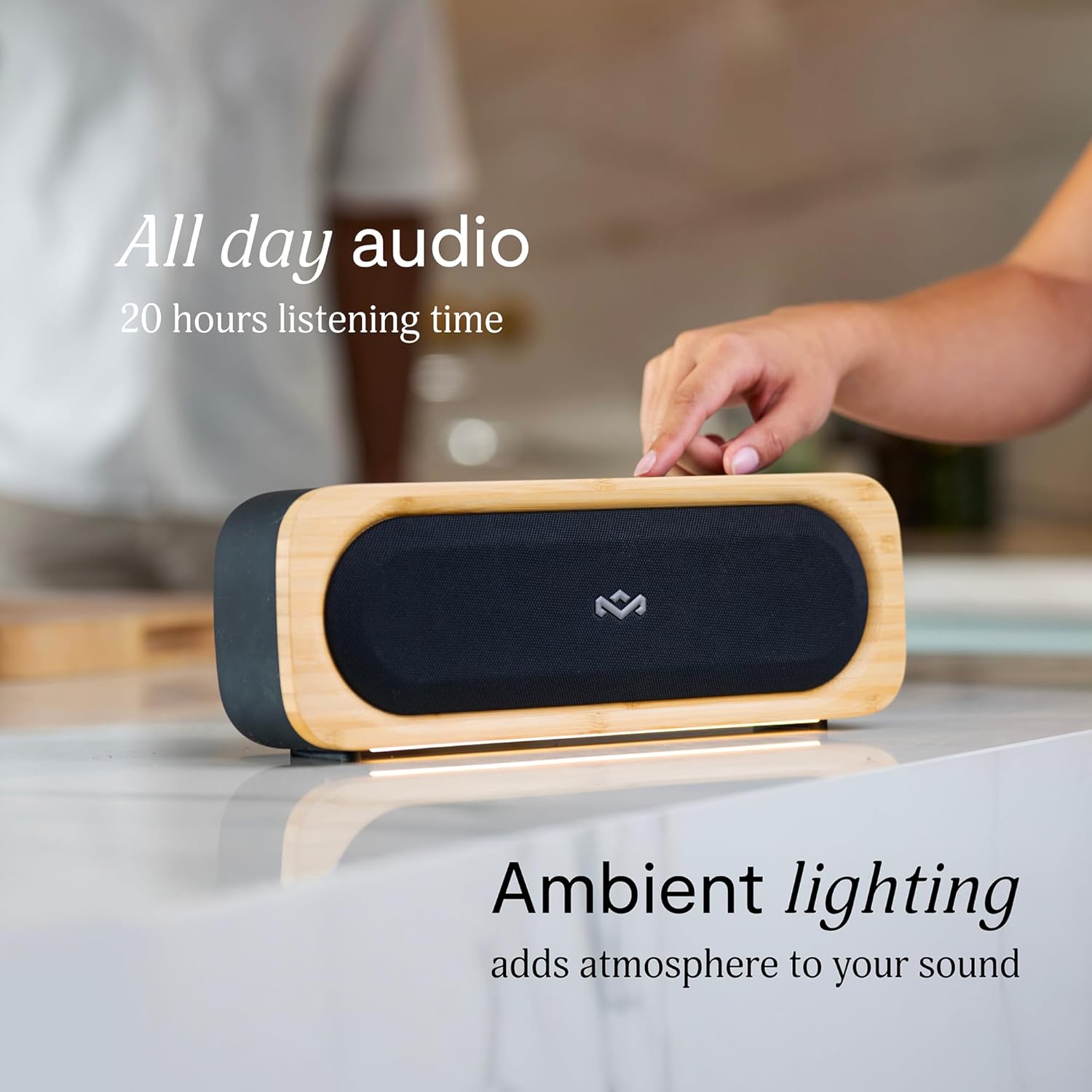
Figure 6: Speaker with ambient lighting active.
4.4 Built-in Bottle Opener
A bottle opener is integrated into the speaker's design for convenience. Locate the bottle opener on the rear or side of the speaker and use it as you would a standard bottle opener.

Figure 7: Demonstrating the use of the built-in bottle opener.
5. וישאַלט
5.1 רייניקונג
- The speaker features a removable grill for easy cleaning. Gently detach the grill to clean any dust or debris from the speaker drivers.
- ווישט אָפּ דעם רעדנער'ס אויסערלעכן טייל מיט אַ ווייכן, טרוקענעם שטאָף.amp שטאָף. ויסמיידן ניצן האַרב קעמיקאַלז אָדער אַברייסיוו קלינערז.
- Ensure the speaker is completely dry before reattaching the grill or using it near water.

Figure 8: Speaker with removable grill detached for cleaning.
5.2 Water and Dust Protection (IP67)
- The IP67 rating means the speaker is protected from dust ingress and can withstand immersion in water up to 1 meter for 30 minutes.
- Always ensure the charging port cover is securely closed before exposing the speaker to water or dust.
- נאך אויסשטעלן זיך צו וואסער, טריקנט דעם רעדנער גוט אויס איידער איר לאדט עס אויף.
5.3 באַטערי קער
- פֿאַר אַן אָפּטימאַלן באַטאַרייע לעבן, זאָלט איר נישט אָפֿט גאָר אויסלאָדן דעם רעדנער.
- האַלט דעם רעדנער אין אַ קיל, טרוקן אָרט ווען עס איז נישט אין באַנוץ פֿאַר לענגערע פּעריאָדן.
6. טראָובלעשאָאָטינג
6.1 Speaker Not Powering On
- Ensure the battery is charged. Connect the speaker to a power source and allow it to charge for at least 30 minutes before attempting to power on again.
- Press and hold the Power button for a few seconds to ensure it's not a brief press.
6.2 בלוטוט פּאָרינג פּראָבלעמען
- Make sure the speaker is in pairing mode (flashing Bluetooth indicator).
- Ensure your device's Bluetooth is enabled and within range (typically 10 meters or 33 feet).
- פרובירט צו פארגעסן דעם רעדנער פון אייער דעווייס' בלועטוט סעטינגס און ווידער פארבינדן.
- ריסטאַרט ביידע דעם רעדנער און אייער בלועטוט מיטל.
6.3 קיין קלאַנג אָדער נידעריקע באַנד
- קאָנטראָלירט די וואָלומען לעוועלס אויף ביידע דעם רעדנער און אייער פֿאַרבונדענעם מיטל.
- Ensure the speaker is properly paired and connected to your device.
- פרובירט צו שפּילן אַודיאָ פֿון אַן אַנדער אַפּליקאַציע אָדער מקור אויף אייער מיטל.
7. ספּעסאַפאַקיישאַנז
| שטריך | דעטאַל |
|---|---|
| מאָדעל נאָמען | קומט צוזאַמען גיי |
| נומער מאָדעל נומער | EM-JA036-SB |
| קאַנעקטיוויטי טעכנאָלאָגיע | בלועטאָאָטה |
| רעדנער מאַקסימום רעזולטאַט מאַכט | 20 וואטס |
| IP שאַץ | IP67 (וואַסערפּרוף און שטויבפּרוף) |
| פּלייַטימע | אַרויף צו 20 שעה |
| פּראָדוקט דימענשאַנז | 5.75"ד רענטגענ 16.13"וו רענטגענ 4.75"ה |
| פּונקט וואָג | 4.05 פונט |
| מאַטעריאַלס | Renewable Bamboo, REGRIND Silicone, REWIND Fabric |
| UPC | 846885011706 |
8. וואָראַנטי און שטיצן
For warranty information and technical support, please refer to the official House of Marley webזייטל אדער קאנטאקט זייער קאסטומער סערוויס גלייך. האלט אייער באווייז פון קויפן פאר גאראנטיע פארלאנגען.
9. Sustainability Commitment
The House of Marley Get Together Go speaker is designed with sustainability in mind, utilizing:
- Renewable Bamboo: Crafted from one of the world's fastest-growing plants.
- REWIND Fabric: Made from recycled plastic bottles for a durable finish.
- REGRIND Silicone: Produced using reclaimed and upcycled post-process and post-consumer waste.

Figure 9: Details on the sustainable materials used in the speaker's construction.


