1. פּראָדוקט איבערview
The KLIM Cassette Player Boombox is a versatile audio device combining classic cassette playback with modern features like AM/FM radio, Bluetooth connectivity, and USB playback/recording. Its portable design allows for use at home or on the go.
שליסל פֿעיִקייטן:
- קאַסעט שפּילער און רעקאָרדער
- AM/FM ראַדיאָ טונער
- Bluetooth Connectivity for wireless streaming
- USB Port for MP3 playback and recording
- Integrated Microphone for direct recording
- Headphone Jack for private listening
- Dual Power: AC power cord or 4 x C-type batteries (not included)
- Portable design with a carrying handle
וואָס איז אין די קעסטל:
- KLIM Cassette Player Boombox
- אַק מאַכט שנור
- באַניצער מאַנואַל

פיגורע 1: פראָנט view of the KLIM Cassette Player Boombox, showcasing its controls and cassette compartment.
2. סעטאַפּ
מאַכט די מיטל:
The KLIM Cassette Player Boombox can be powered in two ways:
- AC מאַכט: Connect the included AC power cord to the device's power input and then to a standard wall outlet.
- באַטאַרייע מאַכט: For portable use, insert 4 x C-type batteries (not included) into the battery compartment located on the underside of the device. Ensure correct polarity.

פיגורע 2: אונטערסייד view showing the battery compartment for portable power.
3. אַפּערייטינג ינסטרוקטיאָנס
3.1. Cassette Player/Recorder
- Slide the function selector to 'TAPE'.
- Press the 'OPEN' button to open the cassette compartment.
- Insert a cassette tape with the open side facing up.
- נאָענט די קאַסעט אָפּטייל.
- Use the 'PLAY', 'STOP/EJECT', 'FFWD' (Fast Forward), and 'REW' (Rewind) buttons to control playback.
- To record, ensure a blank tape is inserted. Press the 'REC' button to start recording from the built-in microphone, radio, or USB.

פיגורע 3: שפּיץ view of the boombox with a cassette tape inserted into the compartment.
3.2. AM/FM Radio
- Slide the function selector to 'RADIO'.
- פֿאַרלענגערט די טעלעסקאָפּישע אַנטענע פֿאַר אַן אָפּטימאַלן אָפּנאַם.
- Use the 'BAND' switch to select between AM and FM frequencies.
- Rotate the 'TUNING' knob to find your desired radio station.
3.3. בלועטאָאָטה קאַנעקטיוויטי
- Slide the function selector to 'BT' (Bluetooth).
- The device will enter pairing mode, indicated by a flashing light or audible prompt.
- אויף דיין סמאַרטפאָנע אָדער טאַבלעט, געבן בלועטאָאָטה און זוכן פֿאַר בנימצא דעוויסעס.
- Select 'KLIM Cassette Player' (or similar name) from the list to pair.
- אַמאָל פּערד, קענט איר סטרימען אַודיאָ וויירלעס פֿון אייער מיטל.
3.4. USB Playback and Recording
- Slide the function selector to 'USB'.
- אַרײַנשטעלן אַ USB פֿלעש דרייוו מיט MP3 אַודיאָ fileס אין די וסב פּאָרט.
- The device will automatically begin playing the audio files. Use the playback controls (play/pause, skip) to navigate.
- To record to USB, ensure a USB drive is inserted. Press the 'REC' button while in radio or cassette mode to record the audio source directly to the USB drive.
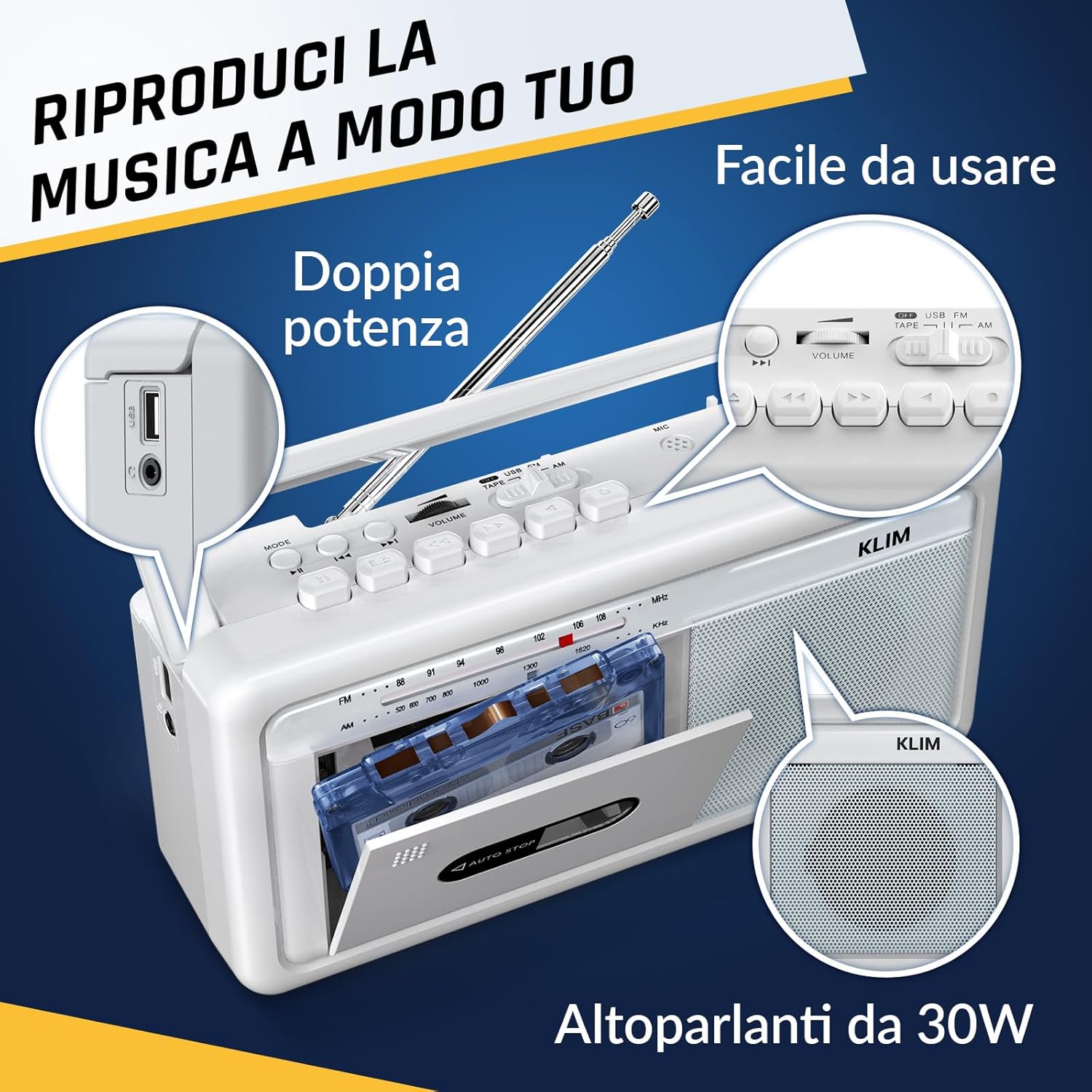
פיגורע 4: זייַט view highlighting the USB port for media playback and recording.
3.5. נוצן פון כעדפאָונז
Connect standard 3.5mm headphones to the headphone jack for private listening. The internal speakers will automatically mute when headphones are connected.
Video 1: Instructions on how to record a tape to USB using the WTB-795 model. This video demonstrates the USB recording functionality.
ווידעא 2: איבערview of a retro cassette player with USB, Bluetooth, and AM/FM radio features, similar to the KLIM Cassette Player Boombox.
4. וישאַלט
- האַלט דאָס אַפּאַראַט ריין דורך עס אָפּווישן מיט אַ ווייכן, טרוקענעם שטאָף. פֿאַרמייַדט ניצן פֿליסיקע רייניגער אָדער סאָלווענטן.
- Regularly clean the cassette head and pinch rollers with a cotton swab lightly dampבאדעקט מיט איזאָפּראָפּיל אַלקאָהאָל צו ענשור אָפּטימאַלע געזונט קוואַליטעט און פאַרמייַדן טייפּ שעדיקן.
- Keep the device away from direct sunlight, heat sources, and excessive dust or moisture.
- When not in use for extended periods, remove batteries to prevent leakage.
5. טראָובלעשאָאָטינג
| פּראָבלעם | מעגלעך לייזונג |
|---|---|
| קיין מאַכט | Check if the AC power cord is securely connected. If using batteries, ensure they are inserted correctly and are not depleted. |
| קיין געזונט פון ספּיקערז | Increase the volume. Ensure headphones are not connected. Check the function selector is in the correct mode (TAPE, RADIO, BT, USB). |
| נעבעך ראַדיאָ אָפּטראָג | Extend the telescopic antenna fully. Adjust the antenna direction. Try moving the unit to a different location. |
| קאַסעטע טייפּ שפּילט/רעקאָרדירט נישט | Ensure the tape is inserted correctly. Check if the tape is damaged. Clean the cassette head and pinch rollers. |
| בלועטאָאָטה איז נישט קאַנעקטינג | Ensure the unit is in Bluetooth mode. Make sure your device's Bluetooth is enabled and within range. Try unpairing and re-pairing the device. |
| פּראָבלעמען מיט USB ווידערשפּיל | Ensure the USB drive is formatted correctly (FAT32) and contains compatible audio files (MP3, WAV, WMA, AAC, FLAC). Try a different USB drive. |
6. ספּעסאַפאַקיישאַנז
- סאָרט: KLIM
- מאָדעל: קאַסעט שפּילער
- פּראָדוקט דימענשאַנז: 25 X 13.1 X 7.6 סענטימעטער
- נומער וואָג: 1 קג
- קאַמפּאַטאַבאַל דעוויסעס: MP3 שפּילער, סמאַרטפאָון, טאַבלעט
- אַודיאָ רעזולטאַט מאָדע: סטערעאָ
- שטיצט אַודיאָ פֿאָרמאַטירונגען: Cassette, Analog Radio, MP3, WAV, WMA, AAC, FLAC, Bluetooth
- מאַכט מקור: Corded Electric (AC) / 4 x C-type Batteries (not included)
- קאַנעקטיוויטי טעכנאָלאָגיע: וסב, בלועטאָאָטה
- קאָליר: פראָסט ווייסע
- נומער נומער: KLSIN4825
7. וואָראַנטי & שטיצן
The KLIM Cassette Player Boombox comes with a 5 יאָר וואָראַנטי. For any questions, technical assistance, or warranty claims, please contact KLIM customer support. Our team is available 24/7 to assist you.
Please refer to the contact information provided in your product packaging or visit the official KLIM webפּלאַץ פֿאַר מער דעטאַילס.


