1. פּראָדוקט איבערview
The DREAME Aqua10 Roller Robot Vacuum & Side Brush is an advanced cleaning device designed to automate floor cleaning. It combines vacuuming and mopping functionalities with intelligent navigation and self-maintenance features.

Figure 1: DREAME Aqua10 Roller Robot Vacuum and its self-cleaning dock.
Key features include fresh water mopping, a fluff roll self-cleaning technology, carpet protection with auto-lifting, FlexRise obstacle climbing, and a powerful 30,000 Pascal suction. The device also features advanced OmniSight navigation and a self-maintaining power dock.
2. קאָמפּאָנענטן און אַקסעסאָריעס
- DREAME Aqua10 Robot Vacuum
- Self-Cleaning Power Dock
- Roller Mop (pre-installed)
- זייַט באַרשט
- Dust Bag (pre-installed in dock)
- מאַכט קאַבלע
- Cleaning Solution (if included)

Figure 2: The side brush component of the DREAME Aqua10.
3. סעטאַפּ גייד
- אויספּאַקן: קערפאַלי באַזייַטיקן אַלע קאַמפּאָונאַנץ פון די פּאַקקאַגינג.
- דאָק פּלייסמאַנט: Place the self-cleaning power dock against a wall in an open area, ensuring at least 1.5 feet of clear space on either side and 5 feet in front. Plug the power cable into the dock and a wall outlet.
- ערשט אָפּצאָל: Place the robot vacuum onto the charging contacts of the dock. Ensure it is properly seated and charging. The robot will indicate charging status.
- וואַסער טאַנק צוגרייטונג: Open the top cover of the power dock. Fill the clean water tank with fresh water. If using cleaning solution, add the recommended amount according to the solution's instructions.
- Dust Bag Installation: Verify that a dust bag is correctly installed in the dock's dust collection compartment.
- App Installation (Optional but Recommended): Download the DREAME app from your device's app store. Follow the in-app instructions to connect your robot vacuum to your Wi-Fi network and complete the initial mapping process.
Video 1: This video demonstrates the initial setup and key features of the DREAME Aqua10, including water tank and dust bag access, and the robot's movement.
4. אַפּערייטינג ינסטרוקטיאָנס
4.1 אָנהייבן אַ רייניקונג
- מאַנואַל אָנהייב: Press the power button on the robot or the dock to initiate a cleaning cycle.
- אַפּ קאָנטראָל: Use the DREAME app to start, pause, or stop cleaning, select specific rooms, or set no-go zones.
- קול קאַמאַנדז: The robot supports voice commands for customized cleaning, such as lifting rollers, boosting suction, prioritizing carpets, or activating pet-friendly care.
4.2 רייניקונג מאָדעס און פֿעיִקייטן
- וואַקוום: The robot utilizes 30,000 Pascals of suction power to effectively remove dirt, crumbs, and dust from various floor types.
- מאָפּינג: The Aqua10 uses fresh water mopping, continuously spraying clean water onto the roller mop while collecting dirty water. This ensures floors are washed, not just wiped.
- Carpet Protection: When the vacuum senses carpet, the AutoSeal Roller Guard automatically closes, and the chassis lifts by more than 0.5 inch to prevent dampening or odors on carpets.
- ויסמיידן מכשול: The OmniSight 2.0 system, combining a retractable LiDAR sensor with binocular AI navigation, allows the robot to recognize and avoid over 240 different objects, including socks, toys, cords, and fragile items.
- Threshold Climbing: The FlexRise air suspension system enables the robot to climb over thresholds, rugs, and obstacles up to 3.15 inches tall, making it suitable for multi-surface homes.
- Edge and Corner Cleaning: The roller mop extends by 1.57 inches to ensure 100% coverage cleaning of edges and corners.
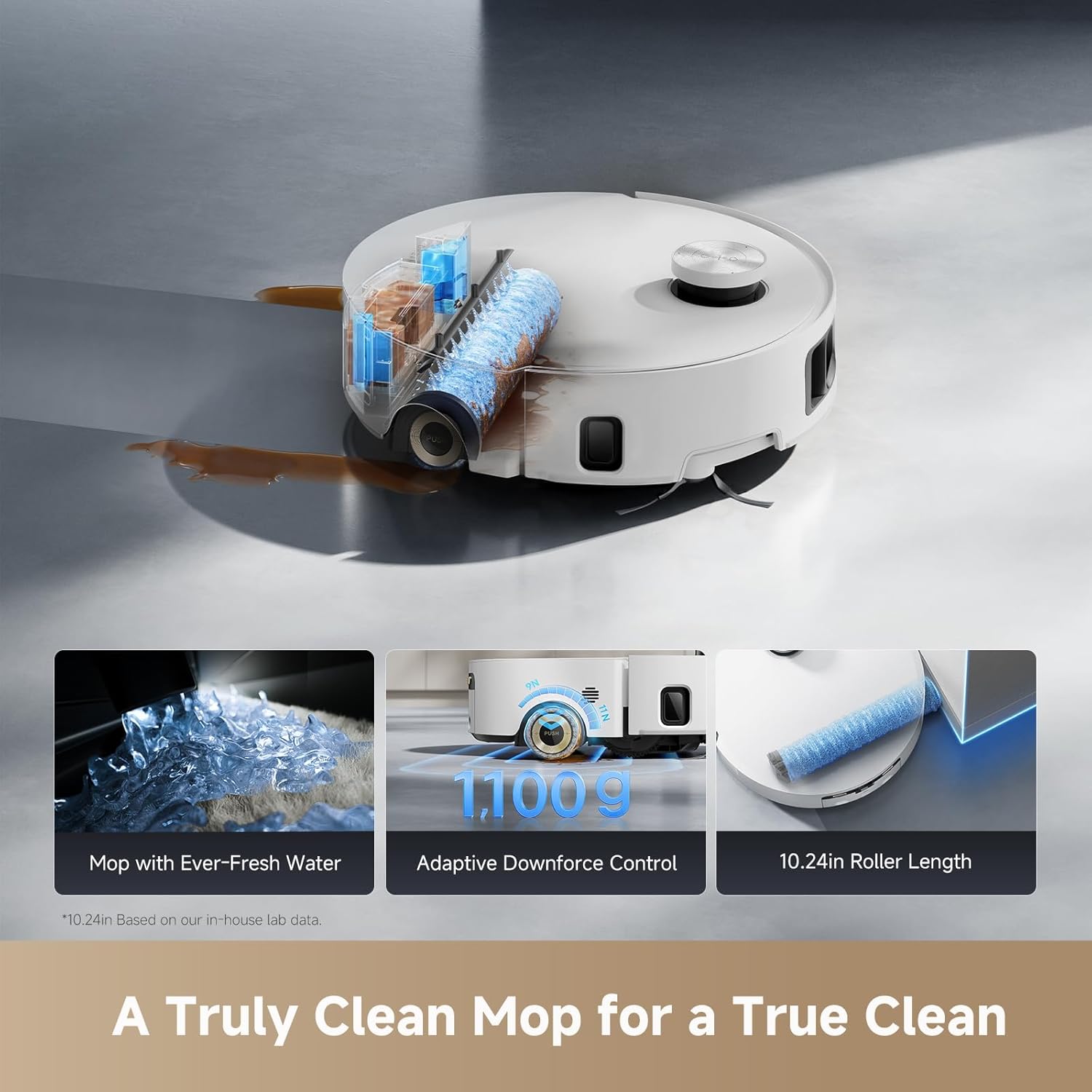
Figure 3: The DREAME Aqua10's mopping system with fresh water, adaptive downforce, and extended roller length.

Figure 4: Intelligent carpet protection feature, showing the AutoSeal Roller Guard in action.

Figure 5: The powerful 30,000 Pa suction effectively cleans various debris.

Figure 6: The robot's ability to clear obstacles and navigate complex layouts.

Figure 7: The extended roller mop ensures thorough cleaning along edges and in corners.
5. וישאַלט
5.1 Self-Cleaning Power Dock
The power dock is designed for hands-free maintenance:
- Automatic Dust Emptying: The dock automatically empties the robot's dustbin into a sealed dust bag, storing debris for up to 100 days.
- Roller Mop Deep Cleaning: The dock deep cleans the roller mop with sterilizing 212°F hot water.
- הייסע לופט טריקעניש: After cleaning, the mop is dried with hot air to prevent odors and mildew.
- Automatic Refill: The robot's water tank is automatically refilled with fresh water and cleaning solution from the dock.

Figure 8: The self-cleaning dock sterilizes the roller mop with 212°F hot water.
5.2 באַניצער מאַינטענאַנסע
- פאַרבייַט פון שטויב באַג: Replace the dust bag in the power dock approximately every 100 days, or when indicated by the app/device.
- ריין וואַסער טאַנק ריפיל: Regularly check and refill the clean water tank in the dock.
- שמוציגע וואסער טאנק ליידיקן: Regularly check and empty the dirty water tank in the dock.
- Roller Brush Detangling: The HyperStream Duo brush actively detangles hair. Periodically check the roller brush for any remaining tangled hair and remove as needed.
- זייט באַרשט דורכקוק: Inspect the side brush for wear or damage and replace if necessary.
- סענסאָר רייניקונג: Wipe the robot's sensors with a dry cloth to ensure optimal navigation and obstacle avoidance.
6. טראָובלעשאָאָטינג
If you encounter issues with your DREAME Aqua10, please refer to the following common troubleshooting steps:
- ראָבאָט לאָדט זיך נישט אויף: Ensure the power dock is plugged in and the robot is correctly aligned with the charging contacts. Clean the charging contacts on both the robot and the dock.
- שלעכטע רייניקונג פאָרשטעלונג: Check if the dustbin is full or the dust bag needs replacement. Ensure the roller mop and side brush are clean and free of debris. Refill the clean water tank and empty the dirty water tank.
- Navigation errors or getting stuck: Clean all sensors on the robot. Remove any obstacles or loose cables from the cleaning path. Ensure the environment is well-lit for optimal visual navigation.
- ומגעוויינטלעך נויזיז: Check the roller brush and side brush for any foreign objects or tangled hair. Ensure all components are correctly installed.
- אַפּ קאַנעקטיוויטי פּראָבלעמען: Ensure your Wi-Fi network is stable and the robot is within range. Restart the robot and your router.
For persistent issues, consult the DREAME app for further diagnostics or contact customer support.
7. ספּעסאַפאַקיישאַנז
| מאָדעל | Aqua10 |
| סאָרט | חלום |
| ASIN | B0FSZ64GZ8 |
| ערשטער דאַטע בנימצא | 21 סעפטעמבער 2025 |
| סאַקשאַן מאַכט | 30,000 פּאַסקאַלס |
| Obstacle Climbing Height | אַרויף צו 3.15 אינטשעס |
| Mop Cleaning Water Temperature | 212°F (100°C) |
| שטויב באַג קאַפּאַציטעט | Up to 100 days of debris storage |
| Roller Mop Extension | 1.57 inches for edge cleaning |
8. וואָראַנטי און שטיצן
For warranty information and customer support, please refer to the official DREAME webזייטל אדער קאָנטאַקט אייער לאקאלן הענדלער. האַלט אייער קויף קוויטל פֿאַר וואָראַנטי קליימז.


