הקדמה
The ASUS RT-BE58 Go is a dual-band WiFi 7 portable travel router designed for versatile connectivity. It offers high-speed wireless performance, advanced security features, and multiple operating modes suitable for various environments, including travel, home, and office use. This manual provides instructions for setting up, operating, and maintaining your device.

Image: The ASUS RT-BE58 Go Portable Travel Router, a compact white device with foldable antennas, shown in a typical product view.
וואָס איז אין די קעסטל
באַשטעטיקן אַז אַלע זאכן זענען פאַראַן אין פּעקל:
- RT-BE58 Go Travel router
- 1M RJ-45 Cable
- מאַכט אַדאַפּטער
- שנעל אָנהייב גייד
- וואָראַנטי קאַרד
פּראָדוקט פֿעיִקייטן
- Next-Gen WiFi 7 Speeds: Experience blazing-fast dual-band WiFi 7 speeds of up to 3600 Mbps with Multi-Link Operation (MLO) and 4K-QAM for low-latency connections.
- ימפּרוווד זיכערהייט: Protect sensitive data with comprehensive VPN features and commercial-grade security. Create a private hotspot over public WiFi (WISP mode) for privacy.
- Mobile Hotspot Capability: Transform your smartphone or mobile dongle into a powerful, shareable network using 4G LTE and 5G mobile tethering.
- USB-C מאַכט עקספּרעס: Power the router anywhere with universal USB-C Power Delivery 18W, using common chargers.
- AiMesh Technology: Create a reliable and extendable AiMesh network for seamless, whole-home coverage with rich security and networking features.
- גרינגע פאַרוואַלטונג: Set up the router in minutes with a simple 3-step process and manage it via the ASUS Router mobile app. Use Guest Network Pro for functional subnetworks or guest portals.
- קאַנעקטיוויטי פּאָרץ: Includes 1x 1G LAN port, 1x 2.5G WAN port, and 1x USB 3.0 port.
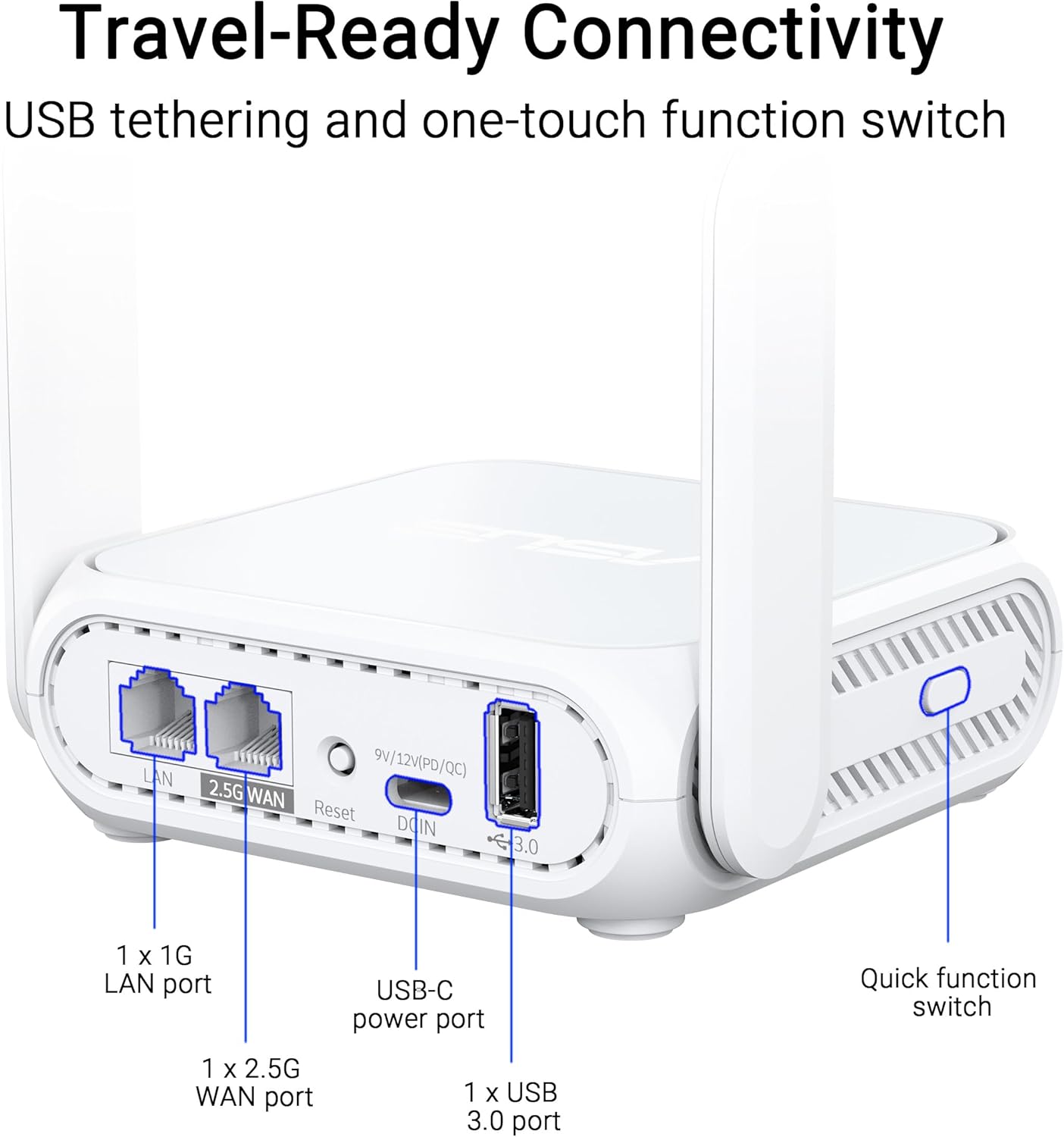
בילד: א נאָענטע בילד view of the ASUS RT-BE58 Go router's rear panel, showing the 1G LAN port, 2.5G WAN port, USB-C power port, USB 3.0 port, and the quick function switch.
סעטאַפּ
ערשט סעטאַפּ סטעפּס:
- פאַרבינדן מאַכט: Plug the provided power adapter into the USB-C power port on the router and then into a power outlet.
- פֿאַרבינדן זיך צום אינטערנעט מקור:
- For wired internet: Connect an Ethernet cable from your modem or existing network to the 2.5G WAN port on the RT-BE58 Go.
- For public WiFi (WISP mode): Power on the router. You will configure WISP mode later via the app or web צובינד.
- For mobile tethering: Connect your smartphone or mobile dongle to the USB 3.0 port.
- פאַרבינדן צו ראָוטער:
- ווירעלעסס: זוכן פֿאַר the default Wi-Fi network name (SSID) printed on the bottom of the router and connect using the default password.
- ווייערד: Connect a device (e.g., laptop) to the 1G LAN port using an Ethernet cable.
- Access Setup Interface: עפענען א web בלעטערער און נאַוויגירן צו http://router.asus.com or download the ASUS Router mobile app. Follow the on-screen instructions for initial configuration, including setting up your Wi-Fi name and password.
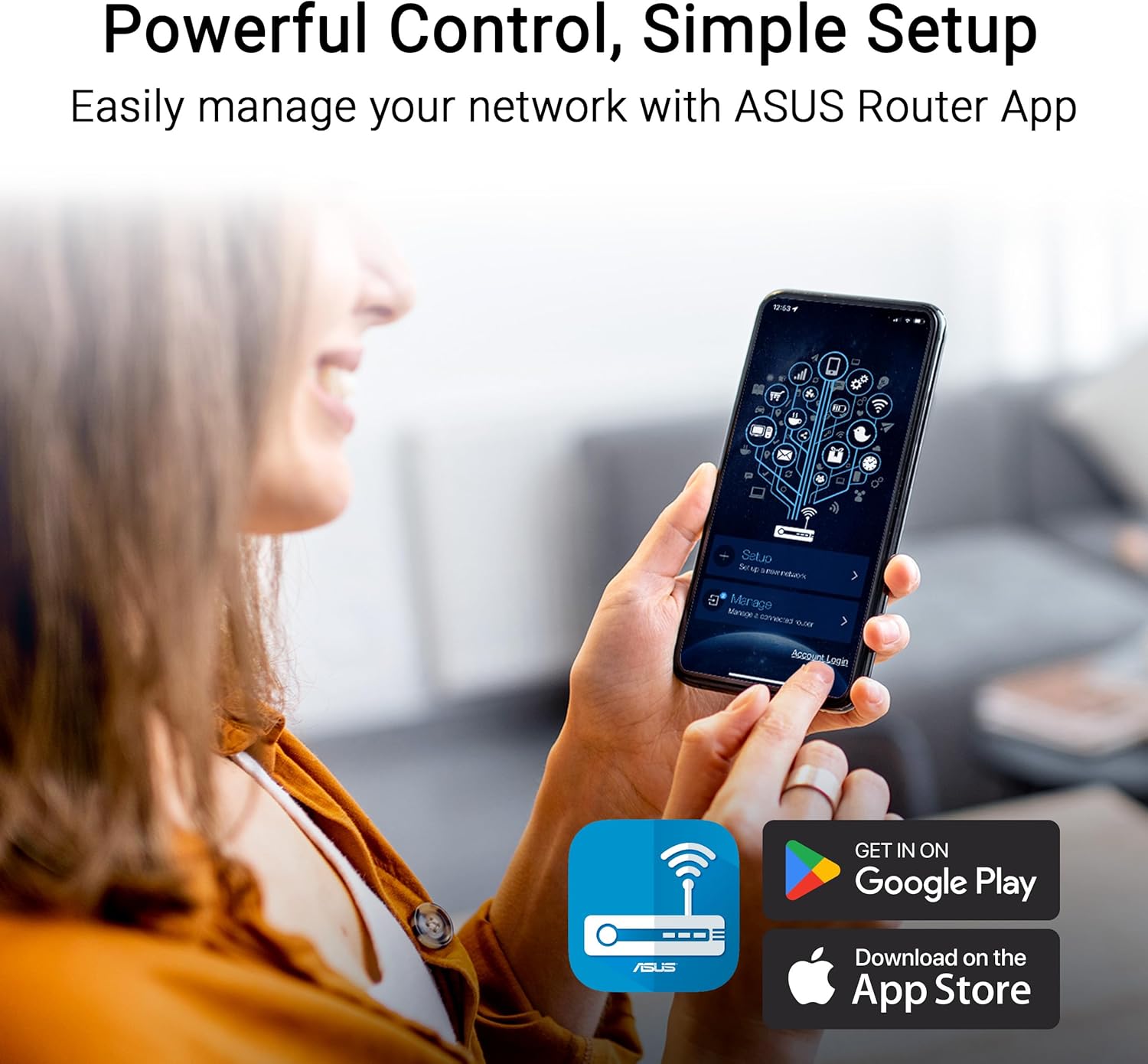
Image: A user interacting with the ASUS Router mobile app on a smartphone, demonstrating the ease of network management and setup.
אַפּערייטינג מאָדעס
The RT-BE58 Go supports multiple operating modes to suit different network requirements:
- Wireless Router Mode: The standard mode where the device acts as your primary Wi-Fi router, connecting to an internet source (modem) and broadcasting a Wi-Fi network.
- AiMesh Node Mode: Integrates into an existing ASUS AiMesh system to extend Wi-Fi coverage.
- קייט עקסטענדער מאָדע: פארברייטערט די קאַווערידזש פון אַן עקזיסטירנדיק Wi-Fi נעץ.
- אַקסעס פונט (אַפּ) מאָדע: Connects to a wired network and broadcasts a Wi-Fi signal, converting a wired network into a wireless one.
- Media Bridge Mode: Allows wired devices to connect to a Wi-Fi network.
- רעפּעאַטער מאָדע: Repeats an existing Wi-Fi signal to extend its range.
- Public WiFi (WISP) Mode: Connects to a public Wi-Fi network (e.g., hotel, cafe) and creates a private, secure Wi-Fi network for your devices. This mode is ideal for travel security.

Image: A woman serving coffee to a customer using a laptop, illustrating a scenario where Public WiFi (WISP) mode can be used for secure internet access in a public setting.
נעץ פאַרוואַלטונג און זיכערהייט
The ASUS RT-BE58 Go provides robust tools for managing your network and ensuring security:
- ASUS ראָוטער אַפּ: Manage all router settings, monitor network traffic, and control connected devices from your smartphone.
- גאַסט נעטוואָרק פּראָ: Create separate subnetworks for guests or IoT devices. This isolates these devices from your main network for enhanced security and control.
- VPN שטיצן: The router includes comprehensive VPN features, allowing you to establish secure connections. It supports various VPN protocols and can be configured as a VPN client or server.
- איי-פּראָטעקשאַן: Commercial-grade network security features to protect against online threats.

Image: A screenshot of the ASUS Router app interface showing options for Guest Network Pro, VPN, and other security settings, with various VPN service logos (NordVPN, Surfshark, CyberGhost VPN) displayed.
AiMesh סעטאַפּ
The RT-BE58 Go can be integrated into an ASUS AiMesh system to create a seamless whole-home Wi-Fi network. This allows you to extend your network coverage and eliminate Wi-Fi dead zones.
Steps to Add as an AiMesh Node:
- Ensure your existing ASUS router supports AiMesh and is running the latest firmware.
- Place the RT-BE58 Go within range of your AiMesh router.
- Power on the RT-BE58 Go.
- Access your main AiMesh router's web צובינד אדער די ASUS ראָוטער אַפּ.
- Navigate to the AiMesh section and select "Add AiMesh Node."
- The system will search for available AiMesh nodes. Select the RT-BE58 Go when it appears and follow the prompts to complete the setup.

Image: A diagram illustrating an ASUS AiMesh network, showing the RT-BE58 Go router extending Wi-Fi coverage from a main AiMesh router to cover a larger home area.
וישאַלט
Regular maintenance ensures optimal performance and longevity of your router:
- Firmware דערהייַנטיקונגען: קאָנטראָלירט רעגולער און אינסטאַלירט די לעצטע פירמווער דערהייַנטיקונגען דורך די ASUS ראָוטער אַפּ אָדער web צובינד. פירמווער דערהייַנטיקונגען אַרייַננעמען אָפט פאָרשטעלונג פֿאַרבעסערונגען, זיכערהייט פּאַטשאַז און נייַע פֿעיִקייטן.
- אָרט: Position the router in an open area, away from obstructions and sources of interference (e.g., microwaves, cordless phones). For optimal signal, avoid placing it inside cabinets or near large metal objects.
- רייניקונג: האַלט דעם ראַוטער ריין און פריי פון שטויב. ניצט אַ ווייכן, טרוקן שטאָף צו ווישן די אויסערלעכע זייט. ניצט נישט קיין פליסיקע רייניקונגס-מיטלען אדער אַעראָזאָלן.
- ריסטאַרטינג: ריסטאַרט דיין ראַוטער פּעריִאָדיש (אַראָפּנעמען דעם שטעקער פֿון עלעקטריע פֿאַר 10 סעקונדעס, און דערנאָך צוריק אַרײַנשטעקן) כּדי צו פֿאַרפֿרישן זײַן פֿאַרבינדונג און פֿאַרריכטן יעדע צײַטווײַליקע פּראָבלעמען.
טראָובלעשאָאָטינג
If you encounter issues with your RT-BE58 Go, try the following troubleshooting steps:
- קיין אינטערנעט פֿאַרבינדונג:
- Check if your modem or internet source is working correctly.
- באַשטעטיקן אַז אַלע קייבלס זענען זיכער פארבונדן.
- Restart both your modem and the RT-BE58 Go router.
- Check the WAN connection status in the ASUS Router app or web צובינד.
- לאַנגזאַמע Wi-Fi גיכקייט:
- זיכער מאַכן אַז דער ראַוטער איז אָפּטימאַל געשטעלט, אַוועק פון שטערונג.
- קוק פֿאַר פירמוואַרע דערהייַנטיקונגען.
- רעדוצירן די צאָל פון פארבונדענע דעוויסעס אדער באַנדווידט-אינטענסיווע אַקטיוויטעטן.
- Try changing Wi-Fi channels in the router settings to avoid congestion.
- קען נישט צוקומען צו די ראָוטער סעטטינגס:
- Ensure your device is connected to the router's Wi-Fi or LAN port.
- באַשטעטיקן אַז איר ניצט די ריכטיקע IP אַדרעס (http://router.asus.com) or the ASUS Router app.
- רייניקט אויס אייער בלעטערער'ס קעש און קיכלעך, אדער פרובירט אן אנדערן בלעטערער.
- אויב איר האָט פארגעסן אייערע לאָגין קראַדענטשאַלז, איר זאָלט אפשר דורכפירן אַ פֿאַבריק ריסעט (זעט די שנעל אָנהייב גייד פֿאַר אינסטרוקציעס).
- Wi-Fi סיגנאַל פאַלט אָפט:
- אַדזשאַסטירן אַנטענע פּאָזיציעס.
- קוק נאָך פיזישע שטערונגען.
- Consider adding an AiMesh node if coverage is insufficient.
ספּעסאַפאַקיישאַנז
| שטריך | דעטאַל |
|---|---|
| מאָדעל נאָמען | RT-BE58 GO |
| נעץ סטאַנדאַרד | IEEE 802.11a/b/g, WiFi 4 (802.11n), WiFi 5 (802.11ac), WiFi 6 (802.11ax), WiFi 6E (802.11ax), WiFi 7 (802.11be), IPv4, IPv6 |
| דאַטע קורס | WiFi 7 (2.4GHz): up to 688 Mbps; WiFi 7 (5GHz): up to 2882 Mbps (Total 3600 Mbps) |
| אַנטענע | External foldable antennas |
| זכּרון | DDR4 RAM 1GB; Flash 256MB |
| פּאָרץ | 1x 1G LAN, 1x 2.5G WAN, 1x USB 3.0, 1x USB-C Power Delivery |
| אַפּערייטינג מאָדעס | Wireless router, AiMesh Node, Range Extender, Access Point, Media Bridge, Repeater, Public Wifi Mode |
| דימענשאַנז | 4.4 X 3.9 X 1.4 אינטשעס |
| פּונקט וואָג | 8 אונסעס |
| מאַכט צושטעלן | וסב-C מאַכט עקספּרעס 18 וו |
| ספּעציעלע פֿעיִקייטן | Dual-band WiFi 7, AiMesh, Advanced VPN, Guest Network Pro |
וואָראַנטי און שטיצן
וואָראַנטי: The ASUS RT-BE58 Go comes with a 3-year manufacturer warranty. Please retain your proof of purchase for warranty claims.
טעכניש שטיצן: For further assistance, troubleshooting, or detailed product information, please visit the official ASUS support website. You can find drivers, manuals, FAQs, and contact information for technical support there.
אָנליין רעסורסן:
- ASUS אפיציעל Webפּלאַץ: https://www.asus.com
- ASUS שטיצע: https://www.asus.com/support/