SHANLING EC Zero Portable CD Player Instruction Manual
Model: EC Zero
1. פּראָדוקט איבערview
The SHANLING EC Zero is a high-fidelity portable CD player designed for audiophiles. It features a professional CD mechanism, a high-resolution AK4493S DAC, and dual SGM8262-2 op-amps for clear and powerful audio output. The device supports various audio connections, including 3.5mm and 4.4mm headphone outputs, line-out, coaxial, optical, and Bluetooth 5.3. It also includes a built-in CD ripping function and a long-lasting 5500mAh battery with external power support.

בילד 1.1: פון אויבן אַראָפּ view of the SHANLING EC Zero Portable CD Player, showcasing its sleek design and visible CD mechanism.
2. סעטאַפּ
2.1 אַנפּאַקינג
נעמט פֿאָרזיכטיק אַרויס אַלע קאָמפּאָנענטן פֿון דער פּאַקעט. מאַכט זיכער אַז די פֿאָלגנדיקע זאַכן זענען פֿאַראַן:
- SHANLING EC Zero Portable CD Player
- USB-C cable (for charging/power/USB DAC)
- 1 AAA battery (included, typically for remote control or minor functions)
- ינסטרוקטיאָן מאַנואַל (דעם דאָקומענט)
2.2 מאַכט אויף
The EC Zero can be powered by its internal 5500mAh battery or an external DC power source via the USB-C port. For optimal performance and extended listening sessions, connect the device to an external DC power source. Locate the power mode switch (BAT/EXT DC) on the rear panel and set it to the desired power source.

Image 2.1: The SHANLING EC Zero supports both internal 5500mAh battery power and external DC power input via USB-C for flexible usage.
2.3 לאָדן אַ סי-די
To load a CD, gently open the transparent top cover. Place the CD onto the central spindle, ensuring it is seated correctly and flat. The device features an active magnetic disc stabilization system to hold the CD securely during playback. Close the cover firmly until it clicks into place.

Image 2.2: A user carefully placing a CD into the SHANLING EC Zero player, demonstrating the top-loading mechanism.
Video 2.1: This video demonstrates the process of loading a CD into the SHANLING EC Zero and initiating playback. It highlights the magnetic disc stabilization feature.
3. אַפּערייטינג ינסטרוקטיאָנס
3.1 גרונטלעכע ווידערשפּיל
After loading a CD and powering on the device, use the control buttons located on the top panel for playback functions:
- שפּיל / פּויזע: דרוק צו אָנהייבן אָדער פּויזע פּלייבאַק.
- אָפּשטעל: דרוק צו האַלטן פּלייבאַק.
- פֿריִערדיקע שפּור: Press to go to the beginning of the current track or the previous track.
- ווייַטער שפּור: דרוק צו האָפּקען צו דער ווייַטער שפּור.
3.2 באַנד קאָנטראָל
Adjust the audio output level using the sliding volume potentiometer located on the side of the device. For precise control, move the slider slowly to achieve the desired volume.
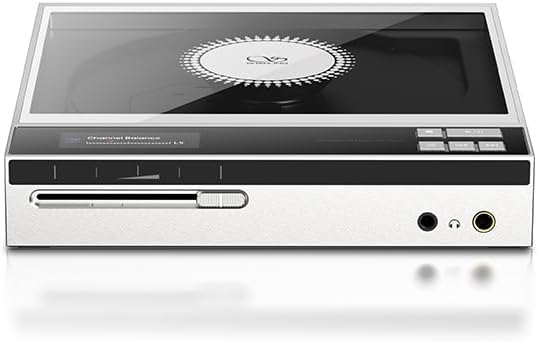
Image 3.1: The sliding volume potentiometer on the front side of the EC Zero for audio level adjustment.
3.3 קאָנעקטיוויטי אָפּציעס
The SHANLING EC Zero offers versatile audio connectivity through its various ports:
- כעדפאָון אַוטפּוץ: Connect headphones to the 3.5mm or 4.4mm balanced headphone jacks. The device provides up to 836mW output (@32Ω balanced) to drive high-impedance headphones.
- שורה-אויס: Use the 3.5mm or 4.4mm balanced line-out ports to connect to external ampליפיערס אָדער אַקטיוו ספּיקערז.
- דיגיטאַל רעזולטאַט: The 3.5mm SPDIF coaxial/optical output allows connection to external DACs or digital audio receivers.
- וסב דאַק: Connect the EC Zero to a computer via USB-C to use it as an external DAC, supporting PCM up to 768kHz and DSD512.
- בלועטאָאָטה 5.3: Pair with Bluetooth headphones or speakers for wireless audio transmission. Supports aptX Adaptive, aptX, and SBC codecs.

בילד 3.2: דעטאַלירט view of the EC Zero's connectivity ports, including headphone jacks, line-out, digital output, and USB-C inputs.
3.4 CD Ripping Function
The EC Zero can rip audio tracks from CDs to WAV format. Connect a FAT32 compatible USB drive to the device's USB-C DAC Input port to store ripped tracks. Follow the on-screen prompts on the device's display to initiate the ripping process.
3.5 Side Button Lock
Utilize the side button lock switch to prevent accidental touches or changes to settings during portable use or when the device is stored.
4. וישאַלט
4.1 רייניקונג
Wipe the exterior of the device with a soft, dry, lint-free cloth. Avoid using abrasive cleaners, solvents, or chemical sprays, as these can damage the finish. For the CD tray and lens, use specialized CD cleaning kits if necessary, following their instructions carefully to avoid damaging sensitive components.
4.2 באַטערי קער
To prolong the lifespan of the internal 5500mAh battery, avoid fully discharging it frequently. If storing the device for an extended period, charge it to approximately 50% and store it in a cool, dry place. All rechargeable batteries are consumables and will experience gradual degradation over time.
4.3 CD Handling
Always handle CDs by their edges to prevent fingerprints, dust, and scratches on the playing surface. Ensure CDs are clean and free of debris before inserting them into the player to maintain optimal playback quality and prevent potential damage to the laser lens and mechanism.
5. טראָובלעשאָאָטינג
If you encounter issues with your SHANLING EC Zero, refer to the following common problems and solutions:
- קיין מאַכט:
- Ensure the device's internal battery is charged or it is connected to a working external DC power source.
- Check that the power mode switch (BAT/EXT DC) is set correctly.
- באַשטעטיקן אַז די USB-C קאַבל און מאַכט אַדאַפּטער אַרבעטן ריכטיק.
- Disc Not Playing/Skipping:
- Ensure the CD is clean and free of scratches or smudges.
- Verify the CD is loaded correctly and securely on the spindle.
- Try a different CD to rule out disc-specific issues.
- קיין סאָונד רעזולטאַט:
- Check headphone or speaker connections are secure.
- זייט זיכער אז די וואודיום איז נישט געשטעלט אויף מינימום אדער שטיל.
- Verify the correct output mode is selected (e.g., headphone, line-out, Bluetooth).
- If using Bluetooth, ensure the device is properly paired and connected to your audio receiver.
- בלועטאָאָטה קאַנעקשאַן ישוז:
- Ensure the EC Zero is in Bluetooth pairing mode.
- Check that the receiving Bluetooth device is discoverable and within range.
- פרובירט אפצופּאַרן און ווידער צופּאַרן די דעווייסעס.
- CD Ripping Failure:
- Ensure the connected USB drive is formatted to FAT32.
- Check for sufficient storage space on the USB drive.
- פּרוּווט אַ אַנדערש וסב פאָר.
If the problem persists after attempting these solutions, please contact SHANLING customer support for further assistance.
6. ספּעסאַפאַקיישאַנז
The following are the technical specifications for the SHANLING EC Zero Portable CD Player:
| שטריך | באַשרייַבונג |
|---|---|
| מאָדעל נאָמען | EC Zero |
| דימענשאַנז | 158 X 150 X 28 מם (6.22 X X X X X X) |
| פּונקט וואָג | 575 ג (1.28 פונט) |
| DAC | AKM AK4493S |
| אפ-Amps | Dual SGM8262-2 |
| באַטאַרייע קאַפּאַציטעט | 5500mAh (Internal) |
| פונדרויסנדיק מאַכט אַרייַנשרייַב | וסב-C 5 וו / 2 אַ |
| קאַנעקטיוויטי טעכנאָלאָגיע | בלועטאָאָטה, וסב |
| בלועטאָאָטה ווערסיע | V5.3 |
| Bluetooth Transmitter Codecs | aptX Adaptive, aptX, SBC |
| USB DAC Support | PCM 768kHz/32bit & DSD512 |
| CD ריפּינג | 1x speed, to FAT32 USB Drive, WAV format |
| דיגיטאַל רעזולטאַט | 3.5mm Combined Coaxial / Optical SPDIF |
| 3.5mm Headphone Output Power | Low Gain: 52mW@32Ω, High Gain: 122mW@32Ω, High Gain (External Power): 213mW@32Ω |
| 4.4mm Headphone Output Power | Low Gain: 211mW@32Ω, High Gain: 525mW@32Ω, High Gain (External Power): 836mW@32Ω |
| CD Play Frequency Response | 20Hz-20KHz (-0.5dB) |
| USB DAC Frequency Response | 20Hz-40KHz (-0.5dB) |
| Signal-to-noise ratio (CD Play) | 117dB |
| THD+N (CD Play) | 0.0004% |
| Dynamic Range (CD Play) | 117dB |
| Channel Separation (CD Play) | 79dB |

Image 6.1: Comprehensive technical specifications of the SHANLING EC Zero, detailing audio performance and connectivity.
7. וואָראַנטי און שטיצן
For detailed warranty information regarding your SHANLING EC Zero Portable CD Player, please refer to the warranty card included in your product packaging. Alternatively, you may visit the official SHANLING webזייטל פֿאַר די מערסט אַרויף-צו-דאַטע וואָראַנטי טערמינען און באדינגונגען.
For technical support, troubleshooting assistance beyond the scope of this manual, or any service-related inquiries, please contact SHANLING customer service directly. Their support team can provide specialized guidance and solutions.
You can typically find contact information on the official SHANLING webפּלאַץ: www.shanling.com


