1. סעטאַפּ גייד
This section provides instructions for the initial setup of your OPPO A6 Pro 5G CPH2781 smartphone.
1.1 אויספּאַקן די קעסטל און ערשטע דורכקוק
נעמט פֿאָרזיכטיק אַרויס אַלע קאָמפּאָנענטן פֿון דער פּאַקעט. באַשטעטיקט אַז די פֿאָלגנדיקע זאַכן זענען פֿאַראַן:
- OPPO A6 Pro 5G CPH2781 device
- 80W SUPERVOOC Flash Charge adapter
- וסב טיפּ-C קאַבלע
- סים עדזשעקטאָר געצייַג
- שנעלע אָנהייב גייד און זיכערהייט אינפֿאָרמאַציע
דורכקוקן די מיטל פֿאַר קיין קענטיק שעדיקן איידער פּראַסידינג.
1.2 סים קאַרטל און סטאָרידזש ינסטאַלירונג
The OPPO A6 Pro 5G supports Dual SIM functionality. Follow these steps to install your SIM cards:
- געפינט די סים קארטל טאַץ אויף דער זייט פון דעם מיטל.
- שטעקט אריין דעם סים אויסווארף געצייג אין דעם קליינעם לאך לעבן דעם טרעי און דריקט לײַכט ביז דער טרעי קומט ארויס.
- Place your Nano-SIM cards into the designated slots on the tray. Ensure the gold contacts face downwards.
- פֿאָרזיכטיק צוריקשטעלט די סים קאַרטל טאַץ אין דעם אַפּאַראַט ביז עס קליקט אַרײַן אין פּלאַץ.
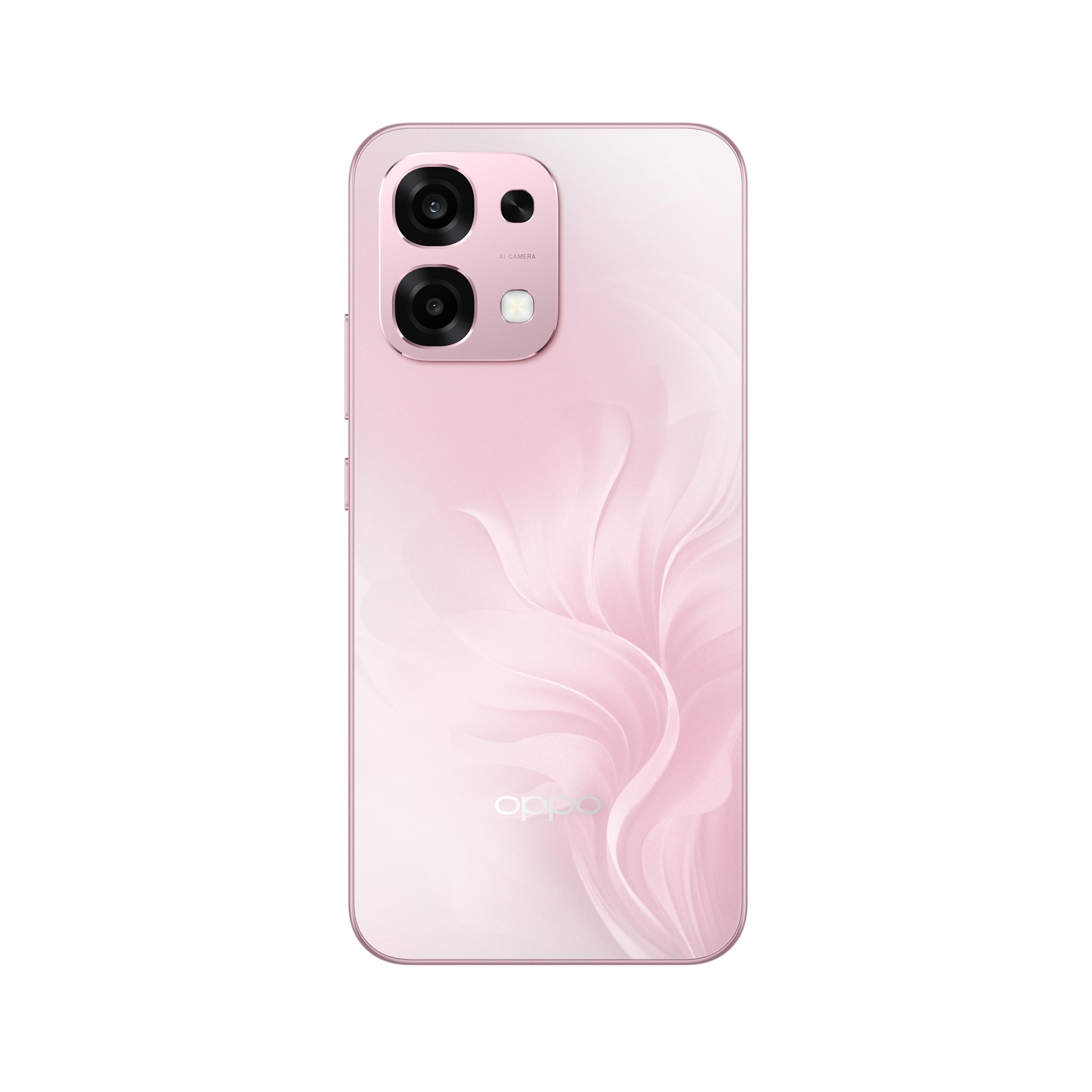
פיגורע 1: דערציען view of the OPPO A6 Pro 5G CPH2781, highlighting the camera array and device color.
1.3 אײַנצושאַלטן און ערשטע קאָנפיגוראַציע
צו אנצינדן אייער אפאראט צום ערשטן מאל:
- Press and hold the Power button (located on the right side) until the OPPO logo appears on the screen.
- פֿאָלגט די אינסטרוקציעס אויף דעם עקראַן צו אויסקלײַבן אײַער שפּראַך, ראַיאָן און זיך פֿאַרבינדן צו אַ Wi-Fi נעץ.
- לאָג אַרײַן מיט אײַער גוגל אַקאַונט אָדער שאַפֿט אַ נײַעם צו צוקומען צו גוגל סערוויסעס און דעם פּלייַ סטאָר.
- Complete the setup wizard, including setting up screen lock methods (PIN, pattern, password, or Face Recognition).
1.4 טשאַרדזשינג די מיטל
Your OPPO A6 Pro 5G is equipped with 80W SUPERVOOC Flash Charge technology for rapid charging. Use the provided 80W SUPERVOOC adapter and USB Type-C cable for optimal charging performance.
- פֿאַרבינדט דעם USB טיפּ-C קאַבל צום טשאַרדזשינג פּאָרט אין דער אונטערשטער טייל פֿון טעלעפֿאָן.
- Connect the other end of the cable to the 80W SUPERVOOC adapter.
- צאַפּן די אַדאַפּטער אין אַ מאַכט ווענטיל.
- דער טשאַרדזשינג אינדיקאַטאָר וועט דערשייַנען אויף דעם עקראַן.
2. אַפּערייטינג ינסטרוקטיאָנס
This section covers the basic operation and key features of your OPPO A6 Pro 5G CPH2781.
2.1 Navigating ColorOS
Your device runs on ColorOS, OPPO's customized Android operating system. Common navigation gestures include:
- סוויפּ אַרויף: Access the app drawer (if enabled) or return to the home screen.
- שלעפּ אַראָפּ: עפֿנט די אָנזאָג פּאַנעל און שנעל סעטטינגס.
- שלעפּן לינקס / רעכט: Navigate between home screen pages.
- צאַפּן: אויסקלייבן אַן אייטעם אָדער עפֿענען אַן אַפּ.
- לאנג פּרעס: צוטריט קאָנטעקסטואַל מעניוז אָדער באַוועגן אַפּ ייקאַנז.
2.2 ווייַז פֿעיִקייטן
The OPPO A6 Pro 5G features a 6.57-inch 120Hz AMOLED Ultra Bright Display, providing vivid colors and smooth scrolling. You can adjust display settings such as brightness, color mode, and refresh rate in the Settings menu under "Display & Brightness".
2.3 קאַמעראַ באַניץ
The device is equipped with an advanced camera system. To open the camera, tap the Camera app icon on your home screen or lock screen. Key features include:
- פאָטאָ מאָדעס: Standard, Portrait, Night, Pro, Panorama.
- ווידעא רעקאָרדינג: Supports various resolutions and frame rates.
- AI אַפּאַראַט: Utilizes artificial intelligence for scene recognition and optimal photo settings.

Figure 2: Detail of the OPPO A6 Pro 5G CPH2781 camera module.
2.4 קינסטלעכע אינטעליגענץ פֿעיִטשערס
The OPPO A6 Pro 5G integrates several AI-powered features to enhance user experience:
- AI Eraser 2.0: For intelligent object removal in photos.
- AI Assistance for Documents: Helps in scanning and managing documents.
- AI Assistant for Notes: Enhances note-taking capabilities.
2.5 קאַנעקטיוויטי
Your device supports 5G cellular technology, Bluetooth, and LTE. AI LinkBoost 3.0 automatically optimizes network performance for stable connections.
- ווי-פי: Connect to wireless networks via Settings > Wi-Fi.
- בלועטאָאָטה: Pair with other Bluetooth devices via Settings > Bluetooth.
- מאָביל נעץ: Manage 5G/LTE settings via Settings > Mobile Network.
3. וישאַלט און קער
Proper maintenance ensures the longevity and optimal performance of your OPPO A6 Pro 5G CPH2781.
3.1 באַטערי קער
The device is equipped with a 6500mAh battery. To maximize battery life:
- ויסמיידן עקסטרעם טעמפּעראַטורעס.
- Use the provided 80W SUPERVOOC Flash Charge adapter and cable.
- פֿאַרמײַדט אָפֿט פֿולשטענדיק אויסצולאָדן די באַטעריע.
- Enable power-saving modes when necessary.
3.2 וואַסער און שטויב קעגנשטעל
The OPPO A6 Pro 5G CPH2781 has an IP69 rating, indicating resistance to dust and high-pressure water jets. While resistant, it is not waterproof under all conditions. To maintain resistance:
- Ensure the SIM tray is fully closed and sealed.
- ויסמיידן סאַבמערדזשינג די מיטל אין וואַסער.
- Do not expose the device to saltwater, chlorinated water, or other liquids.
- If the device gets wet, wipe it dry with a clean, soft cloth before charging.
3.3 פיזישער שוץ
The device is certified to military standards for durability. It also comes with a built-in screen protector. For additional protection:
- Consider using a protective case.
- Avoid dropping the device or exposing it to severe impacts.
- רייניקט דעם עקראַן און קערפּער מיט אַ ווייכן, לינט-פֿרייע שטאָף.
4. טראָובלעשאָאָטינג
This section addresses common issues you might encounter with your OPPO A6 Pro 5G CPH2781.
4.1 דיווייס גייט נישט אן
- זיכער מאַכן אַז די באַטאַרייע איז אויפגעלאָדן. פֿאַרבינדט דעם מיטל צום טשאַרדזשער פֿאַר לפּחות 10 מינוט.
- דורכפירן א געצוואונגענע ריסטארט דורך דריקן און האלטן די מאַכט קנעפּל און באַנד אַרויף קנעפּל סיימאַלטייניאַסלי פֿאַר וועגן 10-15 סעקונדעס.
4.2 Poor Network Connectivity
- קוק אויב אייער סים קאַרטל איז ריכטיק אַרײַנגעשטעלט.
- Verify that mobile data is enabled in Settings.
- פּרוּווט ריסטאַרטינג די מיטל.
- Reset network settings (Settings > System settings > Back up and reset > Reset phone > Reset network settings).
- זייט זיכער אז איר זענט אין נעץ דעקונג.
4.3 אַפּפּס קראַכן אָדער פרירן
- נאָענט און ריאָופּאַן די אַפּ.
- Clear the app's cache and data (Settings > Apps > App management > [App Name] > Storage usage > Clear cache/Clear data).
- Update the app to the latest version from the Google Play Store.
- Ensure your ColorOS is up to date (Settings > About device > Up to date).
4.4 באַטעריע ווערט שנעל אויסגעליידיקט
- קאָנטראָלירט באַטאַרייע באַניץ אין סעטטינגס > באַטאַרייע צו ידענטיפיצירן מאַכט-הונגעריקע אַפּפּס.
- רעדוצירן דעם ברייטקייט פון דעם עקראַן און דעם טיימאַוט פון דעם עקראַן.
- דיאַקטיווירט נישט-נייטיקע פֿעיִקייטן ווי GPS, בלועטוט, אָדער Wi-Fi ווען זיי זענען נישט אין באַנוץ.
- Enable power-saving mode.
5. ספּעסאַפאַקיישאַנז
Below are the key technical specifications for the OPPO A6 Pro 5G CPH2781.
| שטריך | באַשרייַבונג |
|---|---|
| סאָרט | OPPO |
| מאָדעל נאָמען | A6 Pro (CPH2781) |
| אָפּערייטינג סיסטעם | קאָלאָראָס |
| באַראַן זכּרון | 8 גיגאבייט (עקספּאַנדאַבאַל צו 16 גיגאבייט) |
| סטאָרידזש קאַפּאַסיטי | 256 גיגאבייט |
| קפּו מאָדעל | MediaTek Helio G100 |
| פאַרשטעלן גרייס | 6.57 אינטשעס |
| ווייַז טיפּ | AMOLED |
| דערפרישן קורס | 120 הז |
| באַטאַרייע קאַפּאַציטעט | 6500 מאַה |
| טשאַרדזשינג טעכנאָלאָגיע | 80W SUPERVOOC Flash Charge |
| סעליאַלער טעכנאָלאָגיע | 5G |
| סים קאַרטל סלאָט צאָל | צווייענדיק סים |
| וואַסער קעגנשטעל מדרגה | IP69 (וואָטערפּרוף) |
| ביאָמעטריק זיכערהייט | פּנים דערקענונג |
| קאַנעקטער טיפּ | וסב טיפּ C |
| געבויט-אין מידיאַ | סקרין פּראָטעקטאָר |
6. וואָראַנטי אינפֿאָרמאַציע
Your OPPO A6 Pro 5G CPH2781 comes with a 2-יאָר פאַבריקאַנט ס וואָראַנטי. די וואָראַנטי קאָווערס חסרונות אין מאַטעריאַלס און ווערקמאַנשיפּ אונטער נאָרמאַל נוצן.
Please retain your proof of purchase for warranty claims. The warranty does not cover damage caused by misuse, accidents, unauthorized modifications, or normal wear and tear. For detailed terms and conditions, please refer to the warranty card included in your product packaging or visit the official OPPO webפּלאַץ.
7. קונה שטיצן
For further assistance, technical support, or service inquiries regarding your OPPO A6 Pro 5G CPH2781, please contact OPPO customer service through the following channels:
- Official OPPO Webפּלאַץ: באַזוכן OPPO שטיצע פֿאַר אָפֿט געשטעלטע פֿראַגעס, טראָובלעשווטינג גיידס, און קאָנטאַקט אינפֿאָרמאַציע.
- OPPO Store: איר קענט אויך באַזוכן דעם באַאַמטער OPPO Store on Amazon פֿאַר פּראָדוקט אינפֿאָרמאַציע און פֿאַרבונדענע אַקסעסאָריעס.
- סערוויס צענטערס: Locate authorized OPPO service centers in your region for in-person support.
When contacting support, please have your device model (CPH2781) and serial number ready.


