הקדמה
This manual provides detailed instructions for the setup, operation, and maintenance of your Zebronics Pixaplay 35 Android Smart LED Projector. Please read this manual thoroughly before using the product to ensure proper functionality and to prevent damage.
וויכטיק סאַפעטי אינפֿאָרמאַציע
- בלאָקירט נישט די ווענטילאַציע עפענונגען. זאָרגט פֿאַר גענוג לופט־פֿלוס אַרום דעם פּראָיעקטאָר.
- פֿאַרמײַדן דירעקטע אויגן-אויסשטעל צו דער פּראָיעקטאָר לינז ווען די לamp איז אויף.
- ניצן בלויז די מאַכט אַדאַפּטער סאַפּלייד מיט די מיטל.
- האַלט דעם פּראָיעקטאָר אַוועק פון וואַסער, נעץ און עקסטרעמע טעמפּעראַטורן.
- פרובירט נישט צו צענעמען אדער פאררעכטן דעם פראיעקטאר אליין. לאָזט איבער אלע סערוויסינג צו קוואַליפֿיצירטע פּערסאָנעל.
פּראָדוקט איבערview
The Zebronics Pixaplay 35 is a compact Android Smart LED Projector designed for versatile home entertainment. It features 4K UHD support, 4000 lumens brightness, and a 240° tilt mechanism for flexible projection.
פּעקל אינהאַלט
- Projector - 1 Unit
- ווייַט קאָנטראָל
- Power Adapter - 1 Unit
- HDMI קאַבלע
- QR Code Guide - 1 Unit
- Cotton Swab Pack - 1 Unit
פּראַדזשעקטער קאַמפּאָונאַנץ

פיגורע 1: פראָנט-אויבן view of the Zebronics Pixaplay 35 projector with its remote control.
The projector features a compact design with a lens at the front, ventilation grilles on the sides, and various ports at the rear for connectivity. The included remote control allows for easy navigation and settings adjustment.
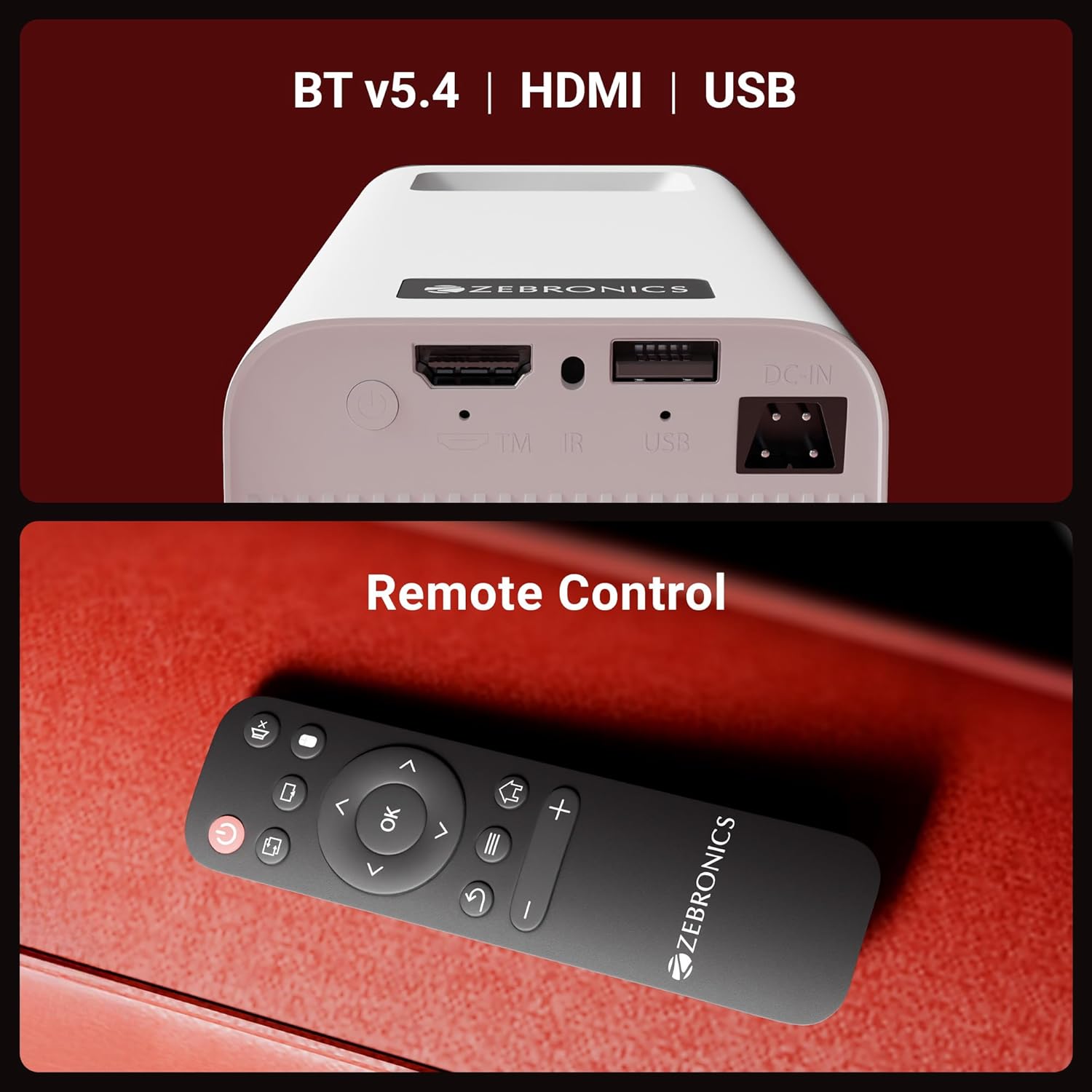
פיגורע 2: דערציען view of the projector highlighting the connectivity ports (DC-IN, USB, HDMI) and the remote control.
The rear panel includes a DC-IN port for power, a USB port for media playback, and an HDMI port for connecting external devices. An IR receiver is also present for remote control operation.
סעטאַפּ אינסטרוקציעס
קסנומקס. פּלאַסעמענט
Position the projector on a stable, flat surface. The 240° tilt mechanism allows you to adjust the projection angle for optimal viewing on a wall or screen. Ensure there are no obstructions in front of the lens or around the ventilation areas.

פיגורע 3: The projector's 240° tilt mechanism allows for flexible positioning and projection angles.
For best results, project onto a smooth, light-colored surface. The projector can create a screen size of up to 254cm (100 inches).

פיגורע 4: The projector can display images up to 254cm (100 inches) diagonally, creating a large viewינג דערפאַרונג.
2. מאַכט קאַנעקשאַן
Connect the provided power adapter to the DC-IN port on the projector and then plug it into a power outlet.
3. ערשטע איינשאַלטונג
Press the power button on the projector or the remote control to turn on the device. The projector will boot up and display the Android smart interface.
אַפּערייטינג ינסטראַקשאַנז
ווייַט קאָנטראָל
Use the included remote control to navigate the projector's interface, adjust settings, and control media playback. Ensure batteries are correctly inserted.
פאָקוס אַדזשאַסטמאַנט
Rotate the focus wheel located near the lens to achieve a clear and sharp image on your projection surface.
אַוטאָ קיסטאָנע אַדאַפּטיישאַן
The projector features automatic vertical keystone correction. This function automatically adjusts the image to be rectangular even if the projector is placed at an angle. Manual adjustment may be available in settings for fine-tuning.
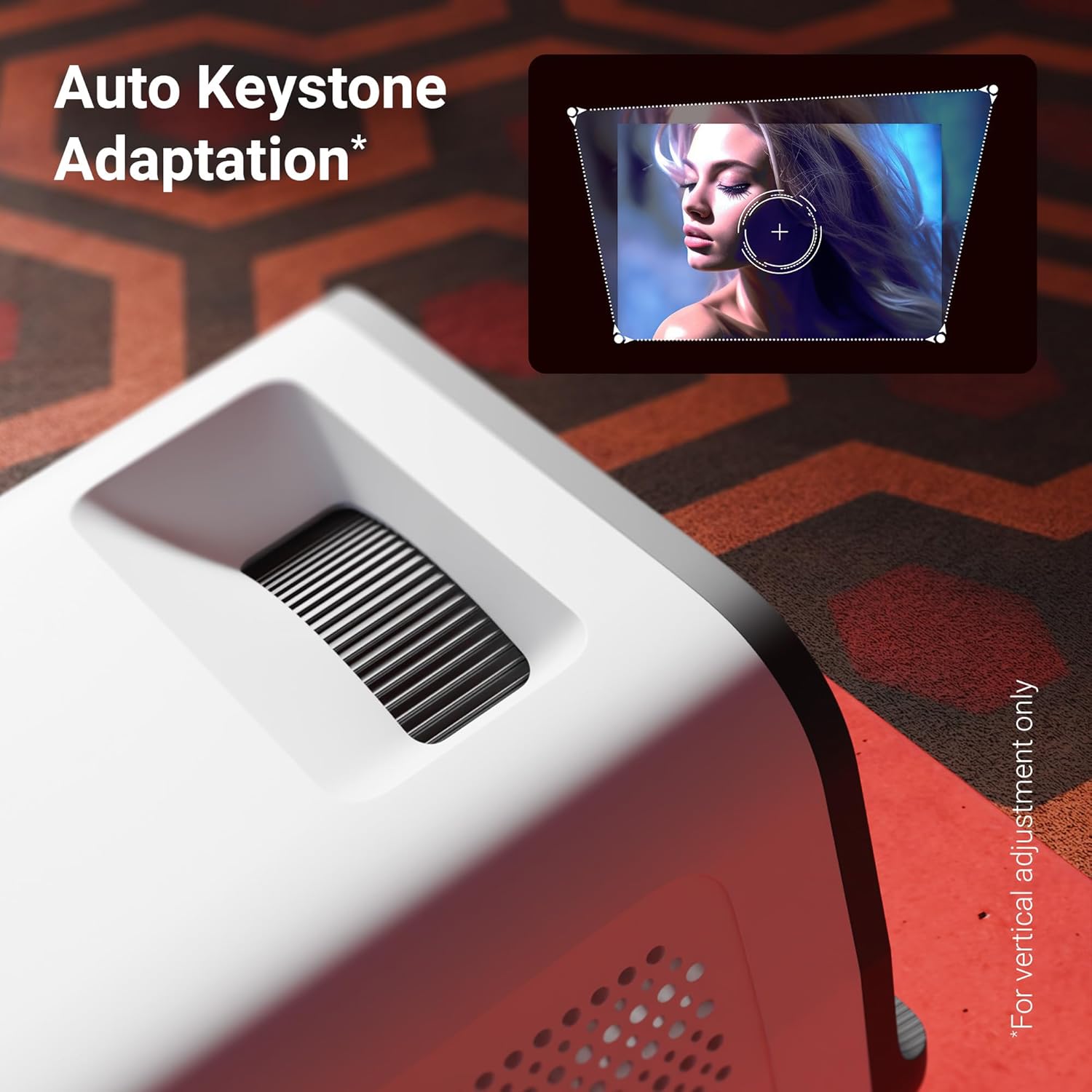
פיגורע 5: The auto keystone adaptation feature corrects vertical image distortion automatically.
קאַנעקטיוויטי
- הדמי: Connect external devices such as laptops, gaming consoles, or Blu-ray players using an HDMI cable. Select the HDMI input source from the projector's menu.
- וסב: אַרײַנשטעלן אַ USB דרייוו אין דעם USB פּאָרט צו שפּילן מעדיע files (photos, videos, music) directly from the drive.
- בלועטאָאָטה וו5.4: Pair Bluetooth audio devices like speakers or headphones for enhanced sound. Access Bluetooth settings in the Android interface.
- Wi-Fi (2.4GHz & 5GHz): Connect the projector to your home Wi-Fi network to access online content, streaming apps, and firmware updates.
- Miracast & iOS Screen Mirroring: Wirelessly mirror the screen of your Android or iOS smartphone/tablet to the projector. Follow the on-screen instructions for pairing.
קלוגע פֿעיִטשערז (אַנדרויד אָפּערירן סיסטעם)
The projector runs on an Android operating system, allowing you to download and use various OTT (Over-The-Top) applications like Netflix and Prime Video directly on the device. Navigate the app store to install desired applications.
שליסל פֿעיִקייטן
- 4K UHD Support: Experience high-resolution content with support for 4K Ultra HD input, delivering sharp and detailed images.
- 4000 לומענס ברייטנאַס: די געפירט לamp provides 4000 lumens, ensuring bright and clear visuals for an immersive viewינג דערפאַרונג.
- Up to 254cm (100") Screen Size: Project large images suitable for home theater setups.
- 240° Tilt Mechanism: Offers flexible projection angles, reducing glare and improving viewאין טרייסט.
- Auto Keystone Adaptation: Automatically corrects vertical image distortion for a perfectly rectangular picture.
- געבויט-אין רעדנער: Integrated speaker provides audio output for convenience. External audio can be connected via Bluetooth or other ports.
- 30,000-hour LED Lamp לעבן: די לאַנג-בלייַביק געפירט לamp ensures extended usage without frequent replacement.
- קוואַד-קאָר פּראַסעסער: Enhances performance and responsiveness for smooth operation of the Android OS and applications.
- צוויי-באַנד ווי-פי: Supports both 2.4GHz and 5GHz Wi-Fi for stable and fast wireless connectivity.
- Miracast & iOS Screen Mirroring: Seamlessly cast content from Android and iOS devices.

פיגורע 6: איבערview of key features including brightness, connectivity, and processing power.

פיגורע 7: The projector includes a built-in speaker for integrated audio playback.
וישאַלט
- לענס רייניקונג: Use a soft, lint-free cloth or the provided cotton swab to gently clean the projector lens. Do not use abrasive cleaners.
- ווענטילאַטיאָן: Regularly check and clean the ventilation grilles to prevent dust buildup, which can affect performance and lifespan.
- סטאָרידזש: ווען נישט אין באַנוץ פֿאַר לענגערע פּעריאָדן, זאָל מען האַלטן דעם פּראָיעקטאָר אין אַ קיל, טרוקן אָרט, באַשיצט פֿון שטויב און דירעקטער זון.
טראָובלעשאָאָטינג
| פּראָבלעם | מעגלעך סיבה | לייזונג |
|---|---|---|
| קיין בילד געוויזן | שטראָם נישט פארבונדן; אומרעכטע אַרייַנגאַנג מקור; לינז דעקל אויף. | Ensure power is connected and unit is on. Select correct HDMI/USB input. Remove lens cap. |
| די בילד איז בלערי | פאָקוס נישט אַדזשאַסטיד; פּראָיעקטאָר צו ווייט/נאָענט צום עקראַן. | Adjust the focus wheel. Reposition the projector for optimal distance. |
| קיין געזונט | קול צו נידעריג; שטיל געמאכט; עקסטערנע אודיאָ דעווייס נישט פארבונדן/פארבינדן. | Increase volume. Unmute. Check Bluetooth connection or external audio cable. |
| ווייַט קאָנטראָל נישט ארבעטן | Batteries low/incorrectly inserted; Obstruction between remote and projector. | Replace batteries. Ensure clear line of sight to IR receiver. |
| ווי-פי קשר ישוז | אומרעכט פּאַראָל; ראַוטער צו ווייט; נעץ שטערונג. | Verify Wi-Fi password. Move projector closer to router. Try connecting to 2.4GHz or 5GHz band. |
ספּעסאַפאַקיישאַנז
| סאָרט | זעבראָניקס |
| מאָדעל | Zeb-Pixa Play 35 |
| ווייַז טעכנאָלאָגיע | געפירט |
| ווייַז טיפּ | 4K UHD Support |
| געבוירן האַכלאָטע | 1280 רענטגענ 720 פּיקסעלס |
| בילד ברייטנאַס | 4000 לומענס |
| בילד קאַנטראַסט פאַרהעלטעניש | 1000:1 |
| אַספּעקט פאַרהעלטעניש | 16:10 |
| קאַנעקטיוויטי טעכנאָלאָגיע | Bluetooth v5.4, HDMI, USB, Dual-band Wi-Fi (2.4GHz & 5GHz) |
| קאַמפּאַטאַבאַל דעוויסעס | Laptops, Smartphones, Tablets, Gaming Consoles, Blu-ray Players, Media Streaming Devices |
| פּראָדוקט דימענשאַנז | 10.5 X 8.8 X 16.5 סענטימעטער |
| פּונקט וואָג | 355 ג |
| מאַונטינג טיפּ | טאַבלעטאָפּ בארג |
וואָראַנטי און שטיצן
The Zebronics Pixaplay 35 Projector comes with a 1 יאָר וואָראַנטי from the date of purchase. For warranty claims, technical support, or service inquiries, please contact Zebronics customer service. Refer to the QR Code Guide included in your package for contact details or visit the official Zebronics webפּלאַץ.
פאַבריקאַנט: Zebronics India Private Limited


