הקדמה
This manual provides detailed instructions for the PUSOKEI B0FS1Z75ZP 2G Unlocked Cell Phone. Please read this manual carefully before using your device to ensure proper operation and to maximize its features. This phone is designed for ease of use, featuring large buttons, a loud speaker, and a clear 2.0-inch display, making it suitable for seniors.
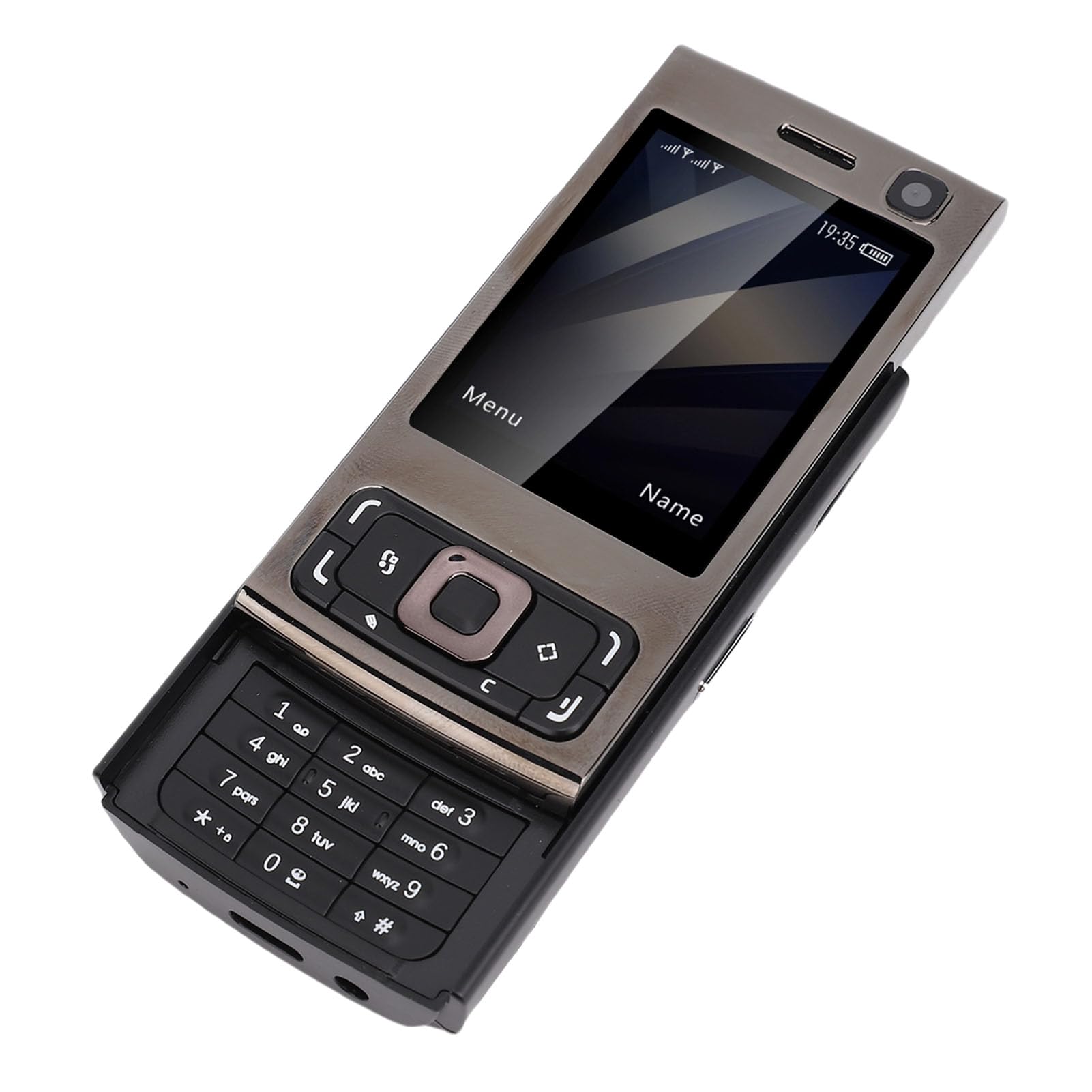
פיגור 1: פאָרנט און הינטן view of the PUSOKEI B0FS1Z75ZP Cell Phone.
פּעקל אינהאַלט
באַשטעטיקן אַז אַלע זאכן זענען פאַראַן אין פּעקל:
- 1 x מאָביל טעלעפאָן
- 1 x טשאַרדזשינג קאַבל (טיפּ-C)
- 1 X Lanyard
- 1 x באַניצער מאַנואַל
- 1 x 1000 מאַה ליטהיום-יאָן באַטערי

Figure 2: PUSOKEI B0FS1Z75ZP Cell Phone, charging cable, and lanyard included in the package.
סעטאַפּ
1. סים קאַרטל און זכּרון קאַרטל ינסטאַלירונג
The phone supports dual SIM cards (1 standard SIM + 1 Nano SIM) and one memory card (up to 16GB, not included). Ensure your SIM card supports 2G GSM networks (850/900/1800/1900 MHZ).
- מאַכט אַוועק: Before inserting or removing cards, ensure the phone is powered off.
- אַראָפּנעמען הינטערשטן דעקל: Gently slide or pry open the back cover of the phone.
- אַרײַנשטעלן סים קאַרטלעך: Locate the SIM card slots. Insert your standard SIM card and Nano SIM card into their respective slots, ensuring the gold contacts face downwards and the cards are correctly oriented as indicated on the phone.
- אַרייַנלייגן זכּרון קאָרט: Locate the memory card slot. Insert a compatible memory card (MicroSD, up to 16GB) into the slot until it clicks into place.
- פאַרבייַטן הינטערשטן דעקל: Carefully reattach the back cover until it is securely closed.
2. באַטאַרייע ייַנמאָנטירונג און טשאַרדזשינג
The phone comes with a 1000mAh Lithium-ion battery.
- ינסטאַלירן באַטערי: If the battery is not pre-installed, remove the back cover and insert the battery into the compartment, aligning the contacts.
- ערשט אָפּצאָל: Connect the Type-C charging cable to the phone's charging port and the other end to a power adapter. Charge the phone fully before first use. The battery indicator on the screen will show charging status.
אַפּערייטינג ינסטראַקשאַנז
1. מאַכט אויף / אויסגעלאשן
- מאַכט אויף: דריק און האלט דעם פּאַוער/ענד רוף קנעפּל (געווענליך רויט) ביז דער עקראַן צינדט זיך אָן.
- מאַכט אַוועק: Press and hold the Power/End Call button until the power off options appear, then select "Power Off" or continue holding until the phone shuts down.
2. יקערדיק נאַוויגאַציע
Use the navigation keys (up, down, left, right) and the central selection key to move through menus and confirm selections. The left and right soft keys perform functions indicated on the screen above them.

פיגורע 3: פראָנט view of the phone showing the screen, navigation keys, and keypad.
3. מאכן און ריסיווינג קאַללס
- מאַכן אַ רוף: אַרייַן די טעלעפאָן נומער ניצן די קלאַוויאַטור און דריקן די רוף קנעפּל (געוויינטלעך גרין).
- באַקומען אַ רוף: When the phone rings, press the Call button to answer. Press the End Call button to reject or end a call.
- הויך רעדנער: The phone features a high-volume speaker for clear audio during calls.
4. Sending and Receiving Text Messages
- נאַוויגירן צו די "מעסעדזשעס" מעניו.
- Select "New Message" to compose a text. Enter the recipient's number and your message.
- Press "Send" to transmit the message.
- Received messages will appear in your inbox.
5. מולטימעדיאַ פֿעיִטשערז
- אַפּאַראַט: Access the camera from the main menu. Use the navigation keys to adjust settings and the central key to capture photos. The phone has an approximate 300,000 pixel camera.
- MP3/MP4 שפּילער: Store music and video files on a memory card. Access the MP3/MP4 player from the multimedia menu to play your media.
- עפעם ראַדיאָ: Plug in headphones (3.5mm jack) to use as an antenna, then access the FM Radio feature to listen to local stations.

Figure 4: The phone's screen showing icons for various functions including camera, MP3, and FM radio.
6. נאָך פאַנגקשאַנז
- בלועטאָאָטה: Enable Bluetooth from the settings menu to connect to compatible devices like headsets.
- שרעק: Set multiple alarms with custom tones.
- קאַלענדאַר: View דאַטעס און צולייגן דערמאָנונגען.
- פלאַשליגהט: אַקטיוויירן די איינגעבויטע טאַשלאָמפּ פֿאַר באַלויכטונג.
- קאַלקולאַטאָר: דורכפירן גרונטלעכע אריטמעטיק אפעראציעס.
- שפּילערייַ: Access pre-installed games for entertainment.
- Internet Access/Browser: The phone supports basic internet access and a browser. Note that this is a 2G device, so internet speeds will be limited.
- Voice Changing Function: This feature allows you to change your voice to male, female, or child during calls. Access this option from the call menu.
7. Quick Dial for Family
You can set up to 9 family numbers for quick dialing. This allows you to call frequently contacted numbers without navigating through the phonebook.
- Go to "Settings" or "Phonebook" menu.
- Locate "Speed Dial" or "Family Numbers" option.
- Assign a number (e.g., 2-9) to a contact from your phonebook.
- To quick dial, simply press and hold the assigned number key.
8. Slider Mechanism
The phone features a slider design. Slide the top part of the phone upwards to reveal the keypad and unlock the screen. Slide it down to cover the keypad and lock the screen, making it compact and portable.

Figure 5: The phone shown in both closed and open (slider up) positions, highlighting its form factor.
וישאַלט
- רייניקונג: ניצט אַ ווייכע, טרוקענע שטאָף צו רייניקן דעם טעלעפאָן'ס עקראַן און קערפּער. פֿאַרמייַדט ניצן פליסיקע רייניקונגסמיטלען אָדער שרײַבנדיקע מאַטעריאַלן.
- סטאָרידזש: האַלט דעם טעלעפאָן אין אַ קיל, טרוקן אָרט אַוועק פון דירעקט זונשייַן און עקסטרעמע טעמפּעראַטורן.
- באַטערי זאָרגן: Do not expose the battery to high temperatures or puncture it. If the phone will not be used for an extended period, charge it partially before storing.
- ויסמיידן וואַסער: This phone is not waterproof. Keep it away from water and high humidity.
טראָובלעשאָאָטינג
| פּראָבלעם | מעגלעך סיבה / לייזונג |
|---|---|
| דער טעלעפאָן גייט נישט אָן. | Battery may be depleted. Charge the phone for at least 30 minutes. Ensure the battery is correctly installed. |
| קען נישט מאַכן אָדער באַקומען רופן. |
|
| שלעכטע רוף קוואַליטעט. | Move to an area with better network reception. Ensure the speaker is not obstructed. |
| קען נישט צוטריטן צום אינטערנעט. | Ensure your SIM card has an active data plan for 2G networks. Check network settings. |
| זכּרון קאַרטל נישט דעטעקטירט. | Ensure the memory card is correctly inserted and formatted. The phone supports up to 16GB. |
ספּעסאַפאַקיישאַנז
- פאַרשטעלן גרייס: Approx. 2.0 inches HD display
- Network Format: GSM: 850/900/1800/1900 MHZ (2G GSM only)
- סים קאַרד סלאָץ: 1 x Standard SIM, 1 x Nano SIM
- זיקאָרן קאָרט שטיצן: Up to 16GB (MicroSD, not included)
- כעדפאָון דזשאַק: 3.5 מם
- בלועטאָאָטה: 4.0
- אַפּאַראַט: Approx. 300,000 pixels (0.3 MP)
- MP3/MP4 שפּילער: געשטיצט
- באַטערי: 1000 מאַה ליטהיום-יאָן באַטערי
- טשאַרדזשינג פּאָרט: טיפּ-C
- שפּראַכן: English (Default), French, Spanish, Portuguese, Russian, Arabic, Persian
- פאָרם פאַקטאָר: סליידער
- נומער וואָג: 6.4 אונסעס
- פּעקל דימענשאַנז: 3.94 X 3.94 X 2.36 אינטשעס
פּראָדוקט איבערview ווידעא
קוקט דעם קורצן ווידעא פאר א וויזועלע איבערבליקview of the PUSOKEI Cell Phone for Seniors, showcasinג זײַן דיזײַן און שליסל פֿעיִקייטן.
ווידעא 1: א קורצע איבערבליקview of the PUSOKEI Cell Phone for Seniors, demonstrating its physical appearance and slider mechanism.
וואָראַנטי און שטיצן
For warranty information or technical support, please refer to the contact details provided with your purchase or visit the official PUSOKEI webזייטל. האַלט אייער קויף קוויטל ווי אַ באַווייַז פון קויפן.