הקדמה
א דאנק פארן קויפןasing the Philips TAX5000 Bluetooth Party Speaker. This manual provides essential information for setting up, operating, and maintaining your speaker to ensure optimal performance and longevity. Please read these instructions carefully before using the product.
וואָס איז אין די קעסטל
באַשטעטיקן אַז אַלע קאָמפּאָנענטן זענען פאַראַן אין דער פּאַקאַדזשינג:
- Philips TAX5000 Bluetooth Party Speaker
- וסב קאַבלע
- שנעל אָנהייב גייד
- וואָראַנטי סערטיפיקאַט
פּראָדוקט איבערview
The Philips TAX5000 is a portable party speaker designed for powerful audio output and dynamic lighting effects. It features dual 8-inch woofers and 2-inch tweeters, delivering 200W maximum sound output with Bass+ technology. The integrated RGB LED lightshow offers 13 modes. Connectivity options include Bluetooth, auxiliary input, and USB playback. For expanded audio, True Wireless Stereo (TWS) and Auracast multi-speaker connections are supported. The speaker also includes dual microphone inputs and a guitar input with independent volume and echo controls for karaoke and live performances. Its design incorporates wheels and a carry handle for portability, and it is IPX4 splash-resistant. A rechargeable battery provides up to 14 hours of playback.
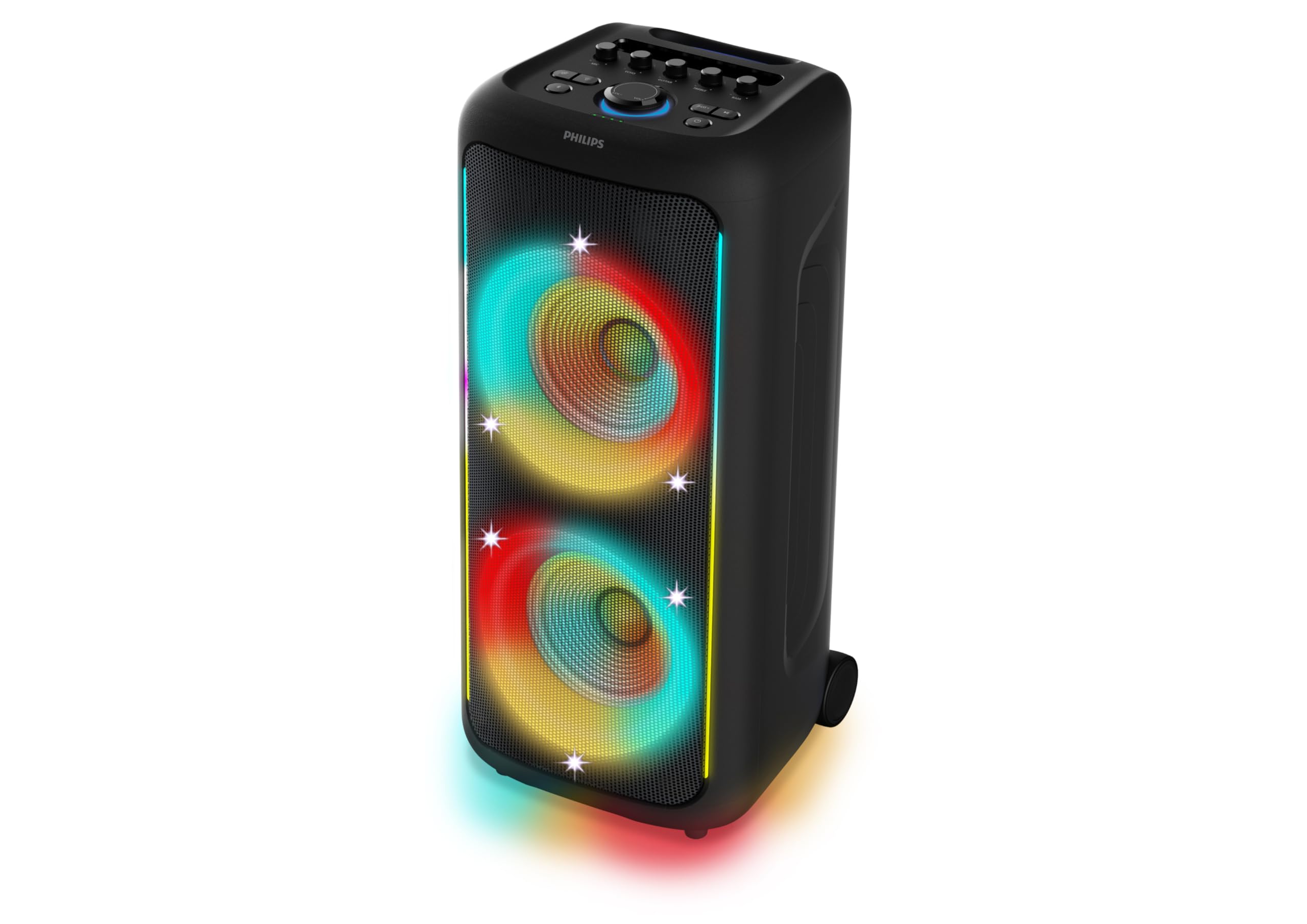
פיגורע 1: פראָנט view of the Philips TAX5000 speaker, showcasing the active RGB lightshow around the dual woofers.
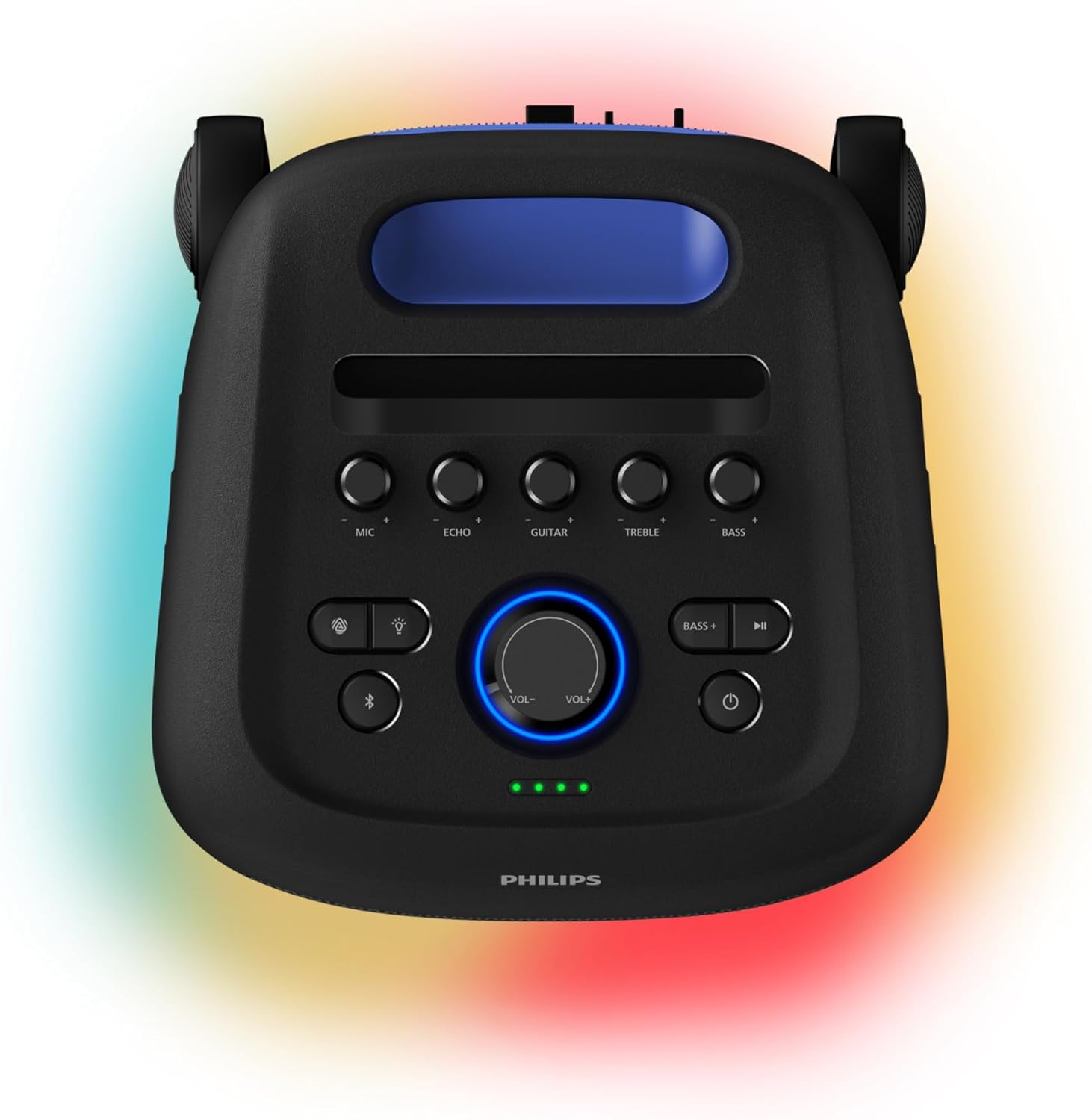
Figure 2: Top control panel of the speaker, showing buttons for microphone, echo, guitar, treble, bass, volume, light modes, Bluetooth, and power.
סעטאַפּ
1. טשאַרדזשינג די ספּיקער
Before initial use, fully charge the speaker. Connect the provided USB cable to the speaker's charging port and a suitable power adapter (not included). A full charge takes approximately 4 hours and provides up to 14 hours of playback. The battery pack is replaceable.
2. פּאָווערינג אויף / אויסגעלאשן
- To power on: Press and hold the Power button on the control panel until the indicator lights illuminate.
- To power off: Press and hold the Power button again until the indicator lights turn off.
3. בלועטאָאָטה פּערינג
- Ensure the speaker is powered on and in Bluetooth pairing mode (the Bluetooth indicator light will flash).
- אויף דיין רירעוודיק מיטל, געבן בלועטאָאָטה און זוכן פֿאַר בנימצא דעוויסעס.
- Select "Philips TAX5000" from the list of devices.
- אַמאָל פּערד, וועט די בלועטוט אינדיקאַטאָר ליכט אויף די רעדנער ווערן האַרט.
אַפּערייטינג ינסטראַקשאַנז
1. אַודיאָ פּלייַבאַקק
- בלועטאָאָטה: After pairing, play audio from your connected device. Control volume and track selection via the speaker's controls or your device.
- וסב פּלייַבאַקק: אַרײַנשטעלן אַ USB דרייוו מיט אַודיאָ files into the USB port. The speaker will automatically begin playback.
- אַגזיליערי אַרייַנשרייַב: Connect an audio device using a 3.5mm auxiliary cable (not included) to the AUX input port.
2. Lightshow Control
The speaker features an RGB LED lightshow with 13 dynamic modes. Use the dedicated Light button on the control panel to cycle through modes or turn the lights off. Further customization is available via the Philips Entertainment App.
3. קאַראַאָקע און גיטאַרע איינגאַבעס
The speaker is equipped with two microphone inputs and one 6.3mm guitar input. Connect your microphones and/or guitar. Use the dedicated MIC, ECHO, GUITAR, TREBLE, and BASS knobs on the control panel to adjust levels and apply echo effects.
4. Multi-Speaker Connection (TWS & Auracast)
- אמת ווירעלעסס סטערעאָ (TWS): To pair two TAX5000 speakers for stereo sound, follow the instructions in the Quick Start Guide for TWS pairing.
- Auracast: For broadcasting audio to multiple compatible speakers, refer to the Philips Entertainment App or the full user manual for Auracast setup instructions.
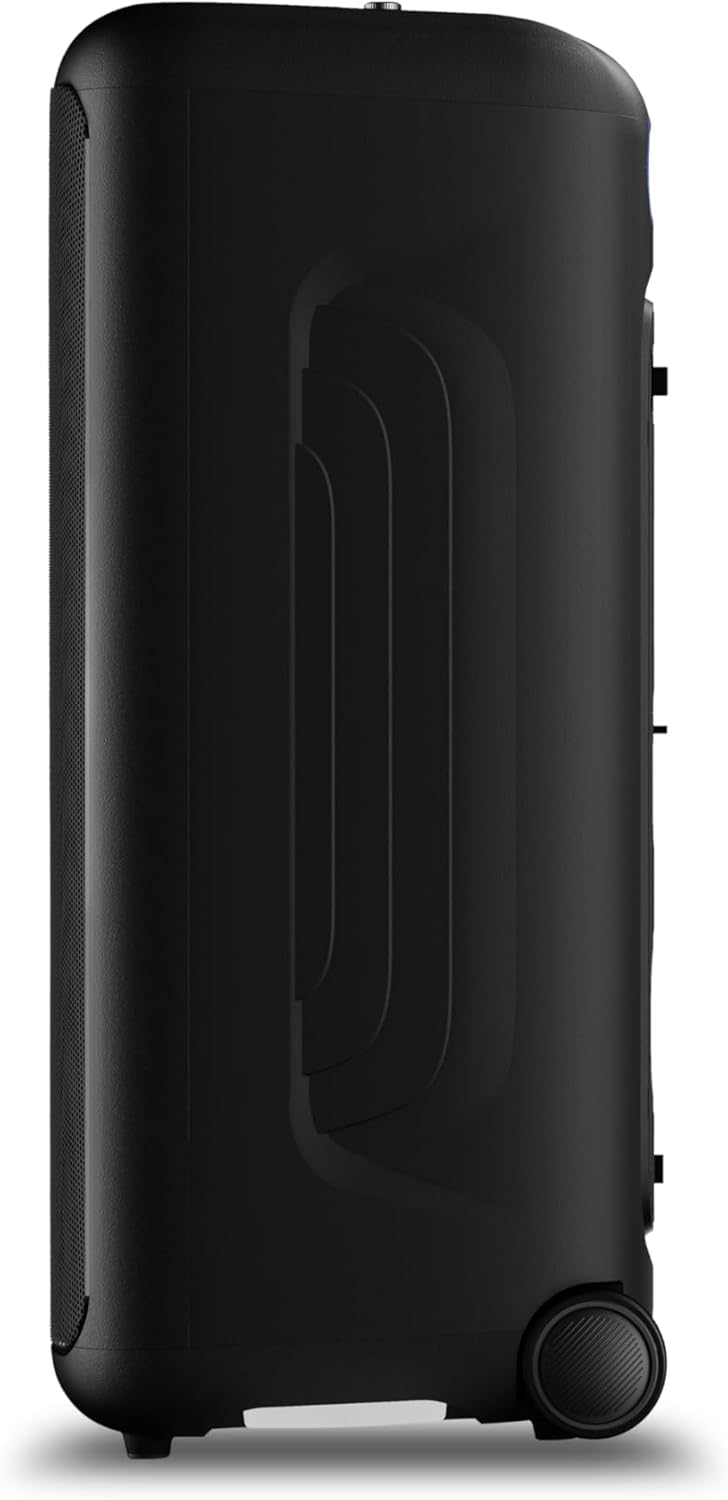
פיגורע 3: זייַט view of the speaker, highlighting the integrated wheels for easy transport.

פיגורע 4: דערציען view of the speaker, illustrating the pull-out handle for portability.
וישאַלט
To maintain your Philips TAX5000 speaker in optimal condition:
- רייניקונג: ניצט אַ ווייכע, טרוקענע שטאָף צו רייניקן די אויסערלעכע ייבערפלאַכן. ניצט נישט קיין שרײַבנדיקע רייניגער אָדער סאָלווענטן.
- סטאָרידזש: האַלט דעם רעדנער אין אַ קיל, טרוקן אָרט אַוועק פון דירעקט זונשייַן און עקסטרעמע טעמפּעראַטורן.
- וואַסער ויסשטעלן: While IPX4 splash-resistant, avoid submerging the speaker in water or exposing it to heavy rain. Ensure all port covers are securely closed when near liquids.
טראָובלעשאָאָטינג
אויב איר טרעפט פּראָבלעמען מיט אייער רעדנער, באַזירט זיך אויף די פאלגענדע געוויינטלעכע לייזונגען:
| פּראָבלעם | מעגלעך לייזונג |
|---|---|
| רעדנער גייט נישט אן | Ensure the battery is charged or the speaker is connected to AC power. Press and hold the Power button. |
| קיין געזונט רעזולטאַט | Check volume levels on both the speaker and the connected device. Ensure the correct input source is selected. Re-pair Bluetooth if necessary. |
| בלועטאָאָטה פּערינג פיילז | Ensure the speaker is in pairing mode. Move the speaker closer to your device. Turn off and on Bluetooth on your device. Clear previous pairings. |
| מיקראָפאָן/גיטאַר אַרבעט נישט | Check connections. Adjust MIC/GUITAR volume knobs. Ensure microphones are powered on if applicable. |
ספּעסאַפאַקיישאַנז
| שטריך | דעטאַל |
|---|---|
| מאָדעל נאָמען | TAX5000/37 |
| רעדנער טיפּ | פּאָרטאַטיוו, דרויסנדיק |
| רעדנער רעזולטאַט מאַכט | 200 Watts Max / 100 Watts RMS |
| וואָאָפער דיאַמעטער | 8 אינטשעס (x2) |
| טוועעטער דיאַמעטער | 2 אינטשעס (x2) |
| קאַנעקטיוויטי טעכנאָלאָגיע | בלועטאָאָטה, אַגזיליערי (3.5 מם), וסב |
| ווירעלעסס קאָמוניקאַציע | בלועטאָאָטה |
| ספּעציעלע פֿעיִקייטן | RGB Lightshow (13 modes), PA System, Portable with Wheels, Rechargeable Battery, TWS & Auracast Multi-Speaker, Dual Mic & Guitar Input, Karaoke |
| באַטערי לעבן | אַרויף צו 14 שעה |
| באַטאַרייע ריטשאַרדזש צייט | בעערעך 4 שעה |
| מאַכט מקור | Plug In Electric (AC) / Rechargeable Battery |
| קאָנטראָל מעטאָד | App, Touch Controls |
| IP שאַץ | IPX4 Splash-Proof |
| פּראָדוקט דימענשאַנז (ד רענטגענ וו רענטגענ ה) | 12.6" x 12.6" x 28.74" |
| פּונקט וואָג | 39.7 פונט |
וואָראַנטי
This Philips TAX5000 Bluetooth Party Speaker comes with a limited warranty. Please refer to the included Warranty Certificate for detailed terms, conditions, and registration information. Keep your proof of purchase for warranty claims.
שטיצן
For further assistance, product updates, or detailed troubleshooting, please visit the official Philips support website or contact Philips customer service. Contact information can be found on the warranty certificate or the Philips webפּלאַץ.
פּראָדוקט ווידיאס
Philips TAX5000 Overview
דאס ווידעא גיט אן אלגעמיינע איבערבליקview of the Philips TAX5000 Bluetooth Party Speaker's features and capabilities.
Philips TAX5000 Features Highlight
A short video highlighting key features of the Philips TAX5000 speaker, such as its portability and lightshow.


