1. הקדמה
Thank you for choosing the NEEWER Basics TP14B Travel Tripod Monopod. This versatile and compact tripod is designed for photographers and videographers seeking a portable and stable support solution for cameras and smartphones. It features a 360° ball head, adjustable height, and the ability to convert into a monopod, making it ideal for various shooting scenarios.

Figure 1: NEEWER Basics TP14B Travel Tripod Monopod (folded)
ווידעא 1: איבערview of NEEWER Basics 72" / 182 cm Travel Tripod Monopod features and quick setup.
2. וואָס איז אין דער קעסטל
- 1 x NEEWER Basics TP14B Travel Tripod Monopod
- 1 רענטגענ טעלעפאָנירן האָלדער
- 1 x L-Shaped Hex Key
- 1 רענטגענ קעריינג באַג

פיגורע 2: פּעקל אינהאַלט
3. פּראָדוקט איבערview
Familiarize yourself with the main components of your NEEWER Basics TP14B tripod.

Figure 3: Tripod Components
4. סעטאַפּ
4.1 אויסלייגן דעם דרייפוס
- Remove the tripod from its carrying bag.
- Gently spread the tripod legs outwards until they lock into one of the preset angle positions.
- Ensure all leg locks are securely fastened.
4.2 הייך צופּאַסן
The tripod offers adjustable height from 19 inches (48 cm) to 72 inches (182 cm).
- To extend the legs, open the flip locks on each leg section. Extend the legs to the desired height and close the flip locks securely.
- To extend the center column, loosen the center column locking knob, pull the center column upwards, and then tighten the knob to secure it.
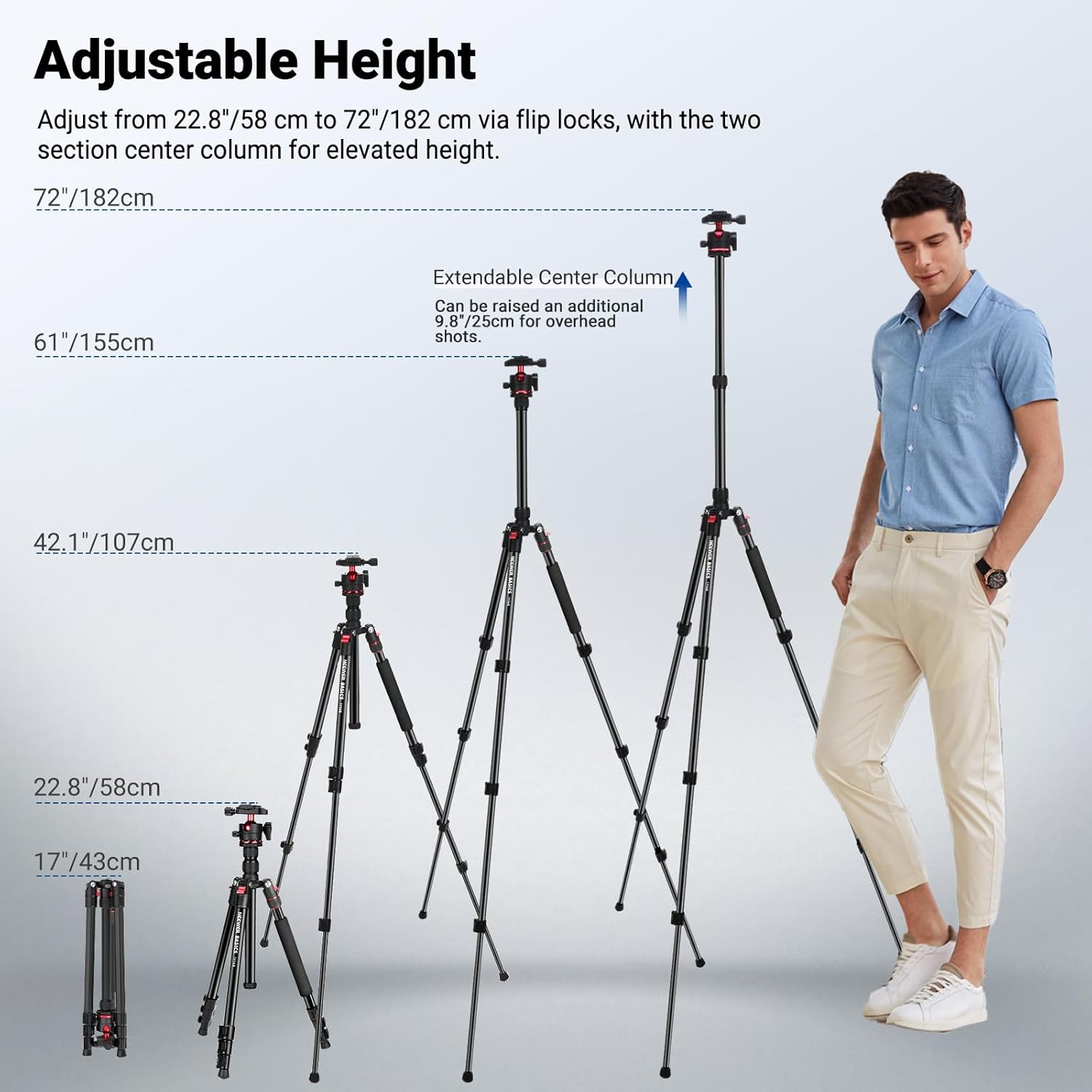
Figure 4: Adjustable Height Options
4.3 אנשטעלן אייער אפאראט
- פֿאַר קאַמעראַס: Attach your camera to the 1/4" screw on the Arca-type quick release plate. Slide the plate into the ball head and secure it with the quick release plate locking knob.
- פֿאַר סמאַרטפאָנעס: Attach the included phone holder to the 1/4" screw on the quick release plate. Insert your smartphone into the phone holder, ensuring it is securely gripped.
4.4 Monopod Conversion
One of the tripod legs can be detached and used as a monopod.
- Locate the leg with the foam grip. Unscrew the leg from the tripod body by twisting the red ring at the top of the leg.
- Unscrew the center column with the ball head from the main tripod body.
- Attach the ball head and center column assembly to the detached leg to form a monopod.
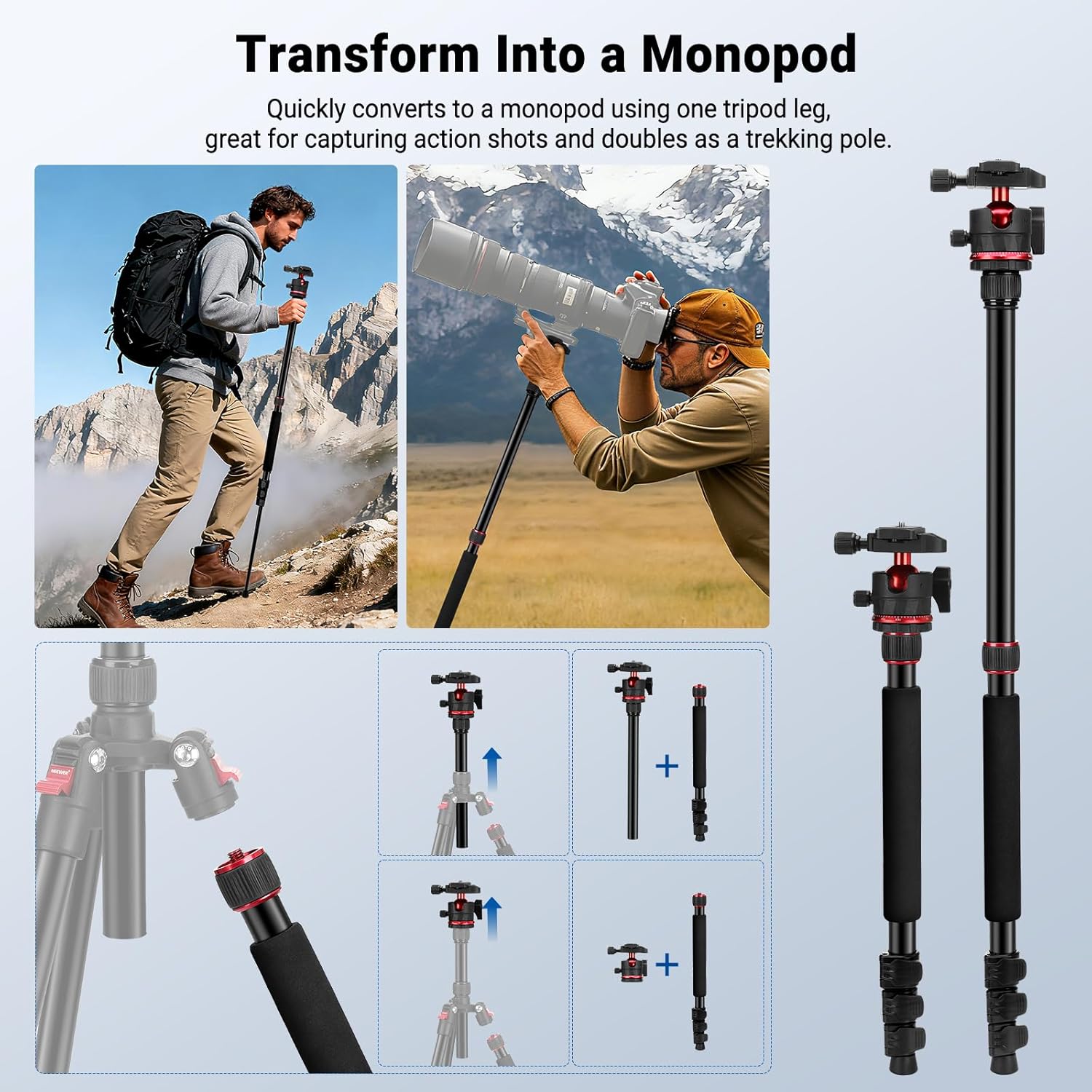
Figure 5: Monopod Conversion
5. אַפּערייטינג ינסטרוקטיאָנס
5.1 360° Ball Head Operation
The Arca-type ball head allows for flexible positioning of your camera.
- אַדזשאַסטינג ווינקל: Loosen the ball head locking knob to tilt and swivel your camera. Tighten the knob to secure the desired angle.
- Panoramic Rotation: Loosen the base locking knob to rotate the camera 360° horizontally for panoramic shots. The integrated leveling scale helps with precise adjustments.
- ווערטיקאַל שאָס: Utilize the 90° tilt notch on the ball head for quick transitions to vertical shooting.

Figure 6: 360° Ball Head Features
5.2 Leg Angle Adjustment
Each leg features an angle adjustment button, allowing you to set the legs at different angles (e.g., 24°, 57°, 86°) for stability on uneven terrain or for specific shooting perspectives.
5.3 Low Angle and Macro Shots
The center column can be inverted for extremely low-angle shots or macro photography. To do this, fully extend and remove the center column, then reinsert it upside down into the tripod body.

Figure 7: Swappable Center Columns for Versatile Shooting
6. וישאַלט
- Clean the tripod regularly with a soft, dry cloth.
- Avoid exposing the tripod to extreme temperatures or harsh chemicals.
- Ensure all locking mechanisms are free of dirt and debris for smooth operation.
- Store the tripod in its carrying bag when not in use to protect it from dust and scratches.
7. טראָובלעשאָאָטינג
| פּראָבלעם | לייזונג |
|---|---|
| טרייפאָד איז נישט סטאַביל. | Ensure all leg sections are fully extended and their flip locks are securely closed. Adjust leg angles for better balance on uneven surfaces. |
| Ball head movement is stiff or loose. | Check the ball head locking knob and base locking knob. Loosen to adjust, tighten to secure. Clean any debris if movement is stiff. |
| Monopod conversion difficulty. | Ensure the correct leg (with foam grip) is being detached and the center column is properly unscrewed before reassembly. |
8. ספּעסאַפאַקיישאַנז
| שטריך | דעטאַל |
|---|---|
| מאָדעל | TP14B |
| נומער טיפּ | רייזע טריפּאָד |
| קאַמפּאַטאַבילאַטי | אַפּאַראַט, סמאַרטפאָנע |
| אַפּפּליקאַטיאָן | פאָטאָ & ווידעא |
| הויפּט פֿעיִקייטן | Flexible Center Column |
| מאַונטינג ווייזט | 1/4", Arca type |
| הויפּט מאַטעריאַל | אַלומינום |
| מאַסע קאַפּאַציטעט | 13.2 לבס / 6 קג |
| מאַקסימום הייך | 72 אינטשעס / 182 ס״מ |
| מינימום הייך | 19 אינטשעס / 48 ס״מ |
| פאָולדיד גרייס | 17 אינטשעס / 43 סענטימעטער |
| פּונקט וואָג | 51 Ounces / 1.45 kg |
| Tripod Head Type | שפּיל פּילקע העאַדס |
9. וואָראַנטי & שטיצן
דער פּראָדוקט קומט מיט אַ 1-יאָר מאַנופאַקטורער וואָראַנטי.
For technical support, warranty claims, or further inquiries, please visit the official NEEWER webזייטל אדער קאנטאקט זייער קאסטומער סערוויס גלייך. איר קענט אויך זיך ווענדן צו די NEEWER Store on Amazon פֿאַר נאָך רעסורסן.