הקדמה
Thank you for choosing the HONOR Choice Earbuds Clip. These open-ear wireless headphones are designed for comfortable listening with advanced features like Bluetooth 5.2 connectivity, AI call noise cancellation, and a long-lasting battery. This manual provides detailed instructions for setup, operation, maintenance, and troubleshooting to ensure optimal performance and user experience.
פּעקל אינהאַלט
- HONOR Choice Earbuds Clip (Left and Right Earbuds)
- ווירעלעסס טשאַרדזשינג קאַסע
- וסב טשאַרדזשינג קאַבלע
- באַניצער מאַנואַל
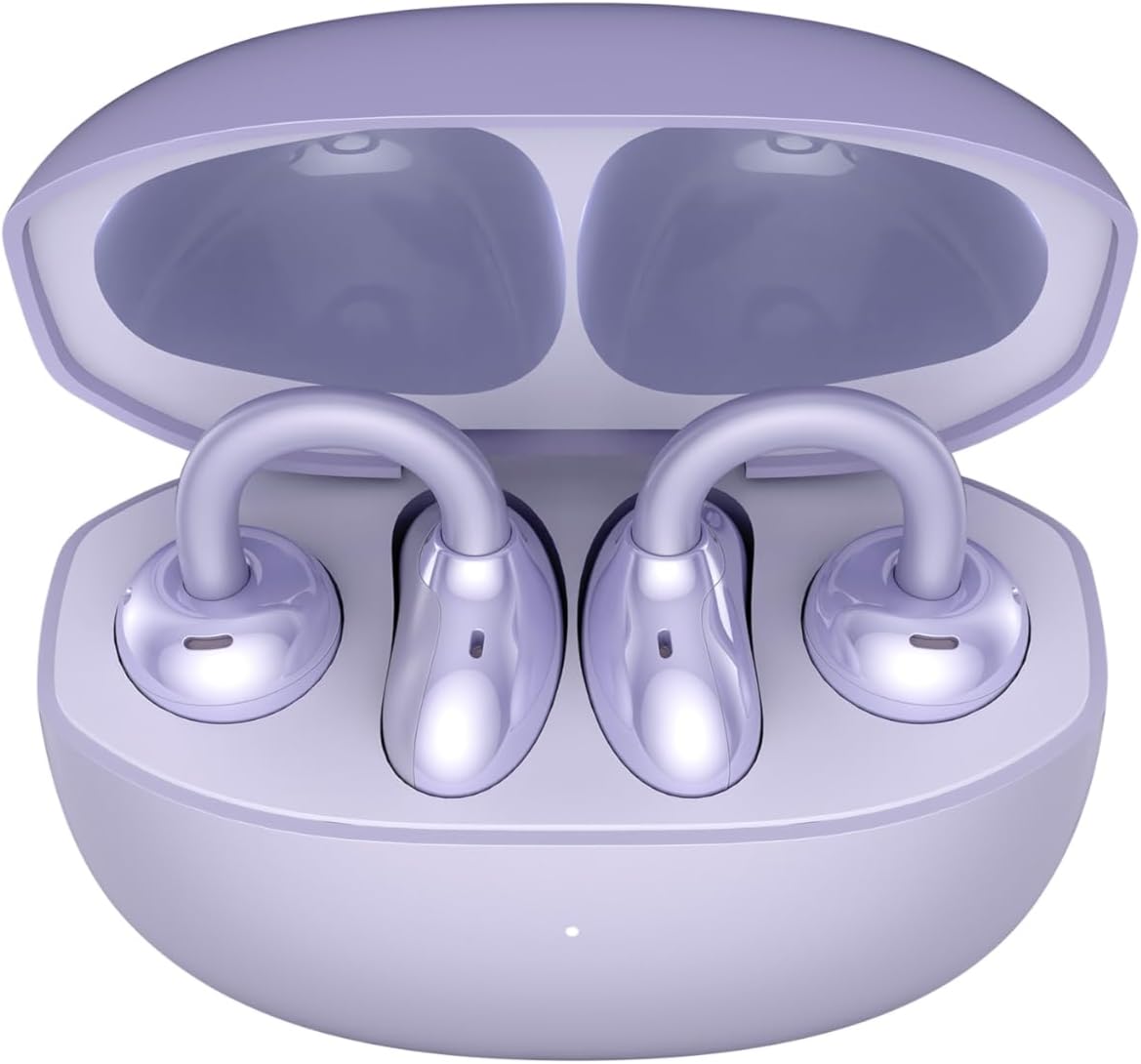
Image: The HONOR Choice Earbuds Clip, showing both earbuds inside their open charging case.
פּראָדוקט איבערview
The HONOR Choice Earbuds Clip features an innovative design and advanced technology for a superior audio experience.
שליסל פֿעיִקייטן:
- Titanium Arch Bridge Design: High-performance titanium alloy material covered with scratch and corrosion-resistant PC material for strength and lightweight comfort.
- Asymmetrical Open-Ear Design: Adapts naturally to the ear cup, combined with two rear vents for direct sound waves and reduced sound leakage.
- Dual Magnetic Driver: 10.8 mm driver with PEEK + Pen titanium-coated membrane for stronger bass, lower distortion, and higher sensitivity.
- עקסטענדעד באַטאַרייע לעבן: Up to 7 hours of single-song playback, extendable to 36 hours with the charging case.
- AI Call Noise Cancellation (DNN): Dual highly sensitive microphones intelligently filter ambient noise for crystal clear calls.
- בלועטאָאָטה 5.2 קאַנעקטיוויטי: זיכערט אַ סטאַביל און עפעקטיוו וויירלעסס פֿאַרבינדונג.
- IP54 וואַסער קעגנשטעל: גיט שוץ קעגן שטויב און שפּריצן.

Image: Diagram highlighting the Titanium Alloy Arch Design of the earbuds, emphasizing comfort and aesthetics.
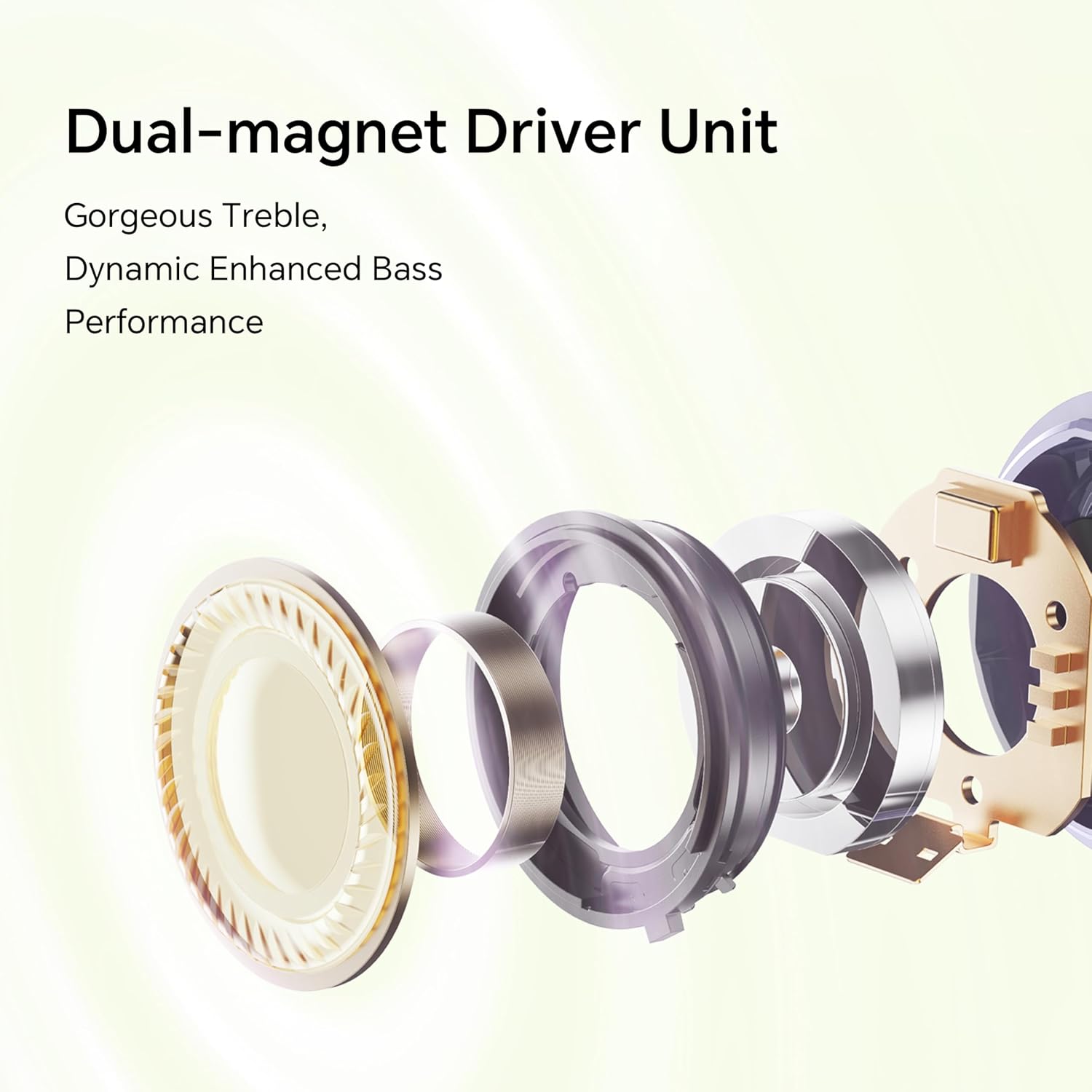
בילד: עקספּלאָדירט view diagram of the dual-magnet driver unit, illustrating its components for enhanced audio performance.
סעטאַפּ
1. אויפלאָדן די אויערקנעפּלעך און קעסטל
פארן ערשטן באַנוץ, לאָדן די אויערקנעפּלעך און די טשאַרדזשינג קעסטל גאָר אויף.
- שטעלן ביידע עאַרבודז אין די טשאַרדזשינג פאַל.
- Connect the charging case to a power source using a USB charging cable.
- The indicator light on the charging case will show the charging status. A full charge provides up to 36 hours of total listening time.

Image: Graphic illustrating the 36-hour extended battery life of the earbuds with their charging case.
2. פּערינג מיט אַ מיטל
Follow these steps to pair your HONOR Choice Earbuds Clip with your Bluetooth-enabled device.
- זיכער מאַכן אַז די אויערקנעפּלעך זענען אין דער טשאַרדזשינג קעסטל און דער דעקל פון דער קעסטל איז אָפֿן.
- On your device (e.g., smartphone, laptop), go to the Bluetooth settings.
- זוכן פֿאַר available devices and select "HONOR Choice Earbuds Clip" from the list.
- אַמאָל פארבונדן, וועט איר הערן אַן אַודיאָ פּראָמפּט, און די אויערקנעפּלעך וועלן זיין גרייט פֿאַר נוצן.
3. טראָגן די אויערקנעפּלעך
The open-ear clip design ensures a comfortable and secure fit.
- Gently clip each earbud onto your ear, ensuring the sound outlet is positioned towards your ear canal.
- Adjust for a comfortable and stable fit. The asymmetrical curve is designed to adapt naturally to the ear cup.

Image: A woman demonstrating the proper way to wear the HONOR Choice Earbuds Clip, highlighting its open clip design and natural fit.
אַפּערייטינג ינסטראַקשאַנז
ריר קאָנטראָלס
די אויערקנעפּלעך האָבן אינטואיטיווע ריר קאָנטראָלס פֿאַר פאַרוואַלטן אַודיאָ פּלייבאַק און רופט.
- שפּיל / פּויזע: איין צאַפּן אויף יעדער עאַרבוד.
- ווייַטער שפּור: צאַפּ צוויי מאָל אויף די רעכטע אויערקנעפּל.
- פֿריִערדיקע שפּור: צאַפּ צוויי מאָל אויף די לינקע אויערקנעפּל.
- ענטפֿערן / סוף רופן: איין צאַפּן אויף יעדער עאַרבוד.
- אָפּוואַרפן רופן: דריק און האלט אויף יעדן אויערקנעפל פאר 2 סעקונדעס.
- אַקטאַווייט קול אַססיסטאַנט: טרייפאַך צאַפּן אויף יעדן אויערקנעפּעל.
AI Call Noise Cancellation
The earbuds utilize dual microphones and an AI multi-channel call noise cancellation algorithm (DNN) to reduce ambient noise during calls, ensuring your voice is clear to the recipient. This feature is automatically active during phone calls.
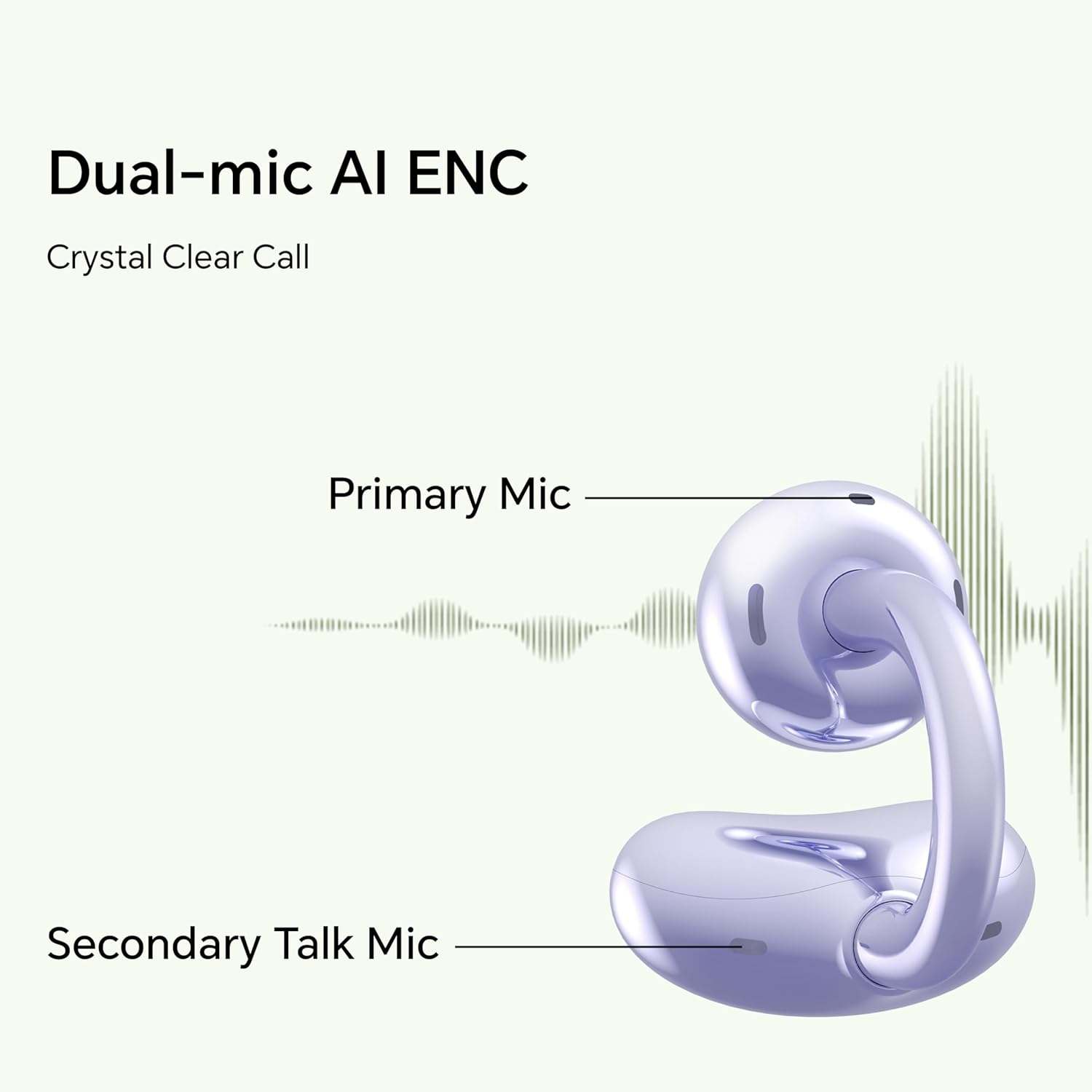
Image: Diagram illustrating the primary and secondary microphones used for AI Enhanced Noise Cancellation (ENC) during calls.
צווייענדיק מיטל קאַנעקשאַן
The HONOR Choice Earbuds Clip supports simultaneous connection to two devices. This allows for seamless switching between audio sources, such as listening to music on a laptop and answering a call on a smartphone.
- פֿאַרבינדט די אויערקנעפּלעך מיט אייער ערשטן דעווייס.
- Disconnect from the first device (or put earbuds back in case and re-enter pairing mode if needed).
- פֿאַרבינדט די אויערקנעפּלעך מיט אײַער צווייטן דעווײַס.
- The earbuds will now remember both devices and automatically switch between them based on active audio or call.
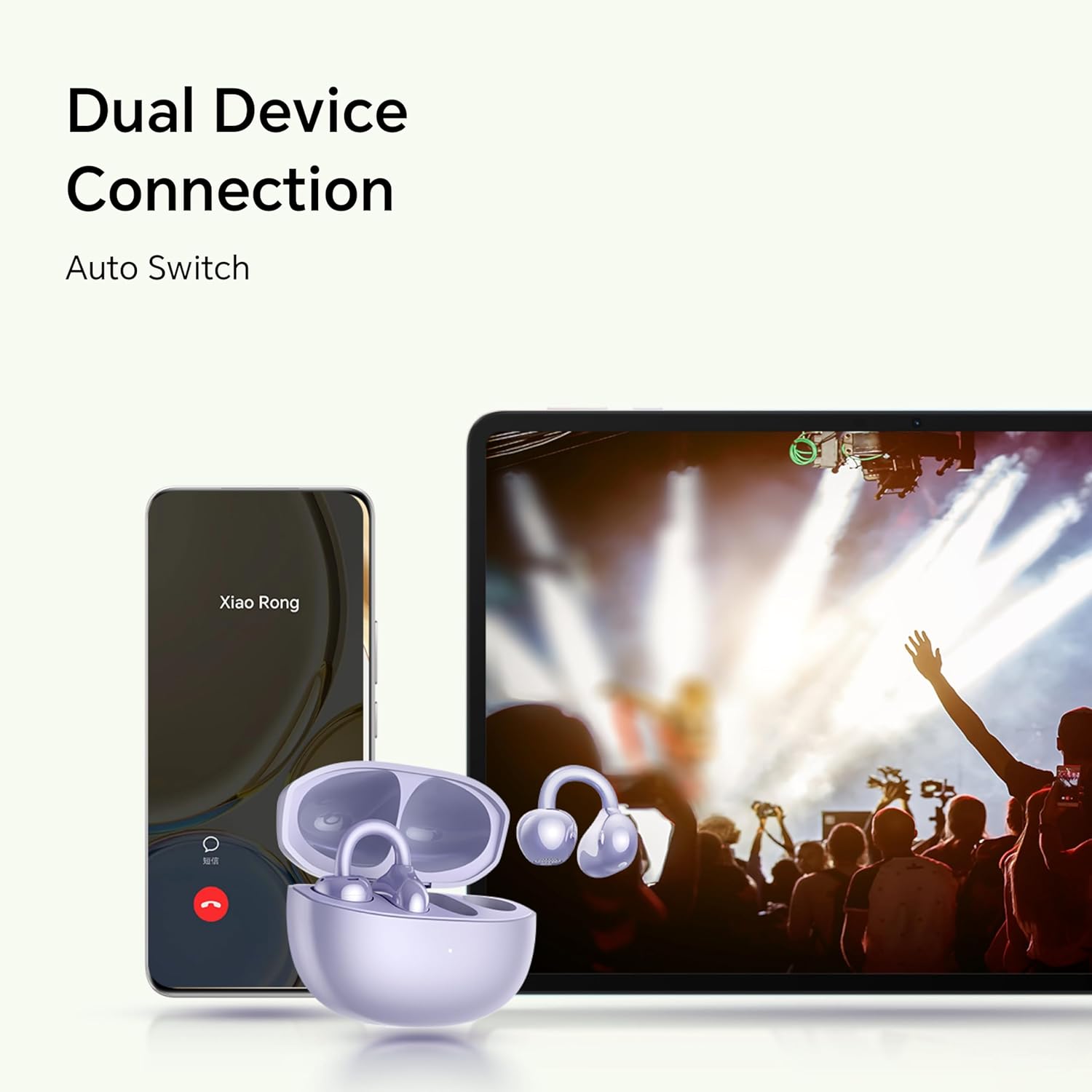
Image: Illustration showing the earbuds connected to both a smartphone and a tablet, demonstrating the dual device connection feature with automatic switching.
וישאַלט
געהעריקע אויפהאלטונג גאראנטירט די לאנגעוויטי און אפטימאלע פאָרשטעלונג פון אייערע אויערן-קנעפּלעך.
- רייניקונג: Use a soft, dry, lint-free cloth to clean the earbuds and charging case. Avoid using abrasive materials or harsh chemicals.
- וואַסער קעגנשטעל: The earbuds are IP54 rated, meaning they are protected against dust ingress and splashing water from any direction. Do not submerge them in water or expose them to heavy rain. Dry them thoroughly if they get wet.
- סטאָרידזש: ווען נישט אין באַנוץ, לייגט די אויערקנעפּלעך אין זייער טשאַרדזשינג קעסטל צו באַשיצן זיי און האַלטן זיי טשאַרדזשד. לייגט זיי אין אַ קיל, טרוקן אָרט אַוועק פון עקסטרעמע טעמפּעראַטורן.
- טשאַרדזשינג קאָנטאַקטן: Periodically check and clean the charging contacts on both the earbuds and inside the case to ensure proper charging.
טראָובלעשאָאָטינג
אויב איר טרעפט פּראָבלעמען מיט אייערע אויערקנעפּלעך, זעט די פאלגענדע געוויינטלעכע לייזונגען.
| פּראָבלעם | לייזונג |
|---|---|
| Earbuds do not turn on or charge. |
|
| Earbuds do not pair with my device. |
|
| קיין קלאַנג אָדער נידעריקע וואָלומען. |
|
| די קוואַליטעט פון די רופן איז שלעכט. |
|
| איין אויערקנעפל ארבעט נישט. |
|
ספּעסאַפאַקיישאַנז
Detailed technical specifications for the HONOR Choice Earbuds Clip.
| מאָדעל נאָמען | האָנאָר טשויס אויערקנעפּלעך קליפּ |
| מאָדעל נומער | 5504ADMY |
| סאָרט | האָנאָור |
| קאַנעקטיוויטי טעכנאָלאָגיע | ווירעלעסס (בלועטאָאָטה) |
| בלועטאָאָטה ווערסיע | 5.2 |
| אויער פּלייסמאַנט | עפענען אויער |
| פאָרם פאַקטאָר | אין אויער |
| ראַש קאָנטראָל | None (AI Call Noise Cancellation only) |
| ספּעציעלע שטריך | Noise Cancellation (AI Call Noise Cancellation) |
| אַודיאָ דרייווער טיפּ | דינאַמיש דרייווער |
| אַודיאָ דרייווער גרייס | 10 מילאַמיטערז |
| באַטעריע לעבן (אויערקנעפּלעך) | 7 שעה (איינציקע אָפּצאָל) |
| גאַנץ באַטאַרייע לעבן (מיט קעסטל) | אַרויף צו 36 שעה |
| קאָנטראָל טיפּ | ריר קאָנטראָל |
| מאַטעריאַל | Titanium Alloy, Plastic |
| פּונקט וואָג | 0.12 קילאָגראַמס (4.2 אונסעס) |
| פּראָדוקט דימענשאַנז | 2.36 X 2.36 X 1.18 אינטשעס |
| IP שאַץ | IP54 |
| אַרייַנגערעכנט קאַמפּאָונאַנץ | ווירעלעסס טשאַרדזשינג קאַסע |
וואָראַנטי און שטיצן
For warranty information and customer support, please refer to the official HONOR website or contact your local HONOR service center. Keep your proof of purchase for warranty claims.
- אָנליין שטיצן: Visit the official HONOR support website for FAQs, drivers, and software updates.
- קאָנטאַקט אינפֿאָרמאַציע: זעט די פּראָדוקט פּאַקאַדזשינג אָדער באַאַמטער webזייטל פֿאַר קונה סערוויס קאָנטאַקט דעטאַילס.