הקדמה
The XIAOMI Smart Camera C302 is an indoor security camera designed to provide comprehensive home monitoring. It features 2K UHD resolution, full-color night vision, and advanced AI detection capabilities for humans, pets, and baby cries. The camera offers 360° panoramic viewing, Wi-Fi 6 connectivity, and two-way audio communication. Enhanced privacy is ensured through a physical lens shield and a financial-grade security chip. This manual provides instructions for setting up, operating, maintaining, and troubleshooting your camera.
וואָס איז אין די קעסטל
באַשטעטיקן אַז אַלע קאָמפּאָנענטן זענען פאַראַן אין דיין פּעקל:
- XIAOMI Smart Camera C302
- ינסטראַקשאַנז מאַנואַל
- מאַכט אַדאַפּטער
פּראָדוקט איבערview
מאַכט זיך באַקאַנט מיט די קאַמעראַ'ס קאָמפּאָנענטן.
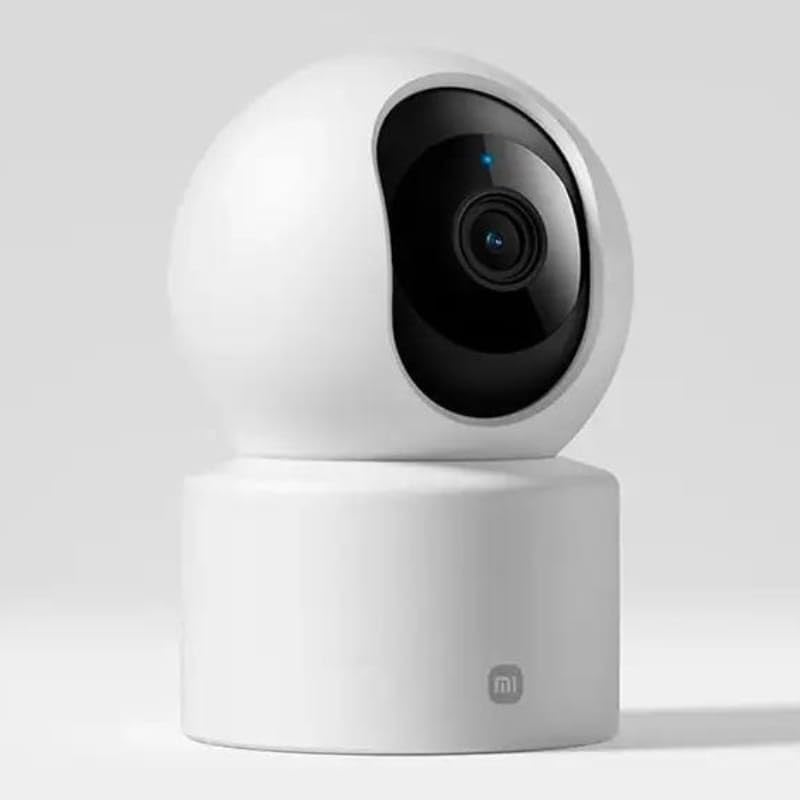
פיגורע 1: פראָנט view of the camera, highlighting the lens.
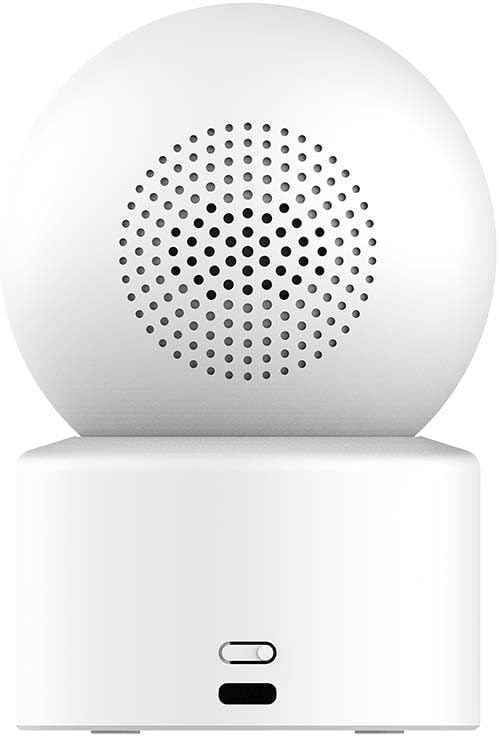
פיגורע 2: צוריק view of the camera, showing the speaker and power input.

Figure 3: The camera's physical lens shield mechanism.
סעטאַפּ
- מאַכט אויף: Connect the provided power adapter to the camera's power port and plug it into an electrical outlet. The camera will power on and initiate its startup sequence.
- Download Xiaomi Home App: Download and install the "Xiaomi Home" app on your smartphone from your device's app store.
- לייג דיווייס: Open the Xiaomi Home app, log in or create an account, and follow the in-app instructions to add the XIAOMI Smart Camera C302. This typically involves scanning a QR code on the camera or selecting it from a list of nearby devices.
- Wi-Fi קאַנעקשאַן: Connect the camera to your home Wi-Fi network (2.4GHz or 5GHz, Wi-Fi 6 compatible) through the app. Ensure your Wi-Fi signal is strong in the camera's intended location.
- מיקראָסד קאַרטל ינסטאַלירונג (אָפּציאָנאַל): For local storage, insert a compatible MicroSD card (8GB to 256GB, not included) into the designated slot on the camera. Format the card via the Xiaomi Home app if prompted.
- אָרט: Place the camera on a flat surface such as a tabletop. Ensure it has a clear view פון די געגנט איר ווילן צו מאָניטאָר.
אַפּערייטינג ינסטראַקשאַנז
Using the Xiaomi Home App
The Xiaomi Home app is the primary interface for controlling and managing your camera.
- לעבן View: צוטריט צו רעאַל-צייט ווידעא פיד פון אייער קאַמעראַ.
- Pan-Tilt Control: Use the app to remotely rotate the camera 360° horizontally and 107° vertically to adjust the viewינג ווינקל.
- צוויי-וועג אַודיאָ: ניצט דעם איינגעבויטן מיקראָפאָן און רעדנער פֿאַר צוויי-וועג קאָמוניקאַציע.
- רעקאָרדינג און פּלייבּעק: View רעקאָרדעד פוtage stored on the MicroSD card or cloud service (subscription may be required).
- פּריוואַטקייט שילד: Activate the physical lens shield through the app to retract the lens into the camera body, blocking the view פֿאַר פּריוואַטקייט.
סמאַרט דעטעקשאַן פֿעיִקייטן
The camera utilizes local AI for various detection functions:
- Human Detection & Tracking: Receive alerts when a human is detected and the camera can track their movement.
- ליבלינג דעטעקציע: Get notifications for pet activity (cats/dogs).
- Baby Cry Detection: Alerts are sent when a baby's cry is detected.
- Virtual Fence & Custom Zones: Define specific areas for monitoring and receive alerts when activity occurs within these zones.
- אומנאָרמאַלע געזונט דעטעקציע: The camera can detect unusual sounds like glass breaking.
נאַכט זעאונג
די קאַמעראַ אָפפערט צוויי נאַכט זעאונג מאָדעס:
- פול-קאָליר נאַכט זעאונג: In low-light conditions, the high-sensitivity sensor enables extended full-color imaging.
- שוואַרץ און ווייסע נאַכט זעאונג: In complete darkness, six non-glow infrared illuminators provide clear black and white footage.
שטימע קאָנטראָל ינטעגראַטיאָן
The camera is compatible with Amazon Alexa and Google Assistant. Link your Xiaomi Home account to these services to control the camera using voice commands, such as viewאין לעבןtage on compatible smart displays.
וישאַלט
- רייניקונג: ניצט אַ ווייכע, טרוקענע שטאָף צו רייניקן די קאַמעראַ לינזע און קערפּער. פֿאַרמייַדט ניצן פליסיקע רייניגער אָדער שרײַבנדיקע מאַטעריאַלן.
- Firmware דערהייַנטיקונגען: Regularly check for and install firmware updates through the Xiaomi Home app to ensure optimal performance and security.
- מיקראָסד קאָרט פאַרוואַלטונג: פּיריאַדיקלי שייַעךview and manage recordings on your MicroSD card. Format the card through the app if performance degrades or storage is full.
טראָובלעשאָאָטינג
- קאַמעראַ פֿאַרבינדט זיך נישט צו Wi-Fi:
- Ensure the camera is within range of your Wi-Fi router. Verify your Wi-Fi password is correct. Try restarting both the camera and your router. Ensure your Wi-Fi network is 2.4GHz or 5GHz and compatible with Wi-Fi 6 standards.
- נעבעך בילד קוואַליטעט:
- Check the camera lens for dirt or smudges and clean it gently. Ensure adequate lighting in the monitored area. Verify your internet connection speed is sufficient for streaming 2K video.
- No detection alerts:
- Confirm that detection settings (human, pet, baby cry, virtual fence) are enabled in the Xiaomi Home app. Adjust sensitivity settings if necessary. Ensure the camera's view איז נישט פארמאכט.
- צוויי-וועג אודיאָ אַרבעט נישט:
- Check microphone and speaker permissions for the Xiaomi Home app on your smartphone. Ensure the camera's volume is not muted in the app.
- קאַמעראַ רעאַגירט נישט:
- Unplug the power adapter, wait 10 seconds, and plug it back in to restart the camera. If the issue persists, a factory reset may be required (refer to the Xiaomi Home app for instructions).
ספּעסאַפאַקיישאַנז
| מאָדעל נאָמען | Xiaomi Smart Camera C302 |
| מאָדעל נומער | MBC28 |
| דרינענדיק / דרויסנדיק באַניץ | דרינענדיק |
| ווידעא קאַפּטורע רעסאָלוטיאָן | 2K (3MP עפעקטיווע סטיל רעזאָלוציע) |
| קאַנעקטיוויטי פּראָטאָקאָל | Wi-Fi (Wi-Fi 6 compatible) |
| מאַכט מקור | עלעקטריש מיט שנור (5V, 5W) |
| מאַונטינג טיפּ | טאַבלעטאָפּ בארג |
| פּאַן / טילט קייט | 360 ° האָריזאָנטאַל, 107 ° ווערטיקאַל |
| נאַכט זעאונג | Full-Color (low light), Black & White (IR) |
| סטאָרידזש אָפּציעס | MicroSD Card (8-256GB, not included), Cloud Service |
| סמאַרט היים קאַמפּאַטאַבילאַטי | אַמאַזאָן אַלעקסאַ, Google אַססיסטאַנט |
| דימענסיעס (L X W X H) | 3.07 X 2.99 X 4.53 אינטשעס |
| פּונקט וואָג | 0.34 קילאָגראַמס (12 אונסעס) |
וואָראַנטי אינפֿאָרמאַציע
Warranty terms and conditions for the XIAOMI Smart Camera C302 are typically provided with your purchase documentation or can be found on the official XIAOMI webזייטל. ביטע באַהאַלטן אייער קויפן באַווייַז פֿאַר וואָראַנטי קליימז.
שטיצן
For further assistance, please refer to the help section within the Xiaomi Home app or visit the official XIAOMI support website. You may also find frequently asked questions and additional resources there.