1. פּראָדוקט איבערview
The Baseus BS1 NC Semi-in-Ear Noise Cancelling Earbuds offer a blend of comfort and advanced audio technology. Featuring Adaptive Hybrid Active Noise Cancellation (ANC), Hi-Res Audio with LDAC support, and a lightweight design, these earbuds are engineered for extended listening and clear communication. They are also equipped with a 6-microphone AI system for clear calls and IP55 water and dust resistance.

Image: Baseus BS1 NC Semi-in-Ear Noise Cancelling Earbuds and their charging case in black.
2. פּעקל אינהאַלט
זיכער מאַכן אַז אַלע זאכן זענען פאַראַן אין פּעקל:
- Baseus Bass BS1 NC Semi-in-Ear Earbuds (Left and Right)
- טשאַרדזשינג קאַסע
- וסב-C טשאַרדזשינג קאַבלע
- שנעל אָנהייב גייד

Image: The complete retail package for the Baseus BS1 NC Earbuds, showing the earbuds, charging case, USB-C cable, and quick start guide.
3. אויפלאָדן די אויערקנעפּלעך און קעסטל
פֿאַר אָפּטימאַלער פאָרשטעלונג, לאָדן די אויערקנעפּלעך און די טשאַרדזשינג קעסטל גאָר אויף איידערן ערשטן באַנוץ.
3.1 טשאַרדזשינג די עאַרבודז
- לייגט די אויערן-קנעפּלעך אין דעם טשאַרדזשינג קעסטל. מאַכט זיכער אַז זיי זענען ריכטיק אַרײַנגעזעצט אין זייערע ריספּעקטיווע סלאָץ (L פֿאַר לינקס, R פֿאַר רעכטס).
- Close the charging case. The earbuds will begin charging automatically.
3.2 אויפלאָדן דעם קעסטל
- פֿאַרבינדט דעם צוגעשטעלטן USB-C טשאַרדזשינג קאַבל צום טשאַרדזשינג פּאָרט אויף דער קעיס.
- פֿאַרבינדט דעם אַנדערן עק פֿונעם קאַבל צו אַ USB מאַכט אַדאַפּטער (נישט אַרייַנגערעכנט) אָדער אַ קאָמפּיוטער'ס USB פּאָרט.
- The LED indicator on the case will show the charging status:
- גרין: 75% - 100% אויפגעלאָדן
- געל: 25% - 75% אויפגעלאָדן
- רויט: Below 25% charged
- A full charge for the case provides up to 40 hours of total playtime for the earbuds (with ANC off). A 10-minute charge can provide up to 2 hours of playback.

Image: The Baseus BS1 NC Earbuds resting in their open charging case, highlighting the 40-hour total playtime and rapid charging capabilities.
4. פּערינג און קאַנעקטיוויטי
4.1 ערשטע פּאָרינג
- עפֿנט דעם טשאַרדזשינג קעסטל. די אויערקנעפּלעך וועלן אויטאָמאַטיש אַרײַן אין פּערינג מאָדע.
- אויף אייער דעווייס (סמאַרטפאָן, טאַבלעט, קאָמפּיוטער), אַקטיווירט בלועטוט.
- זוכן פֿאַר "Baseus Bass BS1 NC" in the list of available Bluetooth devices.
- Select "Baseus Bass BS1 NC" to connect. A voice prompt will confirm successful pairing.
4.2 אָטאַמאַטיק ריקאַנעקשאַן
Once paired, the earbuds will automatically reconnect to the last connected device when removed from the charging case and within Bluetooth range.
4.3 מולטיפונקט פֿאַרבינדונג
The Baseus BS1 NC supports Baseus Smart-Connect (BSC) technology, allowing simultaneous connection to two devices. This enables seamless switching between audio sources without manual re-pairing.
To use multipoint connection:
- פֿאַרבינדט די אויערקנעפּלעך מיט אייער ערשטן דעווייס.
- אָפּשטעקן די אויערקנעפּלעך פֿון די ערשטע דעווייס'ס בלועטוט סעטטינגס (נישט אָפּפּערן).
- פֿאַרבינדט די אויערקנעפּלעך מיט אײַער צווייטן דעווײַס.
- Reconnect the earbuds to the first device from its Bluetooth settings. The earbuds should now be connected to both devices.
אַודיאָ וועט אויטאָמאַטיש איבערגיין צום מיטל וואָס שפּילט אינהאַלט אָדער באַקומט אַ רוף.
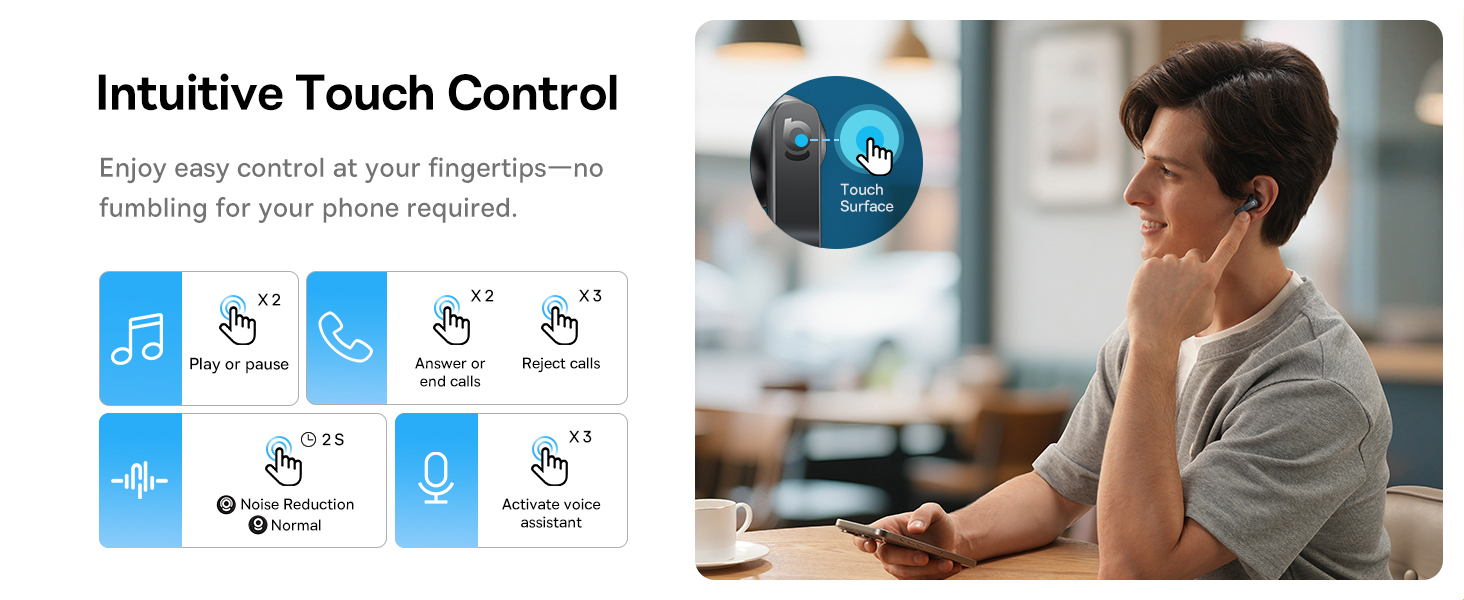
Image: A visual representation of the Baseus BS1 NC Earbuds connected to both a laptop and a smartphone, showcasing the instant multipoint connection feature.
5. טראָגן די אויערקנעפּלעך
The Baseus BS1 NC earbuds feature a semi-in-ear design for comfortable, pressure-free wear. For optimal sound quality and noise cancellation, ensure a proper fit.
- ידענטיפיצירן די לינקס (ל) און רעכט (ר) עאַרבודז.
- פֿאָרזיכטיק אַרײַנשטעלן יעדן אויערקנעפּל אין אײַער אויער קאַנאַל.
- Adjust the earbud until it feels secure and comfortable. The stem should point slightly forward or downward.

Image: A person wearing the Baseus BS1 NC Earbuds, illustrating their ergonomic and lightweight design for all-day comfort.
6. אַפּערייטינג ינסטרוקטיאָנס
6.1 ריר קאָנטראָלס
The earbuds feature intuitive touch controls on their stems. The following are default functions, which may be customizable via the Baseus app:
| קאַמף | פֿונקציע |
|---|---|
| Double-tap (Left or Right Earbud) | שפּיל / פּויזע מוזיק, ענטפֿערן / סוף רופן |
| Triple-tap (Left or Right Earbud) | Reject call, Activate voice assistant |
| דריקן און האַלטן (2 סעקונדעס) | Switch Noise Control Mode (ANC/Normal/Transparency) |

Image: An illustration detailing the intuitive touch controls on the Baseus BS1 NC Earbuds for various functions like play/pause, call management, noise reduction, and voice assistant activation.
6.2 ראַש קאָנטראָל מאָדעס
The Baseus BS1 NC earbuds offer three noise control modes:
- Adaptive Hybrid ANC (Active Noise Cancellation): Reduces ambient noise for an immersive listening experience. Ideal for noisy environments.
- דורכזעיקייַט מאָדע: Allows you to hear your surroundings while still enjoying your audio. Useful for awareness in urban settings or conversations.
- נאָרמאַל מאָדע: Standard audio playback without active noise cancellation or transparency features.
Switch between modes by pressing and holding the touch area on either earbud for 2 seconds.

Image: A cutaway diagram of a Baseus BS1 NC earbud in an ear, illustrating the semi-in-ear fit and the availability of Adaptive Noise Cancelling and Transparency Mode.
6.3 Hi-Res Audio with LDAC
These earbuds support LDAC technology, enabling high-resolution audio transmission for a detailed and rich sound experience. Ensure your device supports LDAC and activate it in your device's Bluetooth settings for the best audio quality.

Image: The Baseus BS1 NC Earbuds surrounded by sound waves, emphasizing features like Hi-Res Audio, SuperBass 2.0, and 13mm dynamic drivers for powerful sound.
6.4 6-Mic AI Clear Calls
The earbuds are equipped with 6 microphones and AI noise isolation technology to ensure your voice is clear during calls, even in noisy environments. Wind noise reduction further enhances call clarity outdoors.
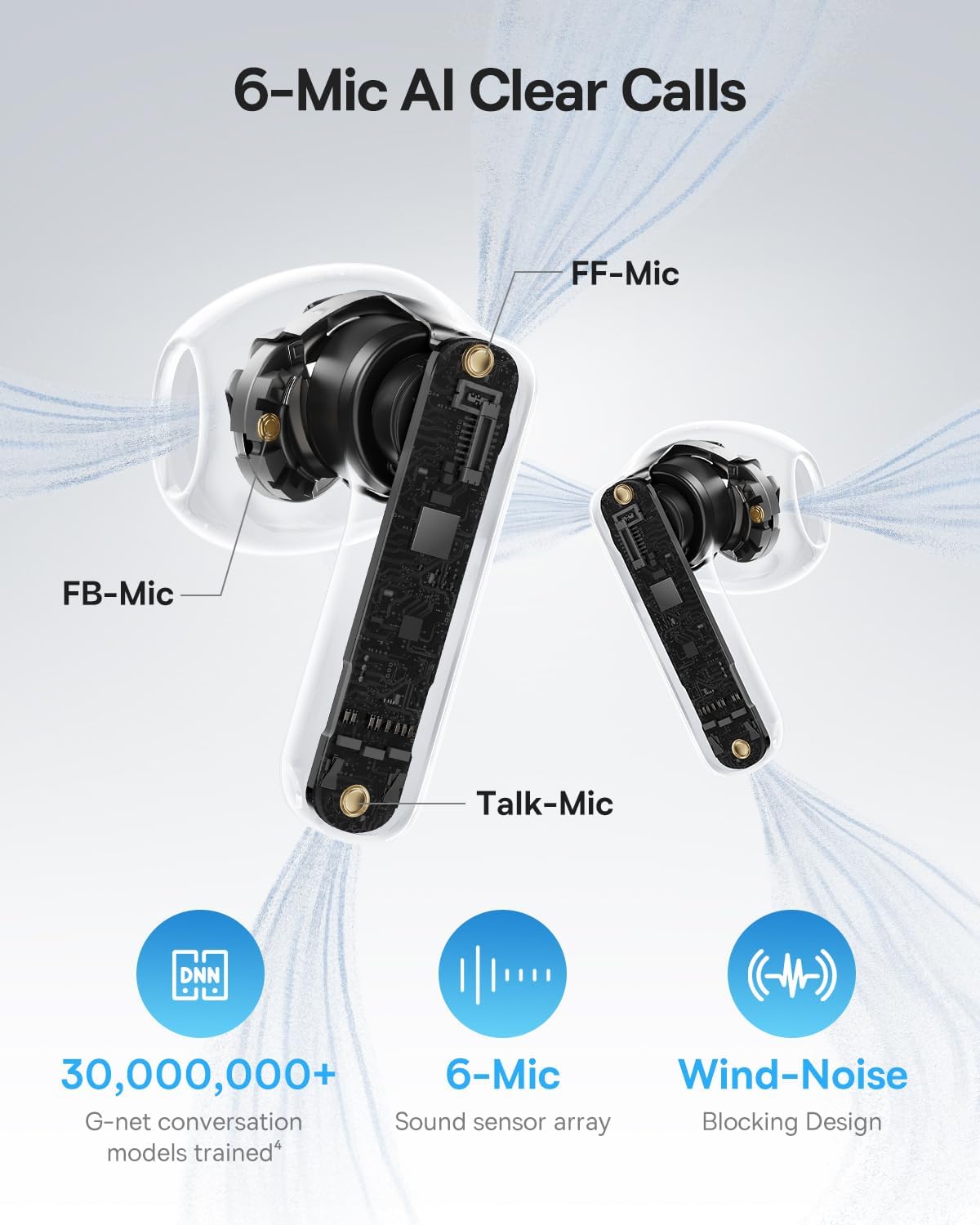
Image: A detailed diagram of the Baseus BS1 NC earbud, highlighting the placement of the FF-Mic, FB-Mic, and Talk-Mic, which contribute to the 6-Mic AI Clear Call technology and wind-noise blocking design.
6.5 סמאַרט אַפּ קאָנטראָל
Download the dedicated Baseus app for enhanced control and customization options. The app allows you to:
- אַדזשאַסטירן באַס בוסט לעוועלס.
- Select from various EQ Modes.
- קאָנטראָלירט ספּיישאַל אַקוסטיק סעטטינגס.
- ניצט די "געפינט אייערע אויערקנעפּלעך" פֿונקציע.
Note: In guest mode, no account creation or permissions are required to customize features, but GPS access is needed to locate lost earbuds.

Image: A smartphone displaying the Baseus app interface, which offers various sound control options including Bass Boost, EQ Modes, Spatial Acoustics, and a "Find Your Earbuds" function.
7. וישאַלט און קער
7.1 רייניקונג
- רייניקט רעגולער די אויערקנעפּלעך און די טשאַרדזשינג קעסטל מיט אַ ווייכן, טרוקענעם, לינט-פֿרייע שטאָף.
- דו זאלסט נישט נוצן האַרב קעמיקאַלז, רייניקונג סאָלוואַנץ אָדער שטאַרק דיטערדזשאַנץ.
- Gently remove any earwax or debris from the earbud mesh and charging contacts using a small, soft brush or cotton swab.
7.2 וואַסער און שטויב קעגנשטעל (IP55)
The earbuds are rated IP55, meaning they are protected against limited dust ingress and low-pressure water jets from any direction. This makes them suitable for workouts and light rain exposure.
- טונקט נישט די אויערן-קנעפּלעך אין וואַסער.
- זיכער מאַכן אַז די אויערקנעפּלעך זענען טרוקן איידער איר לייגט זיי צוריק אין די טשאַרדזשינג קעסטל צו פאַרמייַדן שעדיקן צו די טשאַרדזשינג קאָנטאַקטן.
- די טשאַרדזשינג פאַל איז נישט וואַסער-קעגנשטעליק.

Image: The Baseus BS1 NC Earbuds shown with water droplets, signifying their IP55 rating for dust and water resistance.
7.3 סטאָרידזש
סטאָר די עאַרבודז אין זייער טשאַרדזשינג פאַל ווען ניט אין נוצן צו באַשיצן זיי און האַלטן זיי טשאַרדזשינג.
8. טראָובלעשאָאָטינג
If you encounter issues with your Baseus BS1 NC earbuds, refer to the following common solutions:
- קיין קלאַנג/קאַנעקשאַן פּראָבלעמען:
- זיכער מאַכן אַז די אויערקנעפּלעך זענען אויפֿגעלאָדן.
- Verify Bluetooth is enabled on your device and "Baseus Bass BS1 NC" is selected.
- Try placing earbuds back in the case, closing it, and then reopening to reset the connection.
- פארגעסט דעם דעווייס אין אייערע בלועטוט סעטינגס און פארבינדט עס ווידער.
- איין עאַרבוד טוט נישט אַרבעטן:
- מאַכן זיכער אַז ביידע עאַרבודז זענען באפוילן.
- Place both earbuds back in the case, close, and reopen.
- רייניקט די טשאַרדזשינג קאָנטאַקטן אויף ביידע אויערקנעפּלעך און אינעווייניק פון די קעסטל.
- נעבעך געזונט קוואַליטעט:
- זייט זיכער אז די אויער-קנעפלעך זענען ריכטיק אריינגעזעצט אין אייערע אויערן.
- Clean the earbud mesh to remove any obstructions.
- Check your device's audio settings and ensure LDAC is enabled if supported.
- ANC נישט עפעקטיוו:
- Ensure ANC mode is activated via touch control or the Baseus app.
- Adjust the earbuds for a better seal in your ears.
9. ספּעסאַפאַקיישאַנז
| שטריך | דעטאַל |
|---|---|
| מאָדעל נאָמען | Baseus Bass BS1 NC |
| ראַש קאָנטראָל | Adaptive Noise Cancellation, Environmental Noise Cancellation, Hybrid Noise Cancellation |
| קאַנעקטיוויטי טעכנאָלאָגיע | בלועטוט 6.0, וויירלעס |
| ווירעלעסס קאָמוניקאַציע טעכנאָלאָגיע | בלועטאָאָטה 6.0 |
| בלועטאָאָטה קייט | 10 מעטער |
| אַודיאָ דרייווער טיפּ | דינאַמיש דרייווער |
| אַודיאָ דרייווער גרייס | 13 מילאַמיטערז |
| אָפטקייַט ענטפער | 40 KHz |
| אַודיאָ לייטאַנס | 60 מיליסעקאַנדז |
| באַטעריע לעבן (אויערקנעפּלעך) | 7 שעה (ANC אויסגעלאשן) |
| גאַנץ שפּילצייט (מיט קעסטל) | 40 שעה (ANC אויסגעלאשן) |
| Charging Time (Rapid Charge) | 10 מינוט פֿאַר 2 שעה ווידערשפּיל |
| וואַסער קעגנשטעל מדרגה | IP55 (נאָר אויערקנעפּלעך) |
| קאָנטראָל טיפּ | ריר קאָנטראָל |
| מאַטעריאַל | אַקרילאָניטריל בוטאַדין סטירען (ABS), פּאָליקאַרבאָנאַט (PC) |
| וואָג פון פּראָדוקט (אויערקנעפּלעך) | 4 ג פּער עאַרבוד |
| Product Dimensions (Earbuds) | 1.2 X 0.7 X 0.7 אינטשעס |
| קאַמפּאַטאַבאַל דעוויסעס | Devices with Bluetooth Audio Capability, including iOS, Android, Windows, Mac OS and Switch. |
10. אפיציעלע פּראָדוקט ווידעאָ
Watch the official product video for a visual guide on the Baseus BS1 NC Earbuds:
ווידעא: אן אפיציעלער פראדוקט ווידעא פון באסעוס שאוasing the features and usage of the Baseus BS1 NC Semi-in-Ear True Wireless Earbuds.
11. וואָראַנטי און שטיצן
For warranty information, technical support, FAQs, and further assistance, please visit the official Baseus support center.
Refer to the Quick Start Guide included in your package for a direct link or visit the Baseus webפּלאַץ.
Note: Protection plans may be available for purchase separately.


