1. פּראָדוקט איבערview
The DOOGEE Note 56 is a modern smartphone designed for daily use, featuring a powerful Octa-Core processor, a large 6150 mAh battery, and a vibrant 6.56-inch HD+ display with a 90 Hz refresh rate. This manual provides essential information for setting up, operating, and maintaining your device.

פיגור 1.1: פאָרנט און הינטן view of the DOOGEE Note 56, showcasinג זײַן גלאַטן דיזײַן און קאַמעראַ סעטאַפּ.
2. וואָס איז אין דער קעסטל
- DOOGEE Note 56 Smartphone
- מאַכט אַדאַפּטער
- וסב קאַבלע
- סים עדזשעקטאָר טול
- שנעל אָנהייב גייד
- שוץ־קעסטל (קען זיין אַנדערש לויט ראַיאָן)
- עקראַן פּראָטעקטאָר (פאַר-אַפּליקירט אָדער אַרייַנגערעכנט)
3. סעטאַפּ
3.1 אריינשטעלן סים קארטלעך און מיקראָסד קארטל
The DOOGEE Note 56 supports Dual SIM functionality and MicroSD card expansion up to 2TB. Follow these steps to insert your cards:
- מאַכט אַוועק דיין טעלעפאָן.
- געפינט די סים קארטל טאַץ אויף דער זייט פון דעם מיטל.
- שטעקט אריין דעם סים קארטל ארויסווארפער געצייג אין דעם קליינעם לאך לעבן דעם טרעי און דריקט לײַכט ביז דער טרעי קומט ארויס.
- Place your Nano-SIM cards and/or MicroSD card into the designated slots on the tray. Ensure they are correctly oriented.
- שטופּ פֿאָרזיכטיק צוריק דעם טאַץ אין טעלעפֿאָן ביז עס קליקט אַרײַן אין פּלאַץ.
3.2 Powering On/Off and Initial Setup
To power on your device, press and hold the Power button until the DOOGEE logo appears. To power off, press and hold the Power button, then select 'Power off' from the options. On first use, follow the on-screen instructions to set up your language, Wi-Fi, Google account, and security features.
4. אַפּערייטינג דיין מיטל
4.1 יקערדיק נאַוויגאַציע
The DOOGEE Note 56 runs on Android 16, offering an intuitive user interface. Use gestures or the navigation bar at the bottom of the screen to navigate:
- היים: Swipe up from the bottom or tap the Home button to return to the home screen.
- צוריק: Swipe from the left or right edge, or tap the Back button to go back to the previous screen.
- לעצטע אַפּפּס: Swipe up and hold from the bottom, or tap the Recent Apps button to view and switch between open applications.
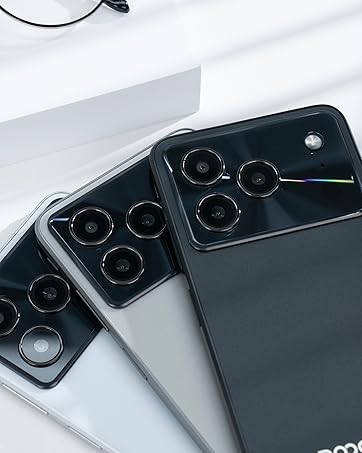
Figure 4.1: Android 16 operating system interface on the DOOGEE Note 56.
4.2 רופן און מעסעדזשינג
To make a call, open the Phone app, enter the number, and tap the call icon. For messaging, open the Messages app, select a contact or start a new conversation, type your message, and send.
4.3 קאַמעראַ פונקציעס
The DOOGEE Note 56 features an 8 MP rear camera and a 5 MP front camera. Open the Camera app to access various modes such as Photo, Video, Portrait, and more. Tap the shutter button to capture photos or start/stop video recording.

Figure 4.2: Camera features and AI scene recognition.
4.4 ווייַז סעטטינגס
Customize your 6.56-inch HD+ 90 Hz IPS display by going to סעטטינגס> ווייַז. Here you can adjust brightness, dark mode, screen timeout, and refresh rate for a smoother visual experience.

Figure 4.3: The 90 Hz HD+ display provides smooth visuals.
5. סטאָרידזש און פאָרשטעלונג
The DOOGEE Note 56 is equipped with 24GB RAM (3GB physical + 21GB virtual) and 64GB of internal storage, expandable up to 2TB via a MicroSD card (sold separately). This configuration ensures smooth multitasking and ample space for your apps, photos, and videos.
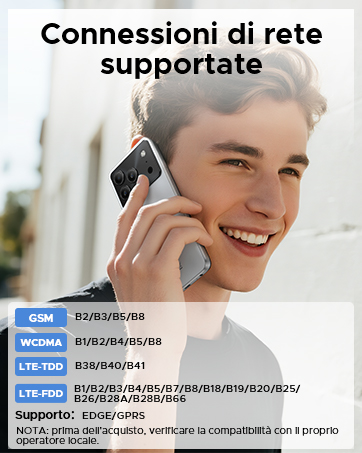
Figure 5.1: Memory configuration of the DOOGEE Note 56.
6. קאָנעקטיוויטי און זיכערהייט
6.1 נעץ קאָנעקטיוויטי
The device supports 4G LTE for fast mobile data. Ensure your SIM cards are active and correctly inserted. For Wi-Fi, go to סעטטינגס > נעץ און אינטערנעט > Wi-Fi and connect to your preferred network.

Figure 6.1: Supported network connections for the DOOGEE Note 56.
6.2 Face ID
Unlock your phone quickly and securely using Face ID. To set it up, go to סעטטינגס > זיכערהייט > פנים אויפשליסן און פֿאָלגט די אינסטרוקציעס אויף דעם עקראַן צו רעגיסטרירן אייער פּנים.
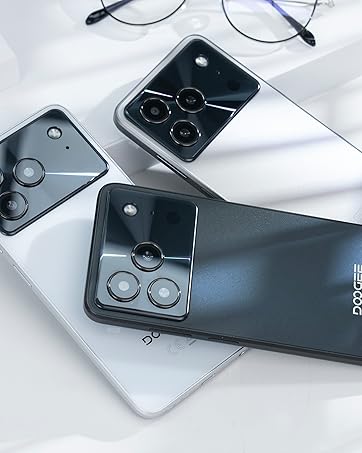
Figure 6.2: Instant facial recognition for unlocking.
6.3 OTG and GPS
The device supports OTG (On-The-Go) for connecting USB accessories like flash drives. GPS functionality provides accurate location services for navigation and location-based apps.
7. באַטערי מאַנאַגעמענט
The DOOGEE Note 56 is equipped with a 6150 mAh silicon-carbon battery, offering extended usage. It supports 10W fast charging. To optimize battery life:
- סטרויערן די ברייטנאַס פון די פאַרשטעלן.
- נאָענט אַניוזד אַפּפּס פליסנדיק אין דער הינטערגרונט.
- אַקטיווירן באַטאַרייע שפּאָרער מאָדע ווען נייטיק.
- ויסמיידן עקסטרעם טעמפּעראַטורעס.
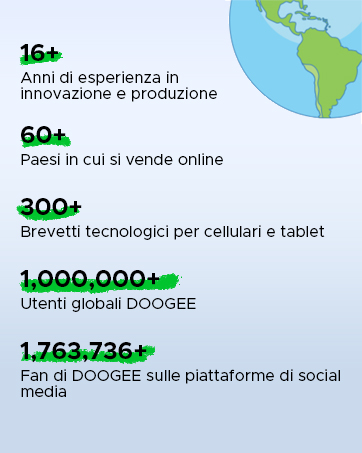
Figure 7.1: The 6150 mAh battery provides long-lasting power.

Figure 7.2: Estimated usage times on a single charge.
8. וישאַלט
8.1 ווייכווארג דערהייַנטיקונגען
קאָנטראָלירט רעגולער נאָך ווייכווארג דערהייַנטיקונגען צו זיכער מאַכן אַז אייער מיטל האט די לעצטע פֿעיִקייטן און זיכערהייט פּאַטשאַז. גייט צו סעטטינגס > סיסטעם > סיסטעם דערהייַנטיקונג צו קאָנטראָלירן און אינסטאַלירן דערהייַנטיקונגען.
8.2 רייניקן דיין דעווייס
ניצט אַ ווייכע, לינט-פֿרייע שטאָף צו רייניקן דעם עקראַן און קערפּער פֿון אייער טעלעפֿאָן. פֿאַרמייַדט ניצן שטרענגע כעמיקאַלן אָדער אַברייסיוו מאַטעריאַלן.
9. טראָובלעשאָאָטינג
9.1 פּראָסט ישוז און סאַלושאַנז
- טעלעפאָן טוט זיך נישט אָן: זיכער מאַכן אַז די באַטאַרייע איז אויפגעלאָדן. פֿאַרבינדט עס צום טשאַרדזשער פֿאַר לפּחות 10 מינוט, און דערנאָך פּרוּווט עס אָנצוצינדן.
- אַפּפּס קראַשן: Clear the cache of the problematic app (Settings > Apps > [App Name] > Storage & cache > Clear cache). If the issue persists, reinstall the app.
- נעבעך באַטאַרייע לעבן: Review Section 7 for battery optimization tips.
- נעטוואָרק קאַנעקטיוויטי ישוז: Check if SIM cards are properly inserted. Restart the phone. Verify network settings in Settings > Network & internet.
10. ספּעסאַפאַקיישאַנז
| שטריך | באַשרייַבונג |
|---|---|
| מאָדעל | נאָטיץ 56 |
| אָפּערייטינג סיסטעם | אַנדרויד 16 |
| ווייַז | 6.56-inch HD+ IPS, 90 Hz |
| פּראַסעסער | אָקטאַ-קאָר |
| באַראַן | 24 גיגאבייט (3 גיגאבייט + 21 גיגאבייט ווירטועל) |
| אינערלעכער סטאָרידזש | 64 גיגאבייט |
| יקספּאַנדאַבאַל סטאָרידזש | Up to 2 TB MicroSD |
| דערציען אַפּאַראַט | 8 מפּ |
| פראָנט אַפּאַראַט | 5 מפּ |
| באַטאַרייע קאַפּאַציטעט | 6150 מאַה |
| טשאַרדזשינג | 10 וו שנעל טשאַרדזשינג |
| דימענשאַנז | 8.45 מם גרעב |
| וואָג | 262 ג |
| קאַנעקטיוויטי | 4G, Dual SIM, Wi-Fi, Bluetooth, GPS, OTG |
| זיכערהייַט | Face ID |
11. אפיציעלע פּראָדוקט ווידעאָס
Video 11.1: DOOGEE Note 56 Plus Smartphone Overview. This video highlights the ultra-thin design, camera features, and overall elegance of the Note 56 Plus, which shares many characteristics with the Note 56 model.
Video 11.2: DOOGEE Note 56 Plus Ultra-thin Smartphone. This video focuses on the slim profile and aesthetic appeal of the Note 56 Plus, demonstrating its comfortable handling and modern look.
12. וואָראַנטי און שטיצן
Your DOOGEE Note 56 smartphone comes with a limited warranty. Please refer to the warranty card included in your product packaging for specific terms and conditions. For technical support or service inquiries, please visit the official DOOGEE webפּלאַץ אָדער קאָנטאַקט זייער קונה דינסט.
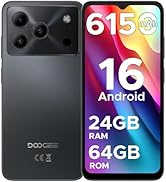
Figure 12.1: DOOGEE customer service details, including warranty and support options.


