הקדמה
The Lifepro HexaPlate Lite Vibration Plate is designed to enhance your fitness routine by stimulating muscle contractions through repetitive motion. This technique aims to engage more muscle fibers, potentially leading to improved circulation, metabolism boost, and relief from joint and back pain. The integrated magnetic acupoints offer additional relaxation and circulation benefits, particularly for the feet and lower extremities. This compact and portable device is suitable for various fitness levels and can be incorporated into rehabilitation routines.

The Lifepro HexaPlate Lite promotes strength, balance, and flexibility.
וואָס איז אין די קעסטל
Upon unboxing your Lifepro HexaPlate Lite, please ensure all the following components are present:
- HexaPlate Vibration Plate
- ווייַט קאָנטראָל
- קעגנשטעל באַנדס (2)
- באַניצער גייד
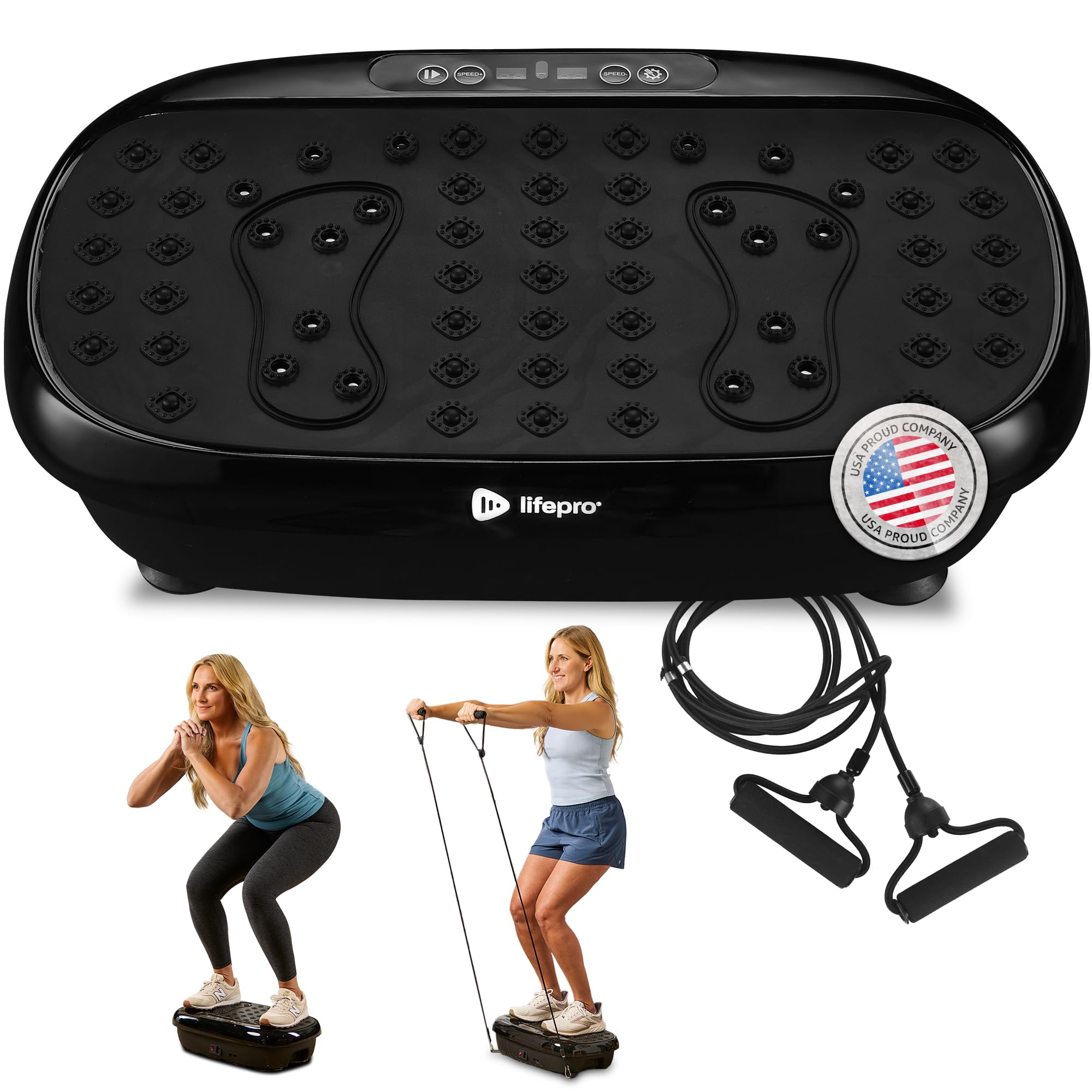
All components included with the Lifepro HexaPlate Lite Vibration Plate.
סעטאַפּ
פֿאָלגט די סטעפּס פֿאַר דער ערשטער סעטאַפּ פֿון אייער ווייבריישאַן פּלאַטע:
- קערפאַלי באַזייַטיקן אַלע קאַמפּאָונאַנץ פון די פּאַקקאַגינג.
- Place the HexaPlate Lite on a flat, stable surface. Ensure there is enough space around the device for safe operation.
- Connect the power cord to the device and then to a suitable electrical outlet.
- Insert the required AAA batteries into the remote control (3 AAA batteries required, not included).
- Attach the resistance bands to the designated points on the side of the vibration plate if you plan to use them.
Video demonstrating the unboxing and initial setup of the Lifepro HexaPlate Lite Vibration Plate.
אַפּערייטינג ינסטראַקשאַנז
The Lifepro HexaPlate Lite offers various settings to customize your workout. Always ensure you are standing or sitting securely on the plate before starting.
מאַכט אויף / אַוועק
- To power on the device, press the power button on the control panel or the remote control.
- צו מאַכט אַוועק, דריקן די מאַכט קנעפּל ווידער.
ניצן די קאָנטראָל פּאַנעל און רימאָוט
The device can be operated directly from the integrated LED control panel or via the included remote control.
- גיכקייט אַדזשאַסטמאַנט: Use the 'Speed' buttons on the control panel or remote to increase or decrease the vibration intensity (1-99 levels).
- צייט באַשטעטיקן: Adjust the workout duration using the 'Time' buttons. The default workout time is 15 minutes.
- מאָדע סעלעקציע: Cycle through different pre-set programs (P1-P10) using the 'Mode' button. Each program offers a unique combination of speed and time variations.
- מאַנואַל מאָדע: Select 'M' mode to manually control speed and time.

The control panel and remote allow for easy adjustment of settings.
געניטונג גייד
The HexaPlate Lite can be used for various exercises to target different muscle groups and achieve specific fitness goals. Always consult with a healthcare professional before starting any new exercise regimen.
אַלגעמיינע באַניץ עצות
- Start with lower speeds and shorter durations, gradually increasing as your body adapts.
- Maintain a slight bend in your knees to absorb vibrations effectively.
- Engage your core muscles throughout your workout.
- Use the resistance bands for upper body exercises.
Recommended Positions and Benefits
- שטייענדיק: Improves core strength, balance, and overall circulation.
- סקוואַץ: Strengthens legs and glutes while benefiting from vibration.
- זיצן: Ideal for lymphatic drainage and relaxation, especially for lower extremities.
- פּלאַנקען: Enhances core stability and muscle engagement.

Standing on the vibration plate while using resistance bands.

Performing squats on the vibration plate to engage leg and glute muscles.

Magnetic acupressure points on the plate surface for deeper relaxation and pain alleviation.

Using the vibration plate while seated can improve circulation.
וישאַלט
Proper maintenance ensures the longevity and optimal performance of your Lifepro HexaPlate Lite.
- רייניקונג: Wipe the surface of the vibration plate with a soft, damp טוך נאך יעדן באַניץ. פֿאַרמייַדן ניצן אַברייסיוו רייניגער אָדער סאָלווענטן.
- סטאָרידזש: Store the device in a cool, dry place away from direct sunlight and extreme temperatures. Its compact design allows for easy storage.
- דורכקוק: Periodically check the power cord and resistance bands for any signs of wear or damage. Discontinue use if any damage is found and contact customer support.

The compact design of the HexaPlate Lite makes it easy to store or transport.
טראָובלעשאָאָטינג
If you encounter any issues with your Lifepro HexaPlate Lite, please refer to the following common troubleshooting tips:
- מיטל נישט פּאַוערינג אויף: Ensure the power cord is securely plugged into both the device and a working electrical outlet. Check if the main power switch on the device is in the 'ON' position.
- רימאָוט קאָנטראָל ניט ריספּאַנדינג: Verify that the batteries in the remote control are correctly inserted and not depleted. Replace batteries if necessary. Ensure there are no obstructions between the remote and the device's sensor.
- ומגעוויינטלעך נויזיז אָדער ווייבריישאַנז: Turn off the device immediately and inspect it for any loose parts or foreign objects. If the issue persists, discontinue use and contact customer support.
ספּעסאַפאַקיישאַנז
| שטריך | באַשרייַבונג |
|---|---|
| מאַקסימום וואָג רעקאָממענדאַטיאָן | 265 פונט |
| קאָנטראָלס טיפּ | ווייַט |
| ווייַז טיפּ | געפירט |
| טיפּ פון שעפּן | Strap (for resistance bands) |
| מאַקסימום גיכקייַט | 99 רפּם |
| מינימום גיכקייַט | 1 רפּם |
| מאָטאָר כאָרספּאַוער | 440 Horsepower (internal rating) / 0.27 Horsepower (output) |
| נומער פון באַטעריז | 3 AAA באַטעריז פארלאנגט (פֿאַר ווייַט) |
| נומער פון קעגנשטעל לעוועלס | 46 |
| אָפּעראַציע מאָדע | אָטאַמאַטיק |
| מאַכט מקור | קאָרדעד עלעקטריק |
| וואָסtage | 200 |
| נומער דימענשאַנז (LxWxH) | 21.65 X 13.39 X 6.1 אינטשעס |
| פּראָדוקט דימענשאַנז | 21.3"ד רענטגענ 13"וו רענטגענ 5.9"ה |
| פּונקט וואָג | 5.85 קילאָגראַמס (12.9 לבס) |
| מאַטעריאַל | פּלאַסטיק |
| מאָדעל יאָר | 2023 |

Dimensions of the Lifepro HexaPlate Lite Vibration Plate.
וואָראַנטי & שטיצן
The Lifepro HexaPlate Lite Vibration Plate comes with Lifetime Support from the manufacturer. For any inquiries, technical assistance, or warranty claims, please refer to the contact information provided in your User Guide or visit the official LifePro webפּלאַץ.


