1. פּראָדוקט איבערview
The GIGABYTE B760M DS3H WIFI6E GEN5 is an M-ATX motherboard designed to support 14th and 13th Generation Intel Core Processors. It features an LGA 1700 socket and is built with a focus on performance and connectivity for modern computing needs.
שליסל פֿעיִקייטן:
- אינטעל LGA 1700 סאָקעט: שטיצט 14טן און 13טן דור אינטעל קאָר סעריע פּראַסעסאָרן.
- DDR5 קאָמפּאַטאַביליטי: Features Dual Channel DDR5 memory support across 4 DIMM slots.
- ראָבאַסט מאַכט פּלאַן: Equipped with a Hybrid 8+2+1 Phases Digital VRM Solution for stable power delivery.
- נעקסט-דזשענעריישאַן קאָנעקטיוויטי: Includes PCIe 5.0, M.2 slots, and USB 3.2 Gen 2x2 Type-C ports.
- הויך-גיכקייט נעטוואָרקינג: Integrated Intel Wi-Fi 6E and 2.5GbE LAN for fast and reliable network connections.
- באַניצער-פרייַנדלעך פֿעיִקייטן: Incorporates Smart Fan 6 for advanced cooling control and Q-Flash Plus for BIOS updates without CPU, memory, or GPU installation.

פיגור 1.1: פון אויבן אַראָפּ view of the GIGABYTE B760M DS3H WIFI6E GEN5 motherboard, showing the LGA 1700 socket, DDR5 DIMM slots, PCIe slots, and M.2 slots.
2. סעטאַפּ און ייַנמאָנטירונג
This section provides general guidelines for installing your GIGABYTE B760M DS3H WIFI6E GEN5 motherboard. Always refer to the detailed instructions provided with your CPU, cooler, and other components for specific installation steps.
2.1 קאָמפּאָנענט אינסטאַלאַציע סדר
- קפּו ינסטאַלירונג: Carefully open the LGA 1700 socket lever, align the CPU with the triangular mark on the socket, place the CPU gently, and close the lever to secure it.
- CPU קולער אינסטאַלאַציע: Install your chosen CPU cooler according to its manufacturer's instructions. Ensure proper thermal paste application.
- זכּרון (RAM) אינסטאַלאַציע: Insert DDR5 memory modules into the DIMM slots. For dual-channel operation, refer to the motherboard manual for recommended slot configurations (typically slots A2 and B2 first). Press firmly until the clips on both ends lock the module in place.
- M.2 SSD ינסטאַלירונג: Locate the M.2 slots on the motherboard. Insert the M.2 SSD at an angle and secure it with the provided screw or EZ-Latch mechanism.
- גראַפיקס קאַרטל (GPU) ינסטאַלירונג: Insert your graphics card into the primary PCIe 5.0 x16 slot. Ensure it is fully seated and secured by the PCIe EZ-Latch.
- מאַכט צושטעלן קאַנעקשאַן: פֿאַרבינדט דעם 24-פּין ATX מאַכט קאַנעקטאָר און דעם 8-פּין CPU מאַכט קאַנעקטאָר פֿון אייער מאַכט צושטעל צום מוטערבאָרד.
- SATA דעוויסעס: Connect SATA data cables to your storage drives (HDDs/SSDs) and the SATA 6Gb/s ports on the motherboard.
- פראָנט פּאַנעל קאַנעקטערז: Connect the case's front panel headers (power button, reset button, USB ports, audio jacks) to the corresponding pins on the motherboard. Refer to the motherboard's silkscreen labels for correct orientation.
- אַנטענע ינסטאַלירונג: For Wi-Fi functionality, screw the included Wi-Fi antennas onto the rear I/O panel's antenna connectors (WiFi EZ-Plug).

Figure 2.1: Motherboard layout diagram highlighting key connectors such as USB ports, Wi-Fi antenna connectors, HDMI, DisplayPort, LAN, and audio jacks.
3. אַפּערייטינג ינסטרוקטיאָנס
3.1 ערשטע אויפשטארט און בייאָס/UEFI צוטריט
- נאָך דעם ווי איר שטעלט צוזאַמען אייער סיסטעם, פֿאַרבינדט אַ מאָניטאָר, קלאַוויאַטור און מויז.
- צינדט אן אייער סיסטעם. בעת דעם בוט פּראָצעס, דריקט איבער און איבער דעם קנעפּל DEL שליסל צו אַרייַן די BIOS/UEFI סעטאַפּ יוטילאַטי.
- In the BIOS/UEFI, you can configure boot order, enable/disable features, adjust fan speeds (Smart Fan 6), and monitor system status.
3.2 דרייווער ינסטאַלירונג
- After installing your operating system, install the necessary drivers for the motherboard components.
- Drivers can be found on the official GIGABYTE website for your specific motherboard model. Key drivers include chipset, LAN, Wi-Fi, audio, and USB drivers.
3.3 BIOS Update with Q-Flash Plus
- The Q-Flash Plus feature allows you to update the BIOS without installing the CPU, memory, or graphics card.
- אראפקאפיע די לעצטע בייאָוס file פֿון גיגאַבייט webזייטל און טוישן עס דעם נאמען צו GIGABYTE.bin.
- קאָפּיר דעם איבערגענומענעם בייאָס file to a USB flash drive (FAT32 format).
- אַרײַנשטעלן דעם USB פלאַש דרייוו אין דעם באַשטימטן Q-Flash Plus USB פּאָרט אויף דער הינטערשטער I/O פּאַנעל.
- With the power supply connected and turned on (but the system off), press the Q-Flash Plus button. The LED will flash, indicating the update process. Wait until the LED stops flashing.
4. וישאַלט
רעגולערע אויפהאלטונג העלפט זיכער מאכן די לאנגעוויטי און אפטימאלע פערפארמאנס פון אייער מאדערבאארד און סיסטעם.
- באַזייַטיקונג פון שטויב: Periodically clean dust from inside your computer case, especially from heatsinks, fans, and motherboard surfaces, using compressed air. Ensure the system is powered off and unplugged before cleaning.
- בייאָוס דערהייַנטיקונגען: Keep your BIOS updated to the latest version to benefit from performance improvements, bug fixes, and support for new hardware. Use the Q-Flash Plus feature or the BIOS utility.
- דרייווער דערהייַנטיקונגען: טשעק רעגולער די גיגאבייט website for updated drivers for your motherboard's components.
- גשמיות דורכקוק: Occasionally inspect all cable connections (power, SATA, front panel) to ensure they are secure.
5. טראָובלעשאָאָטינג
די סעקציע באהאנדלט אלגעמיינע פראבלעמען וואס איר קענט באגעגענען.
5.1 פּראָסט ישוז און סאַלושאַנז
- קיין מאַכט / סיסטעם טוט זיך נישט אָן:
- Ensure the power supply is connected to the motherboard (24-pin ATX and 8-pin CPU) and the wall outlet.
- Check if the power supply switch is in the ON position.
- Verify that the front panel power button cable is correctly connected to the motherboard.
- No Display / No POST (Power-On Self-Test):
- Confirm that the monitor is connected to the graphics card (or integrated graphics if applicable) and powered on.
- Reseat the RAM modules firmly in their slots. Try booting with only one RAM module.
- Reseat the graphics card in its PCIe slot. Ensure any required PCIe power cables are connected to the GPU.
- Clear the CMOS by removing the CMOS battery for 5-10 minutes or using the Clear CMOS jumper (refer to the full manual for location).
- אפערירן סיסטעם בוט נישט:
- Check the boot order in the BIOS/UEFI to ensure your primary storage drive is selected.
- Verify that the SATA data and power cables are securely connected to your storage drive.
- If using an M.2 SSD, ensure it is properly seated and detected in the BIOS.
- נעץ קאָנעקטיוויטי פּראָבלעמען:
- For wired LAN, ensure the Ethernet cable is securely connected and the LAN driver is installed.
- For Wi-Fi, ensure the antennas are properly attached to the WiFi EZ-Plug connectors and the Wi-Fi driver is installed.
- קאָנטראָלירט נעץ סעטטינגס אין אייער אָפּערייטינג סיסטעם.
If issues persist, consult the comprehensive GIGABYTE user manual or contact technical support.
6. טעכניש ספּעסאַפאַקיישאַנז
| שטריך | דעטאַל |
|---|---|
| סאָרט | GIGABYTE |
| מאָדעל נאָמען | B760M DS3H WIFI6E GEN5 |
| קפּו סאָקקעט | LGA 1700 |
| קאָמפּאַטיבלע פּראַסעסאָרן | 14th, 13th Gen Intel Core Series Processors |
| טשיפּסעט | אינטעל B760 עקספּרעס טשיפּסעט |
| ראַם זכּרון טעכנאָלאָגיע | דדר5 |
| זכּרון סלאָץ | 4 x DDR5 DIMM sockets (Dual Channel) |
| מאַקסימום זכּרון גיכקייט | Up to 5600 MHz (O.C.) |
| PCIe Slots | 1 x PCIe 5.0 x16 slot, 2 x PCIe 3.0 x1 slots |
| מ.2 קאַנעקטערז | 2 x M.2 connectors (PCIe 4.0 x4) |
| SATA פּאָרץ | 4 X SATA 6Gb/s קאַנעקטערז |
| USB פּאָרטן (הינטן) | 1 x USB 3.2 Gen 2x2 Type-C, 1 x USB 3.2 Gen 2, 2 x USB 3.2 Gen 1, 4 x USB 2.0/1.1 |
| נעטוואָרקינג | אינטעל Wi-Fi 6E, 2.5GbE לאַן |
| אַודיאָ | Realtek Audio CODEC (High Definition Audio) |
| ווידעא אַוטפּוץ | 1 x HDMI, 1 x DisplayPort (requires CPU with integrated graphics) |
| פאָרם פאַקטאָר | Micro ATX (M-ATX) |
| דימענשאַנז (LxWxH) | 8.82 X 8.82 X 1 אינטשעס |
| פּונקט וואָג | 2 פונט |
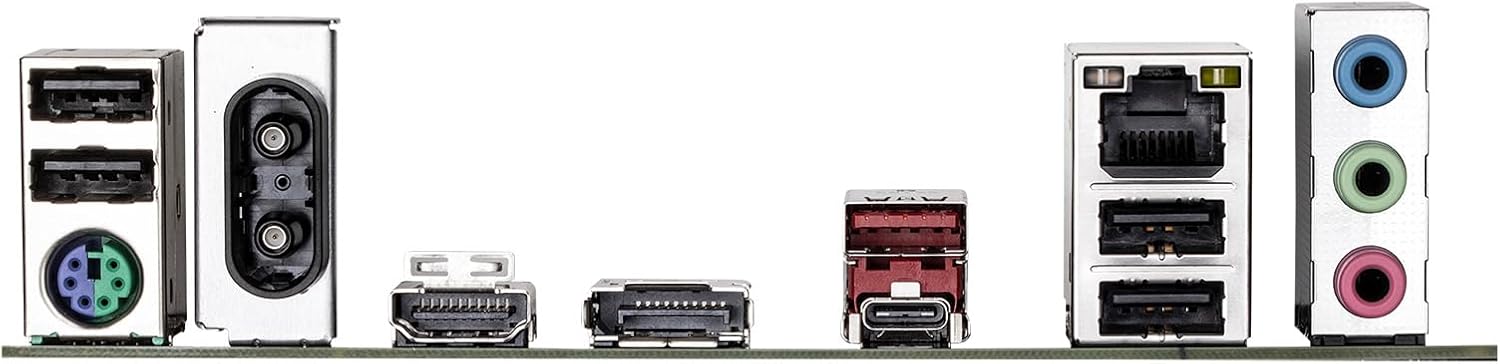
Figure 6.1: Rear I/O panel showing various ports including USB, LAN, Wi-Fi antenna connectors, HDMI, DisplayPort, and audio jacks.
7. וואָראַנטי אינפֿאָרמאַציע
GIGABYTE products are covered by a limited warranty. For detailed and up-to-date warranty terms, conditions, and registration procedures, please refer to the official GIGABYTE website or the warranty card included with your product. Warranty periods may vary by region and product type.
8. טעכניש שטיצן
For technical assistance, driver downloads, BIOS updates, FAQs, and further product information, please visit the official GIGABYTE support webפּלאַץ:
Before contacting support, please have your motherboard model name (B760M DS3H WIFI6E GEN5) and serial number ready.


