1. הקדמה
The Trevi RDA 70 BR is a compact and versatile portable radio designed to provide a comprehensive listening experience. It combines traditional radio functionality with modern digital features, making it suitable for listening to music or news anywhere. This manual provides instructions for the proper setup, operation, and maintenance of your device.
2. זיכערקייַט אינפֿאָרמאַציע
- לייענען אַלע ינסטראַקשאַנז קערפאַלי איידער איר נוצן די מיטל.
- שטעלט נישט אויס דעם ראַדיאָ צו רעגן, פייכטקייט, אדער עקסטרעמע טעמפּעראַטורן.
- ויסמיידן פּלייסינג די מיטל לעבן היץ קוואלן אָדער אין דירעקט זונשייַן.
- נעמט נישט אויס דעם אַפּאַראַט און פּרוּווט נישט צו פאַרריכטן עס אַליין. לאָזט איבער אַלע סערוויסעס צו קוואַליפֿיצירטע פּערסאָנאַל.
- האַלטן די מיטל אַוועק פון שטאַרק מאַגנעטיק פעלדער.
- Use only the specified charging cable (USB Type-C) for recharging the battery.
3. פּעקל אינהאַלט
זיכער מאַכן אַז אַלע זאכן זענען פאַראַן אין פּעקל:
- Trevi RDA 70 BR Portable Radio
- וסב טיפּע- C טשאַרדזשינג קאַבלע
- באַניצער מאַנואַל (דעם דאָקומענט)
4. פּראָדוקט איבערview
Familiarize yourself with the various parts and controls of your Trevi RDA 70 BR radio.

פיגור 1: געווינקלטע פראָנט view of the Trevi RDA 70 BR Portable Radio, showing the speaker grille, display, and main controls.
פראָנט פּאַנעל קאָנטראָלס
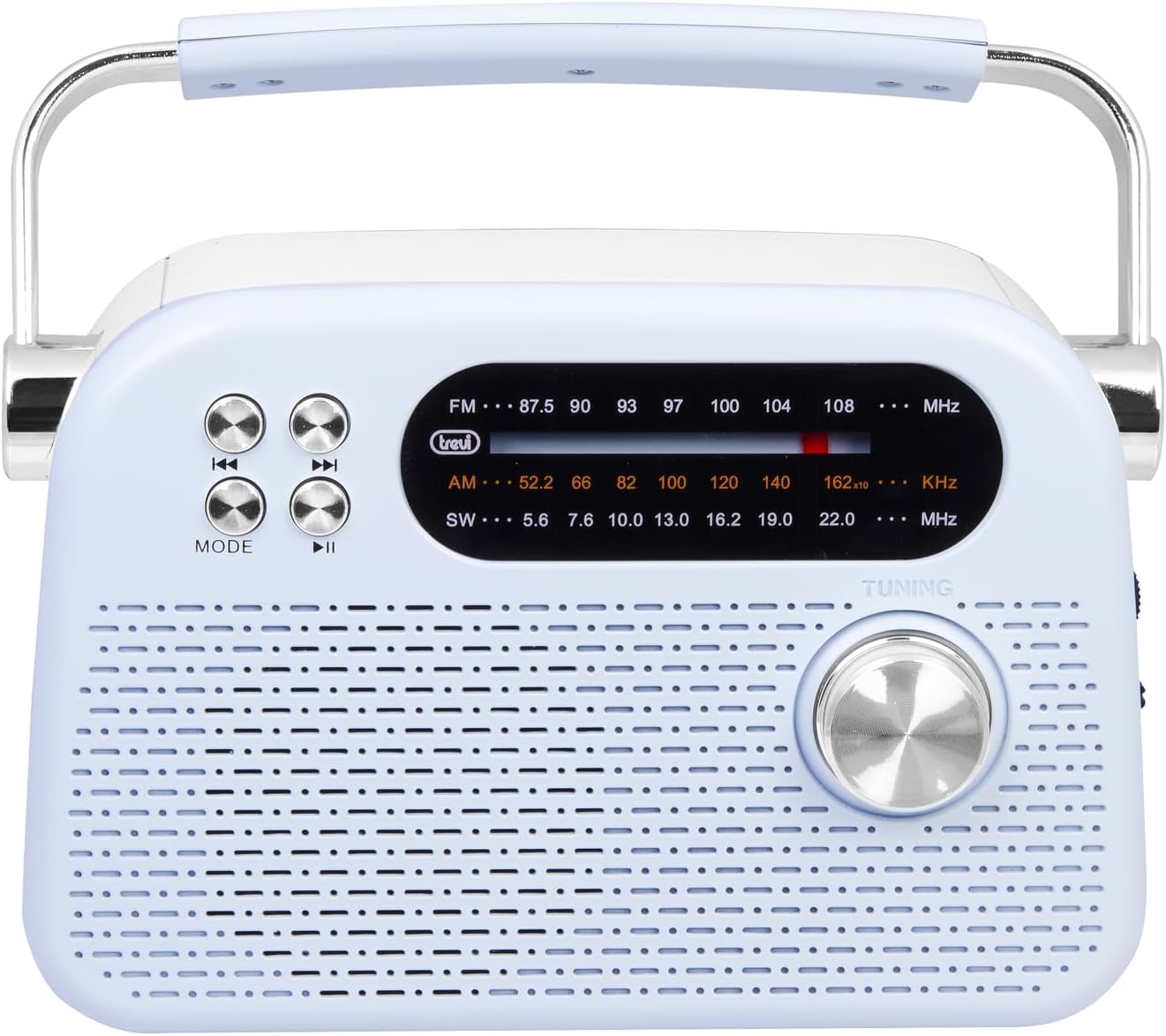
פיגור 2: דעטאַלירטע פראָנט view highlighting the display, mode button, playback controls, and tuning knob.
- ווייַז: Shows frequency, mode, and other information.
- מאָדע קנעפּל: Switches between radio bands (FM/AM/SW) and media playback modes (USB/Micro SD/Wireless).
- Playback Controls (◀◀ / ▶▶ / ▶▶): Used for skipping tracks in media mode or fine-tuning in radio mode.
- טונינג קנעפּל: For manual station tuning.
Side Panel Controls and Ports

פיגורע 3: זייַט view showing the power switch, volume control, USB port, Micro SD slot, and USB Type-C charging port.
- OFF/ON/Volume Knob: Turns the radio on/off and adjusts the volume level.
- DC 5V IN (USB Type-C): Charging port for the internal battery.
- וסב פּאָרט: פֿאַר פֿאַרבינדן USB פֿלאַש דרייווז פֿאַר MP3 ווידערשפּיל.
- Micro SD Slot (TF): For inserting Micro SD cards for MP3 playback.
- באַנד סעלעקטאָר סוויטש: Selects between FM, AM, and SW radio bands, and MEDIA mode for USB/Micro SD/Wireless.
דערציען פּאַנעל

פיגורע 4: דערציען view showing the telescopic antenna and battery compartment.
- טעלאַסקאָפּיק אַנטענע: Extend for improved radio reception, especially for FM and SW bands.
- באַטערי אָפּטייל: Houses the rechargeable lithium battery.
5. סעטאַפּ
5.1 טשאַרדזשינג די באַטאַרייע
- Locate the USB Type-C charging port on the side of the radio.
- Connect the provided USB Type-C cable to the radio's charging port.
- פֿאַרבינדט דעם אַנדערן עק פֿונעם USB קאַבל צו אַ נאָרמאַלן USB מאַכט אַדאַפּטער (נישט אַרייַנגערעכנט) אָדער אַ קאָמפּיוטער'ס USB פּאָרט.
- The charging indicator light will illuminate (if present) to show charging status.
- Once fully charged, disconnect the cable. A full charge ensures maximum portability and uninterrupted use.
5.2 אַנטענע אַדזשאַסטמענט
For optimal radio reception, extend the telescopic antenna fully. Adjust its direction and angle to achieve the clearest signal, especially for FM and Shortwave (SW) broadcasts.
6. אַפּערייטינג ינסטרוקטיאָנס
6.1 מאַכט אויף/אויס און באַנד קאָנטראָל
- צו דרייען דעם ראַדיאָ ON, rotate the OFF/ON/Volume knob clockwise.
- Continue rotating the knob clockwise to פאַרגרעסערן דעם באַנד.
- Rotate the knob counter-clockwise to פאַרמינערן דעם באַנד.
- צו דרייען דעם ראַדיאָ OFF, rotate the knob counter-clockwise until it clicks into the OFF position.
6.2 מאָדע סעלעקציע
ניצן די באַנד סעלעקטאָר סוויטש on the side panel to choose your desired mode:
- עפעם: For Frequency Modulation radio stations.
- AM: פֿאַר Amplitude Modulation radio stations.
- SW: For Shortwave radio stations.
- מעדיע: For playing audio from USB, Micro SD, or Wireless (Bluetooth) sources.
6.3 Radio Tuning
- Select the desired radio band (FM, AM, or SW) using the Band Selector Switch.
- פֿאַרלענגערט די טעלעסקאָפּישע אַנטענע פֿאַר אַ בעסערן אָפּנאַם.
- סלאָולי דרייען די טונינג קנופּ on the front panel to scan for stations.
- The frequency will be displayed on the screen. Stop tuning when you find a clear station.
6.4 USB/Micro SD Playback (MP3)
- Insert a USB flash drive or a Micro SD card (with MP3 files) into the corresponding port/slot on the side panel.
- Switch the Band Selector Switch to מעדיאַ mode. The radio should automatically detect and begin playing MP3 files.
- ניצן די פּלייבאַק קאָנטראָלס (◀◀ / ▶▶) to skip to the previous or next track.
- ניצן די Play/Pause (▶▶) קנעפּל צו פּויזע אָדער נעמענ זיכ ווידער פּלייבאַק.
6.5 Wireless (Bluetooth) Connection
The radio supports wireless audio streaming from compatible devices.
- Switch the Band Selector Switch to מעדיאַ mode. The radio will enter Bluetooth pairing mode (indicated by an audible prompt or flashing indicator).
- אויף אייער סמאַרטפאָון, טאַבלעט, אָדער אַנדער בלוטוט-ענייבאַלד מיטל, אַקטיוויזירט בלוטוט און זוכט פֿאַר בנימצא דעוויסעס.
- אויסקלייבן "Trevi RDA 70 BR" (or similar name) from the list of devices to pair.
- אַמאָל פּערד, קענט איר סטרימען אַודיאָ פֿון אייער מיטל צום ראַדיאָ.
- Use the playback controls on your connected device or the radio's playback controls to manage audio.
7. וישאַלט
- רייניקונג: ניצט אַ ווייכע, טרוקענע שטאָף צו רייניקן די אויסערלעכע זייט פון ראַדיאָ. ניצט נישט קיין שרײַבנדיקע רייניגערס אדער סאָלווענטן.
- סטאָרידזש: ווען נישט אין באַנוץ פֿאַר לענגערע פּעריאָדן, זאָל מען דאָס ראַדיאָ האַלטן אין אַ קיל, טרוקן אָרט, אַוועק פֿון דירעקטער זון און עקסטרעמע טעמפּעראַטורן.
- באַטערי זאָרגן: To prolong battery life, avoid fully discharging the battery frequently. Recharge it regularly, even if not in constant use.
8. טראָובלעשאָאָטינג
| פּראָבלעם | מעגלעך סיבה | לייזונג |
|---|---|---|
| קיין מאַכט | Battery is discharged; Power knob is OFF. | Charge the battery; Rotate the power knob to ON. |
| נעבעך ראַדיאָ אָפּטראָג | אַנטענע נישט אויסגעשטרעקט; שוואַך סיגנאַל; שטערונג. | Extend and adjust the telescopic antenna; Move the radio to a different location; Tune carefully. |
| יו-עס-בי/מיקראָ עס-די שפּילט נישט | Incorrect mode; Unsupported file פֿאָרמאַט; פֿאַרדאָרבן files. | Ensure Band Selector Switch is on MEDIA; Check if files are MP3 format; Try a different USB/Micro SD card. |
| Cannot connect via Wireless (Bluetooth) | Radio not in pairing mode; Bluetooth off on device; Device already connected to another unit. | Ensure radio is in MEDIA mode; Enable Bluetooth on your device; Disconnect from other devices and try again. |
9. ספּעסאַפאַקיישאַנז
| שטריך | דעטאַל |
|---|---|
| סאָרט | טרעווי |
| מאָדעל | RDA 70 BR |
| דימענסיעס (L X W X H) | 18.5 X 7 X 12.5 סענטימעטער |
| וואָג | 600 גראַמז |
| מאַכט מקור | קריקאָנלאָדלעך ליטהיום באַטערי |
| טשאַרדזשינג פּאָרט | USB Type-C (DC 5V) |
| געשטיצטע ראַדיאָ באַנדס | FM, AM, SW |
| מידיאַ פּלייַבאַקק | USB, Micro SD (MP3 format) |
| ווירעלעסס קאַנעקטיוויטי | Yes (Bluetooth compatible) |
| ספּעציעלע פֿעיִקייטן | פּאָרטאַטיוו, קריקאָנלאָדלעך |
10. וואָראַנטי און שטיצן
For warranty information and customer support, please refer to the documentation provided at the time of purchase or visit the official Trevi website. Standard return policies apply for products purchased through retailers. For specific details regarding returns or defective products, consult your purchase platform's help pages.


