הקדמה
This manual provides essential information for the setup, operation, maintenance, and troubleshooting of your AWOW Mini PC, Model BA7. Please read these instructions carefully before using the device.

בילד: איבערview of the AWOW BA7 Mini PC, highlighting its compact design and key features.
פּעקל אינהאַלט
באַשטעטיקן אַז אַלע זאכן זענען פאַראַן אין פּעקל:
- AWOW BA7 Mini PC
- מאַכט אַדאַפּטער
- מאַונטינג סקרוז
- VESA בארג בראַקעט
- HDMI קאַבלע
- באַניצער מאַנואַל (דעם דאָקומענט)

Image: Illustration of the AWOW BA7 Mini PC and its included accessories: power adapter, screws, VESA mount, HDMI cable, and user manual.
סעטאַפּ אינסטרוקציעס
- פאַרבינדן פּעריפעראַלס: Connect your keyboard, mouse, and monitor(s) to the appropriate ports on the Mini PC.
בילד: פראָנט view of the Mini PC showing the Power Button, Type-C port, USB 3.2 ports, and 3.5mm Audio Jack.

בילד: הינטערשטע view of the Mini PC showing the DC IN, DP1.2, HDMI2.0, USB 2.0 ports, and RJ45 LAN port.
- מאַכט קשר: פֿאַרבינדט דעם מאַכט אַדאַפּטער צום DC IN פּאָרט אויף דעם מיני פּיסי, און דערנאָך שטעקט דעם אַדאַפּטער אַרײַן אין אַ מאַכט ווענטיל.
- מאַכט אויף: Press the power button located on the front of the Mini PC. The system will boot up.
- ערשט סעטאַפּ: פֿאָלגט די אינסטרוקציעס אויף דעם עקראַן צו פֿאַרענדיקן די ערשטע סעטאַפּ פֿון Windows 11 Pro, אַרייַנגערעכנט שפּראַך, ראַיאָן, נעץ פֿאַרבינדונג און שאַפונג פֿון באַניצער אַקאַונט.
- נעץ קאַנעקשאַן:
- ווייערד: Connect an Ethernet cable to the RJ45 LAN port for a stable wired connection.
- ווירעלעסס: During Windows setup or via Windows settings, connect to your Wi-Fi network using the built-in WiFi 6.
אַפּערייטינג ינסטראַקשאַנז
יקערדיק אָפּעראַציע
- מאַכט אויף / אַוועק: Press the power button to turn on the PC. To shut down, use the Windows Start menu options (Shut down, Restart, Sleep). A short press on the power button can put the PC to sleep. A long press (approx. 5 seconds) will force a shutdown.
- ווייַז רעזולטאַט: The Mini PC supports up to three 4K displays simultaneously via DP, HDMI, and USB-C. Connect your monitors and configure display settings in Windows.

Image: A user working with a triple monitor setup, demonstrating the Mini PC's multi-display capability.
- וסב קאַנעקטיוויטי: Utilize the USB 2.0 and USB 3.0 ports for connecting external devices such as external hard drives, USB flash drives, printers, and other peripherals. The Type-C port also supports data transfer and display output.
- אַודיאָ: פֿאַרבינדט כעדפאָונז אָדער רעדנערס צו די 3.5 מם אַודיאָ דזשעק.
אַוואַנסירטע באַניץ
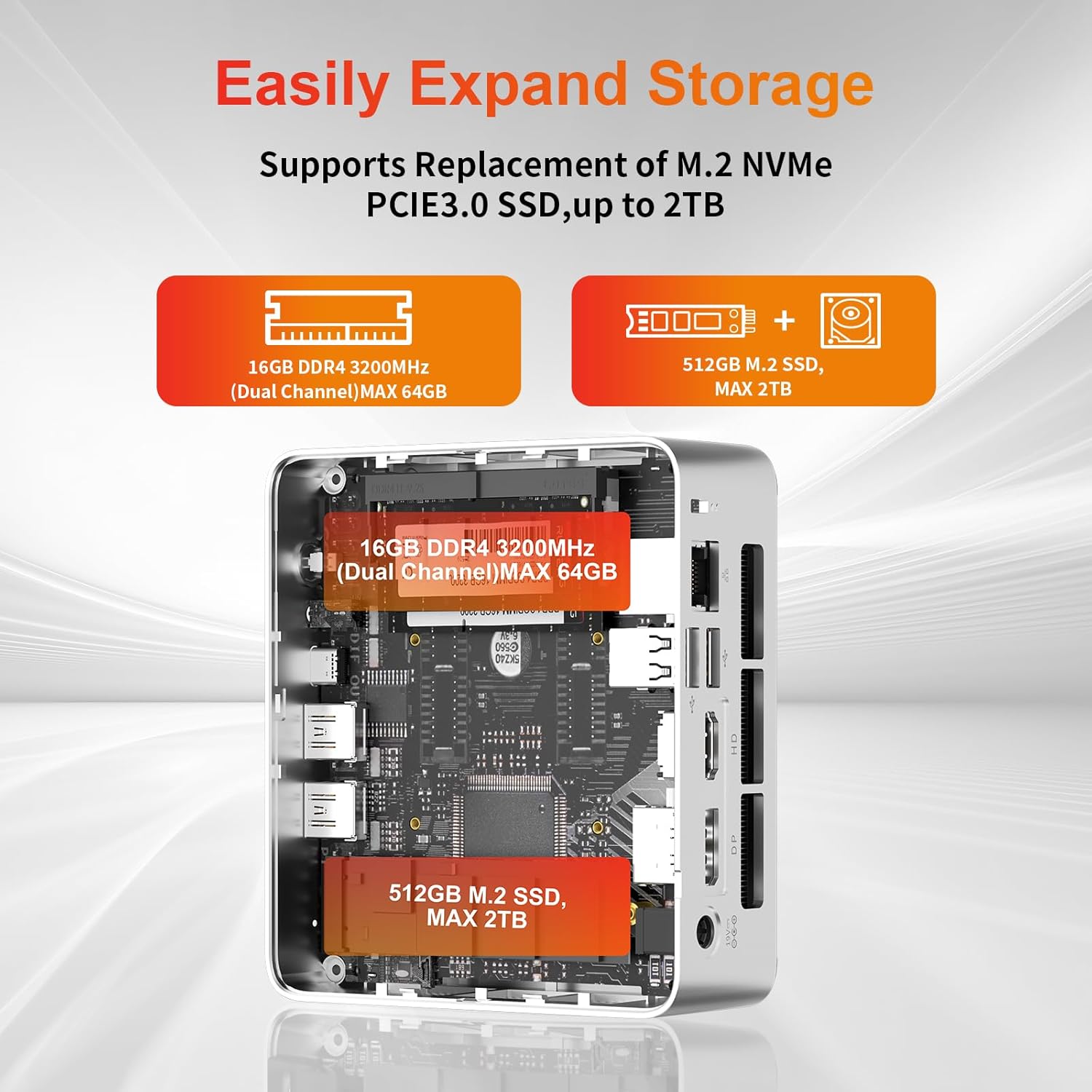
- סטאָרידזש יקספּאַנשאַן: The Mini PC supports replacement of the M.2 NVMe PCIe 3.0 SSD up to 2TB. It also supports memory expansion up to 64GB DDR4.

Image: Diagram illustrating the internal components and options for expanding storage (M.2 SSD up to 2TB) and RAM (DDR4 up to 64GB).
- VESA מאַונטינג: Use the included VESA mount bracket to attach the Mini PC to the back of a compatible monitor or to a wall mount, saving desk space.
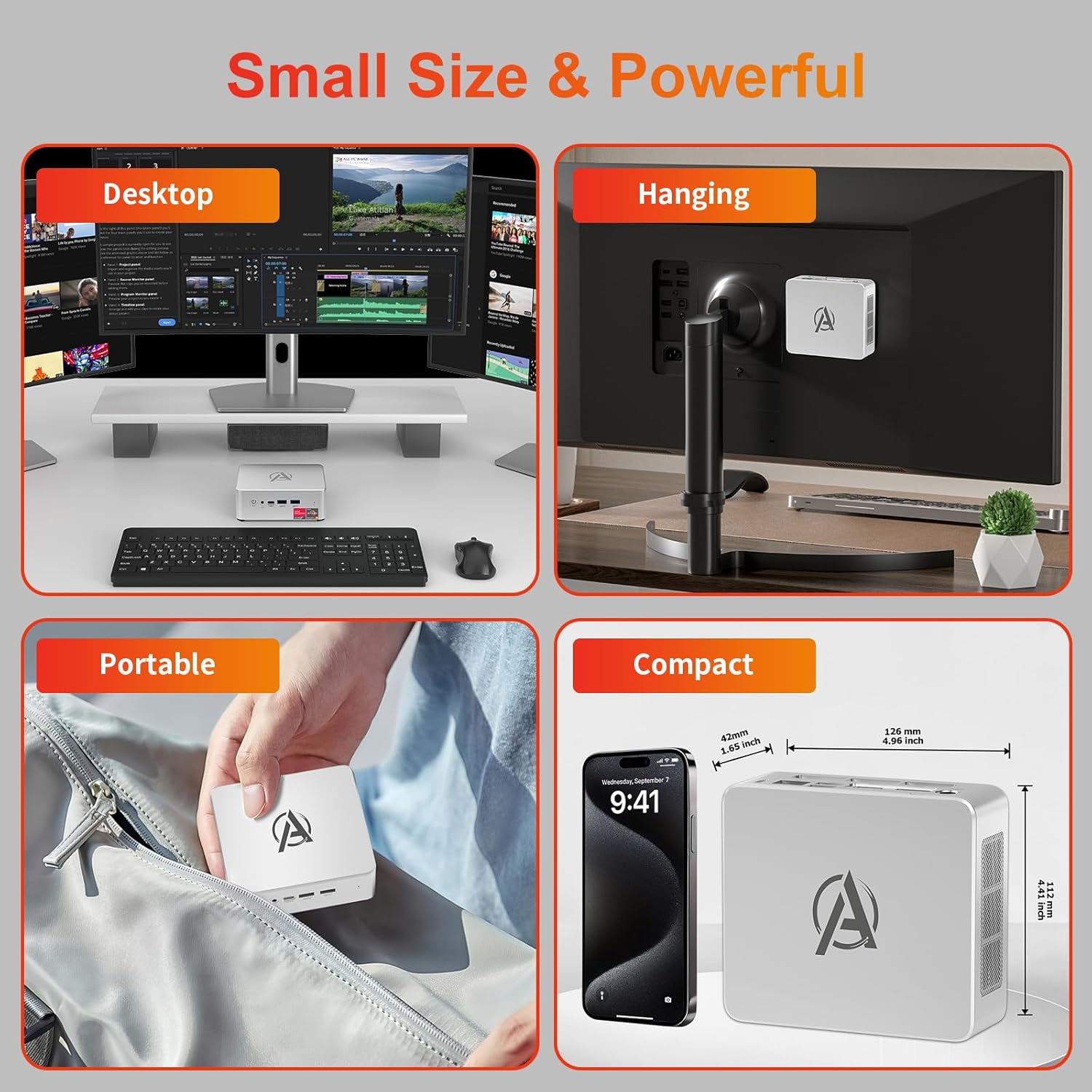
Image: Various usage scenarios for the Mini PC, including desktop, VESA-mounted behind a monitor, portable, and compact size comparison.
וישאַלט
- רייניקונג: Use a soft, dry cloth to clean the exterior of the Mini PC. Do not use liquid cleaners or aerosols. Ensure ventilation openings are free from dust.
- ווייכווארג דערהייַנטיקונגען: קאָנטראָלירט און אינסטאַלירט רעגולער Windows דערהייַנטיקונגען און דרייווער דערהייַנטיקונגען צו ענשור אָפּטימאַלע פאָרשטעלונג און זיכערהייט.
- היץ מאַנאַגעמענט: Ensure the Mini PC is placed in a well-ventilated area. Avoid blocking the air vents. The intelligent cooling system is designed for low noise and efficient heat dissipation.

Image: Diagram illustrating the internal cooling fan and heat sink, showing airflow for efficient heat dissipation.
- סטאָרידזש פאַרוואַלטונג: פּעריִאָדיש רייניקן אויס נישט-נייטיקע files and applications to maintain system performance.
טראָובלעשאָאָטינג
- קיין מאַכט:
- Check if the power adapter is securely connected to both the Mini PC and the power outlet.
- מאַכן זיכער אַז די מאַכט ווענטיל איז פאַנגקשאַנאַל.
- פּרוּווט אַ אַנדערש מאַכט ווענטיל.
- קיין ווייַז:
- Verify that the HDMI/DP/USB-C cable is securely connected to both the Mini PC and the monitor.
- זייט זיכער אז דער מאָניטאָר איז אנגעצונדן און איינגעשטעלט צו דער ריכטיקער אינפוט מקור.
- פרובירט אן אנדערן דיספּלעי קאַבל אדער מאָניטאָר אויב פֿאַראַן.
- פּאַמעלעך פאָרשטעלונג:
- שליסט אומנייטיקע אַפּליקאַציעס וואָס לויפן אין הינטערגרונט.
- קוקט נאָך און אינסטאַלירט אַלע וואַרטנדיקע ווינדאָוז אָדער דרייווער דערהייַנטיקונגען.
- זייט זיכער אז עס איז גענוג פריי פלאץ אויפן SSD.
- Monitor CPU and RAM usage in Task Manager to identify resource-intensive processes.
- נעץ קאָנעקטיוויטי פּראָבלעמען:
- For wired connections, ensure the Ethernet cable is properly connected and the router is working.
- For Wi-Fi, check if the Wi-Fi adapter is enabled and connected to the correct network. Restart your router/modem.
- סיסטעם פרירט זיך/קראכט:
- Restart the Mini PC.
- Ensure the system is not overheating (check ventilation).
- Run a system diagnostic or check Windows Event Viewער פֿאַר טעות מעלדונגען.
ספּעסאַפאַקיישאַנז
| מאָדעל | AWOW BA7 Mini PC |
| פּראַסעסער | AMD Ryzen 5 7430U (6 קערנס, 12 פֿעדעם, ביז 4.3 GHz) |
| גראַפיקס | אינטעגרירטע AMD Radeon גראַפיקס |
| באַראַן | 16 גיגאבייט DDR4 (אויסברייטבאר ביז 64 גיגאבייט) |
| סטאָרידזש | 512GB PCIe 3.0 M.2 SSD (Expandable up to 2TB) |
| אָפּערייטינג סיסטעם | Windows 11 פּראָ |
| ווידעא רעזולטאַט | DP1.2 (4K@60Hz), HDMI2.0 (4K@60Hz), USB-C (4K@60Hz) - Supports Triple Display |
| קאַנעקטיוויטי | WiFi 6, Bluetooth 5.2, 1000Mbps RJ45 LAN |
| פּאָרץ | 2x USB 3.2, 2x USB 2.0, 1x Type-C (Full Function), 1x DP1.2, 1x HDMI2.0, 1x RJ45 LAN, 1x 3.5mm Audio Jack, 1x DC IN |
| דימענשאַנז | 126 מ״מ x 112 מ״מ x 42 מ״מ (אומגעפער 4.96 x 4.41 x 1.65 אינטשעס) |
| וואָג | 398 ג (בלויז מיטל) Image: The Mini PC with its dimensions (126mm x 112mm x 42mm) and weight (398g) labeled. |
וואָראַנטי און שטיצן
AWOW provides comprehensive support for its products.
- וואָראַנטי: This product includes a 12-month service period from the date of purchase, covering manufacturing defects.
- טעכניש שטיצן: Lifetime technical support is available for all AWOW products.
- קאָנטאַקט: For technical assistance, warranty claims, or any product-related inquiries, please visit the official AWOW webפּלאַץ אָדער קאָנטאַקט זייער קונה דינסט.

Image: AWOW brand message emphasizing fulfillment, lifetime technical support, and 12-month service.


