1. הקדמה
Thank you for choosing the EWEADN V102 Wired Gaming Keyboard. This manual provides essential information for setting up, operating, and maintaining your new keyboard. Please read it thoroughly to ensure optimal performance and longevity of your device.

Figure 1: EWEADN V102 Wired Gaming Keyboard
2. פּעקל אינהאַלט
זיכער מאַכן אַז אַלע זאכן זענען פאַראַן אין פּעקל:
- EWEADN V102 דראָטיקע גיימינג קלאַוויאַטור
- וסב טיפּע- C קאַבלע
- באַניצער מאַנואַל (דעם דאָקומענט)
3. סעטאַפּ אינסטרוקציעס
3.1 פֿאַרבינדן די קלאַוויאַטור
- געפֿינען די USB Type-C פּאָרט אויף די קלאַוויאַטור.
- פאַרבינדן איין סוף פון די צוגעשטעלט וסב טיפּ-C קאַבלע צו די קלאַוויאַטור.
- Connect the other end of the USB Type-C cable to an available USB port on your computer or compatible device.
- די קלאַוויאַטור איז פּלאַג-און-פּליי און זאָל ווערן אויטאָמאַטיש דערקענט דורך אייער אָפּערייטינג סיסטעם.

Figure 2: Wired Type-C Connectivity
4. אַפּערייטינג ינסטרוקטיאָנס
4.1 מולטי-פונקציאָנעלער קאָנטראָל קנעפּל
The smart rotary knob provides quick control over various functions:
- איין פרעסע: Toggles between backlight modes.
- דרייען: Adjusts backlight brightness.
- Hold FN + Rotate Knob: Switches to multimedia mode for volume control (rotate) and mute (press).

Figure 3: Multi-Function Control Knob
Video 1: Demonstration of the EWEADN V102 Keyboard's multi-function knob and lighting effects.
4.2 ווייַז סקרין
The integrated display screen shows real-time status indicators without requiring additional software:
- קאַפּס לאָק סטאַטוס
- Num Lock status
- Win Lock status
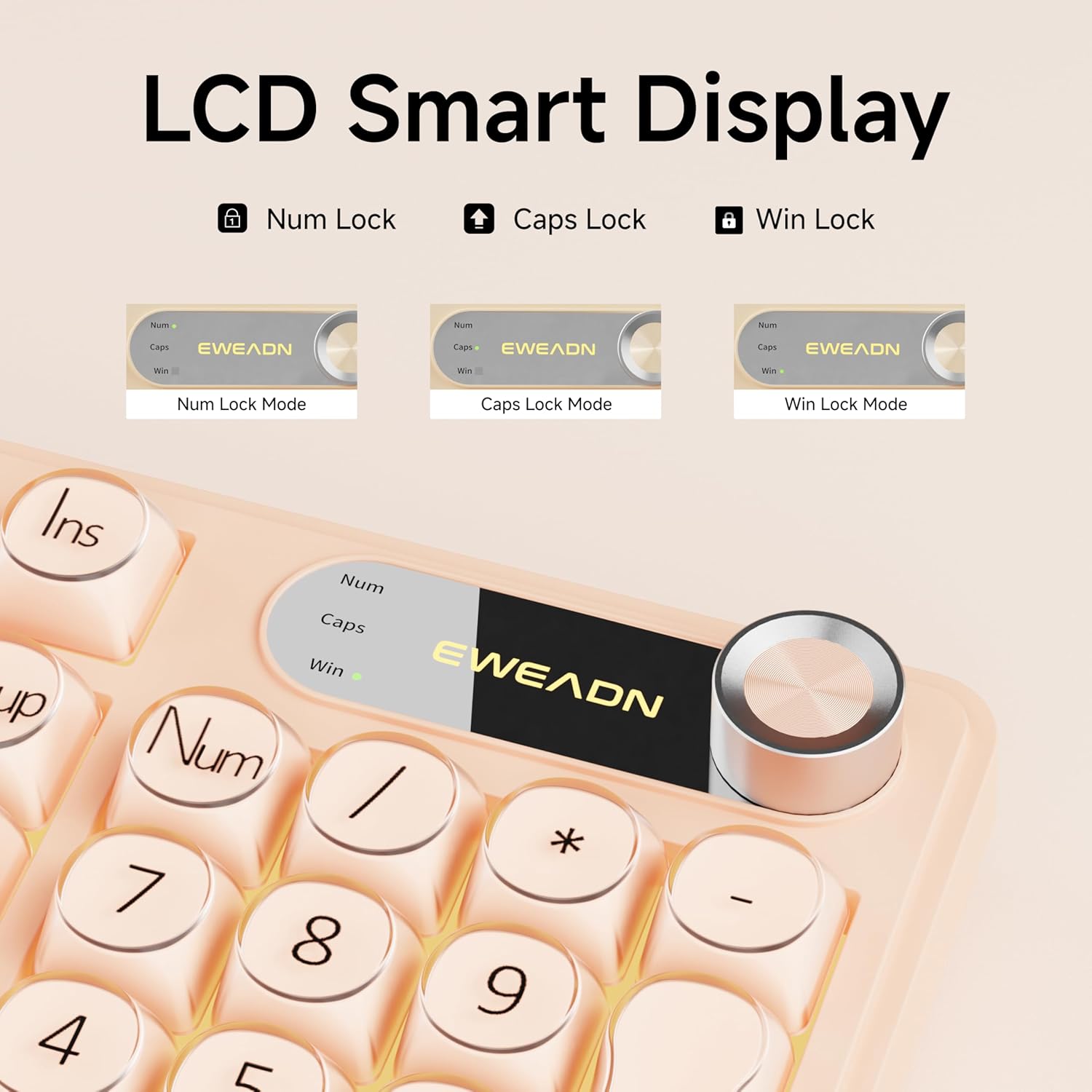
Figure 4: LCD Smart Display
4.3 רגב באַקקליגהטינג
Customize your typing experience with dynamic RGB lighting:
- FN + INS: Switches between 12 stunning RGB lighting effects.
- FN + PGUP/PGDN: אַדזשאַסטירט די ברייטקייט פון דער באַקלייט (5 לעוועלס).
- FN + "_" or "+": אַדזשאַסטירט לייטינג גיכקייט (5 לעוועלס).
- FN + באַקספּייס: Toggles backlight on/off.

Figure 5: RGB Backlight Control Functions
Video 2: Demonstration of various RGB lighting effects on the keyboard.
4.4 קאָמפּאַטיביליטי מיט צוויי סיסטעמען
The V102 keyboard is designed for broad compatibility across multiple operating systems and devices:
- Windows
- Mac (FN + S for Mac layout)
- אַנדרויד
- יאָס
- קסבאָקס
- PS4
- PS5

Figure 6: Dual-System Connection for Windows and Mac
4.5 ערגאָנאָמישער פּלאַן
The keyboard features a streamlined layout and adjustable typing angles for enhanced comfort during extended use. It includes a numeric keypad for efficient data entry.

Figure 7: 98-Key Layout and Adjustable Feet
4.6 שטילע אָפּעראַציע
The membrane keyboard design is engineered to reduce typing sound, providing a quieter experience suitable for various environments.

Figure 8: Silent Computer Keyboard Design
4.7 Spill-Resistant Design
The keyboard features a spill-resistant design to protect against accidental liquid spills. In case of a spill, promptly disconnect the keyboard and allow it to dry completely before reconnecting.

Figure 9: Spill-Resistant Design
5. וישאַלט
To ensure the longevity and optimal performance of your EWEADN V102 keyboard, follow these maintenance guidelines:
- רייניקונג: Use a soft, lint-free cloth to wipe the surface of the keyboard. For deeper cleaning, use a can of compressed air to remove dust and debris from between the keys. Avoid using harsh chemicals or abrasive materials.
- סטאָרידזש: האַלט די קלאַוויאַטור אין אַ קיל, טרוקן אָרט אַוועק פון דירעקט זונשייַן און עקסטרעמע טעמפּעראַטורן.
- האַנדלינג: פֿאַרמײַדט צו לאָזן אַראָפּ די קלאַוויאַטור אָדער אויסשטעלן זי צו איבערגעטריבענע קראַפֿט, וואָס קען שאַטן די אינעווייניקסטע קאָמפּאָנענטן.
6. טראָובלעשאָאָטינג
אויב איר טרעפט פּראָבלעמען מיט אייער קלאַוויאַטור, זעט די פאלגענדע געוויינטלעכע לייזונגען:
- קלאַוויאַטור רעאַגירט נישט: Ensure the USB Type-C cable is securely connected to both the keyboard and your device. Try connecting to a different USB port or a different device to rule out port or device issues.
- באַקלייט אַרבעט נישט: Check if the backlight is turned off using the FN + Backspace shortcut. Adjust brightness using FN + PGUP/PGDN.
- שליסלען רעגיסטרירט זיך נישט: Ensure no debris is lodged under the keys. If the issue persists, contact customer support.
- Incorrect layout (Mac users): Press FN + S to switch to the Mac layout.
פֿאַר ווייטערדיקע הילף, ביטע זעט די וואָראַנטי און שטיצע אָפּטייל.
7. ספּעסאַפאַקיישאַנז
| מאָדעל | V102 |
| אויסלייג | 98-Key Compact Layout with Number Pad |
| קאַנעקטיוויטי | דראָטיקער USB טיפּ-C |
| באַקלייט | Dynamic RGB (12 effects, 5 brightness levels, 5 speed levels) |
| ספּעציעלע פֿעיִקייטן | Multi-Function Control Knob, Display Screen, Silent Membrane Keys, Spill-Resistant Design, Adjustable Typing Angles |
| קאַמפּאַטאַבאַל דעוויסעס | Laptop, PC, Gaming Console (Windows, Mac, Android, iOS, Xbox, PS4, PS5) |
| מאַטעריאַל | פּאָליבוטילענע טערעפטהאַלאַטע |
| פּונקט וואָג | 2.4 פונט |
| פּעקל דימענשאַנז | 17.68 X 7.05 X 1.97 אינטשעס |
8. וואָראַנטי און שטיצן
Your EWEADN V102 Wired Gaming Keyboard is backed by a standard warranty. For specific warranty details, please refer to the product packaging or contact your retailer.
קונה שטיצן
For technical assistance, troubleshooting, or any product-related inquiries, please contact EWEADN customer support:
- E- בריוו שטיצן: eweadnkeyboard@outlook.com
- אָנליין שטיצן: באַזוכן די EWEADN Store on Amazon and click 'Ask a question' to contact the seller.


