1. ערשט סעטאַפּ
This section guides you through the initial setup of your DOOGEE Tab A9 Pro tablet.
1.1 פּעקל אינהאַלט
באַשטעטיקן אַז אַלע זאכן זענען פאַראַן אין פּעקל:
- 1x DOOGEE Tab A9 Pro Tablet
- 1x טיפּ-C וסב קאַבלע
- 1x טשאַרדזשער
- 1x Stylus (VIP Edition)
- 1x Tempered Film (VIP Edition)
- 1x Bluetooth Mouse (VIP Edition)
- 1x Leather Protective Cover (VIP Edition)
- 1x Bluetooth Keyboard (VIP Edition)
- 1x פּאַקינג קעסטל
- 1x באַניצער מאַנואַל

Image: DOOGEE Tab A9 Pro tablet shown with its complete set of accessories, including a stylus, tempered film, Bluetooth mouse, leather protective cover, and Bluetooth keyboard.
1.2 אויפלאָדן די טאַבלעט
Before first use, fully charge the tablet. Connect the Type-C USB cable to the tablet's USB port and the charger to a power outlet. The tablet supports a maximum charging current of 10W.
1.3 פּאַוערינג אויף / אַוועק
- צו מאַכט אויף: דריק און האלט דעם מאַכט קנעפּל ביז דער DOOGEE לאָגאָ דערשיינט.
- צו מאַכט אַוועק: Press and hold the power button, then select "Power off" from the options on the screen.
1.4 ערשט קאַנפיגיעריישאַן
Upon first power-on, follow the on-screen prompts to configure your tablet. This includes selecting your language, connecting to a Wi-Fi network, setting up your Google account, and configuring security options.

בילד: פאָרנט און הינטן view of the DOOGEE Tab A9 Pro tablet, highlighting its sleek design and camera placement.
2. אַפּערייטינג ינסטרוקטיאָנס
This section provides guidance on using the core features of your DOOGEE Tab A9 Pro tablet.
2.1 נאַוויגירן דעם אַנדרויד 15 צובינד
The tablet runs on Android 15. Familiarize yourself with gestures and navigation:
- סוויפּ אַרויף: אַקסעס די אַפּ שופלאָד.
- שלעפּ אַראָפּ: צוטריט צו שנעלע סעטטינגס און נאָוטאַפאַקיישאַנז.
- צאַפּן: אויסקלייַבן זאכן.
- לאנג פּרעס: צוטריט קאנטעקסטועלע מעניוס אדער באוועג איקאנעס.
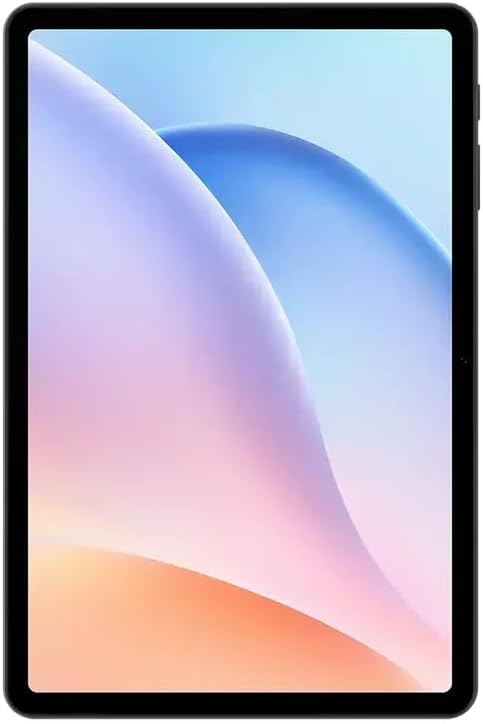
בילד: פראָנט view of the DOOGEE Tab A9 Pro tablet, showcasing its 10.1-inch IPS HD display.
2.2 Wi-Fi און בלועטוט קאָנעקטיוויטי
צו פאַרבינדן צו Wi-Fi אָדער בלועטוט דעוויסעס:
- גיין צו סעטטינגס.
- אויסקלייַבן נעץ און אינטערנעט פֿאַר Wi-Fi אָדער קאָננעקטעד דעוויסעס פֿאַר בלועטאָאָטה.
- Toggle Wi-Fi or Bluetooth on and select the desired network or device to connect.
The tablet supports Wi-Fi 802.11 a/b/g/n/ac (2.4GHz/5GHz) and Bluetooth 5.0.
2.3 ניצן די קאַמעראַ
The tablet features a 5MP front camera and an 8MP rear camera with flash. Open the Camera app to capture photos and videos. Video recording supports FHD 30fps.
2.4 External Storage (TF Card)
The tablet includes a TF card slot, supporting up to 2TB of external storage. Insert a compatible TF card to expand your device's memory for photos, videos, and documents.
2.5 קאַנעקטינג פּעריפעראַלס
The VIP Edition includes a Bluetooth keyboard and mouse. Pair these devices via Bluetooth settings for enhanced productivity. The tablet also supports OTG (On-The-Go) functionality via its Type-C USB port for connecting other USB devices, and has a 3.5mm earphone jack.
3. וישאַלט
Proper maintenance ensures the longevity and optimal performance of your DOOGEE Tab A9 Pro.
3.1 רייניקן די טאַבלעט
- ניצט אַ ווייכן, לינט-פֿרייע שטאָף צו רייניקן דעם עקראַן און קערפּער.
- פֿאַרמײַדן ניצן שטרענגע כעמיקאַלן, אַברייסיוו רייניגער, אָדער אַעראָסאָל ספּרײַס.
- פֿאַר שווערע פֿלעקן, אַ ביסל דampען דעם טוך מיט וואסער.
3.2 באַטערי קער
The tablet is equipped with a 6580mAh battery. To maximize battery life:
- ויסמיידן עקסטרעם טעמפּעראַטורעס.
- לאָזט נישט די באַטאַרייע גאָר אויסליידיקן אָפט.
- ניצט דעם צוגעשטעלטן טשאַרדזשער פֿאַר אָפּטימאַלער טשאַרדזשינג.

Image: Visual representation of the DOOGEE Tab A9 Pro's 6580mAh battery, highlighting its capacity and 10W fast charging capability.
3.3 ווייכווארג דערהייַנטיקונגען
קאָנטראָלירט און אינסטאַלירט רעגולער ווייכווארג דערהייַנטיקונגען צו זיכער מאַכן אַז אייער טאַבלעט האט די לעצטע פֿעיִקייטן, זיכערהייט פּאַטשאַז און פאָרשטעלונג פֿאַרבעסערונגען. גייט צו סעטטינגס > סיסטעם > סיסטעם דערהייַנטיקונג.
4. טראָובלעשאָאָטינג
די סעקציע באהאנדלט אלגעמיינע פראבלעמען וואס איר קענט באגעגענען מיט אייער DOOGEE טאב A9 פרא.
4.1 טאַבלעט גייט נישט אָן
- Ensure the tablet is sufficiently charged. Connect it to the charger for at least 30 minutes.
- Try a forced restart by holding the power button for 10-15 seconds.
4.2 Wi-Fi קאָנעקטיוויטי פּראָבלעמען
- קוק אויב Wi-Fi איז ענייבאַלד אין סעטטינגס.
- ריסטאַרט דיין Wi-Fi ראַוטער.
- פארגעסט די נעץ אין די טאַבלעט סעטטינגס און פארבינדט זיך ווידער.
- זייט זיכער אז איר זענט אין דער רייך פון די Wi-Fi סיגנאַל.
4.3 לאַנגזאַמע פאָרשטעלונג
- נאָענט ומנייטיק הינטערגרונט אַפּלאַקיישאַנז.
- ויסמעקן קאַש דאַטן פֿאַר אַפּפּס.
- זיכער מאַכן אַז גענוג סטאָרידזש פּלאַץ איז בנימצא.
- ריסטאַרט די טאַבלעט.
4.4 עקראַן רעאַגירט נישט
- Perform a forced restart.
- אויב די פראבלעם בלייבט, באַטראַכט אַ פאַבריק ריסעט (ווארענונג: דאָס וועט אויסמעקן אַלע דאַטן).
5. טעכניש ספּעסאַפאַקיישאַנז
Detailed specifications for the DOOGEE Tab A9 Pro tablet.

Image: Infographic detailing the 10.1-inch IPS HD display features, including 1280x800 resolution, 80.2% screen-to-body ratio, and 16.7 million screen colors.
| שטריך | באַשרייַבונג |
|---|---|
| מאָדעל | דוגי טאב A9 פרא |
| אָפּערייטינג סיסטעם | אַנדרויד 15 |
| דימענשאַנז | 242.5 X 160.9 X 9.7 מם |
| וואָג | 512ג |
| פאַרשטעלן גרייס | 10.1 אינטשעס |
| ווייַז טיפּ | IPS LCD HD Display |
| האַכלאָטע | 1280 X 800 בילדצעלן |
| PPI | 149 |
| Screen-to-Body Ratio | 80.2% |
| פּראַסעסער (קפּו) | Unisoc T310 Octa-core (1x Arm Cortex-A75 @2.0GHz, 3x Arm Cortex-A55 @1.8GHz) |
| גראַפיקס (GPU) | אָרעם Mali-G52 |
| באַראַן | 4GB LPDDR4 (with 16GB virtual RAM expansion, total 20GB) |
| אינערלעכער סטאָרידזש (ראַם) | 128GB eMMC |
| יקספּאַנדאַבאַל סטאָרידזש | TF Card Slot, up to 2TB |
| ווי-פי | 802.11 a / b / g / n / ac (2.4 GHz / 5 GHz) |
| בלועטאָאָטה | בלועטאָאָטה 5.0 |
| פראָנט אַפּאַראַט | 5MP |
| דערציען אַפּאַראַט | 8MP מיט בליץ |
| באַטאַרייע קאַפּאַציטעט | 6580 מאַה |
| טשאַרדזשינג | 10W Max Charging Current, Type-C USB |
| אַודיאָ דזשאַק | 3.5 מם |
| סענסאָרס | ג-סענסאָר |
| אנדערע פֿעיִקייטן | OTG support, Bluetooth keyboard connection support |
6. וואָראַנטי און שטיצן
Your DOOGEE Tab A9 Pro comes with a warranty and access to customer support.
6.1 וואָראַנטי אינפֿאָרמאַציע
The DOOGEE Tab A9 Pro includes a 12-חודש וואָראַנטי from the date of purchase. This warranty covers manufacturing defects and malfunctions under normal use. It does not cover damage caused by misuse, accidents, unauthorized repairs, or normal wear and tear. Please retain your proof of purchase for warranty claims.
6.2 קונה שטיצן
For technical assistance, warranty claims, or further inquiries, please contact DOOGEE customer support through their official website or the retailer where the product was purchased. Have your product model and purchase details ready when contacting support.


