1. הקדמה
Thank you for choosing the Oilsky M1 MP3 Player. This device is designed to provide a portable and versatile music experience. It features Bluetooth 5.4 for wireless audio, a 2.4-inch full touch screen for easy navigation, and 128GB of internal storage, expandable via MicroSD card. Beyond music playback, it includes functions such as FM radio, voice recording, e-book reading, and picture viewing. Please read this manual thoroughly to understand the player's features and ensure optimal performance.
2. וואָס איז אין דער קעסטל
Carefully unpack your Oilsky M1 MP3 Player and check for the following items:
- 1x Oilsky M1 Music Player
- 1x ירפאָונז
- 1x USB קאַבל (פֿאַר טשאַרדזשינג און דאַטן אַריבערפירן)
- 1x פּראַטעקטיוו קאַסע
- 1x באַניצער מאַנואַל

Image: All items included in the Oilsky M1 MP3 Player package.
3. פּראָדוקט איבערview
The Oilsky M1 MP3 Player features a compact design with a full touch screen interface. Familiarize yourself with the device's physical components:
- 2.4-אינטש פול טאָוטש סקרין: Main interface for navigation and control.
- מאַכט קנעפּל: Located on the side, used to turn the device on/off and lock/unlock the screen.
- באַנד קנעפּלעך: אַדזשאַסטירן אַודיאָ אַוטפּוט לעוועל.
- וסב- C פּאָרט: For charging and connecting to a computer for data transfer.
- 3.5 מם כעדפאָון דזשאַק: For wired earphone connection.
- מיקראָסד קאָרט שפּעלטל: For expanding storage capacity (card not included).
- געבויט-אין רעדנער: Allows audio playback without headphones.
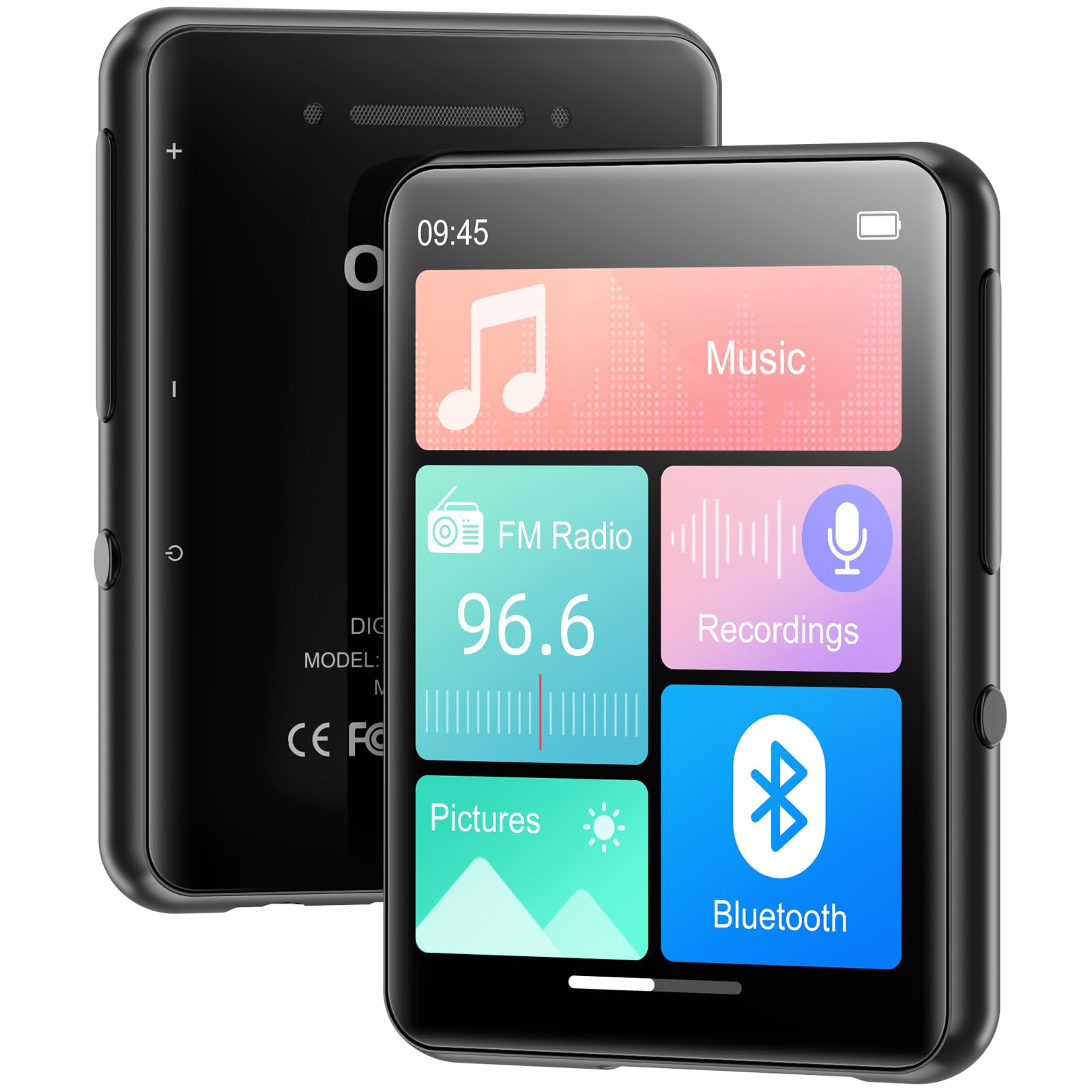
בילד: פראָנט view of the MP3 player displaying its main screen.
4. סעטאַפּ
4.1 טשאַרדזשינג די מיטל
Before first use, fully charge the MP3 player. Connect the provided USB cable to the device's USB-C port and the other end to a USB power adapter (not included) or a computer's USB port. The battery indicator on the screen will show charging status.
4.2 מאַכט אויף / אַוועק
- צו מאַכט אויף: דריקן און האַלטן די מאַכט קנעפּל ביז די פאַרשטעלן לייץ.
- צו מאַכט אַוועק: דריק און האלט דעם פּאַוער קנעפּל, און דערנאָך סעלעקטיר 'פּאַוער אויס' אויפן עקראַן.
- סקרין שלאָס / ופשליסן: Briefly press the Power button to lock or unlock the screen during use.
4.3 שפּראַך סעטטינגס
ביים ערשטן מאָל אנצינדן, קען מען אייך בעטן אויסצוקלײַבן אייער בילכערדיקע שפּראַך. אויב נישט, גייט צו סעטטינגס > שפּראַך to choose from the available options.
4.4 Transferring Music and Files
The Oilsky M1 MP3 Player has 128GB of internal storage and supports MicroSD cards up to 128GB (not included).
- פֿאַרבינדט דעם MP3 שפּילער צו אײַער קאָמפּיוטער מיטן USB קאַבל.
- דער שפּילער וועט דערשייַנען ווי אַ אַרויסנעמבאַר דיסק דרייוו אויף דיין קאָמפּיוטער.
- שלעפּן און פאַלן דיין מוזיק files (MP3, WMA, APE, FLAC, WAV, AAC), pictures (JPEG, BMP), or e-books (TXT) into the appropriate folders on the player or MicroSD card.
- אַרויסוואַרפן דאָס דעווייס זיכער פֿון אייער קאָמפּיוטער איידער איר אָפּטיילט דעם USB קאַבל.

Image: Visual representation of the 128GB internal storage and MicroSD card expansion capability.
5. אַפּערייטינג ינסטרוקטיאָנס
5.1 מוזיק פּלייבאַק
From the main menu, tap the 'Music' icon to access your music library. You can browse by artist, album, genre, or all songs. Tap a song to begin playback. Use the on-screen controls for play/pause, skip tracks, and adjust volume. The player supports MP3, WMA, APE, FLAC, WAV, and AAC audio formats.

Image: User interacting with the touch screen for music playback.
5.2 בלועטאָאָטה פּערינג
The Oilsky M1 features Bluetooth 5.4 for connecting to wireless headphones or speakers. באַמערקונג: This device cannot pair with mobile phones or personal computers via Bluetooth.
- גיין צו סעטטינגס> בלועטאָאָטה or tap the 'Bluetooth' icon from the main menu.
- צינדט אָן בלועטוט.
- זיכער מאַכן אַז אייערע בלועטוט כעדפאָונז אָדער רעדנער זענען אין פּערינג מאָדע.
- The MP3 player will scan for available devices. Select your device from the list to pair.
- Once paired, audio will be routed to your Bluetooth device.

Image: MP3 player demonstrating Bluetooth connectivity with headphones.
5.3 עפעם ראַדיאָ
To use the FM Radio, connect wired earphones to the 3.5mm jack, as they act as the antenna. Tap the 'FM Radio' icon from the main menu. You can manually tune to stations or use the auto-scan feature to find available frequencies.
5.4 קול רעקאָרדער
Tap the 'Recordings' icon to access the voice recorder. The built-in microphone allows you to capture audio. Start, pause, and save recordings using the on-screen controls. Recorded files are saved in the 'Recordings' folder.
5.5 אנדערע פאַנגקשאַנז
The Oilsky M1 MP3 Player includes several other useful applications:
- בילדער: View stored image files (JPEG, BMP).
- E- בוך: לייענען טעקסט files (TXT format).
- וועקער זייגער: Set alarms with your favorite music.
- קאַלענדאַר: View די איצטיקע דאַטע.

Image: Main menu showing various functions of the MP3 player.
ווידעא: אן איבערview of the Oilsky MP3 Player's features and interface, demonstrating its functionality.
6. וישאַלט
- האַלט דעם אַפּאַראַט טרוקן. פֿאַרמייַדט אויסשטעלונג צו פֿײַכטקייט אָדער פֿליסיקייטן.
- Clean the screen and body with a soft, dry cloth. Do not use abrasive cleaners.
- ויסמיידן עקסטרעם טעמפּעראַטורעס.
- דו זאלסט נישט פאַלן אָדער אונטערטעניק די מיטל צו שטאַרק ימפּאַקץ.
- Store the device in the provided protective case when not in use.
7. טראָובלעשאָאָטינג
| פּראָבלעם | מעגלעך לייזונג |
|---|---|
| די מיטל טוט נישט מאַכט אויף. | זיכער מאַכן אַז די באַטאַרייע איז אויפגעלאָדן. פֿאַרבינדט עס צו אַ מאַכט מקור און פּרוּווט ווידער. |
| קען נישט פאַרבינדן צו בלועטוט דעווייס. | Ensure the Bluetooth device is in pairing mode and within range. Confirm the MP3 player's Bluetooth is enabled. Remember, it cannot pair with phones or PCs. |
| קיין קלאַנג פֿון די כעדפאָונז. | קאָנטראָלירט די פֿאַרבינדונג פֿון די קאָפּהערער. מאַכט זיכער אַז די וואָלומען איז נישט שטיל אָדער צו נידעריק. פּרובירט מיט אַנדערע קאָפּהערער. |
| מוזיק files not appearing. | באַשטעטיקן files are in supported formats (MP3, WMA, APE, FLAC, WAV, AAC). Ensure files are transferred to the correct folders. Refresh the music library if available in settings. |
| די פאַרשטעלן איז ניט ריספּאַנדאַבאַל. | Restart the device by holding the power button. If unresponsive, allow the battery to drain completely and then recharge. |
8. ספּעסאַפאַקיישאַנז
| שטריך | דעטאַל |
|---|---|
| מאָדעל נאָמען | M1 |
| סאָרט | אָילסקי |
| קאַנעקטיוויטי טעכנאָלאָגיע | בלועטאָאָטה 5.4, וסב |
| זכּרון סטאָרידזש קאַפּאַסיטי | 128 GB (Internal), supports up to 128 GB Micro SD |
| פאַרשטעלן גרייס | 2.4 אינטשעס |
| ספּעציעלע פֿעיִקייטן | FM Radio, Touch Screen, Built-in Speaker, Voice Recorder, E-book, Picture Viewer, Alarm Clock, Calendar |
| קאַמפּאַטאַבאַל דעוויסעס | Headphones, Bluetooth Speakers |
| שטיצט מעדיע טייפּס | מיקראָ סד |
| שטיצט אַודיאָ פֿאָרמאַטירונגען | MP3, WMA, APE, FLAC, WAV, AAC |
| פּונקט וואָג | 5.9 אונס (בעערעך 167 גראַמז) |
| פּעקל דימענשאַנז | 5.87 X 5.83 X 0.75 אינטשעס |
| באַטערי | 1 ליטהיום יאָן באַטאַרייע (אַרייַנגערעכנט) |
9. וואָראַנטי און שטיצן
The Oilsky M1 MP3 Player comes with a standard manufacturer's warranty. Please refer to the warranty card included in your package for specific terms and conditions. For technical support, troubleshooting assistance, or warranty claims, please contact Oilsky customer service through the retailer where the product was purchased.


