הקדמה
This manual provides essential information for the safe and efficient use of your Philips Smart TV Ambilight THE ONE 55 inch 4K 144 Hz, model 55PUG8929/78. Please read these instructions carefully before operating the device and retain them for future reference.
Your Philips TV features Ambilight technology, a P5 processor for enhanced image quality, Dolby Vision and Dolby Atmos for immersive audiovisual experiences, a 144Hz refresh rate with VRR and AMD FreeSync Premium for gaming, and the Titan OS smart TV platform.
סעטאַפּ
1. אויספּאַקן און פּאַקעט אינהאַלט
Carefully remove all components from the packaging. Ensure all items are present before discarding packaging materials.
- 1 Smart TV Philips 55"
- 1 ווייַט קאָנטראָל
- 2 אַאַאַ באַטעריז
- 1 מאַכט קאַבלע
- 1 שנעל אָנהייב פירער
- 1 Legal and safety leaflet
- 1 טיש שטיין
Note: The product does not include installation services. For apartment delivery, lifting, or wall mounting, the customer is responsible. Philips is not responsible for installation or assembly.
2. צוזאמענשטעלן דעם שטאנד אדער וואנט-מאונטינג
If using the included table stand, follow the instructions in the quick start guide to securely attach it to the TV. Ensure all screws are tightened properly. If wall mounting, use a VESA-compatible wall mount (sold separately) and consult a professional for installation to ensure safety and proper alignment. The TV supports VESA 30cm mounting.

בילד: פראָנט view of the Philips 55 inch Smart TV with its table stand assembled.
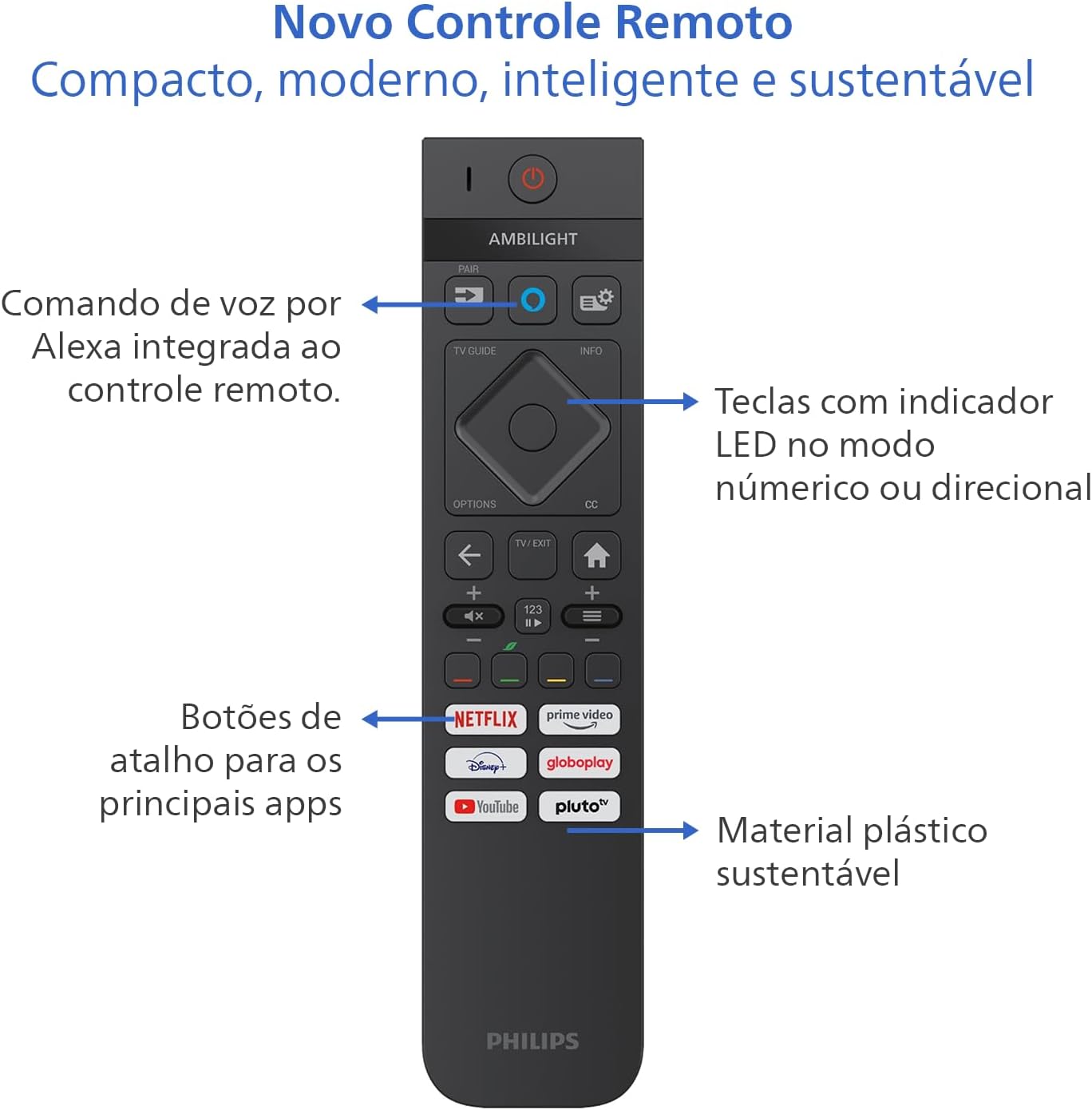
Image: Diagram showing the dimensions of the Philips 55 inch Smart TV with and without the stand, including VESA wall mount specifications (30cm).
3. קאַנעקטינג פּעריפעראַלס
Connect your devices to the TV's ports. Refer to the back and side views for port locations.
- מאַכט: Connect the power cable to the TV and a suitable electrical outlet (110V/220V compatible).
- הדמי: Use HDMI 2.1 ports for high-definition devices like gaming consoles, Blu-ray players, or set-top boxes. There are 4 HDMI ports available.
- וסב: Connect USB drives for media playback or external devices. There are 2 USB ports.
- Antenna/RF: Connect your antenna cable for terrestrial TV reception.
- עטהערנעט (RJ-45): פֿאַר אַ דראָטיקער אינטערנעט פֿאַרבינדונג.
- Audio L-R: אַנאַלאָג אַודיאָ אַרייַנשרייַב.
- SPDIF (Optical Audio): פֿאַר דיגיטאַלער אַודיאָ אַרויסגאַנג צו סאַונדבאַרס אָדער היים טעאַטער סיסטעמען.
- כעדפאָון רעזולטאַט: פֿאַר קאַנעקטינג כעדפאָונז.

בילד: זייט פּראָfile of the Philips 55 inch Smart TV, highlighting the accessible USB ports and other side connections.

בילד: הינטערשטע view of the Philips 55 inch Smart TV, displaying the full array of input and output ports for various connections.
4. ערשטע איינשאַלטונג און נעץ סעטאַפּ
After connecting the power cable, press the power button on the remote control. Follow the on-screen instructions to complete the initial setup, including language selection, country, and network connection (Wi-Fi or Ethernet). The TV supports Wi-Fi Dual Band and Bluetooth 5.2 for wireless connectivity.
אַפּערייטינג ינסטראַקשאַנז
1. רימאָוט קאָנטראָל פאַנגקשאַנז
The included remote control is designed for intuitive navigation and features voice command with integrated Alexa. Insert the two AAA batteries into the remote control before use.

בילד: דעטאַלירט view of the Philips Smart TV remote control, highlighting the voice command button (Alexa), LED indicator keys, and dedicated shortcut buttons for popular streaming applications.
- מאַכט קנעפּל: טורנס די טעלעוויזיע אויף אָדער אַוועק.
- Voice Command (Alexa): Press and hold to use voice commands for searching content, controlling smart home devices, and more.
- נאַוויגאַציע פּאַד: ניצט די ריכטונג קנעפלעך צו נאַוויגירן מעניוז און אויסקלייבן אָפּציעס.
- דורכוועג קנעפּלעך: Direct access to popular streaming apps like Netflix, Prime Video, YouTube, and Pluto TV.
- באַנד/קאַנאַל: אַדזשאַסטירן די באַנד און טוישן קאַנאַלן.
- LED Indicator Keys: Keys with LED indicators for numeric or directional mode.
2. Smart TV Features (Titan OS)
Your TV runs on Titan OS, offering a user-friendly interface and quick access to various applications. The home screen is customizable, allowing you to prioritize your favorite apps and content.

Image: The Philips Smart TV's home screen, showing a selection of streaming applications and a personalized content layout.
- Personalized Home Screen: Access your favorite content and applications with recommendations tailored to your preferences.
- ינטויטיווע צובינד: Organize your home screen by prioritizing frequently used applications for easy daily access.
- אינהאַלט אויפדעקונג: Easily find new content with agile navigation and smart search functions.
3. Ambilight Technology
Ambilight projects colors from the screen onto the surrounding wall, enhancing immersion. Your TV features three-sided Ambilight with 8 illumination modes.

Image: A Philips Ambilight TV displaying dynamic backlighting that extends the on-screen colors onto the wall, creating an immersive viewינג דערפאַרונג.
- נאַטירלעך: Softer colors and brightness for visual comfort.
- לעבעדיק: Stronger, more vibrant Ambilight colors to create a sense of expanded imagery.
- Lounge: Can be active even when the TV is off, creating a cozy ambient atmosphere.
- שפּיל: Adapts lights to dark and dynamic scenes, enhancing gaming immersion.
- מוזיק: Ambilight follows the rhythm of music, ideal for creating a festive home environment.
- AmbiWake Up: Simulates sunrise with soft Ambilight, gentle music, and weather forecast.
- Ambi-sleep: With the screen off, Ambilight emits an orange light and nature sounds to promote sleep.
- אַוראָראַ: Transforms the TV into a decorative piece, displaying continuous animations for a pleasant ambiance.

Image: Comparison of Ambilight's Natural mode (soft, comfortable lighting) and Vivid mode (strong, vibrant lighting for expanded imagery).

Image: Comparison of Ambilight's Lounge mode (ambient lighting when TV is off) and Game mode (dynamic lighting for gaming immersion).

Image: Comparison of Ambilight's Music mode (lights synchronize with music) and AmbiWake Up mode (simulates sunrise).

Image: Comparison of Ambilight's Ambi-sleep mode (orange light and nature sounds for sleep) and Aurora mode (decorative animations).
4. בילד און קלאַנג קוואַליטעט
The TV features a P5 processor, 4K resolution, Dolby Vision, and HDR10+ for exceptional image quality. The audio system includes 40W RMS, Dolby Atmos, and DTS Play-Fi for immersive sound.

Image: Explanation of the Philips P5 Perfect Picture Engine, illustrating how it optimizes colors, contrasts, and movements for realistic images.

Image: Visual comparison demonstrating the enhanced detail and richness of images with Dolby Vision and HDR compared to standard display.
- P5 Processor: Optimizes colors, contrasts, and movements in real-time for vivid and realistic images.
- דאָלבי וויזשאַן און HDR10+: Provides cinematic visual experience with impressive brightness, contrast, and color detail in 4K resolution.
- 40W RMS Audio: Powerful sound output that fills the environment with clarity and intensity.
- דאָלבי אַטמאָס און DTS:X: Advanced audio technologies creating a three-dimensional sound effect for an immersive experience.
- Intellisound with AI: Automatic audio adjustment based on content, ensuring clear and balanced sound from subtle dialogues to intense soundtracks.
5. גיימינג פֿעיִטשערז
Designed for gamers, this TV offers a fluid and responsive gaming experience.

Image: The Philips Smart TV's Game Bar interface, showing various settings for optimizing the gaming experience, including VRR, ALLM, and FreeSync Premium.
- 144Hz VRR: Variable Refresh Rate ensures ultra-fast, tear-free, and stutter-free motion.
- AMD FreeSync Premium: Provides stable, fluid, and lag-free gaming.
- שפּיל באַר: Access gaming-specific settings quickly.
- ALLM (אַוטאָ נידעריק לייטאַנס מאָדע): Automatically switches to low-latency mode for responsive gaming.
- וואָלקן גיימינג: Compatible with cloud gaming services like Blacknut.
וישאַלט
1. רייניקן דעם טעלעוויזאר
- פאַרשטעלן: ווישט אָפּ דעם עקראַן מיט אַ ווייכן, לינט-פֿרײַעם שטאָף. פֿאַר שווערע פֿלעקן, ווישט אַ ביסלampווישט דעם שטאָף מיט וואַסער אָדער אַ ספּעציאַליזירטן עקראַן רייניגער. שפּריצט קיינמאָל נישט פליסיקייט גלייך אויפן עקראַן.
- קאַבינעט: ניצט אַ ווייכע, טרוקענע שטאָף צו רייניקן דעם טעלעוויזיע קאַבינעט. פֿאַרמייַדט אַברייסיוו רייניגער אָדער סאָלווענטן.
- ווייַט קאָנטראָל: ווישן מיט אַ ווייך, טרוקן שטאָף.
2. ווייכווארג דערהייַנטיקונגען
Periodically check for software updates to ensure optimal performance and access to the latest features. You can usually find this option in the TV's settings menu under "System" or "About TV". Ensure your TV is connected to the internet for updates.
טראָובלעשאָאָטינג
אויב איר טרעפט פּראָבלעמען מיט אייער טעלעוויזיע, זעט די פאלגענדע געוויינטלעכע פראבלעם לייזונג טריט איידער איר קאָנטאַקטירט שטיצע.
קיין מאַכט
- זיכער מאַכן אַז דער מאַכט קאַבל איז זיכער פארבונדן צו ביידע די טעלעוויזיע און די עלעקטרישע ווענטיל.
- קוק אויב די מאַכט ווענטיל איז ארבעטן דורך פּלאַגינג אן אנדער מיטל.
- פרובירט צו דריקן דעם פּאַוער קנעפּל אויף דער טעלעוויזיע אַליין, נישט נאָר די ווײַטקאָנטראָל.
קיין בילד אדער שלעכטע בילד קוואַליטעט
- באַשטעטיקט אַז די ריכטיקע אַרייַנגאַנג מקור איז אויסגעקליבן (למשל, HDMI 1, טעלעוויזיע).
- קאָנטראָלירט אַלע קאַבל פֿאַרבינדונגען (HDMI, אַנטענע) פֿאַר לויזקייט אָדער שעדיקן.
- אַדזשאַסטירן בילד סעטטינגס (ברייטקייט, קאָנטראַסט, קאָליר) אין די טעלעוויזיע מעניו.
- If using an external device, try connecting it to a different HDMI port or another TV to rule out device issues.
קיין געזונט אָדער נעבעך געזונט קוואַליטעט
- זייט זיכער אז די קול איז נישט שטיל און איז אויפגעשטרעקט.
- Check audio settings in the TV menu, ensuring the correct audio output is selected (e.g., TV speakers, external audio system).
- If using external speakers or a soundbar, check their power and connections.
ווייַט קאָנטראָל איז נישט ארבעטן
- טוישט די באַטעריעס מיט נייע AAA באַטעריעס.
- זיכער מאַכן אַז עס זענען נישטאָ קיין שטערונגען צווישן דעם ווײַטקאָנטראָל און דעם טעלעוויזיע'ס IR סענסאָר.
- If the remote uses Bluetooth, try re-pairing it with the TV (refer to the TV's settings for pairing instructions).
Network/Internet Connection Issues
- קאָנטראָלירט אייער ראַוטער און מאָדעם צו זיכער מאַכן אַז זיי זענען אנגעצונדן און אַרבעטן ריכטיק.
- ריסטאַרט דיין ראַוטער און מאָדעם.
- If using Wi-Fi, ensure the TV is within range of your router. Try connecting via Ethernet cable if possible.
- Verify Wi-Fi password if prompted.
ספּעסאַפאַקיישאַנז
| שטריך | דעטאַל |
|---|---|
| סאָרט | פיליפּס |
| מאָדעל | 55PUG8929/78 |
| פאַרשטעלן גרייס | 55 אינטשעס |
| ווייַז טעכנאָלאָגיע | 4K UHD, LED, IPS |
| האַכלאָטע | 3840 x 2160 פּיקסעלס (4K) |
| דערפרישן קורס | 144 הז |
| ענטפער צייט | 8 מיליסעקאַנדז |
| Viewינג אַנגלע | 178 דיגריז |
| אַספּעקט פאַרהעלטעניש | 16:9 |
| קאַנטראַסט פאַרהעלטעניש | 1:200,000 |
| אָפּערייטינג סיסטעם | טיטאַן אַס |
| זכּרון סטאָרידזש קאַפּאַסיטי | 8 גיגאבייט |
| ספּעציעלע פֿעיִקייטן | Dolby Atmos / DTS-X, HDR10+/HLG/HDR10, Titan OS, Ambilight |
| אַודיאָ רעזולטאַט מאַכט | 40 וואטס (RMS) |
| סוראַונד סאַונד קאַנאַלן | 2.0 |
| קאַנעקטיוויטי טעכנאָלאָגיע | HDMI, USB, Wi-Fi, בלועטוט |
| HDMI פּאָרץ | 4 (HDMI 2.1 קאָמפּאַטיבל) |
| וסב פּאָרץ | 2 |
| אנדערע קאַנעקשאַנז | 1 Audio L-R, 1 RF (Antenna), 1 SPDIF (Optical Audio), 1 Headphone Output, 1 Ethernet RJ-45 |
| ווירעלעסס קאַנעקטיוויטי | Bluetooth 5.2, Wi-Fi Dual Band |
| Voltage | 110 וואלטס, 220 וואלטס |
| ענערגיע עפעקטיווקייַט לאַבעל | A (ENCE) |
| פּראָדוקט גרייסן (אָן שטאַנד) | 123 x 8.1 x 72 סענטימעטער (ב x ד x ה) |
| פּראָדוקט וואָג (אָן שטאַנד) | 14.2 קג |
| פּראָדוקט וואָג (מיט שטאַנד) | 14.6 קג |
| קאָליר | שוואַרץ |
| Certification | INMETRO |
| יאָר | 2025 |
וואָראַנטי אינפֿאָרמאַציע
Your Philips Smart TV model 55PUG8929/78 comes with a 1-יאָר פאַבריקאַנט ס וואָראַנטי. This warranty covers defects in materials and workmanship under normal use. Please retain your proof of purchase for warranty claims. For detailed terms and conditions, refer to the legal and safety leaflet included in your package.
קונה שטיצן
For further assistance, technical support, or warranty claims, please contact Philips customer service. You can find contact information on the Philips official webוועבזייטל אדער אין דער דאקומענטאציע וואס איז צוגעשטעלט געווארן מיט אייער טעלעוויזיע.
פיליפּס אפיציעל Webפּלאַץ: www.philips.com
פֿאַרבונדענע דאָקומענטן - 55PUG8929/78
 |
Philips 65PUS8919/12 "The One" 4K Ambilight TV Specifications Detailed specifications and features of the Philips 65PUS8919/12 "The One" 4K Ambilight TV, including P5 Perfect Picture Engine, Titan OS, Dolby Vision/Atmos, HDMI 2.1, VRR, FreeSync, and DTS Play-Fi compatibility. |
 |
Philips Xtra 55PML9019: 4K QD MiniLED Ambilight TV - פּרעגלעד און ספּעסאַפאַקיישאַנז דעטאַלין פּריגלעד Philips Xtra 55PML9019 4K QD MiniLED Ambilight TV. סערטאַפאַקיישאַן פון שפּאַנונג, טעכנאָלאָגיע, אַמביליגהט טעכנאָלאָגיע, TITAN OS, גיימינג שפּאַנונג, אַדוואַנידזשיז און דיסאַדוואַנטידזשיז. |
 |
פיליפּס די איינס 75PUS8909/12 4K אַמבילייט טעלעוויזיע - ספּעציפֿיקאַציעס און פֿעיִקייטן אויספאָרשן דעם Philips The One 75PUS8909/12 4K Ambilight טעלעוויזיע. אַנטדעקט זײַן אײַנטונקענדיקע Ambilight טעכנאָלאָגיע, די פֿאַרכאַפּנדיקע P5 Perfect Picture Engine, Dolby Vision/Atmos געזונט, די קלוגע פֿונקציעס פֿון Titan OS, און די פֿאָרגעשריטענע גיימינג מעגלעכקייטן. |
 |
Philips Televizor Ambilight 4K - The One (43PUS8919/12): Descriere și Specificații Descoperiți Philips Televizor Ambilight 4K, modelul The One (43PUS8919/12). O experiență vizuală și sonoră excepțională cu procesor P5, TITAN OS, Dolby Vision/Atmos și funcții avansate de gaming. Aflați specificațiile complete. |
 |
Philips The One 4K Ambilight TV 43PUS9060/12 - Преглед и Спецификации Открийте телевизора Philips The One 4K Ambilight TV (модел 43PUS9060/12) с 4K QLED, процесор P5, Dolby Vision/Atmos и Titan OS. Научете за функциите за игри, звук и свързаност. |
 |
Philips Xtra 4K QD MiniLED Ambilight TV - סקירה און פרטים זען טעלעוויזיע טעלעוויזיע Philips Xtra 4K QD MiniLED Ambilight, מיט קאָלירן מרים, פּירוט אַוטדייטיד און אַמביליגהט טעכנאָלאָגיע. דערהייַנטיקט די מנוע P5 פּערפעקט בילד, אַפּערייטינג סיסטעם TITAN OS, Dolby Vision/Atmos און מאַטאַבאַליזאַם. |