1. הקדמה
א דאנק פארן קויפןasing the Monster S350 Bluetooth Speaker. This portable wireless speaker features a touch screen, Bluetooth 6.0 connectivity, and support for TF cards, offering a versatile audio experience. This manual provides detailed instructions for setup, operation, maintenance, and troubleshooting to ensure optimal performance and longevity of your device.
2. זיכערקייַט אינפֿאָרמאַציע
- שטעלט נישט אויס דעם רעדנער צו עקסטרעמע טעמפּעראַטורן, דירעקטע זונשייַן, אדער הויכע פֿײַכטקייט.
- ויסמיידן דראַפּינג אָדער ונטערטעניק די רעדנער צו שטאַרק ימפּאַקץ.
- האַלטן די רעדנער אַוועק פון וואַסער און אנדערע ליקווידס.
- פּרוּווט נישט צו צענעמען, פאַרריכטן אָדער מאָדיפֿיצירן דעם רעדנער אַליין. קאָנטאַקט קוואַליפֿיצירטע סערוויס פּערסאָנעל אויב נייטיק.
- ניצט נאָר דעם צוגעשטעלטן טשאַרדזשינג קאַבל אָדער אַ סערטיפיצירטן עקוויוואַלענט.
- אַוועקוואַרפן באַטעריעס לויט די לאָקאַלע רעגולאַציעס. נישט פֿאַרברענען.
3. פּעקל אינהאַלט
ביטע טשעק די פּאַקעט פֿאַר די פאלגענדע זאכן:
- Monster S350 Bluetooth Speaker
- וסב טשאַרדזשינג קאַבלע
- באַניצער מאַנואַל
4. פּראָדוקט איבערview
Familiarize yourself with the components of your Monster S350 speaker.

פיגורע 4.1: פראָנט view of the Monster S350 Bluetooth Speaker, showcasing its retro design and touch screen.

פיגורע 4.2: Close-up of the speaker's top controls, illustrating the long press function for power and swipe gestures for volume adjustment.
קאָנטראָלס און פּאָרץ:
- מאַכט / וואָלום קנופּ: Long press to turn on/off. Swipe up to increase volume, swipe down to decrease volume.
- ריר סקרין ווייַז: For navigation, settings, and displaying information.
- טף קאַרד שפּעלטל: Insert a TF (microSD) card for local music playback.
- USB-C טשאַרדזשינג פּאָרט: פֿאַר טשאַרדזשינג די רעדנער.
5. סעטאַפּ
5.1 אויפלאָדן דעם רעדנער
- Connect the USB charging cable to the speaker's USB-C port.
- פֿאַרבינדט דעם אַנדערן עק פֿונעם קאַבל צו אַ USB מאַכט אַדאַפּטער (נישט אַרייַנגערעכנט) אָדער אַ קאָמפּיוטער'ס USB פּאָרט.
- The charging indicator on the screen will show the charging status. A full charge typically takes approximately 2-3 hours.
5.2 פּאַוערינג אויף / אַוועק
- צו מאַכט אויף: Long press the Power/Volume knob until the screen lights up.
- צו מאַכט אַוועק: Long press the Power/Volume knob until the screen turns off.
5.3 בלועטאָאָטה פּערינג
Pair your Monster S350 with a Bluetooth-enabled device.
- Ensure the speaker is powered on and within range of your Bluetooth device (e.g., smartphone, tablet).
- אויף דיין בלועטאָאָטה מיטל, געבן בלועטאָאָטה און זוכן פֿאַר בנימצא דעוויסעס.
- אויסקלייבן "מאָנסטער S350" פֿון דער רשימה פֿון געפֿונענע דעווײַסעס.
- Once paired, the speaker will indicate a successful connection, and you can begin playing audio.

פיגורע 5.1: The speaker displaying its Bluetooth connection status alongside a smartphone's Bluetooth settings.
5.4 TF קאַרטל פּלייבאַק
Play music directly from a TF (microSD) card.
- מאַכן זיכער אַז די רעדנער איז פּאַוערד אַוועק.
- Insert a TF card (up to 32GB, formatted to FAT32) into the TF card slot until it clicks into place.
- Power on the speaker. The speaker will automatically detect the TF card and switch to local music playback mode, or you can select it from the touch screen menu.

פיגורע 5.2: Demonstrating the insertion of a TF card into the speaker's dedicated slot for local music playback.
6. אַפּערייטינג ינסטרוקטיאָנס
6.1 גרונטלעכע אַודיאָ ווידערשפּיל
- שפּיל / פּויזע: Tap the play/pause icon on the touch screen.
- ווייַטער שפּור: Swipe right on the touch screen or tap the next track icon.
- פֿריִערדיקע שפּור: Swipe left on the touch screen or tap the previous track icon.
- באַנד קאָנטראָל: Swipe up on the Power/Volume knob to increase volume, swipe down to decrease volume. Alternatively, adjust volume via the connected Bluetooth device.
6.2 ניצן די ריר סקרין
The full-color touchscreen display allows for intuitive navigation and access to various features.
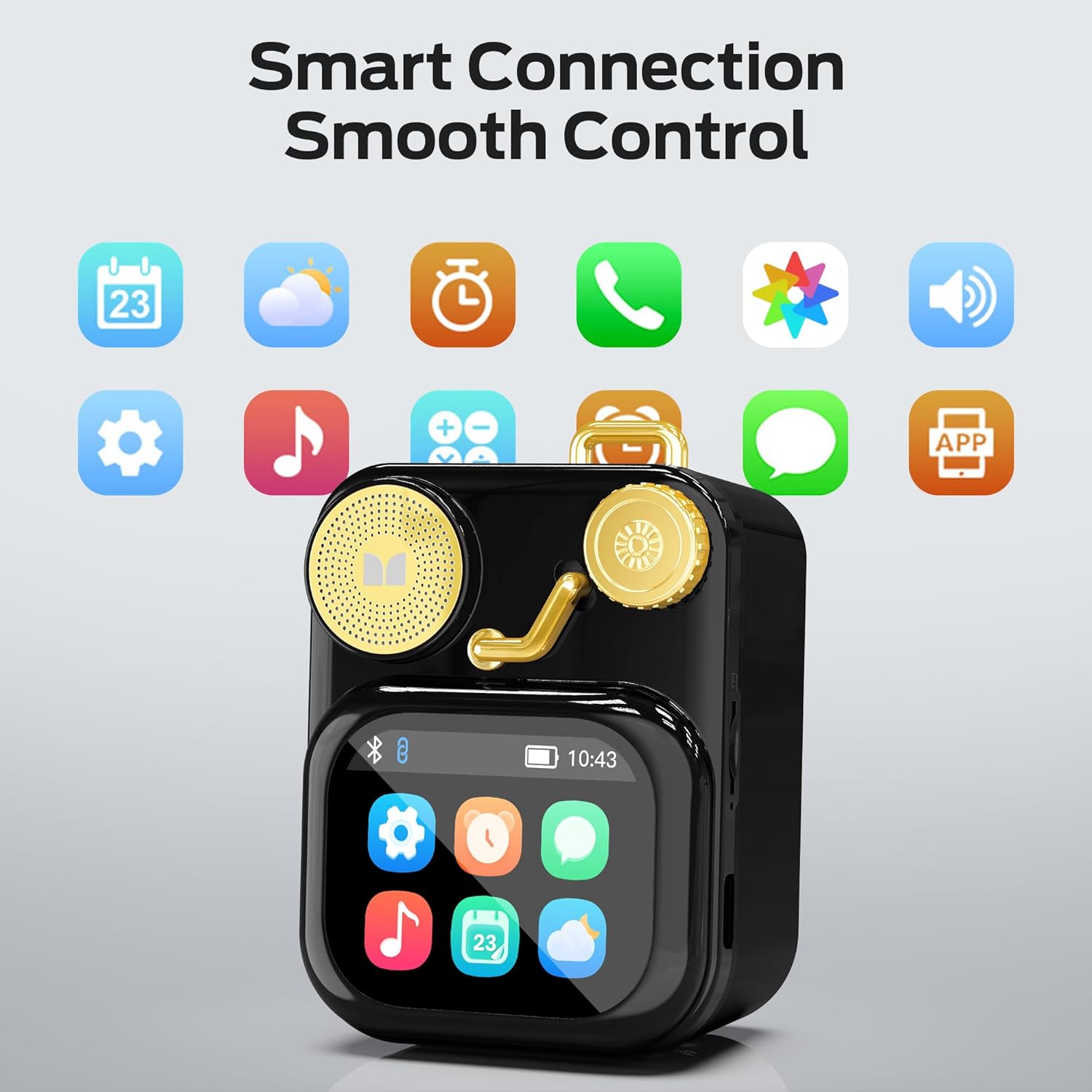
פיגורע 6.1: The speaker's touch screen displaying various application icons for smart features.
- נאַוויגאַציע: Swipe left/right or up/down to browse through menus and options.
- סעלעקציע: צאַפּן אויף אַן איקאָן אָדער אָפּציע צו עס אויסקלײַבן.
- סעטטינגס: Access system settings, Bluetooth options, display preferences, and more through the settings icon.
6.3 סמאַרט פֿעיִקייטן
When connected to a compatible smartphone via Bluetooth and the companion app (if available), the speaker can display various smart features:

פיגורע 6.2: Examples of smart features displayed on the speaker's screen, including notifications, weather, lyrics, and Bluetooth call information.
- Mobile Notifications: Receive alerts for messages and other app notifications.
- ליד אינפֿאָרמאַציע: Display song titles and artist information during playback.
- אַלאַרמס: Set and manage alarms directly from the speaker.
- וועטער דערהייַנטיקונגען: View פאַקטיש-צייט וועטער אינפֿאָרמאַציע.
- ווייַס ראַש: Access soothing white noise sounds for relaxation.
7. וישאַלט
7.1 רייניקונג
- Wipe the speaker's surface with a soft, dry, lint-free cloth.
- ניצט נישט קיין שרײַבנדיקע רייניגער, אַלקאָהאָל אדער כעמישע סאָלווענטן, ווײַל די קענען שאַטן די ענדיקונג.
- האַלט די פּאָרטן פריי פון שטויב און דעבריס.
7.2 סטאָרידזש
- האַלט דעם רעדנער אין אַ קיל, טרוקן אָרט אַוועק פון דירעקט זונשייַן און עקסטרעמע טעמפּעראַטורן.
- If storing for an extended period, charge the battery to approximately 50% every three months to preserve battery life.
8. טראָובלעשאָאָטינג
If you encounter issues with your Monster S350 speaker, refer to the following solutions:
| פּראָבלעם | מעגלעך סיבה | לייזונג |
|---|---|---|
| דער רעדנער גייט נישט אן. | באַטערי איז דיפּליטיד. | באַשולדיקן די רעדנער מיט די צוגעשטעלט וסב קאַבלע. |
| קיין געזונט פון די רעדנער. | Volume is too low or muted. Device not paired. | Increase speaker volume. Ensure Bluetooth device is paired and playing audio. |
| נישט מעגלעך צו פאַרבינדן דורך בלוטוט. | Speaker is not in pairing mode. Device is out of range. Interference. | Ensure speaker is on and Bluetooth is enabled. Move devices closer. Turn off other Bluetooth devices. |
| TF קאַרטל מוזיק שפּילט נישט. | Card not inserted correctly. Unsupported file format. Corrupted card. | אריינשטעלן צוריק די TF קארטל. זיכער מאכן אז מוזיק fileדי טעקעס זענען אין א געשטיצטן פֿאָרמאַט (למשל, MP3). פּרוּווט אַן אַנדער TF קאַרטל. |
| קלוגע פֿונקציעס אַרבעטן נישט. | Not connected to companion app. App issues. | Ensure the speaker is connected to the companion app on your smartphone. Check app permissions and updates. |
9. ספּעסאַפאַקיישאַנז
Technical details of the Monster S350 Bluetooth Speaker:
- מאָדעל נאָמען: S350
- סאָרט: פאַרזעעניש
- מאַטעריאַל: מעטאַל
- קאָליר: שוואַרץ
- פּראָדוקט דימענשאַנז: 12.5D x 10.5W x 5.4H סענטימעטער (אומגעפער 4.9 x 4.1 x 2.1 אינטשעס)
- נומער וואָג: 160 גראַם (אומגעפער 0.35 פונט)
- קאַנעקטיוויטי טעכנאָלאָגיע: בלועטאָאָטה 6.0
- רעדנער מאַקסימום רעזולטאַט מאַכט: 10 וואטס
- אַודיאָ רעזולטאַט מאָדע: סטערעאָ
- מאַונטינג טיפּ: טאַבלעטאָפּ
- באַטערי: 1 ליטהיום יאָן באַטאַרייע (אַרייַנגערעכנט)
- TF קאַרטל שטיצע: Yes (up to 32GB, FAT32 format recommended)

פיגורע 9.1: Diagram illustrating the internal woofer for deep bass and tweeter for crisp highs, contributing to the speaker's audio quality.
10. וואָראַנטי און שטיצן
For warranty information or technical support, please refer to the documentation included with your purchase or contact Monster customer service. Keep your proof of purchase for warranty claims.
קונה סערוויס קאָנטאַקט: ביטע באַזוכט דעם אָפֿיציעלן מאָנסטער website or refer to your product packaging for the most current support contact information.


