הקדמה
This manual provides instructions for the proper installation, operation, and maintenance of the Pard USA TL3 IR Light Module and its accompanying bracket. This accessory is designed to enhance the performance of the Pard Night Stalker Mini Digital Night Vision Scope by providing additional infrared illumination.
The TL3 IR Light Module offers three adjustable lighting levels and an infrared light distance of up to 380 yards, improving visibility in low-light and complete darkness conditions. It is engineered for seamless integration with the Night Stalker Mini.
זיכערקייַט אינפֿאָרמאַציע
- Do not look directly into the IR emitter. Infrared light is invisible to the naked eye but can cause eye damage.
- Keep the device away from water and moisture. The product is not water resistant.
- באַהאַנדלט דעם אַפּאַראַט מיט פֿאָרזיכט צו פֿאַרמייַדן שאָדן פֿון פֿאַלן אָדער קלאַפּן.
- Ensure the device is securely mounted to prevent accidental detachment during use.
פּעקל אינהאַלט
באַשטעטיקן אַז אַלע זאכן זענען פאַראַן אין פּעקל:
- Pard TL3 IR Light Module
- מאָונטינג קלאַמער
- באַניצער מאַנואַל (דעם דאָקומענט)
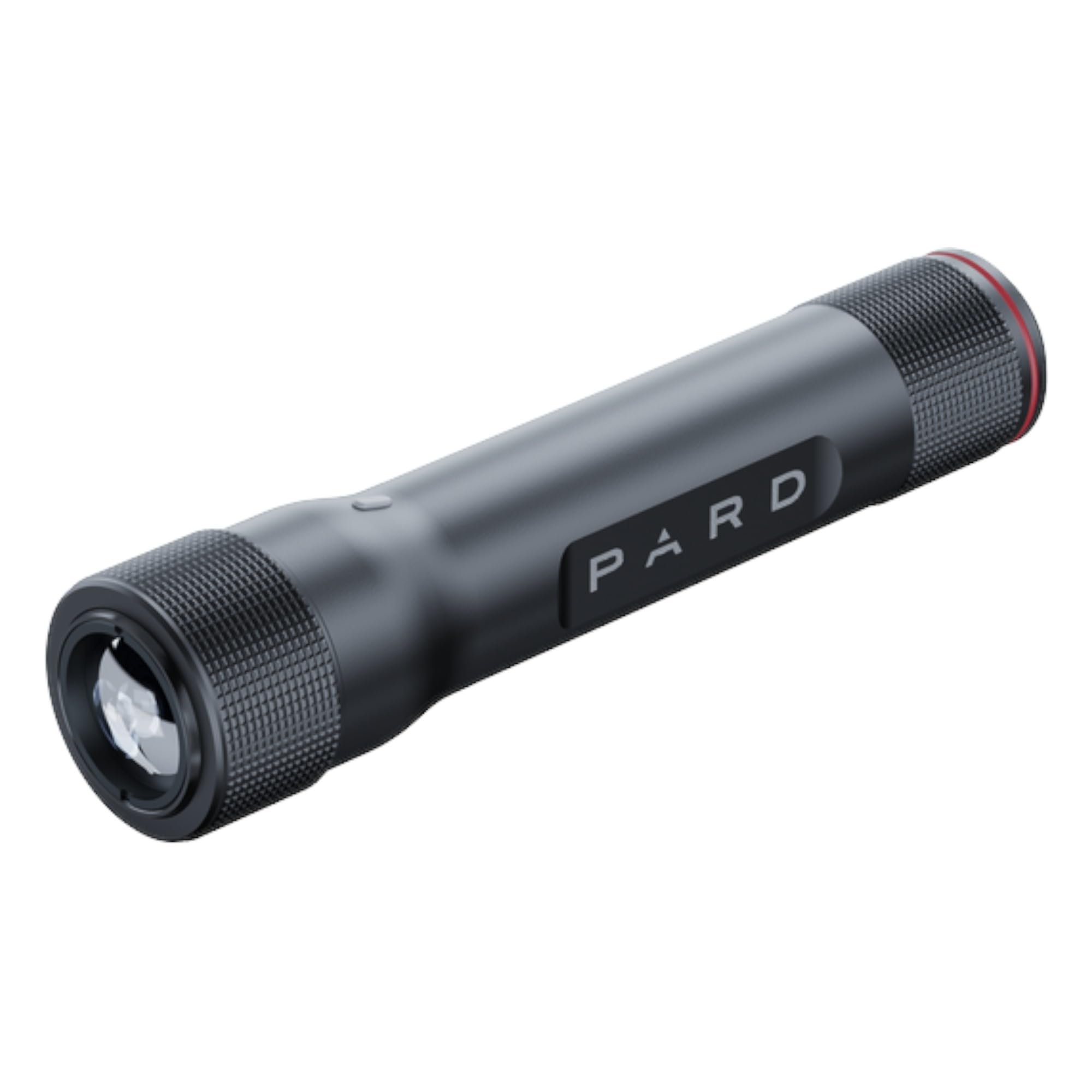
Image: The Pard TL3 IR Light Module, a cylindrical black device with the 'PARD' logo visible on its side.
פּראָדוקט איבערview
The Pard TL3 IR Light Module is a compact and lightweight accessory designed to provide supplemental infrared illumination for night vision devices, specifically the Pard Night Stalker Mini. It features a durable aluminum housing and an integrated bracket for secure attachment.
שליסל פֿעיִקייטן:
- Adjustable Light Levels: Three distinct brightness settings for varied environmental conditions.
- Extended IR Range: Provides illumination up to 380 yards for long-distance observation.
- Dedicated Compatibility: Engineered for optimal performance and fit with the Pard Night Stalker Mini.
- שטאַרק קאַנסטראַקשאַן: Durable aluminum body and secure mounting bracket for outdoor use.

בילד: זייט view of the Pard TL3 IR Light Module, showing the product label with model information and certifications.
סעטאַפּ און ינסטאַלירונג
Follow these steps to attach the TL3 IR Light Module to your Pard Night Stalker Mini Digital Night Vision Scope:
- אידענטיפיצירן מאָנטירונג פונקט: Locate the designated accessory mounting point on your Night Stalker Mini scope.
- צוטשעפּען קלאַמער: Secure the provided mounting bracket to the Night Stalker Mini. Ensure it is firmly tightened but do not overtighten.
- Insert IR Module: Slide the Pard TL3 IR Light Module into the bracket. Ensure it clicks or locks into place securely.
- באַשטעטיקן סטאַביליטי: Gently test the module's stability. It should not wobble or move freely.

בילד: הינטערשטע view of the Pard TL3 IR Light Module, showing the IR emitter lens and knurled grip.
אַפּערייטינג ינסטראַקשאַנז
The Pard TL3 IR Light Module is designed for simple operation to provide supplemental illumination for your night vision activities.
- מאַכט אויף / אַוועק: Locate the power button on the IR module. Press and hold for approximately 2 seconds to turn the unit on or off.
- סטרויערן ברייטנאַס: Once powered on, short press the power button to cycle through the three available IR brightness levels (Low, Medium, High). Select the level appropriate for your viewing distance and environmental conditions.
- אָפּטימאַל נוצן: For best results, adjust the IR intensity to match the ambient light and the distance to your target. Higher settings provide greater range but may consume more power.

בילד: פראָנט view of the Pard TL3 IR Light Module, showing the connection interface and knurled grip.
וישאַלט און זאָרג
Proper maintenance ensures the longevity and optimal performance of your Pard TL3 IR Light Module.
- רייניקונג: Use a soft, dry cloth to clean the exterior of the module. For the IR emitter lens, use a lens cleaning cloth and solution specifically designed for optics. Avoid abrasive materials.
- סטאָרידזש: Store the module in a cool, dry place away from direct sunlight and extreme temperatures. If storing for extended periods, ensure the device is turned off.
- דורכקוק: Periodically inspect the mounting bracket and connections for any signs of wear or damage. Ensure all screws remain tight.

בילד: פון אויבן אַראָפּ view of the Pard TL3 IR Light Module, highlighting its cylindrical shape and textured surfaces.
טראָובלעשאָאָטינג
| פּראָבלעם | מעגלעך סיבה | לייזונג |
|---|---|---|
| IR module does not turn on. | Low or depleted internal power source. | Ensure the internal power source is charged (if rechargeable) or functioning. Contact support if issues persist. |
| IR illumination is weak or inconsistent. | Incorrect brightness setting; obstruction of IR emitter. | Cycle through brightness levels. Check for any debris or obstructions on the IR emitter lens and clean if necessary. |
| Module is loose on the scope. | Bracket not securely fastened. | Re-tighten the mounting bracket to the scope and ensure the IR module is properly seated in the bracket. |
ספּעסאַפאַקיישאַנז
| שטריך | דעטאַל |
|---|---|
| מאָדעל נומער | TL3U-850 |
| ליכט מקור טיפּ | ינפרערעד (IR) |
| IR ליכט דיסטאַנסע | אַרויף צו 380 יאַרדס |
| אַדזשאַסטאַבאַל ליכט לעוועלס | 3 לעוועלס |
| קאַמפּאַטאַבילאַטי | Pard Night Stalker Mini Digital Night Vision Scope |
| מאַטעריאַל | אַלומינום |
| קאָליר | שוואַרץ |
| מאַכט מקור | אינערלעכער |
| פּונקט וואָג | 9.6 אונס (0.6 לבס) |
| פּראָדוקט דימענשאַנז (L x W x H) | 8.75 X 2.5 X 1.5 אינטשעס |
| וואַסער קעגנשטעל מדרגה | ניט וואַסער קעגנשטעליק |
וואָראַנטי און שטיצן
For warranty information and technical support, please refer to the official Pard USA webזייטל אדער קאנטאקט זייער קאסטומער סערוויס גלייך. האלט אייער קויף קוויטל פאר גאראנטיע טענות.
Pard USA LLC
Seller ID: A3MR9QDS07LUL9
Visit the Pard Store on Amazon


