1. פּראָדוקט איבערview
The JOMAA 78 Keys Dual Mode Wireless Trackball Keyboard offers versatile connectivity and ergonomic design for enhanced productivity across multiple devices. Featuring both 2.4GHz wireless and Bluetooth 5.0, it allows seamless switching between up to three connected devices. The integrated 19mm optical trackball provides precise cursor control, eliminating the need for a separate mouse and saving valuable desk space. Its compact, lightweight, and energy-efficient design makes it ideal for various computing environments.

Image 1: JOMAA 78 Keys Dual Mode Wireless Trackball Keyboard
This image displays the sleek, silver-colored JOMAA 78 Keys Dual Mode Wireless Trackball Keyboard, highlighting its compact layout and integrated trackball. The image also shows icons indicating system-wide compatibility (Windows, Mac, iOS, Android), multi-device association (three devices), and dual wireless connectivity (Bluetooth/2.4G).
2. פּעקל אינהאַלט
- JOMAA 78 Keys Dual Mode Wireless Trackball Keyboard
- 2.4GHz USB Receiver (stored inside the keyboard's battery compartment)
- וסב טשאַרדזשינג קאַבלע
- שנעל אָנהייב גייד
- 2 x AA Batteries (included, pre-installed in some models)
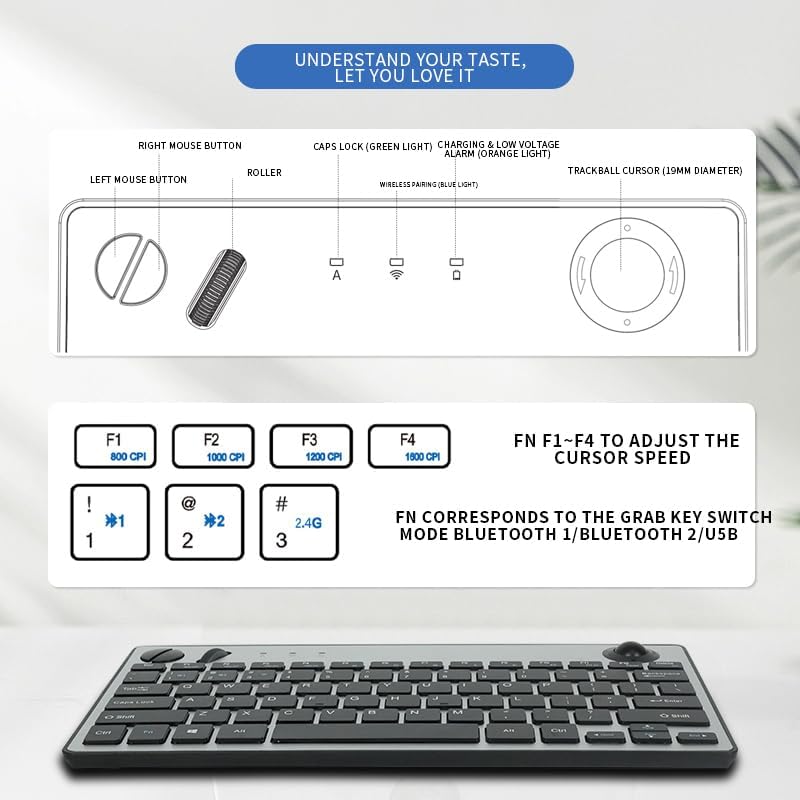
Image 2: JOMAA Keyboard Package Contents Diagram
This diagram illustrates the various components of the JOMAA keyboard, including the keyboard itself, the left and right mouse buttons, the roller, Caps Lock indicator, charging and low voltage alarm lights, and the 19mm trackball. It also details the DPI adjustment keys (F1-F4) and the function keys for switching between Bluetooth 1, Bluetooth 2, and USB modes.
3. פּראָדוקט פֿעיִקייטן
- Dual-Mode Wireless Connectivity: Supports stable 2.4GHz wireless (nano receiver included) and advanced Bluetooth 5.0 connection.
- Multi-Device פּערינג: Easily pair with and switch between up to 3 devices (PC, tablet, phone) simultaneously.
- ברייט קאַמפּאַטאַבילאַטי: Broadly compatible with Windows, macOS, iOS, and Android operating systems.
- Integrated Trackball Design: Features a built-in 19mm precision optical trackball for accurate and smooth cursor control, eliminating the need for a separate mouse.
- ענערגיע-עפעקטיוו: Low power consumption (≤10mA working current) for long-lasting battery life with 2 AA batteries.
- פּאָרטאַטיוו פּלאַן: Compact 78-key layout and lightweight (403g) for travel or clutter-free workspaces.
- פּלוג און שפּיל: No drivers needed for 2.4G connection; quick Bluetooth pairing.
- באַניצער-פרייַנדלעך ערגאָנאָמיקס: Thoughtful key layout and thumb-operated trackball designed to reduce arm movement and wrist strain.

Image 3: JOMAA Keyboard Multi-Device Compatibility
This image illustrates the keyboard's ability to connect to multiple devices, including a smartphone, tablet, and desktop computer, via Bluetooth (BT1, BT2) and a 2.4G USB receiver, allowing for seamless switching between them.
4. סעטאַפּ אינסטרוקציעס
4.1. באַטאַרייע ייַנמאָנטירונג
- געפינט די באַטעריע אָפּטייל אויף דער אונטערשטער זייט פון דער קלאַוויאַטור.
- רוק עפענען די באַטאַרייע דעקן.
- אַרייַנלייגן 2 אַאַ באַטעריז, ינשורינג די ריכטיק פּאָולעראַטי (+/-).
- פאַרמאַכן די באַטאַרייע דעקן סיקיורלי.
4.2. 2.4GHz ווירעלעס פֿאַרבינדונג
- Locate the 2.4GHz USB receiver, usually stored in the keyboard's battery compartment.
- שטעקט אריין דעם USB ריסיווער אין א פאראן USB פארט אויף אייער קאמפיוטער אדער דעווייס.
- Slide the power switch on the keyboard to the 'ON' position.
- Press the 'FN' key + '3' key (labeled 2.4G) to select 2.4G mode. The indicator light will illuminate.
- Your device should automatically detect and connect to the keyboard.
4.3. בלועטאָאָטה פּערינג
The keyboard supports two Bluetooth channels (BT1 and BT2).
- Slide the power switch on the keyboard to the 'ON' position.
- Press and hold the 'FN' key + '1' key (for BT1) or 'FN' key + '2' key (for BT2) for 3-5 seconds until the corresponding Bluetooth indicator light starts blinking rapidly. This indicates the keyboard is in pairing mode.
- On your device (computer, tablet, smartphone), go to Bluetooth settings.
- זוכן פֿאַר new devices and select "JOMAA Keyboard" (or similar name) from the list.
- Follow any on-screen prompts to complete the pairing process. The indicator light on the keyboard will stop blinking and remain solid once connected.
- To pair another device, repeat steps 2-5 using the other available Bluetooth channel.
Video 1: JOMAA Keyboard Unboxing and Setup
This video demonstrates the unboxing of the JOMAA keyboard, showing its sleek design and how to install the batteries and connect via the 2.4GHz USB receiver. It highlights the ease of setup and the keyboard's sturdy construction.
5. אַפּערייטינג ינסטרוקטיאָנס
5.1. וועקסלען צווישן דעווייסעס
Once paired, you can switch between connected devices by pressing the 'FN' key along with the corresponding channel key:
- FN + 1: באַשטימען צו בלועטאָאָטה דיווייס 1
- FN + 2: באַשטימען צו בלועטאָאָטה דיווייס 2
- FN + 3: Switch to 2.4GHz USB Receiver Device
5.2. טרעקבאָל באַניץ
The integrated 19mm optical trackball is located on the right side of the keyboard. Use your thumb to control the cursor movement. The left and right mouse click buttons are positioned conveniently next to the trackball.

Image 4: JOMAA Keyboard Trackball and X-Structure
This image highlights the smooth trackball for accurate and precise cursor positioning. It also features a diagram illustrating the X-Structure of the keys, which provides a steady and great rebound feeling for comfortable typing.
5.3. Adjusting Trackball DPI (Cursor Speed)
You can adjust the trackball's DPI (dots per inch) to change cursor sensitivity:
- FN+F1: 800 קפּי
- FN+F2: 1000 קפּי
- FN+F3: 1200 קפּי
- FN+F4: 1600 קפּי
5.4. Media and Function Keys
The F1-F12 keys have secondary media functions. To activate these, press the 'FN' key simultaneously with the desired F-key.
- FN+F5: פֿריִערדיקע שפּירט
- FN+F6: שפּיל / פּויזע
- FN+F7: ווייַטער שפּור
- FN+F8: שטום
- FN+F9: באַנד אַראָפּ
- FN+F10: באַנד אַרויף
6. באַטעריע אינפֿאָרמאַציע און טשאַרדזשינג
The keyboard operates on 2 AA batteries. For optimal performance and battery life, use high-quality alkaline batteries. The low power consumption design ensures extended usage.
- נידעריק וואָלtagE שרעק: An orange indicator light will illuminate when the battery level is low, signaling that batteries need replacement.
- טשאַרדזשינג: If your model supports rechargeable batteries, use the provided USB charging cable to connect the keyboard to a power source. The charging indicator light will show charging status.
7. וישאַלט
- רייניקונג: Use a soft, dry cloth to clean the keyboard surface. For stubborn dirt, slightly dampווייקט דעם שטאָף מיט וואַסער אָדער אַ מילדער רייניקונג לייזונג. פֿאַרמייַדט איבעריקע פֿײַכטקייט.
- Trackball Cleaning: Periodically remove the trackball (if removable) and clean its housing and the ball itself to ensure smooth operation.
- סטאָרידזש: When not in use for extended periods, turn off the keyboard to conserve battery life. Store in a cool, dry place.
8. טראָובלעשאָאָטינג
8.1. קאָנעקטיוויטי פּראָבלעמען
- קיין קשר: Ensure the keyboard is powered on and the correct channel (BT1, BT2, or 2.4G) is selected.
- 2.4GHz: Verify the USB receiver is securely plugged into your device. Try a different USB port.
- בלועטאָאָטה: Ensure Bluetooth is enabled on your device and the keyboard is in pairing mode (blinking indicator). Remove previous pairings on your device and try re-pairing.
- ינטערפיראַנס: ריקט די קלאַוויאַטור נענטער צו אייער דעווייס און אַוועק פון אַנדערע וויירלעס דעווייסעס וואָס קענען פאַרשאַפן שטערונג.
8.2. קלאַוויאַטור רעאַגירט נישט
- באַטערי טשעק: Replace batteries if the low voltage indicator is on or if the keyboard is unresponsive.
- מאַכט ציקל: מאַכט אויס די קלאַוויאַטור, וואַרט אַ פּאָר סעקונדעס, און דאַן מאַכט עס ווידער אָן.
- ריפּער: If issues persist, try re-pairing the keyboard with your device.
8.3. Trackball Not Working
- Clean Trackball: Dust or debris can affect trackball performance. Clean the trackball and its housing as described in the Maintenance section.
- DPI באַשטעטיקן: Ensure the DPI setting is not too low (FN + F1). Adjust to a higher setting if needed.
9. ספּעסאַפאַקיישאַנז
| מאָדעל | 78 Keys Dual Mode Wireless Trackball Keyboard |
| קאַנעקטיוויטי טעכנאָלאָגיע | Bluetooth 5.0, 2.4GHz USB |
| נומער פון קיז | 78 |
| טראַקבאָל גרייס | 19mm Optical |
| אַפּערייטינג סיסטעם קאַמפּאַטאַבילאַטי | Windows, macOS, iOS, Android |
| אַפּערייטינג וואָלtage | 3V |
| אַרבעט קראַנט | ≤10מאַ |
| טראַנסמיסיע דיסטאַנסע | 7-10 מעטער (33 פֿיס) |
| מאַכט מקור | 2 רענטגענ אַאַ באַטעריז |
| פּונקט וואָג | 1.14 pounds (403g without battery) |
| דימענשאַנז | 12.6 X 10.63 X 1.57 אינטשעס |

Image 5: JOMAA Keyboard Dimensions and Specifications
דאָס בילד גיט אַ דעטאַלירטע view of the keyboard's dimensions (28.6cm length, 14.9cm width, 3.1cm height) and lists key specifications such as transmission distance (7-10m), number of keys (78), compatible OS (Windows 7/10/11, Mac 10.6-15.2), operating current (≤10mA), trackball size (19mm), weight (403g without battery), and operating voltagE (3 וו).
10. וואָראַנטי און שטיצן
For warranty information, technical support, or customer service inquiries, please refer to the official JOMAA webזייטל אדער קאנטאקט זייער קאסטומער שטיצע גלייך. האלט אייער קויף קוויטל פאר גאראנטיע קליימס.


