1. הקדמה
This manual provides detailed instructions for the proper setup, operation, and maintenance of your AOC ACW2212 Headset. Designed for PC use, this headset features a noise-cancelling microphone and voice isolation technology to enhance communication clarity in various work environments. Please read this manual thoroughly before using the product to ensure optimal performance and longevity.
2. פּעקל אינהאַלט
באַשטעטיקט אַז אַלע זאכן וואָס זענען אויסגערעכנט אונטן זענען פאַראַן אין אייער פּראָדוקט פּאַקעט:
- AOC ACW2212 Headset
- וסב ווירעלעסס דאָנגלע
- 3.5 מם אַודיאָ קאַבלע
- טשאַרדזשינג קאַבלע (וסב- C צו וסב- א)
- באַניצער מאַנואַל (דעם דאָקומענט)
3. פּראָדוקט איבערview
Familiarize yourself with the components of your AOC ACW2212 Headset:
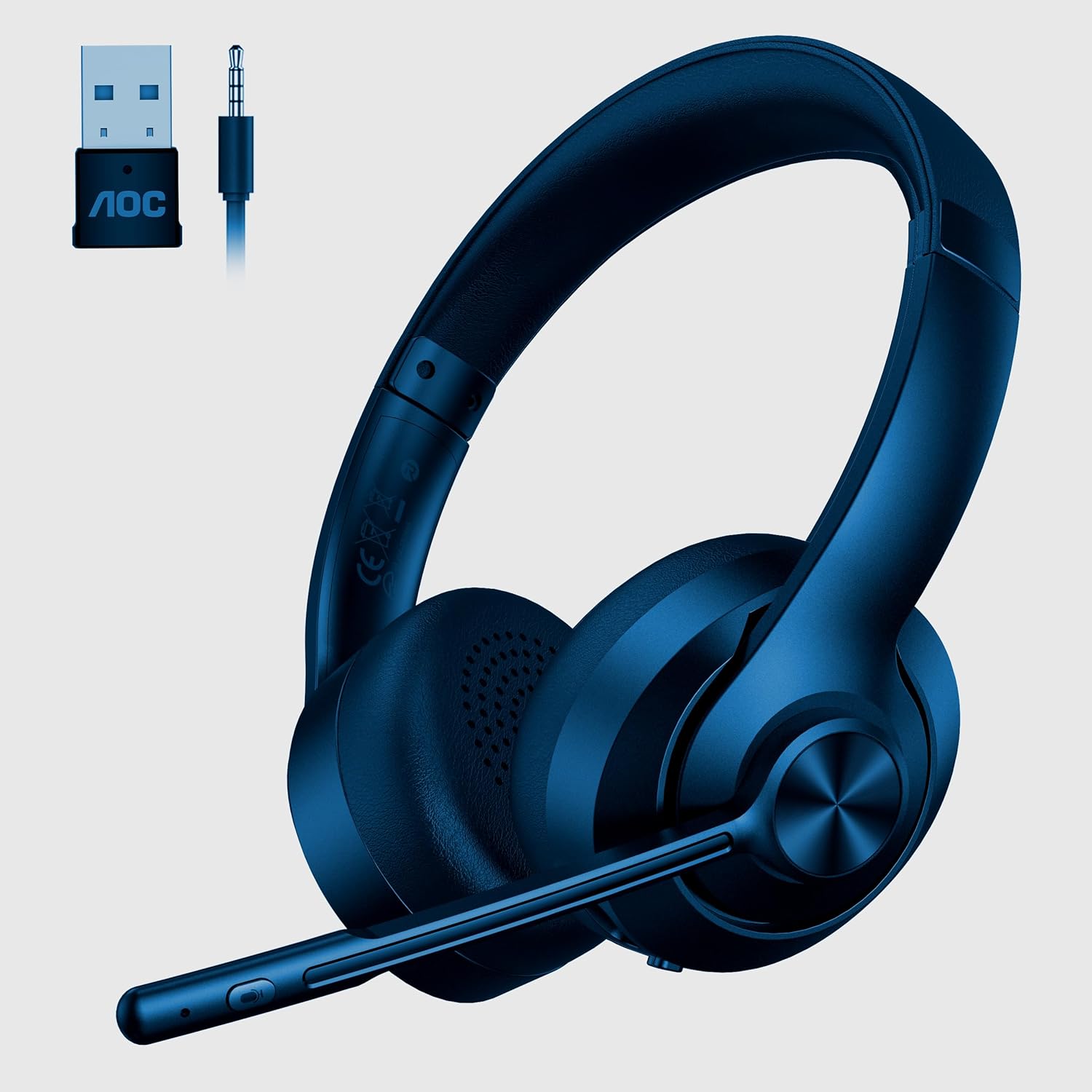
Image 1: AOC ACW2212 Headset with included USB wireless dongle and 3.5mm audio jack. The headset features an adjustable headband, over-ear cups, and a flexible boom microphone with integrated controls.
כעדסעט קאָמפּאָנענטן:
- אַדזשאַסטאַבאַל כעדבאַנד: פֿאַר אַ באַקוועמען פּאַסיק.
- עאַרקופּס: Over-ear design for sound isolation.
- בום מיקראָפאָן: Flexible and adjustable, with noise-cancelling capabilities.
- באנד קאָנטראָלס: Buttons located on the earcup for adjusting audio output.
- מיקראָפאָן שטום קנעפּל: For quick muting/unmuting of the microphone.
- מאַכט קנעפּל: To turn the headset on or off.
- USB-C טשאַרדזשינג פּאָרט: פֿאַר איבערלאָדן די אינערלעכע באַטאַרייע.
- 3.5 מם אַודיאָ דזשאַק: פֿאַר דראָטיקער פֿאַרבינדונג.
4. סעטאַפּ
4.1 דראָטיקע פֿאַרבינדונג (3.5 מ״מ אַודיאָ קאַבל)
- Connect one end of the 3.5mm audio cable to the 3.5mm audio jack on the headset.
- Connect the other end of the 3.5mm audio cable to the audio output port on your PC or device.
- Ensure your device's audio settings are configured to use the headset as the input and output device.
4.2 Wireless Connection (USB Dongle)
- Insert the USB wireless dongle into an available USB port on your PC.
- צינדט אן דעם כעדסעט דורך דריקן און האַלטן דעם פּאַוער קנעפּל ביז די אינדיקאַטאָר ליכט צינדט זיך אָן.
- The headset and dongle should automatically pair. A solid indicator light on the headset typically signifies a successful connection.
- Adjust your PC's sound settings to select the AOC ACW2212 Headset as the default playback and recording device.
4.3 בלועטאָאָטה קאַנעקשאַן
- פאַרזיכערן די כעדסעט איז Powered אַוועק.
- Press and hold the Power button for approximately 5-7 seconds until the indicator light flashes rapidly, indicating pairing mode.
- On your device (PC, smartphone, etc.), navigate to the Bluetooth settings and enable Bluetooth.
- זוכן פֿאַר available devices and select "AOC ACW2212" from the list.
- Once connected, the headset's indicator light will typically become solid or flash slowly.
5. אַפּערייטינג ינסטרוקטיאָנס
5.1 מאַכט אויף / אַוועק
- צו מאַכט אויף: דריקן און האַלטן די מאַכט קנעפּל פֿאַר 2 סעקונדעס.
- צו מאַכט אַוועק: דריקן און האַלטן די מאַכט קנעפּל פֿאַר 3 סעקונדעס.
5.2 באַנד קאָנטראָל
- באַנד אַרויף: דריק דעם '+' קנעפל.
- באַנד אַראָפּ: דריק דעם '-' קנעפּל.
5.3 Microphone Mute/Unmute
- Press the Microphone Mute button on the boom mic to toggle mute on or off. An indicator light on the mic or headset may show the mute status.
5.4 אויפלאָדן דעם כעדסעט
- Connect the charging cable to the USB-C port on the headset and the other end to a USB power source.
- The indicator light will typically show charging status (e.g., red for charging, green/off for fully charged).
6. וישאַלט
כדי צו זיכער מאַכן די לאַנגלעבעניש און אָפּטימאַלע פאָרשטעלונג פון דיין כעדסעט, נאָכפאָלגן די וישאַלט גיידליינז:
- רייניקונג: ניצט אַ ווייכע, טרוקענע שטאָף צו רייניקן די כעדסעט. פֿאַר די אויערקעפּלעך, אַ ביסל טרוקןamp מען קען ניצן אַ שטאָף, אָבער פֿאַרמייַדן איבעריקע פֿײַכטקייט. ניצט נישט קיין שטרענגע כעמיקאַלן אָדער אַברייסיוו רייניגער.
- סטאָרידזש: האַלט די כעדסעט אין אַ קיל, טרוקן אָרט אַוועק פון דירעקט זונשייַן און עקסטרעמע טעמפּעראַטורן.
- קאַבלע זאָרגן: פֿאַרמײַדט צו בייגן אָדער דרייען קאַבלען צו פֿיל כּדי צו פֿאַרמײַדן שאָדן.
- באַטערי: For optimal battery life, avoid fully discharging the headset frequently. Charge it regularly.
7. טראָובלעשאָאָטינג
If you encounter issues with your headset, refer to the following table for common problems and solutions:
| פּראָבלעם | מעגלעך סיבה | לייזונג |
|---|---|---|
| קיין קלאַנג פֿון כעדסעט | Headset not powered on; Incorrect audio output selected; Low battery; Loose cable connection. | Ensure headset is on; Check PC audio settings; Charge headset; Reconnect cables securely. |
| מיקראָפאָן טוט נישט אַרבעטן | Microphone muted; Incorrect audio input selected; Loose cable connection. | Unmute microphone; Check PC audio input settings; Reconnect cables securely. |
| Cannot pair via Bluetooth/Wireless | Headset not in pairing mode; Device Bluetooth off; Dongle not properly inserted. | Put headset in pairing mode; Enable Bluetooth on device; Reinsert USB dongle. |
| נעבעך אַודיאָ קוואַליטעט | Interference; Distance from dongle/device; Low battery. | Move closer to device/dongle; Charge headset; Avoid sources of interference. |
8. ספּעסאַפאַקיישאַנז
Technical specifications for the AOC ACW2212 Headset:
| שטריך | דעטאַל |
|---|---|
| מאָדעל נאָמען | ACW2212 |
| קאַנעקטיוויטי טעכנאָלאָגיע | Wired (3.5mm), Wireless (USB Dongle), Bluetooth |
| פאָרם פאַקטאָר | אויף אויער |
| אויער פּלייסמאַנט | איבער אויער |
| קאָליר | שוואַרץ |
| פאַבריקאַנט | AOC |
| פּונקט וואָג | 331.12 ג |
| באַטעריז | 1 א באַטאַרייע (אַרייַנגערעכנט) |
9. וואָראַנטי און שטיצן
This AOC ACW2212 Headset comes with a standard manufacturer's warranty. For specific warranty terms and conditions, please refer to the warranty card included in your product packaging or visit the official AOC website. For technical support, troubleshooting assistance, or service inquiries, please contact AOC customer support through their official channels.


