הקדמה
This manual provides detailed instructions for the setup, operation, and maintenance of your GUSTARD R30 Fully-Discrete R2R Network Streamer DAC. Please read this manual thoroughly before using the device to ensure optimal performance and longevity.
פּאַקקאַגינג רשימה
ווען איר עפנט דעם פעקל, ביטע זיכער מאכן אז אלע פאלגנדע זאכן זענען אריינגערעכנט:
- GUSTARD R30 Mainframe
- מאַכט שנור
- וסב קאַבלע
- ווייַט קאָנטראָל
- וואָראַנטי קאַרד

פראָנט פּאַנעל איבערview
The front panel of the GUSTARD R30 features essential controls and a display for real-time status and operations.
- מאַכט קנעפּל: Toggles between standby and active states. The R30 can remain in standby mode when the rear power switch is ON.
- ווייַז שטח: Shows the current input channel, encoding format, and sampling rate. Displays menu items when in the setup menu.
- Volume Display: Indicates the current volume level, ranging from -63.5dB to 0dB. 'FIXED' indicates bypass mode. Displays menu options during configuration.
- '-' קנעפּל: Normally decreases volume. Cycles through options in the menu.
- גאַנג קנעפּל: Short press switches inputs. Long press enters/exits the menu. Short press navigates items in the menu.
- '+' קנעפּל: Normally increases volume. Cycles through options in the menu.

דערציען פּאַנעל איבערview
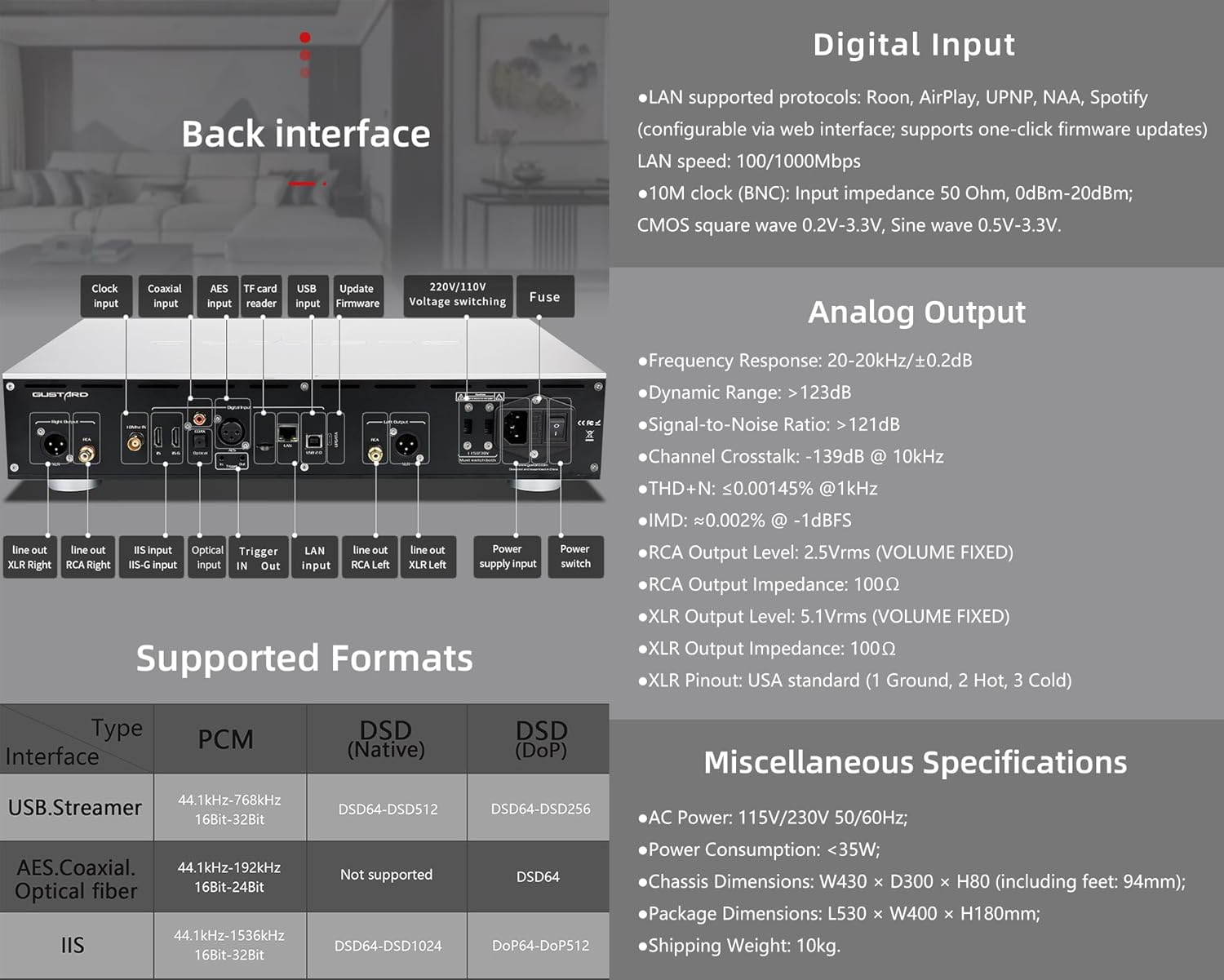
The rear panel provides various input and output connections for the GUSTARD R30.
- זייגער אַרייַנשרייַב: For external 10MHz clock synchronization.
- קאָאַקסיאַל אַרייַנשרייַב: דיגיטאַל אַודיאָ אַרייַנגאַנג.
- AES אַרייַנשרייַב: דיגיטאַל אַודיאָ אַרייַנגאַנג.
- וסב ינפּוט: פֿאַר פֿאַרבינדן צו אַ קאָמפּיוטער אָדער אַנדערע USB אַודיאָ מקור.
- LAN Input: For network streaming functionality.
- TF קאַרד לייענער: פֿאַר פירמוואַרע דערהייַנטיקונגען.
- דערהייַנטיקן פירמוואַרע: USB port for firmware updates.
- 220 וו/110 וו חלקtagאי וועקסלען: Selector for power voltage.
- קאָריק מאַכט פוסע.
- Line Out XLR Right/Left: Balanced analog audio outputs.
- Line Out RCA Right/Left: Unbalanced analog audio outputs.
- IIS Input (IIS-G): Digital audio input with Gustard pinout.
- אָפּטיש אַרייַנשרייַב: דיגיטאַל אַודיאָ אַרייַנגאַנג.
- טריגער אין/אויס: For 12V trigger control.
- מאַכט צושטעלן אַרייַנשרייַב: AC power connection.
- מאַכט סוויטש: הויפּט מאַכט טאַגאַל.
Important: Ensure both voltagדי סוויטשעס זענען געשטעלט צו דער זעלבער וואָלומעןtagווען מען ארבעט מיטן 220V/110V וואלוטעtage switch, otherwise, it may damage the internal transformer upon powering on.
אַרויסווייַז און פּאַנעל קאָנטראָלס
The R30 utilizes a large OLED display for real-time status monitoring and functional operations. The diagram below illustrates the main interface display states.
1. אָלעד ווייַז
The display shows the input channel, external clock indication, encoding format, sampling rate, and volume.
2. Input Channel Selection
דער R30 פֿאַרמאָגט 7 אינפוט קאַנאַלן. אויף דער הויפּט אינטערפֿייס, יעדעס דריק פֿון דעם גיר קנעפּל גייט דורך די פֿאַראַן קאַנאַלן אין דער דאָזיקער סיקוואַנס: COAX → AES → OPT → USB → STREAMER → IIS(G) → IIS(M*).
***Note: IIS(G) is for fixed Gustard pinout configuration and cannot be adjusted. IIS(M*) supports adjustable pinout configuration.
3. באַנד אַדזשאַסטמאַנט
- When the main interface is displayed, pressing the "+" or "-" buttons directly adjusts the analog volume attenuation function of the passive preampליפיער. פארשוואכונג ריינדזשד פון 0dB ביז -63.5dB (גאַנץ 63.5dB פארשוואכונג).
- Pressing "+" at 0dB activates Fixed Output mode (bypassing attenuation circuit), displaying 'FIXED' indicator.
- When 'FIXED' is displayed, pressing "-" first exits bypass mode before controlling the attenuation level.

סעטאַפּ מעניו
On the main screen, long press the Gear Button to enter the settings menu (hereinafter referred to as the menu button). In this state, the menu button can sequentially switch the menu items to be modified. "+" and "-" buttons are used to adjust the currently selected menu options. When the screen is in the settings menu, long press the menu button again to return to the main screen.
מעניו סטרוקטור:
- פּקם פילטער
- דסד פילטער
- נאָס מאָדע
- REF CLOCK
- IIS MODE
- פאַסע
- TRIGGER CH.
- TRIGGER VOL.
- DISPLAY

מעניו פאַנגקשאַנז
גייט אריין אין מעניו דורך דריקן דעם מעניו קנעפל אויפן הויפט אינטערפייס. יעדע מעניו אפציע איז דעטאלירט אונטן.
1. PCM FILTER (PCM Digital Filter Adjustment)
דער R30 ניצט אַ זעלבסט-דעוועלאָפּעד הויך-פּערפאָרמאַנס PCM אָוווערסampלינג דיגיטאַל פילטער מאָדול מיט דריי פילטער טייפּס:
- VIVID (Default): Similar to the FAST roll-off type of traditional digital filter, but with better ringing characteristics, very small pre-ringing, and fast convergence post-ringing. It aims for a broad soundstage and sound restoration. Recommended for most music styles.
- GENTLE: Similar to the SLOW roll-off type of traditional digital filter, offering a soft listening experience.
- קאָמפּאָסיט: A hybrid digital filter, balancing characteristics between Vivid and Gentle for a good listening experience.
2. DSD FILTER (DSD Digital Filter Adjustment)
The DSD filter has 4 built-in bandwidth options: 47K (Default), 50K, 60K, 70K.
3. קיין מאָדע (קיין אָוווערסampling Filter Mode)
When enabled, the PCM signal bypasses the oversampling filter entirely, decoded straight through the R-2R decoder module. This preserves micro-details and timing integrity. When enabled, there may be a slight clicking sound when the playback data format switches between PCM and DSD.
- DISABLE (Default)
- געבן
4. REF CLOCK (Reference Clock Selection)
The GUSTARD-K2, low-noise clock synthesizer, achieves ultra-low jitter performance. The R30 offers two clock options:
- INTERNAL (Default): Uses the built-in OCXO internal reference.
- EXT. 10MHz: Selects an external 10MHz reference source. It is recommended to connect to GUSTARD C16 or C18 reference 10M master clocks.
If the external clock is lost, powered off, or its frequency deviation is greater than +/-150ppm, "EXT ERR" will be displayed and flash.
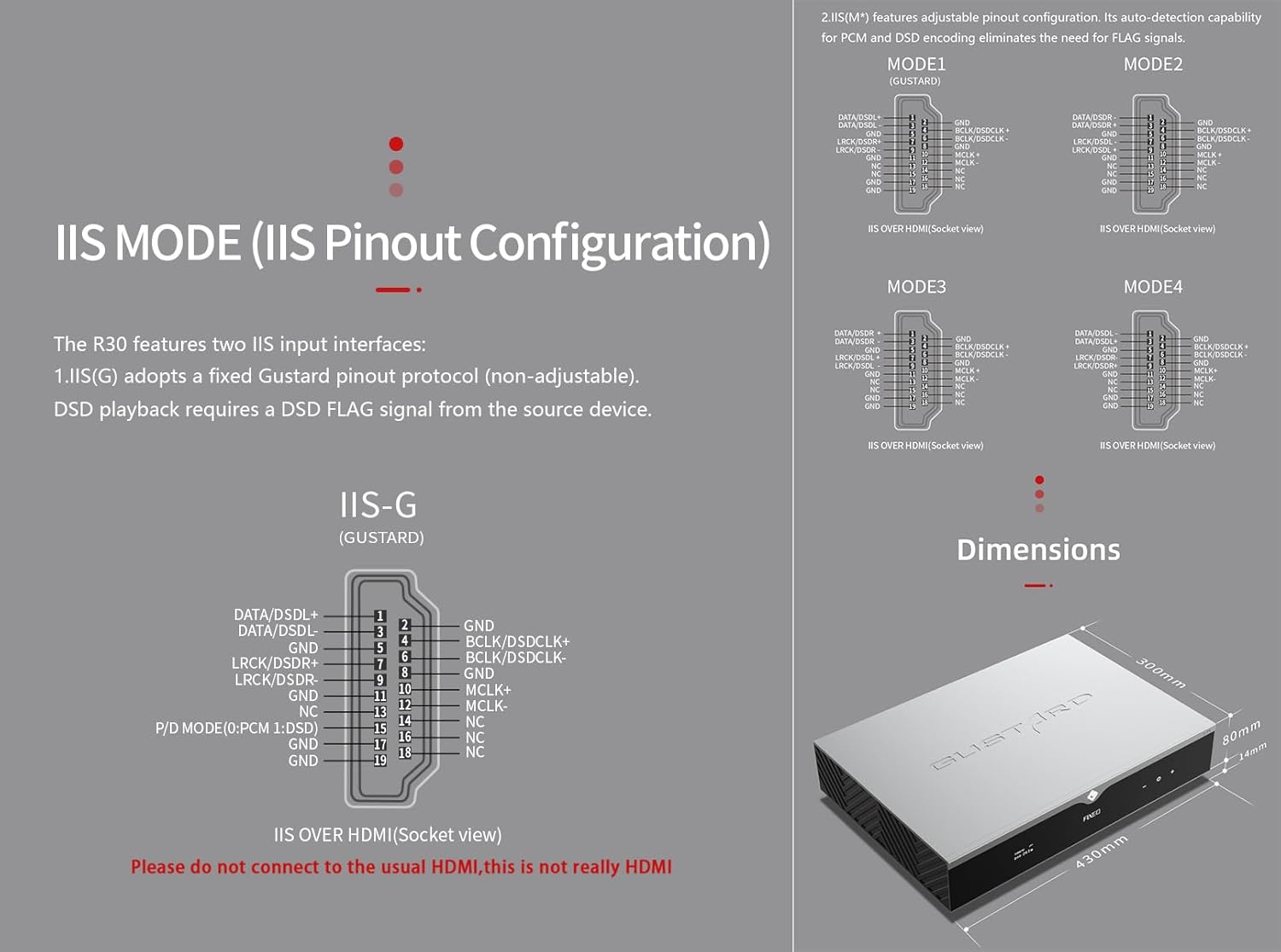
5. IIS MODE (IIS Pinout Mode Selection)
די R30 פֿאַרמאָגט צוויי IIS אינפֿוט אינטערפֿייסן:
- IIS(G): Fixed Gustard pinout protocol (non-adjustable). DSD playback requires a DSD FLAG signal from the source device.
- IIS(M*): Features adjustable pinout configuration. Its auto-detection capability for PCM and DSD encoding eliminates the need for FLAG signals.
IIS(M*) adjustable Pinout mode IIS input has four Pinouts: MODE1 (Default), MODE2, MODE3, MODE4. MODE1 is compatible with the GUSTARD mode. If you are connecting to a GUSTARD front end such as U12, U16, U18, S16, S26, etc., you can match them with MODE1, which is the former works in the Gustard output mode.
Please do not connect to the usual HDMI, this is not really HDMI.
6. PHASE (Phase Setting)
די פונקציע אָפפערט צוויי אָפּציעס:
- NON-inverted (Default): When non-inverted, the RCA output of R30 is normal phase, and the XLR balanced output is American standard polarity output (1 ground, 2 hot, 3 cold).
- איבערגעקערט: When inverted, only the RCA output is reverse phase, and the XLR balanced output is Japanese/European standard polarity output (1 ground, 2 cold, 3 hot).
7. TRIGGER CH. (Linkage Trigger Start Channel Selection)
The R30 can be triggered by an external 12V linkage signal and automatically turn on from standby mode. When the 12V trigger signal ceases or drops to 0V, automatic standby activation occurs. When the R30 is working, it is switched to the input channel of this setting by the 12V trigger linkage signal.
- LAST (Default): The input channel that was in use before entering standby last time.
- Other options include COAX, AES, OPT, USB, STREAMER, IIS(G), IIS. Selecting any channel activates it upon receiving a 12V trigger signal.
8. TRIGGER VOL. (Link Trigger Boot Volume Selection)
דער R30 קען ווערן אנגעצינדן פון סטענדביי דורך אן עקסטערנעם 12V טריגער סיגנאל און אויטאמאטיש איינגעשטעלט צום אויסגעקליבענעם וואליום לעוועל. אנדערש, בעתן אפעראציע, א 12V טריגער סיגנאל טוישט דעם ארויסגאנג צום פארגעשטעלטן וואליום. די אפציע קאנפיגורירט דעם ארויסגאנג וואליום נאך טריגער אקטיוואציע.
- LAST (Default): The volume used before entering standby.
- פאַרפעסטיקט: Fixed full-scale output bypassing attenuation.
- -20 דב: Output at a volume attenuated to -20dB.
- -30 דב: Output at a volume attenuated to -30dB.
- -40 דב: Output at a volume attenuated to -40dB.
9. DISPLAY (Screen Brightness Settings)
Long-term high-brightness use of OLED screens can cause screen burn-in or ghosting. Therefore, the R30 is designed to always select automatic screen off, or manually select automatic screen off, which can also reduce interference.
- AUTO (Default): Automatically reduce brightness.
- AUTO OFF: Automatically turn off the screen.
ינפראַרעד רימאָוט קאָנטראָל
ווען איר אַפּערירט DAC פּראָדוקטן, דריקט און האַלט דעם DAC קנעפּל פֿאַר מער ווי 3 סעקונדעס צו אַרייַן אין DAC קאָנטראָל מאָדע. AMP/STREAM מאָדעס קאָנטראָלירן אַנדערע גוסטאַרד פּראָדוקטן.
- סטאַנדביי: Press once to activate R30 from standby. Press once during operation to enter standby.
- מעניו: Press to access R30's setup menu.
- פּאַד מיט 4 ריכטונג קנעפּלעך: Up/Down navigates menu items. Left/Right adjusts selected options. Center press activates/deactivates mute.
- צוריק: Returns to main interface.
- וואָל-: Decreases output volume on main interface.
- Vol+: Increases output volume on main interface.
הערות:
- Operational range varies with angle.
- Obstructions between remote and sensor may cause malfunction.
- Remove batteries if unused for more than 1 month.
- Thoroughly clean battery compartment if leakage occurs.
- May accidentally trigger other IR-controlled devices.

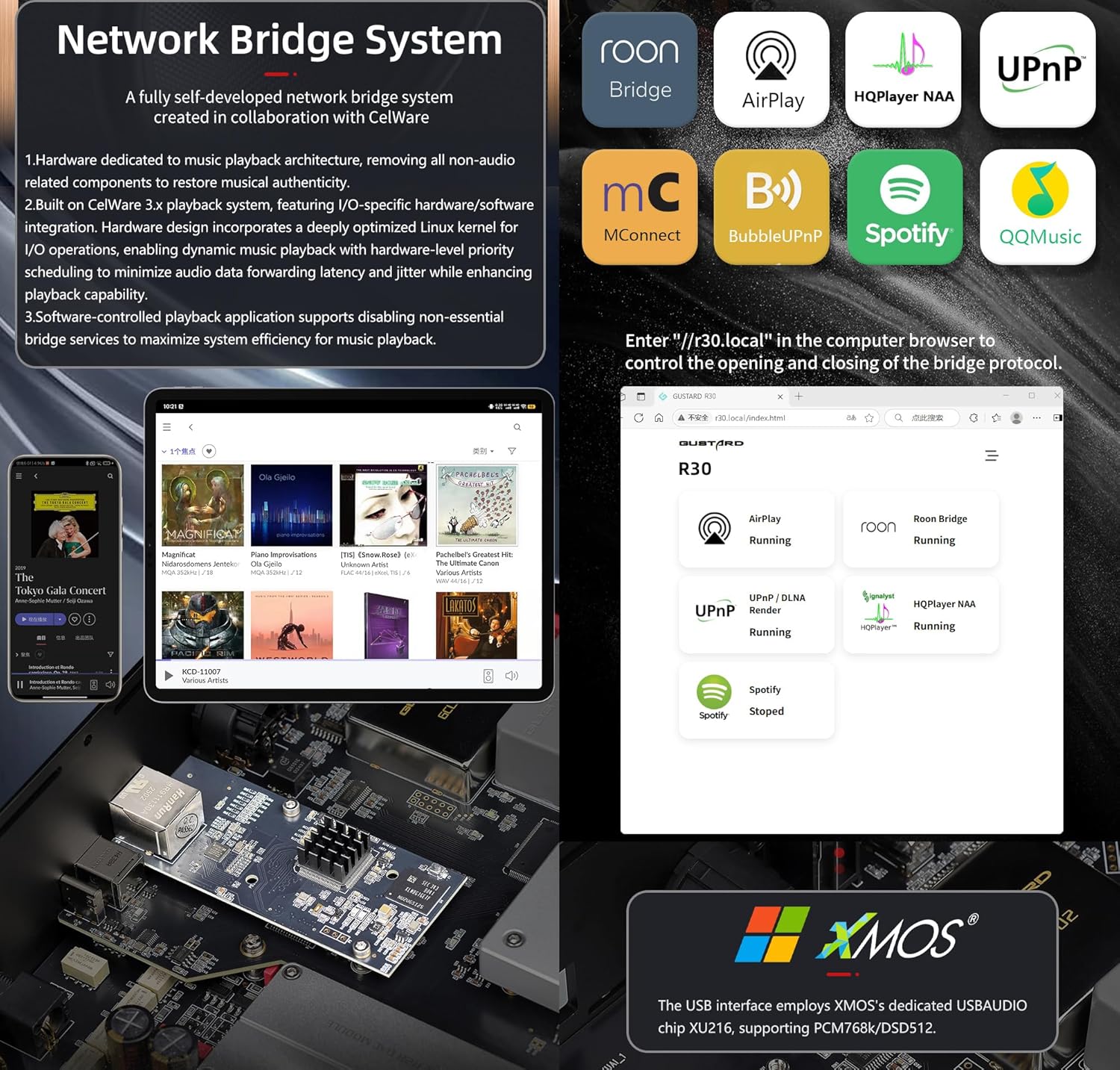
נעטוואָרק בריק סטרימער שנעל אָנהייב
After connecting R30's RJ45 port to your local network:
- Select the STREAMER channel and await system boot (approximately 1 minute, until "DSD 24.5MHz" appears).
- Access R30's configuration page via: http://R30.local (as shown below). Disable unused streaming protocols on the web צובינד צו מאַקסאַמיזירן סיסטעם עפעקטיווקייט. פירמווער דערהייַנטיקונגען ווערן אויך דורכגעפירט דאָ.
(מאָביל/טאַבלעט אָפּעראַציע וואַרט ביז דער דעדיקירטער אַפּ איז ארויסגעגעבן געוואָרן)
You can turn off streaming protocols that are not frequently used through the web page to maximize system music playback performance. At the same time, the online upgrade of the Streamer is also operated on the web בלאַט.
(נאכדעם וואס די באזונדערע סטרימער אפליקאציע ווערט געלאנצירט, קענען די אויבנדערמאנטע אפעראציעס דורכגעפירט ווערן אין דער אפליקאציע)
Official Product Video: GUSTARD R30 - User Manual
פּראָדוקט ספּעסאַפאַקיישאַנז
Digital Input Support Formats:
| טיפּ | PCM | DSD (געבוירענער) | DSD (DoP) |
|---|---|---|---|
| USB.Streamer | 44.1kHz-768kHz 16Bit-32Bit | DSD64-DSD512 | DSD64-DSD256 |
| AES.Coaxial.Optical fiber | 44.1kHz-192kHz 16Bit-24Bit | ניט געשטיצט | DSD64 |
| IIS | 44.1kHz-1536kHz 16Bit-32Bit | DSD64-DSD1024 | DoP64-DoP512 |
אַנאַלאָג רעזולטאַט:
- אָפטקייט רעאַקציע: 20-20kHz/±0.2dB
- דינאַמיש קייט:> 123 דב
- סיגנאַל-צו-ראַש פאַרהעלטעניש:> 121 דב
- קאַנאַל קראָסטאָלק: -139dB @ 10kHz
- THD+N: ≤ 0.00145% @1kHz
- IMD: ≈0.002% @ -1dBFS
- RCA אויסגאַנג לעוועל: 2.5Vrms (פֿיקסירט מיט וואָלומען)
- RCA Output Impedance: 100Ω
- XLR אויסגאַנג לעוועל: 5.1Vrms (פֿיקסירט מיט וואָלומען)
- XLR Output Impedance: 100Ω
- XLR פּינאַוט: USA סטאַנדאַרט (1 גראַונד, 2 הייס, 3 קאַלט)
אנדערע ספּעסאַפאַקיישאַנז:
- AC Power: 115V/230V 50/60Hz
- מאַכט קאַנסאַמשאַן: <35 וו
- Chassis Dimensions: W430 × D300 × H80 (including feet: 92mm)
- Package Dimensions: L530 × W400 × H180mm
- Shipping Weight: 10kg (with package)
- 10MHz BNC Input: Input impedance 50 Ohm, 0dBm-20dBm; CMOS square wave 0.2V-3.3V, Sine wave 0.5V-3.3V.
- Trigger: IN- 12V Typ. OUT- 12V Typ.
וואָראַנטי תּנאָים
Thank you for choosing GUSTARD HIFI products. To safeguard your rights and interests, please read the following warranty terms carefully. You can promptly obtain comprehensive after-sales service provided by GUSTARD.
פּראָדוקט וואָראַנטי
You will enjoy a 2-year free warranty and lifetime maintenance after the date of purchasing GUSTARD's HIFI product.
* דער פאַבריקאַנט טראגט בלויז די פרייץ פון כינעזיש יאַבאָשע. טייל פון די פרייט און שטייַער דזשענערייטאַד פון מעייווער - לייאַם וועט זיין סאַלווד דורך די באַניצער מיט די הענדלער פאַרהאַנדלונג.
פריי וואָראַנטי סערוויס
GUSTARD R30 from the purchasinג דאַטע אין דער פרייער וואָראַנטי פּעריאָד, דער באַניצער ניצט דעם פּראָדוקט אין נאָרמאַל, און דער פּראָדוקט פיילז רעכט צו קאָמפּאָנענט קוואַליטעט אָדער מאַנופאַקטורינג פּראָבלעמען.
ווייַטער פון די וואָראַנטי סערוויס
Belonging to one of the following circumstances, products are no longer provided warranty service:
- פּראָדוקטן פון די קויפן טאָג האָבן יקסידיד אַ פּרידיטערמינד וואָראַנטי צייַט.
- מאָדעל, באַרקאָדעס און קויפן טאָג טאָן ניט שטימען מיט די פאַקטיש פּראָדוקט און וואָראַנטי קאָרט.
- Without GUSTARD technician permission, unauthorized modifications to the circuit, components or self-repaired product.
- דאַמידזשינג געפֿירט דורך יריזיסטאַבאַל נאַטירלעך פאָרסעס.
- ווייַטער פון דער דערלויבט נוצן פון ינווייראַנמענאַל שעדיקן.
- דאַמידזשינג רעכט צו פאַלש נוצן אָדער ימפּראַפּער סטאָרידזש. אַרייַנגערעכנט אָבער ניט לימיטעד צו: די וואָלtagE איז צו הויך צו פאַרברענען די סערקאַץ אָדער קאַמפּאָונאַנץ; באַמפּינג און ריזאַלטינג אין דאַמידזשינג די שאָל אָדער ינערלעך; דאַמידזשינג רעכט צו וואַסער, ייל, פליסיק און יבעריק שטויב; פּראָדוקט אַקסאַדיישאַן אָדער קעראָוזשאַן, עטק.
- ווייַטער פון די וואָראַנטי צייַט, אַזאַ ווי אַ יחיד קאָמפּאָנענט שעדיקן, אויסזען רעכט צו מענטש שעדיקן, פירמוואַרע מאָדיפיקאַטיאָנס פירן צו אַנאָטערייזד יוזערז קענען נישט אַרבעטן. GUSTARD קאַמיץ צו נעמען גלייַך וישאַלט פיז (אַחוץ גרויס שטח קאַמפּאָונאַנץ אָדער קרייַז ברעט פארברענט ווייַטער פון פאַרריכטן). פרייט און וישאַלט קאָס, מאַטעריאַל קאָס זענען פארלאנגט דער באַניצער צו טראָגן.
קאָנטאַקט אינפֿאָרמאַציע
פאַבריקאַנט: Shenzhen Goshide Technology Co., LTD
אַדרעס: Room 302, Building 1, No. 28, Huimin 1st Road, Guanlan Sub-district, Longhua District, Shenzhen City, Guangdong Province
תּל: +86-18682080102
Webפּלאַץ: http://www.gustard.com
בליצפּאָסט: service@gustard.com


