1. הקדמה
This manual provides instructions for the operation and maintenance of your LIGE FV26-F Smartwatch. Please read this manual carefully before using the device to ensure proper function and to maximize its features. The smartwatch is designed for women, featuring a round display, silver stainless steel band with diamond accents, and a silicone strap option.
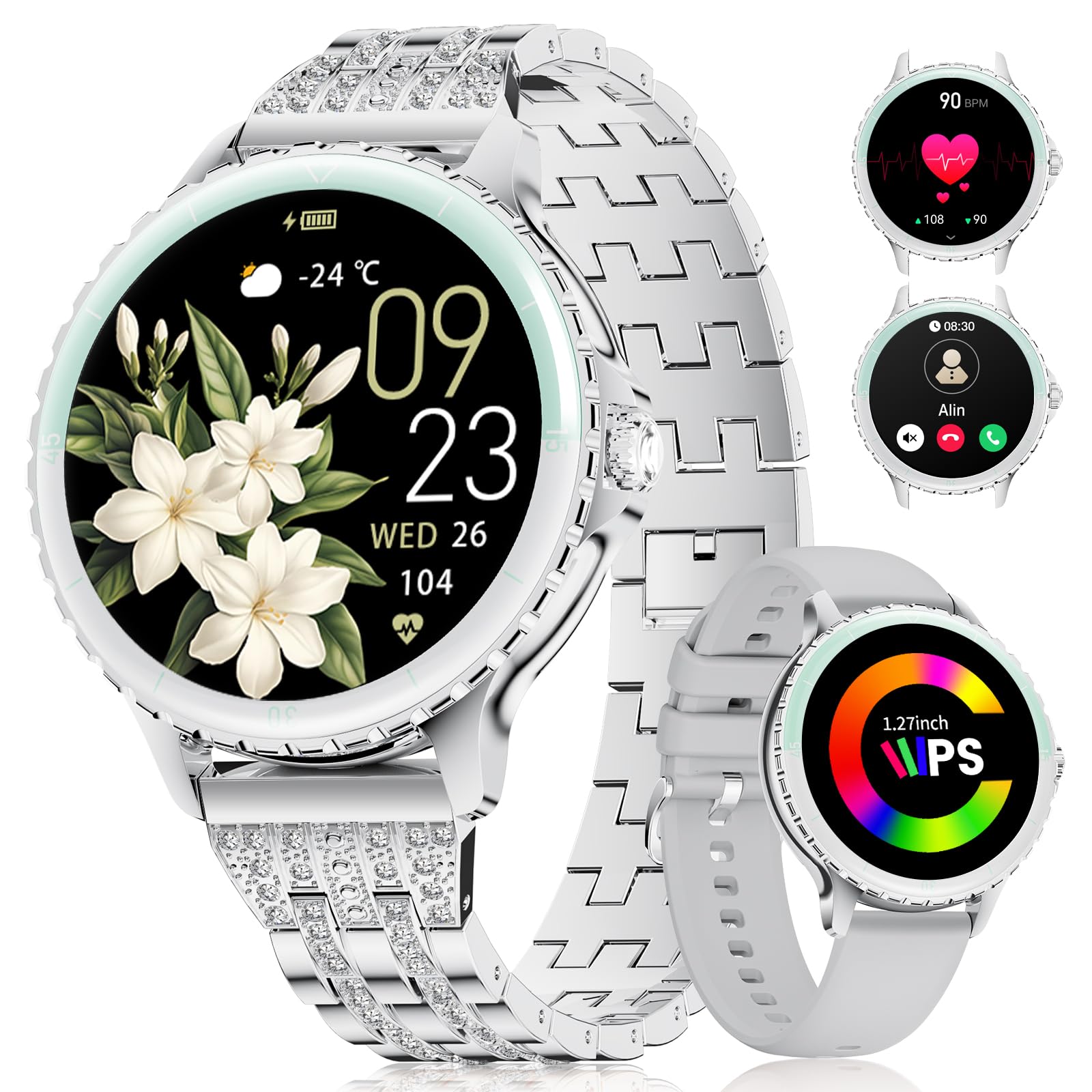
Image: LIGE FV26-F Smartwatch displaying its elegant design with both stainless steel and silicone strap options.
2. סעטאַפּ
2.1 אויפלאָדן די סמאַרטוואַטש
- פֿאַרבינדט דעם טשאַרדזשינג קאַבל צום טשאַרדזשינג פּאָרט אויף דער הינטערשטער זייגער פֿון דער סמאַרטוואַטש.
- שטעקט אריין דעם USB עק פונעם קאבל אין א סטאנדארטן USB פאוער אדאפטער (נישט אריינגערעכנט) אדער א קאמפיוטער'ס USB פארט.
- Ensure the charging pins are properly aligned with the smartwatch's contacts.
- A charging indicator will appear on the screen. Allow approximately 2-3 hours for a full charge.
2.2 אַפּ אינסטאַלאַציע און פּערינג
- אָפּלאָדירן די FitcloudPro application from your smartphone's app store (Google Play Store for Android, Apple App Store for iOS).
- Ensure your smartphone meets the compatibility requirements: Android 6.0 or higher, or iOS 9.0 or higher.
- געבן בלועטאָאָטה אויף דיין סמאַרטפאָנע.
- Open the FitcloudPro app and follow the on-screen instructions to create an account or log in.
- In the app, navigate to the device pairing section and search for your LIGE FV26-F smartwatch.
- Select your smartwatch from the list of available devices to initiate the pairing process. Confirm any pairing requests on both your phone and the smartwatch.
Once paired, the smartwatch will synchronize data with the app, and you can customize settings.
3. אַפּערייטינג ינסטרוקטיאָנס
3.1 יקערדיק נאַוויגאַציע
- טאָוטשסקרעען: סווייפּ לינקס, רעכטס, אַרויף, אָדער אַראָפּ צו נאַוויגירן דורך מעניוז און פֿעיִקייטן. צאַפּן צו סעלעקטירן אַן אָפּציע.
- זייַט קנעפּל: Typically used to return to the home screen or to power on/off the device (long press).
3.2 בלועטוט רופן
- After successful Bluetooth pairing, you can make and receive calls directly from your wrist.
- The smartwatch supports contact uploading from your phone and displays call history.
- Utilize the integrated AI voice assistant for hands-free control of your phone's calling functions.
3.3 רעאַל-צייט נאָוטאַפאַקיישאַנז
- Receive alerts for incoming calls, messages, WhatsApp, and other application activities.
- The smartwatch will gently vibrate to notify you.
- Note for WhatsApp: To ensure WhatsApp notifications are received, set your WhatsApp notification settings on your phone to "Show comments - Always show." If your software is connected to a computer, the watch may not send messages.
3.4 געזונט מאָניטאָרינג
- הארץ ראטע: Continuous 24/7 heart rate measurement.
- SpO2: Blood oxygen saturation measurement (data for reference only).
- פרויען געזונט: Features include menstrual cycle prediction, pregnancy preparation mode, and pregnancy mode.
- שלאָף מאָניטאָרינג: Tracks and analyzes sleep patterns.
- סידענטאַרי אַלערט: דערמאָנט אײַך זיך צו רירן נאָך פּעריאָדן פֿון אומאַטישקייט.
- ברידינג עקסערסייזיז: געפֿירטע אָטעמען־געניטונגען פֿאַר אָפּרו.
3.5 ספּאָרט מאָדעס
- The smartwatch supports over 100 sport modes.
- Ten built-in sports include yoga, cycling, running, and badminton.
- Use the "Sport Push" function in the FitcloudPro app to transfer additional sport modes to your watch.
- During workouts, the watch provides comprehensive data such as steps, training time, distance, calories burned, and heart rate (data for reference only).
3.6 Camera Remote and Music Control
- קאַמעראַ רימאָוט: קאָנטראָלירט די קאַמעראַ פון אייער סמאַרטפאָון אויף ווייטן צו נעמען בילדער.
- מוזיק קאָנטראָל: שפּילט, פּויזירט, איבערשפּרינגען לידער, און אַדזשאַסטירט די באַנד פֿאַר מוזיק וואָס שפּילט אויף אייער פֿאַרבונדענע סמאַרטפאָון.
3.7 קוסטאָמיזאַבלע וואַך פנימער
- Personalize your smartwatch by setting photos from your phone (e.g., family, pets) as watch faces through the FitcloudPro app.
4. וישאַלט
- רייניקונג: Wipe the smartwatch and straps regularly with a soft, dry cloth. Avoid harsh chemicals.
- באַטערי זאָרגן: The 300 mAh battery provides approximately 3 to 5 days of usage depending on feature use. Charge the device before the battery is completely depleted to prolong its lifespan.
- סטאָרידזש: סטאָר די סמאַרטוואַטטש אין אַ קיל, טרוקן אָרט ווען ניט אין נוצן.
5. טראָובלעשאָאָטינג
- קאַנעקטיוויטי ישוז: If the smartwatch disconnects from your phone, ensure Bluetooth is enabled on both devices and that the FitcloudPro app is running in the background. Try restarting both the smartwatch and your phone.
- נאָטיפיקאַטיאָנס ניט באקומען: Verify that app notifications are enabled in your phone's settings and within the FitcloudPro app. For WhatsApp, ensure the specific setting "Show comments - Always show" is active.
- ומפּינקטלעך געזונט דאַטן: Ensure the smartwatch is worn snugly on your wrist, but not too tight. Environmental factors and movement can affect sensor readings. Health data is for reference only and not for medical diagnosis.
- עקראַן רעאַגירט נישט: Try restarting the smartwatch by long-pressing the side button. If the issue persists, ensure the device is charged.
6. ספּעסאַפאַקיישאַנז
| שטריך | באַשרייַבונג |
|---|---|
| סאָרט | LIGE |
| מאָדעל נומער | FV26-F |
| קאָליר | זילבער |
| אָפּערייטינג סיסטעם | יאָס, אַנדרויד |
| פאַרשטעלן גרייס | 1.27 אינטשעס |
| פאָרעם | קייַלעכיק |
| קאַנעקטיוויטי טעכנאָלאָגיע | בלועטאָאָטה |
| ווירעלעסס קאָמוניקאַציע סטאַנדאַרד | בלועטאָאָטה |
| ספּעציעלע פֿעיִקייטן | Phone Call, Voice Control, Email, Notification, Touchscreen |
| קאַמפּאַטאַבאַל דעוויסעס | סמאַרטפאָנע |
| באַטאַרייע קאַפּאַציטעט | 300 מאַה |
| באַטאַרייע זאַץ | ליטהיום-פּאָלימער |
| קריקאָנלאָדלעך באַטערי | יא |
| זכּרון סטאָרידזש קאַפּאַסיטי | 256 מב |
| גפּס | דזשי-פי-עס דורך סמאַרטפאָון |
7. וואָראַנטי און שטיצן
Specific warranty information for the LIGE FV26-F Smartwatch is not provided in the product data. Please refer to the manufacturer's official webזייטל אדער אייער קויפן-פונקט פאר דעטאלירטע גאראנטיע באדינגונגען.
For technical support, software updates, or further assistance, please consult the FitcloudPro application or visit the LIGE official support channels.


