1. הקדמה
Thank you for choosing the OKP Life L1 Lidar Robot Vacuum Cleaner. This manual provides essential information for the safe operation, maintenance, and troubleshooting of your device. Please read it thoroughly before use and retain it for future reference.
2. וויכטיק סאַפעטי אינסטרוקציעס
To reduce the risk of injury or damage, read these safety instructions carefully and keep them handy when setting up, using, and maintaining your robot.
- דער מיטל קענען ווערן גענוצט דורך קינדער אַלט 8 יאר און העכער און מענטשן מיט רידוסט פיזיש, סענסערי אָדער גייַסטיק קייפּאַבילאַטיז אָדער פעלן פון דערפאַרונג און וויסן אויב זיי האָבן באקומען השגחה אָדער לימעד וועגן נוצן פון די אַפּפּליאַנסע אויף אַ זיכער וועג און פֿאַרשטיין די כאַזערדז ינוואַלווד. .
- קינדער זאָל זיין סופּערווייזד צו ענשור אַז זיי טאָן ניט שפּילן מיט די אַפּפּליאַנסע.
- רייניקונג און באַניצער וישאַלט זאָל ניט זיין געמאכט דורך קינדער אָן השגחה.
- Only use the original power adapter provided by the manufacturer.
- ניצט נישט דעם ראָבאָט אין סביבות מיט אָפֿענע פֿלאַמען אָדער שוואַכע אָביעקטן.
- Ensure the robot is used on dry surfaces only.
- האַלטן האָר, פרייַ קליידער, פינגער און אַלע טיילן פון דעם גוף אַוועק פון אָופּאַנינגז און מאָווינג טיילן.
3. פּעקל אינהאַלט
באַשטעטיקן אַז אַלע קאָמפּאָנענטן זענען פאַראַן אין דער פּאַקעט:
- OKP Life L1 Robot Vacuum Cleaner
- טשאַרדזשינג דאָק
- מאַכט אַדאַפּטער
- זייט ברושעס (2 פּאָר)
- HEPA Filter (1 extra)
- רייניקונג טול
- באַניצער מאַנואַל
4. פּראָדוקט איבערview
Familiarize yourself with the components of your OKP Life L1 robot vacuum.

פיגורע 4.1: Top view of the OKP Life L1 Lidar Robot Vacuum Cleaner alongside its mobile application interface. The robot is white with a dark grey Lidar sensor on top and a power button. The app shows cleaning status and control options.
ראָבאָט קאַמפּאָונאַנץ:
- לידאַר סענסאָר: פֿאַר פּינקטלעכער נאַוויגאַציע און מאַפּינג.
- מאַכט קנעפּל: To start/pause cleaning or power on/off.
- מיסט Collects debris.
- זייט ברושעס: אַוועקוואַרפן די דעבריס אין דעם הויפּט באַרשט וועג.
- Main Brush Roll: Agitates and lifts debris from floors.
- טשאַרדזשינג קאָנטאַקטן: For automatic recharging at the dock.
- קליף סענסארן: Prevent the robot from falling down stairs.
- באַמפּער: דעטעקטירט שטערונגען.
5. אויפשטעלן און ערשטע באנוץ
5.1 צוגרייטן דעם ראָבאָט
- Remove all protective films and stickers from the robot and charging dock.
- Install the side brushes by pressing them onto the posts until they click.
5.2 Placing the Charging Dock
Place the charging dock against a wall in an open, uncluttered area. Ensure there is at least 0.5 meters (1.6 feet) of clear space on both sides and 1.5 meters (4.9 feet) in front of the dock. Plug in the power adapter.
5.3 ערשט אָפּצאָל
Place the robot on the charging dock. The indicator light will show charging status. Fully charge the robot before its first use (approximately 5-6 hours).
5.4 Connecting to the OKP Life App
The OKP Life L1 supports remote control via the OKP Life App. This allows for scheduling, mode customization, and real-time monitoring.
- Download the "OKP Life" app from your mobile device's app store.
- רעגיסטרירן אַ חשבון און קלאָץ אין.
- Follow the in-app instructions to add your L1 robot vacuum. Ensure your Wi-Fi network is 2.4GHz.
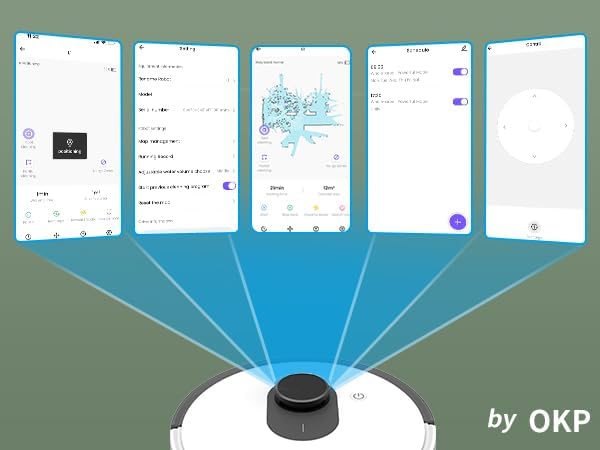
פיגורע 5.1: Various screenshots of the OKP Life mobile application, demonstrating features like device connection, settings, mapping, and remote control options.
5.5 שטימע קאנטראל אינטעגראציע
The L1 is compatible with Amazon Alexa and Google Assistant for hands-free operation.
- Ensure your robot is connected to the OKP Life App.
- עפֿנט די אַלעקסאַ אָדער גוגל היים אַפּ.
- זוכן פֿאַר the "OKP Life" skill/service and enable it.
- Link your OKP Life account.
- You can now use voice commands such as "Alexa, turn on L1" or "Hey Google, start cleaning with L1."

פיגורע 5.2: The OKP Life L1 robot vacuum on a rug, with an Amazon Echo Dot speaker and a smartphone displaying the control app. This illustrates the voice and app control capabilities.
6. אפערירן אייער ראָבאָט וואַקוום
6.1 Cleaning Modes and Navigation
The L1 utilizes advanced LDS laser radar and SLAM navigation to create accurate real-time maps of your home, optimizing cleaning routes and ensuring comprehensive coverage.

פיגורע 6.1: The OKP Life L1 robot vacuum navigating a living room, with blue lines illustrating its precision LiDAR mapping and navigation path.
The robot offers various cleaning modes accessible via the app:
- אַוטאָ ריין: דער ראָבאָט רייניקט קלוג דיין גאַנץ היים.
- אָרט ריין: Cleans a specific area with concentrated effort.
- זאָנע רייניקונג: Select specific rooms or areas on the map for cleaning.
- פּלאַנירטע רייניקונג: שטעלט איין ספעציפישע צייטן פארן ראָבאָט צו רייניקן אויטאָמאַטיש.

פיגורע 6.2: The OKP Life L1 robot vacuum next to a smartphone displaying its app, which shows a floor plan map where a user can select a specific zone for vacuuming using the LiDAR sensor data.

פיגורע 6.3: The OKP Life L1 robot vacuum on a rug, with a smartphone displaying the app's features including No-Go Zones, Real-time Mapping, Recharge Resume, Partial Cleaning, and Spot Cleaning.
6.2 Suction Power and Carpet Boost
The L1 features a 4000Pa suction motor for effective cleaning. It automatically increases suction power when detecting carpets for deeper cleaning.

פיגורע 6.4: The OKP Life L1 robot vacuum moving from a hard floor to a carpet, illustrating its ability to boost suction power for effective carpet cleaning.
6.3 No-Go Zones and Invisible Walls
Use the OKP Life App to define "No-Go Zones" or "Invisible Walls" to prevent the robot from entering specific areas or protecting fragile items.

פיגורע 6.5: The OKP Life L1 robot vacuum demonstrating its ability to respect "No-Go Zones" (preventing entry into a pet area) and "Invisible Walls" (blocking access to a specific room entrance).
6.4 שטערונג אַוווידאַנס
Freemove 3.0 obstacle avoidance technology ensures the robot navigates smoothly around furniture, stairs, walls, and pets, minimizing collisions and preventing it from getting stuck.
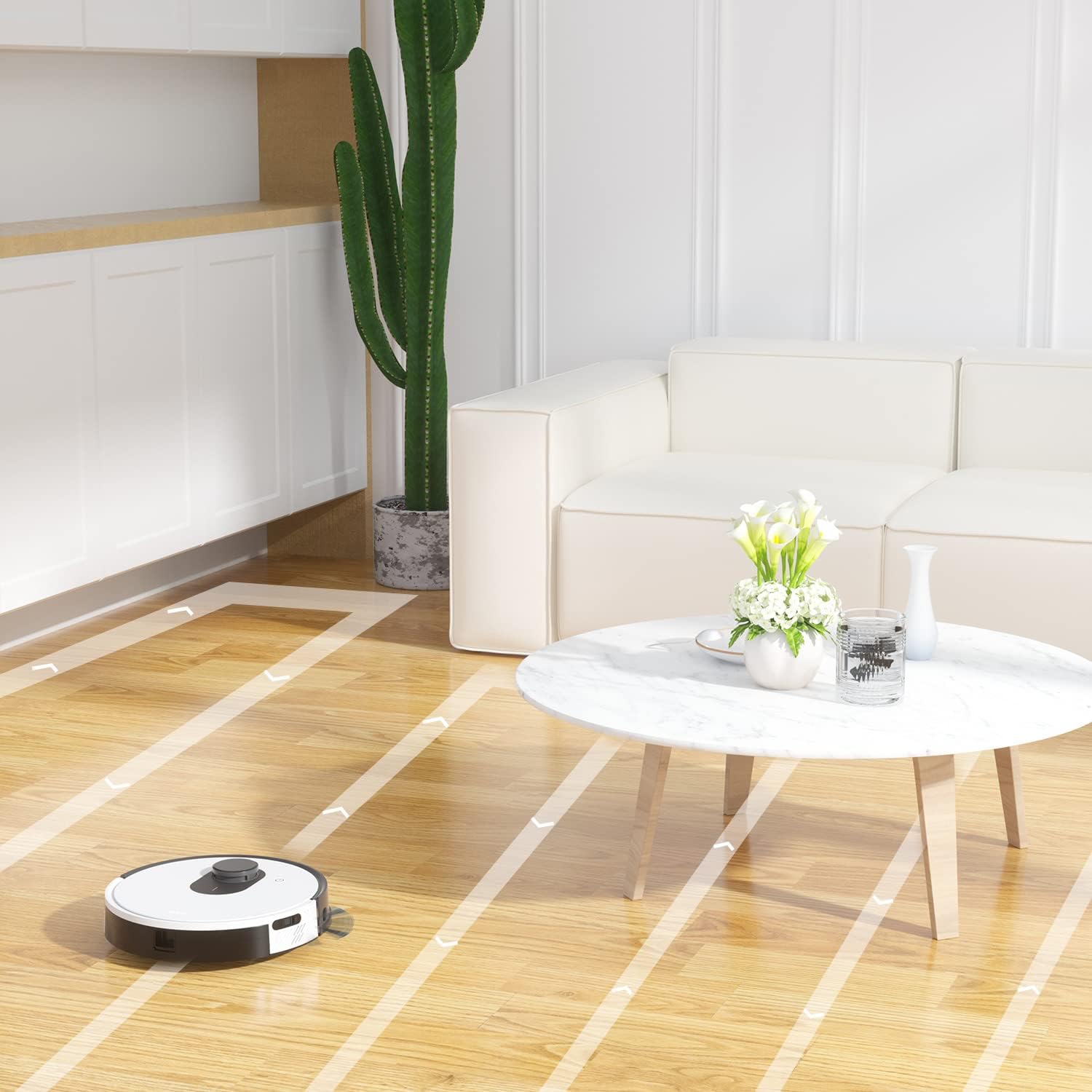
פיגורע 6.6: The OKP Life L1 robot vacuum cleaning a room, illustrating its efficient path planning and obstacle avoidance capabilities.
6.5 באַטערי מאַנאַגעמענט
The robot features a 4000mAh battery, providing up to 200 minutes of continuous cleaning. When the battery is low or cleaning is complete, the robot automatically returns to its charging dock.
7. וישאַלט
Regular maintenance ensures optimal performance of your robot vacuum.
7.1 אויסליידיקן דעם מיסטקאסטן
Empty the dustbin after each cleaning cycle. Press the dustbin release button, remove the dustbin, and discard collected debris. Clean the filter inside the dustbin.
7.2 Cleaning the Main Brush Roll
The self-cleaning brush roll reduces hair tangles. However, periodically remove the main brush roll and use the provided cleaning tool to remove any tangled hair or debris.
7.3 רייניקונג פון זייט-באַרשטן
Check side brushes regularly for wear or damage. Remove any tangled hair or debris. Replace worn brushes as needed.
7.4 רייניקונג פון סענסאָרן און טשאַרדזשינג קאָנטאַקטן
Wipe the cliff sensors, bumper sensor, and charging contacts on both the robot and the charging dock with a clean, dry cloth to ensure proper function.
7.5 פילטער פאַרבייַט
Replace the HEPA filter every 3-6 months, or more frequently depending on usage, to maintain optimal suction performance.
8. טראָובלעשאָאָטינג
זעט דעם אָפּטייל פֿאַר געוויינטלעכע פּראָבלעמען און זייערע לייזונגען.
| פּראָבלעם | מעגלעך סיבה | לייזונג |
|---|---|---|
| ראָבאָט טוט נישט קער אויף. | נידעריגע באַטעריע; מאַכט אויסשאַלטן. | Charge the robot; Ensure power switch is on. |
| ראָבאָט קען נישט צוריקקומען צום טשאַרדזשינג דאָק. | Charging dock obstructed; Robot too far from dock. | Clear obstacles around the dock; Manually place robot near dock. |
| סאַקשאַן מאַכט איז שוואַך. | מיסט קאַסטן פול; פילטער פארשטאפט; הויפּט באַרשט פארפּלאָנטערט. | ליידיקן דעם מיסטקאסטן; רייניקן/פארבייטן דעם פילטער; רייניקן דעם הויפט בירשט. |
| ראָבאָט בלייבט אָפט שטעקן. | Loose cables/rugs; Small obstacles. | Clear floor of obstructions; Use No-Go Zones. |
| אַפּ קאַנעקשאַן פּראָבלעמען. | Incorrect Wi-Fi (not 2.4GHz); Router issues. | Ensure 2.4GHz Wi-Fi; Restart router and robot; Re-pair in app. |
9. ספּעסאַפאַקיישאַנז
| שטריך | דעטאַל |
|---|---|
| סאָרט | OKP לעבן |
| מאָדעל נאָמען | L1 Lidar Robot Vacuum |
| ספּעציעלע שטריך | HEPA Filtration, Vacuums |
| קאָליר | Cloud White |
| פּראָדוקט דימענשאַנז | 12"ל x 12"בר x 3.5"ה |
| אַרייַנגערעכנט קאַמפּאָונאַנץ | באַטערי |
| באַטערי לעבן | Up to 200 minutes (4000mAh battery) |
| קאַפּאַציטעט (מוסטבין) | 500 מיליליטער |
| באַטעריז פארלאנגט | 1 ליטהיום יאָן באַטאַרייע (אַרייַנגערעכנט) |
| קאַמפּאַטאַבאַל דעוויסעס | אַמאַזאָן עקאָ, גוגל היים, סמאַרטפאָונז |
| פּונקט וואָג | 7 פונט |
| פאַבריקאַנט | OKP לעבן |
| נומער מאָדעל נומער | L1 |
10. וואָראַנטי און שטיצן
For warranty information and technical support, please refer to the official OKP Life webזייטל אדער קאנטאקט זייער קאסטומער סערוויס. האלט אייער קויף קוויטל אלס באווייז פון קויפן.
אָנליין שטיצן: Visit the official OKP Life webפּלאַץ פֿאַר FAQ, טראָובלעשאָאָטינג פירער און קאָנטאַקט אינפֿאָרמאַציע.
קונה סערוויס: Refer to your product packaging or the OKP Life webזייטל פֿאַר ספּעציפֿישע קונה סערוויס קאָנטאַקט דעטאַילס.


