1. הקדמה
Thank you for choosing the Transformers GM04 Lightweight Wireless Gaming Mouse. This manual provides essential information for setting up, operating, and maintaining your new gaming mouse. Designed for precision and comfort, the GM04 features a high-precision PAW3311 sensor, triple connection modes (2.4G wireless, Bluetooth 5.3, and USB-C wired), 5 programmable buttons, and up to 100 hours of battery life. Its ergonomic design and lightweight construction ensure a comfortable and responsive experience for gaming, work, and study.
2. וואָס איז אין דער קעסטל
- TF-GM04 Wireless Gaming Mouse x 1
- USB Wireless Dongle x 1
- וסב- C קאַבלע רענטגענ 1
- באַניצער מאַנואַל x 1
3. פּראָדוקט איבערview
Familiarize yourself with the key features and components of your Transformers GM04 gaming mouse.
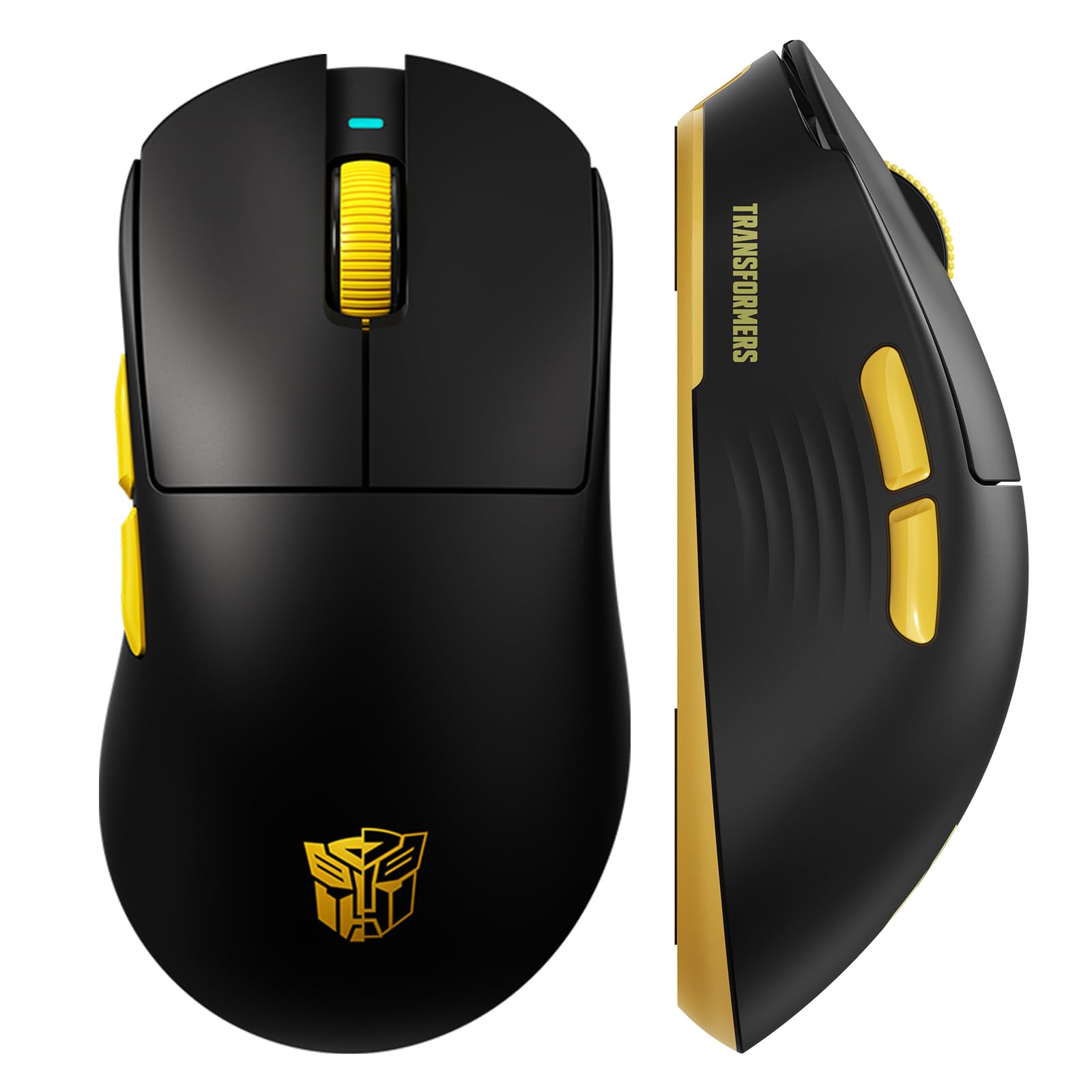
בילד 1: The Transformers GM04 Wireless Gaming Mouse, showcasing its sleek black and yellow design, along with icons highlighting its core features such as PixArt PAW3311 sensor, up to 12000 DPI, 1000Hz polling rate, 20 million clicks, Tri-Mode connectivity, custom macros, 63g lightweight design, and up to 100 hours of battery life. A USB wireless dongle is also visible next to the mouse.

בילד 2: A hand demonstrating the ergonomic design of the Transformers GM04 mouse. The image highlights how the mouse fits comfortably in the palm, promoting more comfort and less fatigue during extended use, thanks to its non-slip texture.

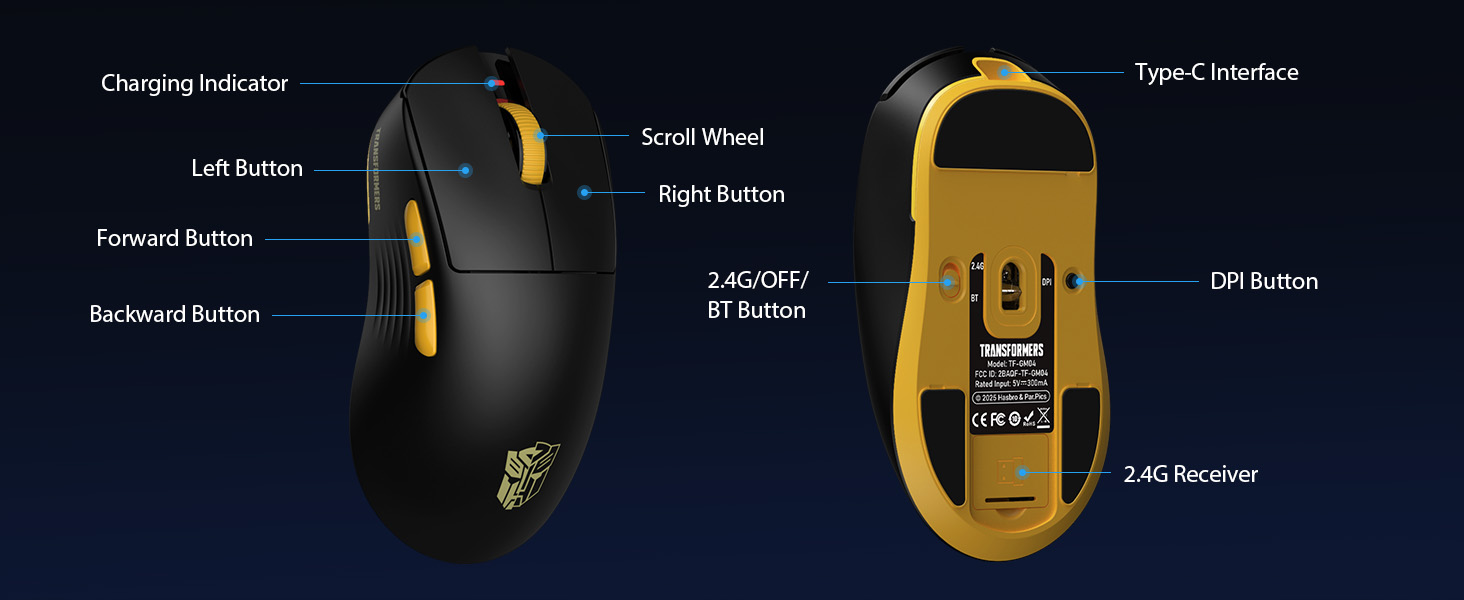
בילד 3: The underside of the Transformers GM04 mouse, detailing the 2.4G/OFF/BT switch for connection modes, the DPI button, and the storage compartment for the 2.4G wireless receiver. This view is crucial for understanding how to switch modes and adjust settings.

בילד 4: An illustration of the 6-level adjustable DPI settings for the Transformers GM04 mouse. It shows the DPI values (1200, 2400, 3200, 4800, 6400, 12000) and their corresponding LED indicator colors (Red, Green, Blue, Purple, Yellow, Cyan), which helps users identify the current DPI level.
בילד 5: אן אויפגעריסן view diagram of the Transformers GM04 mouse, highlighting the HUANO micro switches. This image emphasizes the precision-engineered mechanical switches designed for crisp feedback and a lifespan of over 20 million clicks, ideal for rapid gaming actions.
ווידעא 1: An official product video from Transformers Keyboard showcasing the GM04 Lightweight Wireless Gaming Mouse. This short video provides a dynamic overview of the mouse's design and features.
4. סעטאַפּ
4.1. אויפלאָדן די מויז
Before first use, it is recommended to fully charge your GM04 mouse. Connect the provided USB-C cable to the mouse's front port and the other end to a USB power source (e.g., computer USB port, USB wall adapter). The LED indicator will show charging status.
4.2. קאַנעקטינג די מאַוס
The GM04 mouse supports three connection modes: 2.4G Wireless, Bluetooth 5.3, and USB-C Wired. Use the switch on the bottom of the mouse to select your desired mode.
4.2.1. 2.4G ווירעלעס מאָדע
- Remove the USB wireless dongle from its storage slot on the bottom of the mouse.
- שטעקט אריין דעם USB ווייערלעס דאנגל אין א פאראן USB-A פארט אויף אייער קאמפיוטער.
- רוקט דעם מאָדע סוויטש אויף דער אונטערשטער טייל פון דער מויז צו דער "2.4G" פּאָזיציע.
- די מויז זאָל זיך אויטאָמאַטיש פֿאַרבינדן צו דיין קאָמפּיוטער.
4.2.2. בלועטאָאָטה מאָדע
- רוקט דעם מאָדע סוויטש אויף דער אונטערשטער טייל פון דער מויז צו דער "BT" פּאָזיציע.
- אויף אייער קאָמפּיוטער אָדער מיטל, עפֿנט די בלועטוט סעטטינגס און זוכט פֿאַר נײַע דעוויסעס.
- Select "TF-GM04 BT" from the list of available devices to pair.
- The mouse should connect and be ready for use.
4.2.3. USB-C ווייערד מאָדע
- Connect the provided USB-C cable to the mouse's front port and the other end to a USB-A port on your computer.
- די מויז וועט זיך אויטאמאטיש איבערקערן צו ווייערד מאָדע און אָנהייבן טשאַרדזשינג.
5. אָפּערייטינג
5.1. דפּי אַדזשאַסטמאַנט
The GM04 mouse offers 6 default DPI settings. To cycle through these settings, press the דפּי קנעפּל located on the bottom of the mouse. The LED indicator will change color to reflect the current DPI level:
- רויט: 1200 דפּי
- גרין: 2400 דפּי
- בלוי: 3200 דפּי
- לילאַ: 4800 דפּי
- געל: 6400 דפּי
- סיאַן: 12000 דפּי
5.2. פּראָגראַמירבאַרע קנעפּלעך
The mouse features 5 programmable buttons. To customize these buttons with macro commands, shortcut keys, or other functions, you will need to use the dedicated driver software. This software is typically available for Windows systems under 2.4G wireless and wired modes. Bluetooth mode may not support full software customization.
5.3. Connection Mode Switching
Easily switch between 2.4G Wireless, Bluetooth, and Wired modes using the dedicated switch on the bottom of the mouse. This allows for seamless transitions between multiple devices.
5.4. געפֿירט ינדיקאַטאָרס
- DPI ינדיקאַטאָר: Changes color according to the current DPI setting (see 5.1).
- טשאַרדזשינג ינדיקאַטאָר: A green LED near the scroll wheel indicates charging. It turns off when fully charged.
6. וישאַלט
6.1. רייניקונג
To maintain optimal performance and appearance, regularly clean your mouse. Use a soft, dry cloth to wipe the surface. For stubborn dirt, a slightly damp מען קען ניצן אַ שטאָף, און זיכער מאַכן אַז קיין נעץ גייט נישט אַרײַן אין די אינעווייניקסטע קאָמפּאָנענטן. פֿאַרמײַדט שטרענגע כעמיקאַלן אָדער אַברייסיוו מאַטעריאַלן.
6.2. באַטערי קער
The GM04 mouse is equipped with a 500mAh high-capacity battery. To prolong battery life:
- פֿאַרמײַדט אָפֿט פֿולשטענדיק אויסצולאָדן די באַטעריע.
- האַלט די מויז אין אַ קיל, טרוקן אָרט ווען נישט אין באַנוץ פֿאַר לענגערע פּעריאָדן.
- If using wired mode, the mouse will charge automatically.
7. טראָובלעשאָאָטינג
7.1. מויז רעאַגירט נישט
- קאָנטראָלירן די באַטאַרייע: Ensure the mouse is charged. Connect it via USB-C cable.
- טשעק קאנעקשאן מאָדע: Verify the switch on the bottom is set to the correct mode (2.4G, BT, or Wired).
- Re-pair (2.4G/Bluetooth): For 2.4G, try plugging the dongle into a different USB port. For Bluetooth, unpair and re-pair the device in your computer's settings.
- פרובירט דראָט מאָדע: Connect the mouse directly via USB-C cable to see if it functions.
7.2. DPI טוישט זיך נישט
- Ensure you are pressing the correct DPI button on the bottom of the mouse.
- Observe the LED indicator for color changes to confirm DPI cycles.
- If using custom software, ensure settings are applied correctly.
7.3. פֿאַרשפּעטיקונג אָדער דיסקאַנעקשאַן אין וויירלעסס מאָדע
- רעדוצירן ינטערפיראַנס: Move the mouse closer to the receiver/device. Avoid obstacles or other wireless devices that may cause interference.
- קאָנטראָלירן די באַטאַרייע: Low battery can affect wireless performance.
- דערהייַנטיקן דריווערס: Ensure your computer's Bluetooth or USB drivers are up to date.
8. ספּעסאַפאַקיישאַנז
| שטריך | דעטאַל |
|---|---|
| פּראָדוקט דימענשאַנז | 4.68 X 2.52 X 0.1 אינטשעס |
| פּונקט וואָג | 2.22 אונסעס (בעערעך 63 ג) |
| נומער מאָדעל נומער | טף-דזשי-עם04 |
| קאַנעקטיוויטי טעכנאָלאָגיע | 2.4G ווירעלעס, בלועטוט 5.3, USB-C מיט ווייערס |
| באַוועגונג דעטעקשאַן טעכנאָלאָגיע | אָפּטיש (PAW3311 סענסאָר) |
| דפּי סעטטינגס | 1200/2400/3200/4800/6400/12000 (Adjustable) |
| פּאָללינג קורס | 1000 הערץ (1 מס לעיטענסי) |
| טראַקינג ספּיד | 300 יפּס |
| אַקסעלעריישאַן | 35G |
| קנעפּלעך | 5 פּראָגראַממאַבלע קנעפּלעך |
| באַשטימען טיפּ | HUANO Micro Switches (20 Million Clicks) |
| באַטאַרייע קאַפּאַציטעט | 500 מאַה |
| באַטערי לעבן | ביז 100 שעה (בלוטעט מאָדע) |
| קאַמפּאַטאַבילאַטי | Windows, Mac OS, and other systems |
9. וואָראַנטי & שטיצן
9.1. וואָראַנטי אינפֿאָרמאַציע
The Transformers GM04 Lightweight Wireless Gaming Mouse comes with a standard manufacturer's warranty. Please refer to the packaging or the official Transformers webזייטל פֿאַר דעטאַלירטע וואָראַנטי טערמינען און באַדינגונגען. האַלט דיין קויף קוויטל ווי אַ באַווייַז פון קויפן פֿאַר קיין וואָראַנטי קליימז.
9.2. קונה שטיצן
For technical assistance, troubleshooting, or any questions regarding your Transformers GM04 mouse, please contact Transformers customer support. Contact details can typically be found on the product packaging or the official brand webפּלאַץ.


