1. וויכטיק סאַפעטי אינסטרוקציעס
ביטע ליינט אלע אינסטרוקציעס קערפול איידער איר ניצט דעם אפאראט. האלט דעם מאנואל פאר שפעטערדיגע רעפערענץ.
- פאַרזיכערן די וואָלtage specified on the rating label matches your mains voltage.
- Do not immerse the fan, plug, or cord in water or other liquids.
- נעמט ארויס דעם ווענטילאַטאָר פֿון דער ווענטילאַטאָר ווען ער איז נישט אין באַנוץ, פֿאַר רייניקונג, אָדער פֿאַר אַריבערפירן.
- Do not operate the fan with a damaged cord or plug. Contact authorized service personnel for repair.
- Keep fingers and other objects away from the fan blades and openings.
- Do not use the fan near windows, in bathrooms, or in wet environments.
- דער אַפּפּליאַנסע איז נישט בדעה פֿאַר נוצן דורך מענטשן (אַרייַנגערעכנט קינדער) מיט רידוסט פיזיש, סענסערי אָדער גייַסטיק קייפּאַבילאַטיז, אָדער פעלן פון דערפאַרונג און וויסן, סייַדן זיי האָבן באקומען השגחה אָדער לימעד וועגן די נוצן פון דעם אַפּפּליאַנסע דורך אַ מענטש פאַראַנטוואָרטלעך פֿאַר זייער זיכערקייַט. .
- קינדער זאָל זיין סופּערווייזד צו ענשור אַז זיי טאָן ניט שפּילן מיט די אַפּפּליאַנסע.
2. פּראָדוקט איבערview
The Mistral MFD4389DRW is a 43-inch DC Turbo Tower Fan designed for efficient air circulation. It features a DC brushless motor, 12 speed settings, and multiple operating modes. Control options include a full touch screen, remote control, and Wi-Fi with online voice control capabilities. The fan also offers a unique height conversion feature and 60-degree left-right oscillation.

פיגורע 2.1: פראָנט view of the Mistral MFD4389DRW DC Turbo Tower Fan, showcasing its sleek design and touch control panel.

פיגורע 2.2: זייַט view of the Mistral MFD4389DRW DC Turbo Tower Fan, highlighting its slim profile.

פיגורע 2.3: צוריק view of the Mistral MFD4389DRW DC Turbo Tower Fan, showing the air intake grille.
3. פּעקל אינהאַלט
באַשטעטיקן אַז אַלע קאָמפּאָנענטן זענען פאַראַן אין דער פּאַקאַדזשינג:
- Mistral MFD4389DRW DC Turbo Tower Fan Unit
- ווייַט קאָנטראָל
- באַניצער מאַנואַל (דעם דאָקומענט)
- Base components (if not pre-assembled)
- Height extension component (for convertible height models)
4. פֿאַרזאַמלונג
The Mistral MFD4389DRW fan features simple assembly. Typically, this involves attaching the base to the main fan unit. For models with height conversion, an additional extension piece may need to be secured.
- קערפאַלי באַזייַטיקן אַלע קאַמפּאָונאַנץ פון די פּאַקקאַגינג.
- Place the main fan unit upside down on a soft, flat surface to avoid scratching.
- Align the base with the bottom of the fan unit. Ensure the power cord passes through the designated opening in the base.
- Secure the base to the fan unit using the provided screws (if applicable).
- For height conversion, insert the extension component between the base and the main unit, ensuring it clicks securely into place or is fastened as per instructions.
- שטעלט דעם ווענטילאַטאָר אויפֿרעכט אויף אַ סטאַבילער, גלייכער ייבערפֿלאַך.
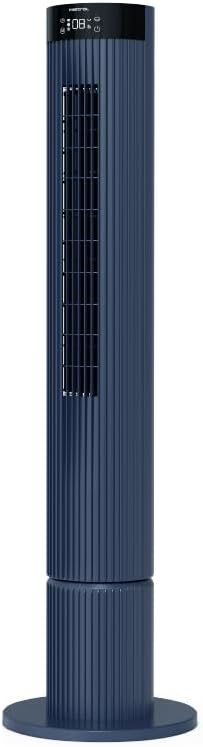
Figure 4.1: The fan demonstrating its convertible height feature, allowing adjustment between two different heights.
5. אויפשטעלן און ערשטע באנוץ
After assembly, position the fan in your desired location. Ensure it is on a stable, flat surface and away from curtains or objects that could obstruct airflow.
- Plug the power cord into a suitable electrical outlet (220-240V~, 50-60Hz).
- The fan will enter standby mode. The touch screen display may illuminate briefly.
- To power on, touch the power icon on the control panel or press the power button on the remote control.
6. אַפּערייטינג ינסטרוקטיאָנס
The fan can be operated via the full touch screen control panel on the unit or the included remote control.
6.1 קאָנטראָל פּאַנעל פאַנגקשאַנז
The touch screen control panel provides access to all fan functions:
- מאַכט קנעפּל: טוט אן אדער אויסלעשן דעם פען.
- גיכקייט אַדזשאַסטמאַנט: Cycles through 12 fan speeds.
- מאָדע סעלעקציע: Switches between Turbo, One-key Cycle, and Baby modes.
- אַסאַליישאַן: Activates or deactivates 60-degree left-right oscillation.
- טיימער: Sets the pre-set On/Off timer for up to 12 hours.
- Wi-Fi ינדיקאַטאָר: ווײַזט Wi-Fi פֿאַרבינדונג סטאַטוס.
6.2 רימאָוט קאָנטראָל
The remote control duplicates all functions available on the touch screen panel for convenient operation from a distance.
- ענשור אַז די ווייַט קאָנטראָל האט ארבעטן באַטעריז.
- Point the remote control towards the fan's control panel for optimal signal reception.
6.3 אַפּערייטינג מאָדעס
- טורבאָ מאָדע: Provides maximum airflow for rapid cooling.
- One-key Cycle Mode: Automatically cycles through different fan speeds to simulate natural breeze.
- בעיבי מאָדע: Operates at a gentle, quiet speed suitable for nurseries or light sleeping.
7. Wi-Fi and Online Voice Control
The Mistral MFD4389DRW fan can be connected to your home Wi-Fi network for smart control via a mobile application and online voice commands.
7.1 ווי-פי קאַנעקשאַן
- Download the official Mistral smart home application from your device's app store.
- רעגיסטרירט זיך אדער לאגט אריין אין אייער אקאונט אין דער אפליקאציע.
- פאַרזיכערן אַז דיין רירעוודיק מיטל איז קאָננעקטעד צו אַ 2.4GHz Wi-Fi נעץ.
- Follow the in-app instructions to add a new device. This typically involves putting the fan into pairing mode (refer to the app or fan display for specific instructions, often by holding a Wi-Fi button).
- Once connected, the Wi-Fi indicator on the fan's control panel will illuminate steadily.
7.2 Online Voice Control
After successful Wi-Fi connection, you can link your fan to compatible smart home voice assistants (e.g., Google Assistant, Amazon Alexa) through the Mistral app settings.
- Open the Mistral app and navigate to the 'Integrations' or 'Voice Control' section.
- Select your preferred voice assistant and follow the prompts to link your Mistral account.
- אַמאָל פֿאַרבונדן, קענט איר נוצן שטימע באַפֿעלן ווי:
- "Turn on the fan."
- "Set fan speed to 5."
- "Turn off oscillation."
- "Change fan mode to Baby."
8. וישאַלט
רעגולערע רייניקונג העלפט אויפהאלטן די פען'ס פאָרשטעלונג און פארלענגערט זיין לעבנסדויער.
8.1 רייניקונג
- שטענדיק ארויסנעמען דעם ווענטילאַטאָר פֿון דער עלעקטרישער אַוטלעט איידער איר רייניגט.
- ניצן אַ ווייך, דamp א שטאָף צו ווישן די אויסערלעכע ייבערפלאַכן פון דעם ווענטילאַטאָר. ניצט נישט קיין שרײַבנדיקע רייניגער אָדער סאָלווענטן.
- Use a vacuum cleaner with a brush attachment to remove dust from the air intake and outlet grilles.
- זיכער מאַכן אַז דער ווענטילאַטאָר איז גאָר טרוקן איידער איר עס צוריק אַרײַנשטעקן און עס ניצן.
8.2 סטאָרידזש
If storing the fan for an extended period, unplug it, clean it thoroughly, and store it in its original packaging or a dust-free environment.
9. טראָובלעשאָאָטינג
אויב איר טרעפט פּראָבלעמען מיט אייער ווענטילאַטאָר, זעט די פאלגענדע געוויינטלעכע פּראָבלעמען און לייזונגען:
| פּראָבלעם | מעגלעך סיבה | לייזונג |
|---|---|---|
| דער ווענטילאַטאָר צינדט זיך נישט אָן. | קיין מאַכט צושטעלן. | קאָנטראָלירט צי דער עלעקטרישער שנור איז זיכער אריינגעשטעקט אין א ארבעטנדיקן ווענטיל. |
| שוואַך לופט לויפן. | Air intake/outlet blocked; Fan speed too low. | Clean grilles to remove dust. Increase fan speed. |
| דער ווענטילאַטאָר מאַכט אַ נישט־געוויינטלעכן גערויש. | Obstruction; Loose parts. | Unplug and check for any foreign objects. Ensure base is securely attached. |
| ווייַט קאָנטראָל נישט ארבעטן. | טויטע באַטעריעס; שטערונג. | טוישן די באַטעריעס פון די ווײַטקאָנטראָל. זיכער מאַכן אַז קיין אָביעקטן בלאָקירן נישט דעם סיגנאַל וועג. |
| די Wi-Fi פֿאַרבינדונג פֿאַרפֿעלט. | Incorrect Wi-Fi password; Router issues; Fan too far from router. | Verify Wi-Fi password. Ensure fan is within range of a 2.4GHz Wi-Fi network. Restart router and fan. |
אויב די פראבלעם בלייבט נאך פרובירן די לייזונגען, ביטע קאנטאקטירט קאסטומער סופארט.
10. ספּעסאַפאַקיישאַנז
| שטריך | באַשרייַבונג |
|---|---|
| מאָדעל | MFD4389DRW |
| Voltage | 220-240V~, 50-60Hz 1.3A |
| וואָסtage | 40 וו |
| לופט באנד | 29.54 מ³ / מין |
| מאַקסימום לופט לויפן | 4.26 עם / s |
| Noise Level (Lowest Speed) | 33.2dB |
| Noise Level (Highest Speed) | 68.3dB |
| פּראָדוקט דימענשאַנז (ל * וו * ה) | 168 * 300 * 900 OR 1104 mm |
| נעץ וואָג | 4.46 קג |
| זיכערקייַט מארק | 250467-11 |
| ספּעציעלע פֿעיִקייטן | Remote Controlled, Timer, Wi-Fi Enabled |
| נומער פון ספּידז | 12 |
11. וואָראַנטי און שטיצן
This Mistral MFD4389DRW DC Turbo Tower Fan comes with a comprehensive warranty:
- אַלגעמיינע וואָראַנטי: 1 יאָר פֿון דער טאָג פון קויפן.
- מאָטאָר וואָראַנטי: An additional 3 Years for the motor only, totaling 4 years for the motor.
For warranty claims, technical support, or service inquiries, please contact your local Mistral authorized service center or refer to the contact information provided on the official Mistral webפּלאַץ.


