1. הקדמה
א דאנק פארן קויפןasing the Moukey MAMP3 2.0 Channel Stereo Amplifier. This manual provides essential information for the safe and efficient operation of your device. Please read it thoroughly before use and retain it for future reference.
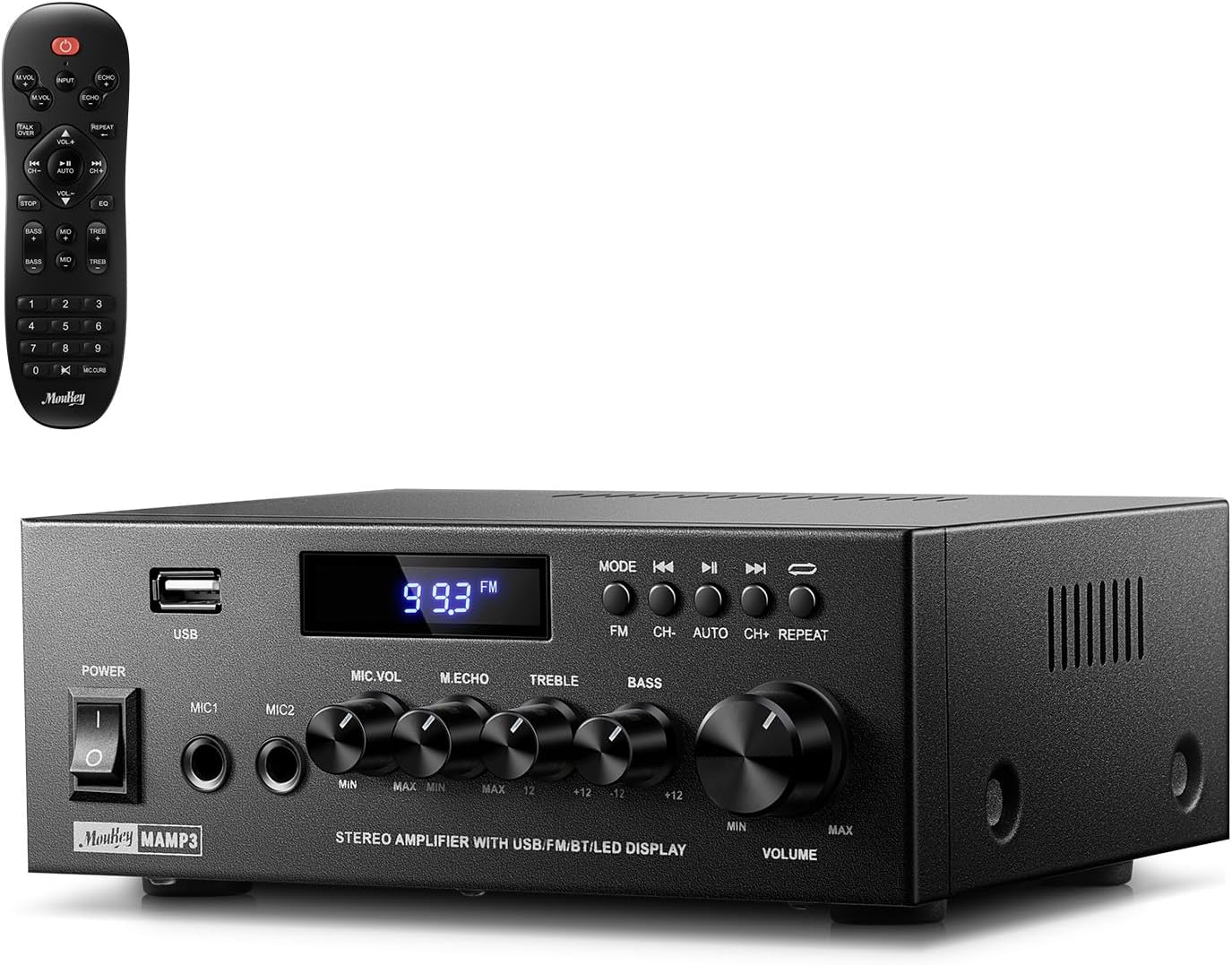
Image 1.1: The Moukey MAMP3 amplifier and its remote control.
2. זיכערקייַט אינסטרוקציעס
- לייענען אַלע ינסטראַקשאַנז איידער אַפּערייטינג די ampליפער.
- האַלטן די ampהאַלט אַוועק פון וואַסער, נעץ און עקסטרעמע טעמפּעראַטורן.
- בלאָקירט נישט די ווענטילאַציע עפענונגען. זאָרגט פֿאַר געהעריקע לופט־פֿלוס אַרום דעם אַפּאַראַט.
- ניצן בלויז די מאַכט אַדאַפּטער סאַפּלייד מיט די אַפּאַראַט.
- פרובירט נישט צו פאררעכטן אדער מאדיפיצירן דעם איינהייט אליין. לאָזט איבער אלע סערוויסינג צו קוואַליפֿיצירטע פּערסאָנעל.
- Disconnect the power cord from the outlet if the unit will be unused for extended periods.
3. פּראָדוקט איבערview
3.1 שליסל פֿעיִקייטן
- 2.0 Channel Stereo Audio Output
- Bluetooth 5.3 for stable wireless connection
- Multiple Audio Inputs: RCA, USB, FM Radio, 2 Microphone Inputs
- Full-function Remote Control with EQ adjustments
- Customizable Treble, Midrange, and Bass controls
- Memory function for mode, volume, and EQ settings
- 300 Watts Peak Power Output
3.2 פראָנט פּאַנעל קאָנטראָלס און ינדיקאַטאָרס

Image 3.1: Front Panel Layout
- מאַכט סוויטש: טורנס די אַפּאַראַט אויף אָדער אַוועק.
- MIC1/2: 6.35 מם מיקראָפאָן אַרייַנשרייַב דזשאַקס.
- מיקראָפאָן באַנד קנאַפּ: אַדזשאַסטירט דעם באַנד פון פֿאַרבונדענע מיקראָפאָנען.
- Echo Knob: אַדזשאַסטירט דעם עקאָ עפֿעקט פֿאַר מיקראָפֿאָנען.
- טרעבל קנופּ: Adjusts the high-frequency audio output.
- באַס קנופּ: Adjusts the low-frequency audio output.
- מוזיק באַנד קנעפּל: Main volume control for all audio sources.
- וסב שפּעלטל: פֿאַר פֿאַרבינדן USB סטאָרידזש דעוויסעס פֿאַר אַודיאָ ווידערשפּיל.
- געפֿירט ווייַז: ווײַזט איצטיקן מאָדע, ליד אינפֿאָרמאַציע, אָדער FM פֿרעקווענץ.
- מאָדע קנעפּל: Switches between input sources (BT, Aux, CD, USB, FM).
- פֿריִערדיקע קנעפּל: Skips to the previous track (USB/BT) or FM station.
- שפּיל / פּויזע קנעפּל: Plays or pauses audio (USB/BT).
- ווייַטער קנעפּל: Skips to the next track (USB/BT) or FM station.
- איבערחזרן קנעפּל: Repeats current track or all tracks (USB).
3.3 דערציען פּאַנעל קאַנעקשאַנז

Image 3.2: Rear Panel Connections
- FM אַנטענע אַרייַנשרייַב: פֿאַרבינדט די אַרייַנגערעכנטע FM אַנטענע פֿאַר ראַדיאָ אָפּנאַם.
- AUDIO INPUT (RCA): Connect external audio sources like CD/DVD players using RCA cables.
- AUDIO OUTPUT (Speaker Terminals): Connect passive speakers. Ensure correct polarity (+ to + and - to -).
- POWER AC INPUT: פאַרבינדן די מאַכט שנור צו אַ ווענטיל.
4. סעטאַפּ
4.1 אַנפּאַקינג
קערפאַלי אַראָפּנעמען די amplifier and all accessories from the packaging. Verify that all items listed in the 'What's in the Box' section are present.
4.2 קאַנעקטינג ספּיקערז
די מAMP3 amplifier supports two passive speakers. Connect your speakers to the אַודיאָ אָוטפּוט terminals on the rear panel. Ensure that the positive (+) terminal on the amplifier connects to the positive (+) terminal on your speaker, and the negative (-) terminal on the amplifier connects to the negative (-) terminal on your speaker. Incorrect polarity can affect sound quality.

Image 4.1: Speaker Connection Diagram
4.3 פֿאַרבינדן אַודיאָ קוועלער
די amplifier offers multiple input options:
- RCA אַרייַנשרייַב: Use RCA cables to connect devices such as CD players, DVD players, or other audio equipment to the אַודיאָ אַרייַנשרייַב דזשעקס אויף די הינטערשטע טאַפליע.
- וסב ינפּוט: אַרייַנלייגן אַ וסב בליץ פאָר אין די וסב שפּעלטל on the front panel for direct audio playback.
- בלועטאָאָטה: Pair your Bluetooth-enabled device (smartphone, tablet, laptop) wirelessly.
- עפעם ראַדיאָ: פֿאַרבינדט די אַרייַנגערעכנטע FM אַנטענע צו דער עפעם אַנטענע אַרייַנשרייַב on the rear panel for radio reception. Extend the antenna for optimal signal.
- מיקראָפאָן ינפּוץ: פֿאַרבינדט ביז צוויי מיקראָפֿאָנען צום MIC1/2 jacks on the front panel for karaoke or public address.

Image 4.2: Available Signal Inputs
4.4 מאַכט קאַנעקשאַן
פאַרבינדן די מאַכט שנור צו די POWER AC INPUT on the rear panel and then plug it into a standard AC power outlet.
5. אַפּערייטינג ינסטרוקטיאָנס
5.1 מאַכט אויף / אַוועק
דרוק די מאַכט סוויטש אויף דער פראָנט פּאַנעל צו דרייען די amplifier on or off. The LED display will illuminate when the unit is powered on.
5.2 אַרייַנשרייַב סעלעקציע
דרוק די מאָדע button on the front panel or the remote control to cycle through the available input sources: Bluetooth (BT), Auxiliary (Aux), CD, USB, and FM radio. The selected mode will be shown on the LED display.
5.3 באַנד קאָנטראָל
דרייען די גרויסע Music Volume Knob on the front panel clockwise to increase volume and counter-clockwise to decrease it. Volume can also be adjusted using the remote control.
5.4 Equalizer (EQ) Adjustment
Adjust the sound characteristics using the דרייבאַל קנופּ און באַס קנופּ on the front panel. The remote control also provides dedicated buttons for Treble, Midrange, and Bass adjustments. The amplifier will automatically save your preferred EQ settings.
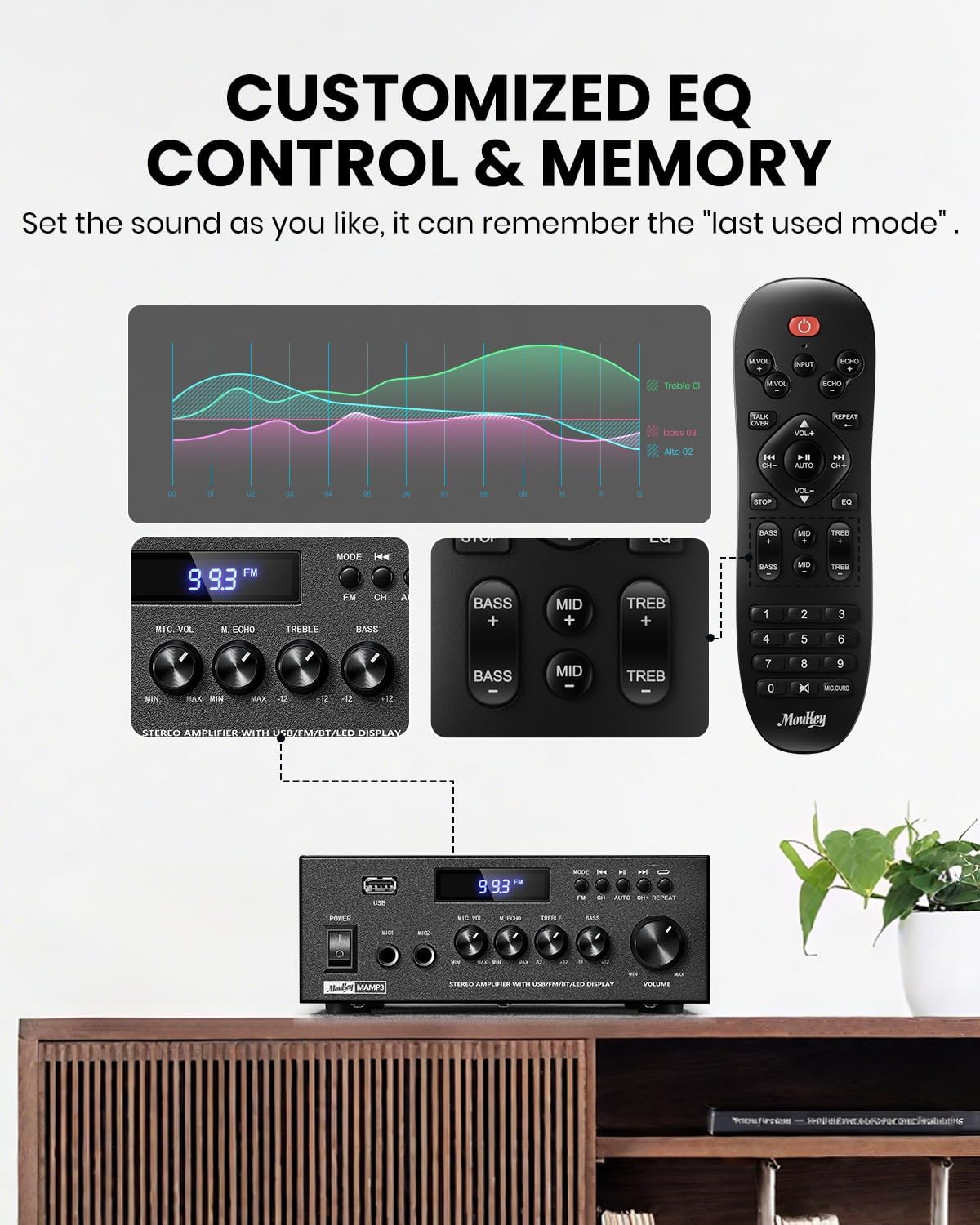
Image 5.1: Customizable EQ Control
5.5 מיקראָפאָן קאָנטראָלס
If microphones are connected, use the מיקראָפאָן באנד קנופּ to adjust their output level and the Echo Knob to add an echo effect. The remote control also features a 'Talkover' function.
5.6 בלועטאָאָטה אָפּעראַציע
- דרוק די מאָדע button until "BT" appears on the LED display. The amplifier is now in Bluetooth pairing mode.
- On your mobile device, enable Bluetooth and search for "Moukey MAMP3".
- Select "Moukey MAMP3" to pair. Once connected, you will hear a confirmation tone.
- איר קענט איצט שפּילן אַודיאָ פֿון אייער דעווייס דורך די ampליפער.

Image 5.2: Bluetooth Pairing
5.7 FM ראַדיאָ אָפּעראַציע
- דרוק די מאָדע button until "FM" appears on the LED display.
- אַוטאָ סקאַן: Press the "AUTO" button on the remote to automatically scan and save available FM stations.
- מאַנואַל טונינג: Use the number pad on the remote control to directly enter the desired FM frequency (e.g., for 101.1 MHz, enter 1011).
- ניצן די פֿריִערדיקע און ווייַטער buttons to navigate between saved stations or fine-tune frequencies.
5.8 יו-עס-בי פּלייבּעק
אַרײַנשטעלן אַ USB פֿלעש דרייוו מיט MP3 אָדער WAV אַודיאָ fileס אין די וסב שפּעלטל. די amplifier will automatically switch to USB mode and begin playback. Use the פֿריִערדיקע, שפּיל / פּויזע, און ווייַטער buttons to control playback. The איבערחזרן button allows you to repeat the current track or all tracks.
5.9 רימאָוט קאָנטראָל
The included full-function remote control allows for convenient operation from a distance. It provides control over input selection, volume, EQ settings (treble, midrange, bass), microphone echo, and talkover functions across all input modes.

Image 5.3: Upgraded Remote Control Functionality
6. וישאַלט
- רייניקונג: ניצן אַ ווייך, טרוקן שטאָף צו ריין די יקסטיריער פון די ampניצט נישט קיין פליסיקע רייניגער אדער סאָלווענטן.
- ווענטילאַטיאָן: Ensure that the ventilation openings are free from dust and debris to prevent overheating.
- סטאָרידזש: ווען נישט אין באַנוץ פֿאַר לענגערע צייטן, זאָל מען עס אַוועקלייגן amplifier in a cool, dry place, away from direct sunlight and extreme temperatures.
7. טראָובלעשאָאָטינג
| פּראָבלעם | מעגלעך סיבה | לייזונג |
|---|---|---|
| קיין מאַכט | שטראָם־קאַבל נישט פֿאַרבונדן; אַוטלעט דעפֿעקטיוו; שטראָם־שוואַלטער אויסגעלאָשן. | Ensure power cord is securely connected; Test outlet with another device; Turn power switch on. |
| קיין געזונט רעזולטאַט | Volume too low; Incorrect input selected; Speaker wires loose/incorrectly connected; Audio source issue. | Increase volume; Select correct input mode; Check speaker wire connections and polarity; Verify audio source is playing. |
| בלועטאָאָטה איז נישט קאַנעקטינג | Amplifier not in BT mode; Device too far; Device already connected to another unit; Interference. | באַשטימען amplifier to BT mode; Move device closer; Disconnect from other devices; Reduce interference. |
| נעבעך עפעם אָפּטראָג | Antenna not connected or poorly positioned; Weak signal. | Connect and adjust FM antenna position; Try auto-scan or manual tuning for stronger stations. |
| פּראָבלעמען מיט USB ווידערשפּיל | ניט געשטיצט file format; USB drive not formatted correctly; USB drive capacity too large. | פאַרזיכערן files are MP3/WAV; Format USB drive to FAT32; Use USB drives 32GB or less. |
8. ספּעסאַפאַקיישאַנז
| שטריך | באַשרייַבונג |
|---|---|
| מאָדעל נומער | MAMP3 |
| רעזולטאַט מאַכט | 300 וואטס (פּיקס) |
| טשאַנאַלז | 2.0 סטערעאָ |
| קאַנעקטיוויטי טעכנאָלאָגיע | Auxiliary, Bluetooth 5.3, FM, USB |
| קאַמפּאַטאַבאַל דעוויסעס | Smartphone, Tablet, Laptop, Computer, Speakers, CD/DVD Player |
| קאַנעקטער טיפּ | RCA, USB, 2 Mic input |
| אַודיאָ רעזולטאַט מאָדע | סטערעאָ |
| פּראָדוקט דימענשאַנז | 6.1" ד x 7.1" ב x 2.8" ה (15.5 x 18.0 x 7.1 ס"מ) |
| פּונקט וואָג | 2.14 פונט (0.97 קג) |
| קאָליר | שוואַרץ |
8.1 וואָס איז אין דער קעסטל
- מוקיי מAMP3 Ampליפער
- ווייַט קאָנטראָללער
- עפעם אַנטענע
- באַניצער מאַנואַל
- מאַכט אַדאַפּטער
9. וואָראַנטי און שטיצן
9.1 וואָראַנטי אינפֿאָרמאַציע
Moukey products are designed and manufactured to the highest quality standards. This product is covered by a limited warranty against defects in materials and workmanship. Please refer to the warranty card included with your purchase for specific terms and conditions, or visit the official Moukey webפּלאַץ פֿאַר דיטיילד וואָראַנטי אינפֿאָרמאַציע.
9.2 קונה שטיצן
If you encounter any issues or have questions regarding your Moukey MAMP3 amplifier, please contact our customer support team. You can find contact information on the official Moukey webזייטל אדער דורך אייער קויפן פּלאַטפאָרמע.
Webפּלאַץ: www.moukey.com (עקסampדער לינק, ביטע זעט די פאַקטישע פּראָדוקט דאָקומענטאַציע)
בליצפּאָסט: support@moukey.com (עקסample email, please refer to actual product documentation)


